 73fcaec788
Signed-off-by: Glenn Jocher <glenn.jocher@ultralytics.com>
Co-authored-by: UltralyticsAssistant <web@ultralytics.com>
Co-authored-by: fatih akyon <34196005+fcakyon@users.noreply.github.com>
Co-authored-by: Jing Qiu <61612323+Laughing-q@users.noreply.github.com>
Co-authored-by: Onuralp SEZER <onuralp@ultralytics.com>
Co-authored-by: Glenn Jocher <glenn.jocher@ultralytics.com>
58 KiB
| comments | description | keywords |
|---|---|---|
| true | Complete REST API reference for Ultralytics Platform including authentication, endpoints, and examples for datasets, models, and deployments. | Ultralytics Platform, REST API, API reference, authentication, endpoints, YOLO, programmatic access |
REST API Reference
Ultralytics Platform provides a comprehensive REST API for programmatic access to datasets, models, training, and deployments.
!!! tip "Quick Start"
```bash
# List your datasets
curl -H "Authorization: Bearer YOUR_API_KEY" \
  https://platform.ultralytics.com/api/datasets
```
!!! tip "Interactive API Docs"
Explore the full interactive API reference in the [Ultralytics Platform API docs](https://platform.ultralytics.com/api/docs).
API Overview
The API is organized around the core platform resources:
graph LR
    A[API Key] --> B[Datasets]
    A --> C[Projects]
    A --> D[Models]
    A --> E[Deployments]
    B -->|train on| D
    C -->|contains| D
    D -->|deploy to| E
    D -->|export| F[Exports]
    B -->|auto-annotate| B
| Resource | Description | Key Operations |
|---|---|---|
| Datasets | Labeled image collections | CRUD, images, labels, export, versions, clone |
| Projects | Training workspaces | CRUD, clone, icon |
| Models | Trained checkpoints | CRUD, predict, download, clone, export |
| Deployments | Dedicated inference endpoints | CRUD, start/stop, metrics, logs, health |
| Exports | Format conversion jobs | Create, status, download |
| Training | Cloud GPU training jobs | Start, status, cancel |
| Billing | Credits and subscriptions | Balance, top-up, payment methods |
| Teams | Workspace collaboration | Members, invites, roles |
Authentication
Resource APIs such as datasets, projects, models, training, exports, and predictions use API-key authentication. Public endpoints (listing public datasets, projects, and models) support anonymous read access without a key. Account-oriented routes — including activity, settings, teams, billing, and GDPR flows — currently require an authenticated browser session and are not available via API key.
Get API Key
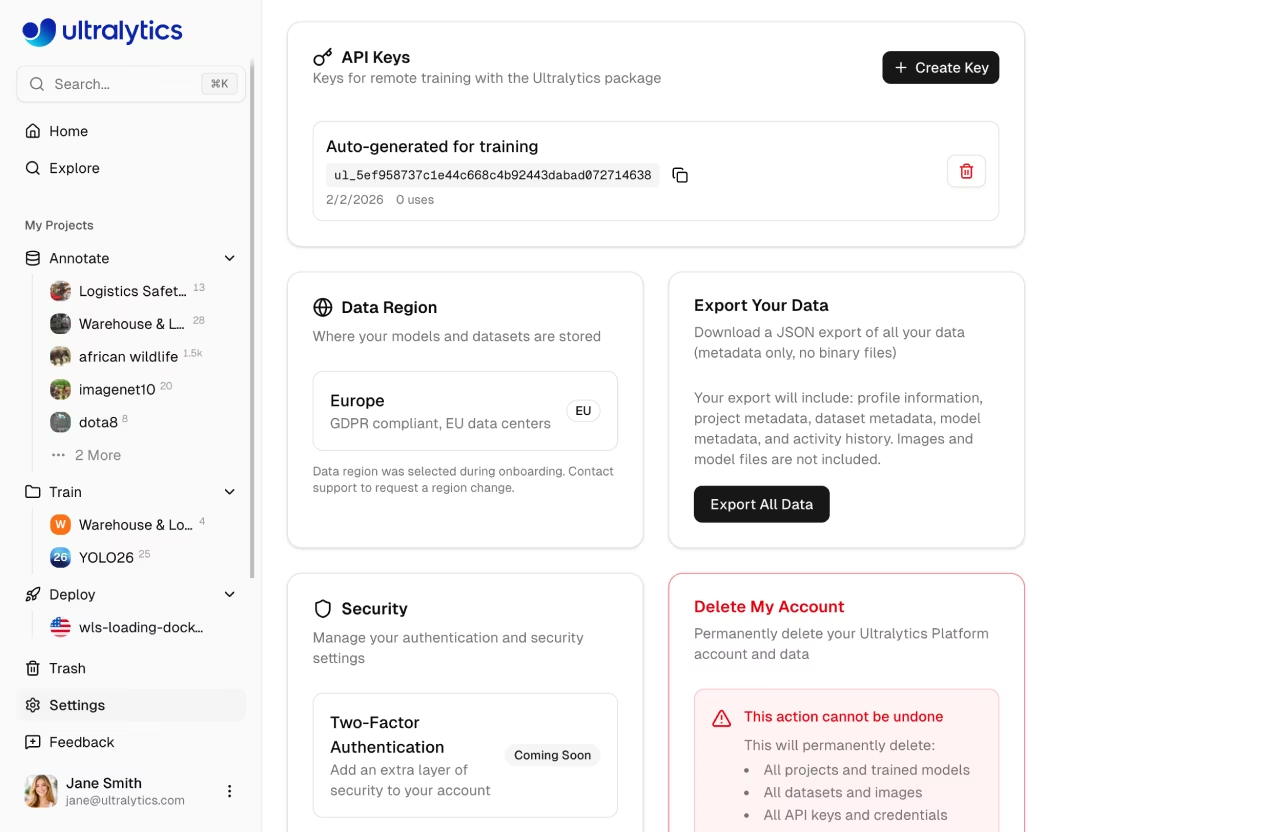
- Go to
Settings>API Keys - Click
Create Key - Copy the generated key
See API Keys for detailed instructions.
Authorization Header
Include your API key in all requests:
Authorization: Bearer YOUR_API_KEY
!!! info "API Key Format"
API keys use the format `ul_` followed by 40 hex characters. Keep your key secret -- never commit it to version control or share it publicly.
Example
=== "cURL"
```bash
curl -H "Authorization: Bearer YOUR_API_KEY" \
  https://platform.ultralytics.com/api/datasets
```
=== "Python"
```python
import requests

headers = {"Authorization": "Bearer YOUR_API_KEY"}
response = requests.get(
    "https://platform.ultralytics.com/api/datasets",
    headers=headers,
)
data = response.json()
```
=== "JavaScript"
```javascript
const response = await fetch("https://platform.ultralytics.com/api/datasets", {
  headers: { Authorization: "Bearer YOUR_API_KEY" },
});
const data = await response.json();
```
Base URL
All API endpoints use:
https://platform.ultralytics.com/api
Rate Limits
The API enforces per-API-key rate limits (sliding-window, Upstash Redis-backed) to protect against abuse while keeping legitimate usage unrestricted. Anonymous traffic is additionally protected by Vercel's platform-level abuse controls.
When throttled, the API returns 429 with retry metadata:
Retry-After: 12
X-RateLimit-Reset: 2026-02-21T12:34:56.000Z
Per API Key Limits
Rate limits are applied automatically based on the endpoint being called. Expensive operations have tighter limits to prevent abuse, while standard CRUD operations share a generous default:
| Endpoint | Limit | Applies To |
|---|---|---|
| Default | 100 requests/min | All endpoints not listed below (list, get, create, update, delete) |
| Training | 10 requests/min | Starting cloud training jobs (POST /api/training/start) |
| Upload | 10 requests/min | File uploads, signed URLs, and dataset ingest |
| Predict | 20 requests/min | Shared model inference (POST /api/models/{id}/predict) |
| Export | 20 requests/min | Model format exports (POST /api/exports), dataset NDJSON exports, and version creation |
| Download | 30 requests/min | Model weight file downloads (GET /api/models/{id}/download) |
| Dedicated | Unlimited | Dedicated endpoints — your own service, no API limits |
Each category has an independent counter per API key. For example, making 20 predict requests does not affect your 100 request/min default allowance.
Dedicated Endpoints (Unlimited)
Dedicated endpoints are not subject to API key rate limits. When you deploy a model to a dedicated endpoint, requests to that endpoint URL (e.g., https://predict-abc123.run.app/predict) go directly to your dedicated service with no rate limiting from the Platform. You're paying for the compute, so you get throughput from your dedicated service configuration rather than the shared API limits.
!!! tip "Handling Rate Limits"
When you receive a `429` status code, wait for `Retry-After` (or until `X-RateLimit-Reset`) before retrying. See the [rate limit FAQ](#how-do-i-handle-rate-limits) for an exponential backoff implementation.
Response Format
Success Responses
Responses return JSON with resource-specific fields:
{
    "datasets": [...],
    "total": 100
}
Error Responses
{
    "error": "Dataset not found"
}
| HTTP Status | Meaning |
|---|---|
200 |
Success |
201 |
Created |
400 |
Invalid request |
401 |
Authentication required |
403 |
Insufficient permissions |
404 |
Resource not found |
409 |
Conflict (duplicate) |
429 |
Rate limit exceeded |
500 |
Server error |
Datasets API
Create, browse, and manage labeled image datasets for training YOLO models. See Datasets documentation.
List Datasets
GET /api/datasets
Query Parameters:
| Parameter | Type | Description |
|---|---|---|
username |
string | Filter by username |
slug |
string | Fetch single dataset by slug |
limit |
int | Items per page (default: 20, max: 500) |
owner |
string | Workspace owner username |
=== "cURL"
```bash
curl -H "Authorization: Bearer YOUR_API_KEY" \
  "https://platform.ultralytics.com/api/datasets?limit=10"
```
=== "Python"
```python
import requests

resp = requests.get(
    "https://platform.ultralytics.com/api/datasets",
    headers={"Authorization": f"Bearer {API_KEY}"},
    params={"limit": 10},
)
for ds in resp.json()["datasets"]:
    print(f"{ds['name']}: {ds['imageCount']} images")
```
Response:
{
    "datasets": [
        {
            "_id": "dataset_abc123",
            "name": "my-dataset",
            "slug": "my-dataset",
            "task": "detect",
            "imageCount": 1000,
            "classCount": 10,
            "classNames": ["person", "car"],
            "visibility": "private",
            "username": "johndoe",
            "starCount": 3,
            "isStarred": false,
            "sampleImages": [
                {
                    "url": "https://storage.example.com/...",
                    "width": 1920,
                    "height": 1080,
                    "labels": [{ "classId": 0, "bbox": [0.5, 0.4, 0.3, 0.6] }]
                }
            ],
            "createdAt": "2024-01-15T10:00:00Z",
            "updatedAt": "2024-01-16T08:30:00Z"
        }
    ],
    "total": 1,
    "region": "us"
}
Get Dataset
GET /api/datasets/{datasetId}
Returns full dataset details including metadata, class names, and split counts.
Create Dataset
POST /api/datasets
Body:
{
    "slug": "my-dataset",
    "name": "My Dataset",
    "task": "detect",
    "description": "A custom detection dataset",
    "visibility": "private",
    "classNames": ["person", "car"]
}
!!! note "Supported Tasks"
Valid `task` values: `detect`, `segment`, `classify`, `pose`, `obb`.
Update Dataset
PATCH /api/datasets/{datasetId}
Body (partial update):
{
    "name": "Updated Name",
    "description": "New description",
    "visibility": "public"
}
Delete Dataset
DELETE /api/datasets/{datasetId}
Soft-deletes the dataset (moved to trash, recoverable for 30 days).
Clone Dataset
POST /api/datasets/{datasetId}/clone
Creates a copy of the dataset with all images and labels. Only public datasets can be cloned. Requires an active platform browser session — not available via API key.
Body (all fields optional):
{
    "name": "cloned-dataset",
    "description": "My cloned dataset",
    "visibility": "private",
    "owner": "team-username"
}
Export Dataset
GET /api/datasets/{datasetId}/export
Returns a JSON response with a signed download URL for the latest dataset export.
Query Parameters:
| Parameter | Type | Description |
|---|---|---|
v |
integer | Version number (1-indexed). If omitted, returns latest (uncached) export. |
Response:
{
    "downloadUrl": "https://storage.example.com/export.ndjson?signed=...",
    "cached": true
}
Create Dataset Version
POST /api/datasets/{datasetId}/export
Create a new numbered version snapshot of the dataset. Owner-only. The version captures current image count, class count, annotation count, and split distribution, then generates and stores an immutable NDJSON export.
Request Body:
{
    "description": "Added 500 training images"
}
All fields are optional. The description field is a user-provided label for the version.
Response:
{
    "version": 3,
    "downloadUrl": "https://storage.example.com/v3.ndjson?signed=..."
}
Update Version Description
PATCH /api/datasets/{datasetId}/export
Update the description of an existing version. Owner-only.
Request Body:
{
    "version": 2,
    "description": "Fixed mislabeled classes"
}
Response:
{
    "ok": true
}
Get Class Statistics
GET /api/datasets/{datasetId}/class-stats
Returns class distribution, location heatmap, and dimension statistics. Results are cached for up to 5 minutes.
Response:
{
    "classes": [{ "classId": 0, "count": 1500, "imageCount": 450 }],
    "imageStats": {
        "widthHistogram": [{ "bin": 640, "count": 120 }],
        "heightHistogram": [{ "bin": 480, "count": 95 }],
        "pointsHistogram": [{ "bin": 4, "count": 200 }]
    },
    "locationHeatmap": {
        "bins": [
            [5, 10],
            [8, 3]
        ],
        "maxCount": 50
    },
    "dimensionHeatmap": {
        "bins": [
            [2, 5],
            [3, 1]
        ],
        "maxCount": 12,
        "minWidth": 10,
        "maxWidth": 1920,
        "minHeight": 10,
        "maxHeight": 1080
    },
    "classNames": ["person", "car", "dog"],
    "cached": true,
    "sampled": false,
    "sampleSize": 1000
}
Get Models Trained on Dataset
GET /api/datasets/{datasetId}/models
Returns models that were trained using this dataset.
Response:
{
    "models": [
        {
            "_id": "model_abc123",
            "name": "experiment-1",
            "slug": "experiment-1",
            "status": "completed",
            "task": "detect",
            "epochs": 100,
            "bestEpoch": 87,
            "projectId": "project_xyz",
            "projectSlug": "my-project",
            "projectIconColor": "#3b82f6",
            "projectIconLetter": "M",
            "username": "johndoe",
            "startedAt": "2024-01-14T22:00:00Z",
            "completedAt": "2024-01-15T10:00:00Z",
            "createdAt": "2024-01-14T21:55:00Z",
            "metrics": {
                "mAP50": 0.85,
                "mAP50-95": 0.72,
                "precision": 0.88,
                "recall": 0.81
            }
        }
    ],
    "count": 1
}
Auto-Annotate Dataset
POST /api/datasets/{datasetId}/predict
Run YOLO inference on dataset images to auto-generate annotations. Uses a selected model to predict labels for unannotated images.
Body:
| Field | Type | Required | Description |
|---|---|---|---|
imageHash |
string | Yes | Hash of the image to annotate |
modelId |
string | No | Model ID to use for inference |
confidence |
float | No | Confidence threshold (default: 0.25) |
iou |
float | No | IoU threshold (default: 0.45) |
Dataset Ingest
POST /api/datasets/ingest
Create a dataset ingest job to process uploaded ZIP or TAR files, including .tar.gz and .tgz, containing images and labels.
graph LR
    A[Upload Archive] --> B[POST /api/datasets/ingest]
    B --> C[Process Archive]
    C --> D[Extract images]
    C --> E[Parse labels]
    C --> F[Generate thumbnails]
    D & E & F --> G[Dataset ready]
Dataset Images
List Images
GET /api/datasets/{datasetId}/images
Query Parameters:
| Parameter | Type | Description |
|---|---|---|
split |
string | Filter by split: train, val, test |
offset |
int | Pagination offset (default: 0) |
limit |
int | Items per page (default: 50, max: 5000) |
sort |
string | Sort order: newest, oldest, name-asc, name-desc, height-asc, height-desc, width-asc, width-desc, size-asc, size-desc, labels-asc, labels-desc (some disabled for >100k image datasets) |
hasLabel |
string | Filter by label status (true or false) |
hasError |
string | Filter by error status (true or false) |
search |
string | Search by filename or image hash |
includeThumbnails |
string | Include signed thumbnail URLs (default: true) |
includeImageUrls |
string | Include signed full image URLs (default: false) |
Get Signed Image URLs
POST /api/datasets/{datasetId}/images/urls
Get signed URLs for a batch of image hashes (for display in the browser).
Delete Image
DELETE /api/datasets/{datasetId}/images/{hash}
Get Image Labels
GET /api/datasets/{datasetId}/images/{hash}/labels
Returns annotations and class names for a specific image.
Update Image Labels
PUT /api/datasets/{datasetId}/images/{hash}/labels
Body:
{
    "labels": [{ "classId": 0, "bbox": [0.5, 0.5, 0.2, 0.3] }]
}
!!! info "Coordinate Format"
Bounding boxes use YOLO normalized format: `[x_center, y_center, width, height]` where all values are between 0 and 1.
Bulk Image Operations
Move images between splits (train/val/test) within a dataset:
PATCH /api/datasets/{datasetId}/images/bulk
Bulk delete images:
DELETE /api/datasets/{datasetId}/images/bulk
Projects API
Organize your models into projects. Each model belongs to one project. See Projects documentation.
List Projects
GET /api/projects
Query Parameters:
| Parameter | Type | Description |
|---|---|---|
username |
string | Filter by username |
limit |
int | Items per page |
owner |
string | Workspace owner username |
Get Project
GET /api/projects/{projectId}
Create Project
POST /api/projects
=== "cURL"
```bash
curl -X POST \
  -H "Authorization: Bearer YOUR_API_KEY" \
  -H "Content-Type: application/json" \
  -d '{"name": "my-project", "slug": "my-project", "description": "Detection experiments"}' \
  https://platform.ultralytics.com/api/projects
```
=== "Python"
```python
resp = requests.post(
    "https://platform.ultralytics.com/api/projects",
    headers={"Authorization": f"Bearer {API_KEY}"},
    json={"name": "my-project", "slug": "my-project", "description": "Detection experiments"},
)
project_id = resp.json()["projectId"]
```
Update Project
PATCH /api/projects/{projectId}
Delete Project
DELETE /api/projects/{projectId}
Soft-deletes the project (moved to trash).
Clone Project
POST /api/projects/{projectId}/clone
Clones a public project (with all its models) into your workspace. Requires an active platform browser session — not available via API key.
Project Icon
Upload a project icon (multipart form with image file):
POST /api/projects/{projectId}/icon
Remove the project icon:
DELETE /api/projects/{projectId}/icon
Both require an active platform browser session — not available via API key.
Models API
Manage trained YOLO models — view metrics, download weights, run inference, and export to other formats. See Models documentation.
List Models
GET /api/models
Query Parameters:
| Parameter | Type | Required | Description |
|---|---|---|---|
projectId |
string | Yes | Project ID (required) |
fields |
string | No | Field set: summary, charts |
ids |
string | No | Comma-separated model IDs |
limit |
int | No | Max results (default 20, max 100) |
List Completed Models
GET /api/models/completed
Returns models that have finished training (for use in model selectors and deployment).
Get Model
GET /api/models/{modelId}
Create Model
POST /api/models
JSON Body:
| Field | Type | Required | Description |
|---|---|---|---|
projectId |
string | Yes | Target project ID |
slug |
string | No | URL slug (lowercase alphanumeric/hyphens) |
name |
string | No | Display name (max 100 chars) |
description |
string | No | Model description (max 1000 chars) |
task |
string | No | Task type (detect, segment, pose, obb, classify) |
!!! note "Model File Upload"
Model `.pt` file uploads are handled separately. Use the platform UI to drag-and-drop model files onto a project.
Update Model
PATCH /api/models/{modelId}
Delete Model
DELETE /api/models/{modelId}
Download Model Files
GET /api/models/{modelId}/files
Returns signed download URLs for model files.
Clone Model
POST /api/models/{modelId}/clone
Clone a public model to one of your projects. Requires an active platform browser session — not available via API key.
Body:
{
    "targetProjectSlug": "my-project",
    "modelName": "cloned-model",
    "description": "Cloned from public model",
    "owner": "team-username"
}
| Field | Type | Required | Description |
|---|---|---|---|
targetProjectSlug |
string | Yes | Destination project slug |
modelName |
string | No | Name for the cloned model |
description |
string | No | Model description |
owner |
string | No | Team username (for workspace cloning) |
Track Download
POST /api/models/{modelId}/track-download
Track model download analytics.
Run Inference
POST /api/models/{modelId}/predict
Multipart Form:
| Field | Type | Description |
|---|---|---|
file |
file | Image file (JPEG, PNG, WebP) |
conf |
float | Confidence threshold (default: 0.25) |
iou |
float | IoU threshold (default: 0.7) |
imgsz |
int | Image size in pixels (default: 640) |
=== "cURL"
```bash
curl -X POST \
  -H "Authorization: Bearer YOUR_API_KEY" \
  -F "file=@image.jpg" \
  -F "conf=0.5" \
  https://platform.ultralytics.com/api/models/MODEL_ID/predict
```
=== "Python"
```python
with open("image.jpg", "rb") as f:
    resp = requests.post(
        f"https://platform.ultralytics.com/api/models/{model_id}/predict",
        headers={"Authorization": f"Bearer {API_KEY}"},
        files={"file": f},
        data={"conf": 0.5},
    )
results = resp.json()["images"][0]["results"]
```
Response:
{
    "images": [
        {
            "shape": [1080, 1920],
            "results": [
                {
                    "class": 0,
                    "name": "person",
                    "confidence": 0.92,
                    "box": { "x1": 100, "y1": 50, "x2": 300, "y2": 400 }
                }
            ]
        }
    ],
    "metadata": {
        "imageCount": 1
    }
}
Get Predict Token
POST /api/models/{modelId}/predict/token
!!! note "Browser session only"
This route is used by the in-app Predict tab to issue short-lived inference tokens for direct browser → predict-service calls (lower latency, no API proxy). It requires an active platform browser session and is not available via API key. For programmatic inference, call [`POST /api/models/{modelId}/predict`](#run-inference) with your API key.
Warmup Model
POST /api/models/{modelId}/predict/warmup
!!! note "Browser session only"
The warmup route is used by the Predict tab to pre-load a model's weights on the predict service before the user's first inference. It requires an active platform browser session and is not available via API key.
Training API
Launch YOLO training on cloud GPUs (23 GPU types from RTX 2000 Ada to B200) and monitor progress in real time. See Cloud Training documentation.
graph LR
    A[POST /training/start] --> B[Job Created]
    B --> C{Training}
    C -->|progress| D[GET /models/id/training]
    C -->|cancel| E[DELETE /models/id/training]
    C -->|complete| F[Model Ready]
    F --> G[Deploy or Export]
Start Training
POST /api/training/start
=== "cURL"
```bash
curl -X POST \
  -H "Authorization: Bearer YOUR_API_KEY" \
  -H "Content-Type: application/json" \
  -d '{
    "modelId": "MODEL_ID",
    "projectId": "PROJECT_ID",
    "gpuType": "rtx-4090",
    "trainArgs": {
      "model": "yolo26n.pt",
      "data": "ul://username/datasets/my-dataset",
      "epochs": 100,
      "imgsz": 640,
      "batch": 16
    }
  }' \
  https://platform.ultralytics.com/api/training/start
```
=== "Python"
```python
resp = requests.post(
    "https://platform.ultralytics.com/api/training/start",
    headers={"Authorization": f"Bearer {API_KEY}"},
    json={
        "modelId": "MODEL_ID",
        "projectId": "PROJECT_ID",
        "gpuType": "rtx-4090",
        "trainArgs": {
            "model": "yolo26n.pt",
            "data": "ul://username/datasets/my-dataset",
            "epochs": 100,
            "imgsz": 640,
            "batch": 16,
        },
    },
)
```
!!! note "GPU Types"
Available GPU types include `rtx-4090`, `a100-80gb-pcie`, `a100-80gb-sxm`, `h100-sxm`, `rtx-pro-6000`, and others. See [Cloud Training](../train/cloud-training.md) for the full list with pricing.
Get Training Status
GET /api/models/{modelId}/training
Returns the current training job status, metrics, and progress for a model. Public projects are accessible anonymously; private projects require an active platform browser session (this route does not accept API-key authentication).
Cancel Training
DELETE /api/models/{modelId}/training
Terminates the running compute instance and marks the job as cancelled. Requires an active platform browser session — not available via API key.
Deployments API
Deploy models to dedicated inference endpoints with health checks and monitoring. New deployments use scale-to-zero by default, and the API accepts an optional resources object. See Endpoints documentation.
!!! info "API-key support by route"
Only `GET /api/deployments`, `POST /api/deployments`, `GET /api/deployments/{deploymentId}`, and `DELETE /api/deployments/{deploymentId}` support API-key authentication. The `predict`, `health`, `logs`, `metrics`, `start`, and `stop` sub-routes require an active platform browser session — they are convenience proxies for the in-app UI. For programmatic inference, call the deployment's own endpoint URL (e.g., `https://predict-abc123.run.app/predict`) directly with your API key. [Dedicated endpoints](../deploy/endpoints.md#using-endpoints) are not rate-limited.
graph LR
    A[Create] --> B[Deploying]
    B --> C[Ready]
    C -->|stop| D[Stopped]
    D -->|start| C
    C -->|delete| E[Deleted]
    D -->|delete| E
    C -->|predict| F[Inference Results]
List Deployments
GET /api/deployments
Query Parameters:
| Parameter | Type | Description |
|---|---|---|
modelId |
string | Filter by model |
status |
string | Filter by status |
limit |
int | Max results (default: 20, max: 100) |
owner |
string | Workspace owner username |
Create Deployment
POST /api/deployments
Body:
{
    "modelId": "model_abc123",
    "name": "my-deployment",
    "region": "us-central1",
    "resources": {
        "cpu": 1,
        "memoryGi": 2,
        "minInstances": 0,
        "maxInstances": 1
    }
}
| Field | Type | Required | Description |
|---|---|---|---|
modelId |
string | Yes | Model ID to deploy |
name |
string | Yes | Deployment name |
region |
string | Yes | Deployment region |
resources |
object | No | Resource configuration (cpu, memoryGi, minInstances, maxInstances) |
Creates a dedicated inference endpoint in the specified region. The endpoint is globally accessible via a unique URL.
!!! note "Default Resources"
The deployment dialog currently submits fixed defaults of `cpu=1`, `memoryGi=2`, `minInstances=0`, and `maxInstances=1`. The API route accepts a `resources` object, but plan limits cap `minInstances` at `0` and `maxInstances` at `1`.
!!! tip "Region Selection"
Choose a region close to your users for lowest latency. The platform UI shows latency estimates for all 43 available regions.
Get Deployment
GET /api/deployments/{deploymentId}
Delete Deployment
DELETE /api/deployments/{deploymentId}
Start Deployment
POST /api/deployments/{deploymentId}/start
Resume a stopped deployment.
Stop Deployment
POST /api/deployments/{deploymentId}/stop
Pause a running deployment (stops billing).
Health Check
GET /api/deployments/{deploymentId}/health
Returns the health status of the deployment endpoint.
Run Inference on Deployment
POST /api/deployments/{deploymentId}/predict
Send an image directly to a deployment endpoint for inference. Functionally equivalent to model predict, but routed through the dedicated endpoint for lower latency.
Multipart Form:
| Field | Type | Description |
|---|---|---|
file |
file | Image file (JPEG, PNG, WebP) |
conf |
float | Confidence threshold (default: 0.25) |
iou |
float | IoU threshold (default: 0.7) |
imgsz |
int | Image size in pixels (default: 640) |
Get Metrics
GET /api/deployments/{deploymentId}/metrics
Returns request counts, latency, and error rate metrics with sparkline data.
Query Parameters:
| Parameter | Type | Description |
|---|---|---|
range |
string | Time range: 1h, 6h, 24h (default), 7d, 30d |
sparkline |
string | Set to true for optimized sparkline data for dashboard view |
Get Logs
GET /api/deployments/{deploymentId}/logs
Query Parameters:
| Parameter | Type | Description |
|---|---|---|
severity |
string | Comma-separated filter: DEBUG, INFO, WARNING, ERROR, CRITICAL |
limit |
int | Number of entries (default: 50, max: 200) |
pageToken |
string | Pagination token from previous response |
Monitoring API
!!! note "Browser session only"
`GET /api/monitoring` is a UI-only route and requires an active platform browser session. It does not accept API-key authentication. Query individual deployment metrics via the per-deployment routes (which are also browser-session only) or use [Cloud Monitoring exports](https://cloud.google.com/monitoring) on the deployed Cloud Run service for programmatic access.
Aggregated Metrics
GET /api/monitoring
Returns aggregated metrics across all user deployments: total requests, active deployments, error rate, and average latency.
Export API
Convert models to optimized formats like ONNX, TensorRT, CoreML, and TFLite for edge deployment. See Deploy documentation.
List Exports
GET /api/exports
Query Parameters:
| Parameter | Type | Description |
|---|---|---|
modelId |
string | Model ID (required) |
status |
string | Filter by status |
limit |
int | Max results (default: 20, max: 100) |
Create Export
POST /api/exports
Body:
| Field | Type | Required | Description |
|---|---|---|---|
modelId |
string | Yes | Source model ID |
format |
string | Yes | Export format (see table below) |
gpuType |
string | Conditional | Required when format is engine (TensorRT) |
args |
object | No | Export arguments (imgsz, half, dynamic, etc.) |
=== "cURL"
```bash
curl -X POST \
  -H "Authorization: Bearer YOUR_API_KEY" \
  -H "Content-Type: application/json" \
  -d '{"modelId": "MODEL_ID", "format": "onnx"}' \
  https://platform.ultralytics.com/api/exports
```
=== "Python"
```python
resp = requests.post(
    "https://platform.ultralytics.com/api/exports",
    headers={"Authorization": f"Bearer {API_KEY}"},
    json={"modelId": "MODEL_ID", "format": "onnx"},
)
export_id = resp.json()["exportId"]
```
Supported Formats:
| Format | Value | Use Case |
|---|---|---|
| ONNX | onnx |
Cross-platform inference |
| TorchScript | torchscript |
PyTorch deployment |
| OpenVINO | openvino |
Intel hardware |
| TensorRT | engine |
NVIDIA GPU optimization |
| CoreML | coreml |
Apple devices |
| TFLite | tflite |
Mobile and embedded |
| TF SavedModel | saved_model |
TensorFlow Serving |
| TF GraphDef | pb |
TensorFlow frozen graph |
| PaddlePaddle | paddle |
Baidu PaddlePaddle |
| NCNN | ncnn |
Mobile neural network |
| Edge TPU | edgetpu |
Google Coral devices |
| TF.js | tfjs |
Browser inference |
| MNN | mnn |
Alibaba mobile inference |
| RKNN | rknn |
Rockchip NPU |
| IMX | imx |
Sony IMX500 sensor |
| Axelera | axelera |
Axelera AI accelerators |
| ExecuTorch | executorch |
Meta ExecuTorch runtime |
Get Export Status
GET /api/exports/{exportId}
Cancel Export
DELETE /api/exports/{exportId}
Track Export Download
POST /api/exports/{exportId}/track-download
Activity API
View a feed of recent actions on your account — training runs, uploads, and more. See Activity documentation.
!!! note "Browser Session Only"
The Activity routes are powered by browser-authenticated requests from the platform UI. They are not exposed as a public API, do not accept API-key authentication, and the route shapes below are documented only for reference. Use the Activity feed in the platform UI to view, mark, or archive events.
List Activity
GET /api/activity
Query Parameters:
| Parameter | Type | Description |
|---|---|---|
limit |
int | Page size (default: 20, max: 100) |
page |
int | Page number (default: 1) |
archived |
boolean | true for Archive tab, false for Inbox |
search |
string | Case-insensitive search in event fields |
Mark Events Seen
POST /api/activity/mark-seen
Body:
{
    "all": true
}
Or pass specific IDs:
{
    "eventIds": ["EVENT_ID_1", "EVENT_ID_2"]
}
Archive Events
POST /api/activity/archive
Body:
{
    "all": true,
    "archive": true
}
Or pass specific IDs:
{
    "eventIds": ["EVENT_ID_1", "EVENT_ID_2"],
    "archive": false
}
Trash API
View and restore deleted items. Items are permanently removed after 30 days. See Trash documentation.
List Trash
GET /api/trash
Query Parameters:
| Parameter | Type | Description |
|---|---|---|
type |
string | Filter: all, project, dataset, model |
page |
int | Page number (default: 1) |
limit |
int | Items per page (default: 50, max: 200) |
owner |
string | Workspace owner username |
Restore Item
POST /api/trash
Body:
{
    "id": "item_abc123",
    "type": "dataset"
}
Permanently Delete Item
DELETE /api/trash
Body:
{
    "id": "item_abc123",
    "type": "dataset"
}
!!! warning "Irreversible"
Permanent deletion cannot be undone. The resource and all associated data will be removed.
Empty Trash
DELETE /api/trash/empty
Permanently deletes all items in trash.
!!! note "Authentication"
`DELETE /api/trash/empty` requires an authenticated browser session and is not available via API key. Use the **Empty Trash** button in the UI instead.
Billing API
Check your credit balance, purchase credits, view transaction history, and configure auto top-up. See Billing documentation.
!!! note "Currency Units"
Billing amounts use cents (`creditsCents`) where `100 = $1.00`.
Get Balance
GET /api/billing/balance
Query Parameters:
| Parameter | Type | Description |
|---|---|---|
owner |
string | Workspace owner username |
Response:
{
    "creditsCents": 2500,
    "plan": "free",
    "cashBalance": 25,
    "creditBalance": 0,
    "reservedAmount": 0,
    "totalBalance": 25
}
Get Usage Summary
GET /api/billing/usage-summary
Returns plan details, limits, and usage metrics.
Get Transactions
GET /api/billing/transactions
Returns transaction history (most recent first).
Query Parameters:
| Parameter | Type | Description |
|---|---|---|
owner |
string | Workspace owner username |
Create Checkout Session
POST /api/billing/checkout-session
Body:
{
    "amount": 25,
    "owner": "team-username"
}
| Field | Type | Required | Description |
|---|---|---|---|
amount |
number | Yes | Amount in dollars ($5-$1000) |
owner |
string | No | Team username for workspace top-ups (requires admin role) |
Creates a checkout session for credit purchase.
Create Subscription Checkout
POST /api/billing/subscription-checkout
Creates a checkout session for Pro subscription upgrade.
Body:
{
    "planId": "pro",
    "billingCycle": "monthly",
    "owner": "team-username"
}
| Field | Type | Required | Description |
|---|---|---|---|
planId |
string | Yes | Plan to subscribe to (pro) |
billingCycle |
string | No | Billing cycle: monthly (default) or yearly |
owner |
string | No | Team username for workspace upgrades (requires admin role) |
Cancel or Resume Subscription
DELETE /api/billing/subscription-checkout
Cancels a Pro subscription at period end by default. Send {"resume": true} to resume an already scheduled cancellation before the billing period ends.
Body:
{
    "resume": true
}
Auto Top-Up
Automatically add credits when balance falls below a threshold.
Get Auto Top-Up Config
GET /api/billing/auto-topup
Query Parameters:
| Parameter | Type | Description |
|---|---|---|
owner |
string | Workspace owner username |
Update Auto Top-Up Config
PATCH /api/billing/auto-topup
Body:
{
    "enabled": true,
    "thresholdCents": 500,
    "amountCents": 2500
}
Payment Methods
List Payment Methods
GET /api/billing/payment-methods
Create Setup Intent
POST /api/billing/payment-methods/setup
Returns a client secret for adding a new payment method.
Set Default Payment Method
POST /api/billing/payment-methods/default
Body:
{
    "paymentMethodId": "pm_123"
}
Update Billing Info
PATCH /api/billing/payment-methods
Body:
{
    "name": "Jane Doe",
    "address": {
        "line1": "123 Main St",
        "city": "San Francisco",
        "state": "CA",
        "postal_code": "94105",
        "country": "US"
    }
}
Delete Payment Method
DELETE /api/billing/payment-methods/{id}
Storage API
Check your storage usage breakdown by category (datasets, models, exports) and see your largest items.
!!! note "Browser session only"
Storage routes require an active platform browser session and are not accessible via API key. Use the [Settings > Profile](../account/settings.md#storage-usage) page in the UI for interactive breakdowns.
Get Storage Info
GET /api/storage
Response:
{
    "tier": "free",
    "usage": {
        "storage": {
            "current": 1073741824,
            "limit": 107374182400,
            "percent": 1.0
        }
    },
    "region": "us",
    "username": "johndoe",
    "updatedAt": "2024-01-15T10:00:00Z",
    "breakdown": {
        "byCategory": {
            "datasets": { "bytes": 536870912, "count": 2 },
            "models": { "bytes": 268435456, "count": 4 },
            "exports": { "bytes": 268435456, "count": 3 }
        },
        "topItems": [
            {
                "_id": "dataset_abc123",
                "name": "my-dataset",
                "slug": "my-dataset",
                "sizeBytes": 536870912,
                "type": "dataset"
            },
            {
                "_id": "model_def456",
                "name": "experiment-1",
                "slug": "experiment-1",
                "sizeBytes": 134217728,
                "type": "model",
                "parentName": "My Project",
                "parentSlug": "my-project"
            }
        ]
    }
}
Recalculate Storage
POST /api/storage
Triggers a recalculation of storage usage.
Upload API
Upload files directly to cloud storage using signed URLs for fast, reliable transfers. Uses a two-step flow: get a signed URL, then upload the file. See Data documentation.
Get Signed Upload URL
POST /api/upload/signed-url
Request a signed URL for uploading a file directly to cloud storage. The signed URL bypasses the API server for large file transfers.
Body:
{
    "assetType": "images",
    "assetId": "abc123",
    "filename": "my-image.jpg",
    "contentType": "image/jpeg",
    "totalBytes": 5242880
}
| Field | Type | Description |
|---|---|---|
assetType |
string | Asset type: models, datasets, images, videos |
assetId |
string | ID of the target asset |
filename |
string | Original filename |
contentType |
string | MIME type |
totalBytes |
int | File size in bytes |
Response:
{
    "sessionId": "session_abc123",
    "uploadUrl": "https://storage.example.com/...",
    "objectPath": "images/abc123/my-image.jpg",
    "downloadUrl": "https://cdn.example.com/...",
    "expiresAt": "2026-02-22T12:00:00Z"
}
Complete Upload
POST /api/upload/complete
Notify the platform that a file upload is complete so it can begin processing.
Body:
{
    "datasetId": "abc123",
    "objectPath": "datasets/abc123/images/my-image.jpg",
    "filename": "my-image.jpg",
    "contentType": "image/jpeg",
    "size": 5242880
}
API Keys API
Manage your API keys for programmatic access. See API Keys documentation.
List API Keys
GET /api/api-keys
Create API Key
POST /api/api-keys
Body:
{
    "name": "training-server"
}
Delete API Key
DELETE /api/api-keys
Query Parameters:
| Parameter | Type | Description |
|---|---|---|
keyId |
string | API key ID to revoke |
Example:
curl -X DELETE \
  -H "Authorization: Bearer YOUR_API_KEY" \
  "https://platform.ultralytics.com/api/api-keys?keyId=KEY_ID"
Teams & Members API
Create team workspaces, invite members, and manage roles for collaboration. See Teams documentation.
List Teams
GET /api/teams
Create Team
POST /api/teams/create
Body:
{
    "username": "my-team",
    "fullName": "My Team"
}
List Members
GET /api/members
Returns members of the current workspace.
Invite Member
POST /api/members
Body:
{
    "email": "user@example.com",
    "role": "editor"
}
!!! info "Member Roles"
| Role     | Permissions                                                                    |
| -------- | ------------------------------------------------------------------------------ |
| `viewer` | Read-only access to workspace resources                                        |
| `editor` | Create, edit, and delete resources                                             |
| `admin`  | Manage members, billing, and all resources (only assignable by the team owner) |

The team `owner` is the creator and cannot be invited. Owner is transferred separately via [`POST /api/members/transfer-ownership`](#transfer-ownership). See [Teams](../account/teams.md) for full role details.
Update Member Role
PATCH /api/members/{userId}
Remove Member
DELETE /api/members/{userId}
Transfer Ownership
POST /api/members/transfer-ownership
Invites
Accept Invite
POST /api/invites/accept
Get Invite Info
GET /api/invites/info
Query Parameters:
| Parameter | Type | Description |
|---|---|---|
token |
string | Invite token |
Revoke Invite
DELETE /api/invites/{inviteId}
Resend Invite
POST /api/invites/{inviteId}/resend
Explore API
Search and browse public datasets and projects shared by the community. See Explore documentation.
Search Public Content
GET /api/explore/search
Query Parameters:
| Parameter | Type | Description |
|---|---|---|
q |
string | Search query |
type |
string | Resource type: all (default), projects, datasets |
sort |
string | Sort order: stars (default), newest, oldest, name-asc, name-desc, count-desc, count-asc |
offset |
int | Pagination offset (default: 0). Results return 20 items per page. |
Sidebar Data
GET /api/explore/sidebar
Returns curated content for the Explore sidebar.
User & Settings APIs
Manage your profile, API keys, storage usage, and data privacy settings. See Settings documentation.
Get User by Username
GET /api/users
Query Parameters:
| Parameter | Type | Description |
|---|---|---|
username |
string | Username to look up |
Follow or Unfollow User
PATCH /api/users
Body:
{
    "username": "target-user",
    "followed": true
}
Check Username Availability
GET /api/username/check
Query Parameters:
| Parameter | Type | Description |
|---|---|---|
username |
string | Username to check |
suggest |
bool | Optional: true to include a suggestion if taken |
Settings
GET /api/settings
POST /api/settings
Get or update user profile settings (display name, bio, social links, etc.).
Profile Icon
POST /api/settings/icon
DELETE /api/settings/icon
Upload or remove profile avatar.
Onboarding
POST /api/onboarding
Complete onboarding flow (set data region, username).
GDPR API
Request an export of all your data or permanently delete your account. See Settings documentation.
Get GDPR Job Status
GET /api/gdpr
Query Parameters:
| Parameter | Type | Description |
|---|---|---|
jobId |
string | GDPR job ID to check |
Returns job status. For completed export jobs, response includes a downloadUrl.
Start Export or Delete Flow
POST /api/gdpr
Body:
{
    "action": "export"
}
{
    "action": "delete",
    "confirmationWord": "DELETE"
}
Optional for team workspaces:
{
    "action": "delete",
    "confirmationWord": "DELETE",
    "teamUsername": "my-team"
}
!!! warning "Irreversible Action"
Account deletion is permanent and cannot be undone. All data, models, and deployments will be deleted.
Error Codes
| Code | HTTP Status | Description |
|---|---|---|
UNAUTHORIZED |
401 | Invalid or missing API key |
FORBIDDEN |
403 | Insufficient permissions |
NOT_FOUND |
404 | Resource not found |
VALIDATION_ERROR |
400 | Invalid request data |
RATE_LIMITED |
429 | Too many requests |
INTERNAL_ERROR |
500 | Server error |
Python Integration
For easier integration, use the Ultralytics Python package which handles authentication, uploads, and real-time metric streaming automatically.
Installation & Setup
pip install ultralytics
Verify installation:
yolo check
!!! warning "Package Version Requirement"
Platform integration requires **ultralytics>=8.4.35**. Lower versions will NOT work with Platform.
Authentication
=== "CLI (Recommended)"
```bash
yolo settings api_key=YOUR_API_KEY
```
=== "Environment Variable"
```bash
export ULTRALYTICS_API_KEY=YOUR_API_KEY
```
=== "In Code"
```python
from ultralytics import settings

settings.api_key = "YOUR_API_KEY"
```
Using Platform Datasets
Reference datasets with ul:// URIs:
from ultralytics import YOLO

model = YOLO("yolo26n.pt")

# Train on your Platform dataset
model.train(
    data="ul://your-username/datasets/your-dataset",
    epochs=100,
    imgsz=640,
)
URI Format:
| Pattern | Description |
|---|---|
ul://username/datasets/slug |
Dataset |
ul://username/project-name |
Project |
ul://username/project/model-name |
Specific model |
ul://ultralytics/yolo26/yolo26n |
Official model |
Pushing to Platform
Send results to a Platform project:
from ultralytics import YOLO

model = YOLO("yolo26n.pt")

# Results automatically sync to Platform
model.train(
    data="coco8.yaml",
    epochs=100,
    project="your-username/my-project",
    name="experiment-1",
)
What syncs:
- Training metrics (real-time)
- Final model weights
- Validation plots
- Console output
- System metrics
API Examples
Load a model from Platform:
# Your own model
model = YOLO("ul://username/project/model-name")

# Official model
model = YOLO("ul://ultralytics/yolo26/yolo26n")
Run inference:
results = model("image.jpg")

# Access results
for r in results:
    boxes = r.boxes  # Detection boxes
    masks = r.masks  # Segmentation masks
    keypoints = r.keypoints  # Pose keypoints
    probs = r.probs  # Classification probabilities
Export model:
# Export to ONNX
model.export(format="onnx", imgsz=640, half=True)

# Export to TensorRT
model.export(format="engine", imgsz=640, half=True)

# Export to CoreML
model.export(format="coreml", imgsz=640)
Validation:
metrics = model.val(data="ul://username/datasets/my-dataset")

print(f"mAP50: {metrics.box.map50}")
print(f"mAP50-95: {metrics.box.map}")
Webhooks
The Platform uses internal webhooks to stream real-time training metrics from the ultralytics Python SDK (running on cloud GPUs or remote/local machines) back to the Platform — epoch-by-epoch loss, mAP, system stats, and completion status. These webhooks are authenticated via the HMAC webhookSecret provisioned per training job and are not intended to be consumed by user applications.
!!! info "Working on your side"
**All plans**: Training progress via the `ultralytics` SDK (real-time metrics, completion notifications) works automatically on every plan — just set `project=username/my-project name=my-run` when training and the SDK streams events back to the Platform. No user-side webhook registration is required.

**User-facing webhook subscriptions** (POST callbacks to a URL you control) are on the Enterprise roadmap and not currently available. In the meantime, poll `GET /api/models/{modelId}/training` for status or use the [activity feed](#activity-api) in the UI.
FAQ
How do I paginate large results?
Most endpoints use a limit parameter to control how many results are returned per request:
curl -H "Authorization: Bearer YOUR_API_KEY" \
  "https://platform.ultralytics.com/api/datasets?limit=50"
The Activity and Trash endpoints also support a page parameter for page-based pagination:
curl -H "Authorization: Bearer YOUR_API_KEY" \
  "https://platform.ultralytics.com/api/activity?page=2&limit=20"
The Explore Search endpoint uses offset instead of page, with a fixed page size of 20:
curl "https://platform.ultralytics.com/api/explore/search?type=datasets&offset=20&sort=stars"
Can I use the API without an SDK?
Yes, all functionality is available via REST. The Python SDK is a convenience wrapper that adds features like real-time metric streaming and automatic model uploads. You can also explore all endpoints interactively at platform.ultralytics.com/api/docs.
Are there API client libraries?
Currently, use the Ultralytics Python package or make direct HTTP requests. Official client libraries for other languages are planned.
How do I handle rate limits?
Use the Retry-After header from the 429 response to wait the right amount of time:
import time

import requests


def api_request_with_retry(url, headers, max_retries=3):
    for attempt in range(max_retries):
        response = requests.get(url, headers=headers)
        if response.status_code != 429:
            return response
        wait = int(response.headers.get("Retry-After", 2**attempt))
        time.sleep(wait)
    raise Exception("Rate limit exceeded")
How do I find my model or dataset ID?
Resource IDs are returned when you create resources via the API. You can also find them in the platform URL:
https://platform.ultralytics.com/username/project/model-name
                                  ^^^^^^^^ ^^^^^^^ ^^^^^^^^^^
                                  username project   model
Use the list endpoints to search by name or filter by project.