
7.8 KiB
| comments | description | keywords |
|---|---|---|
| true | Learn about model deployment options in Ultralytics Platform including inference testing, dedicated endpoints, and monitoring dashboards. | Ultralytics Platform, deployment, inference, endpoints, monitoring, YOLO, production, cloud deployment |
Deployment
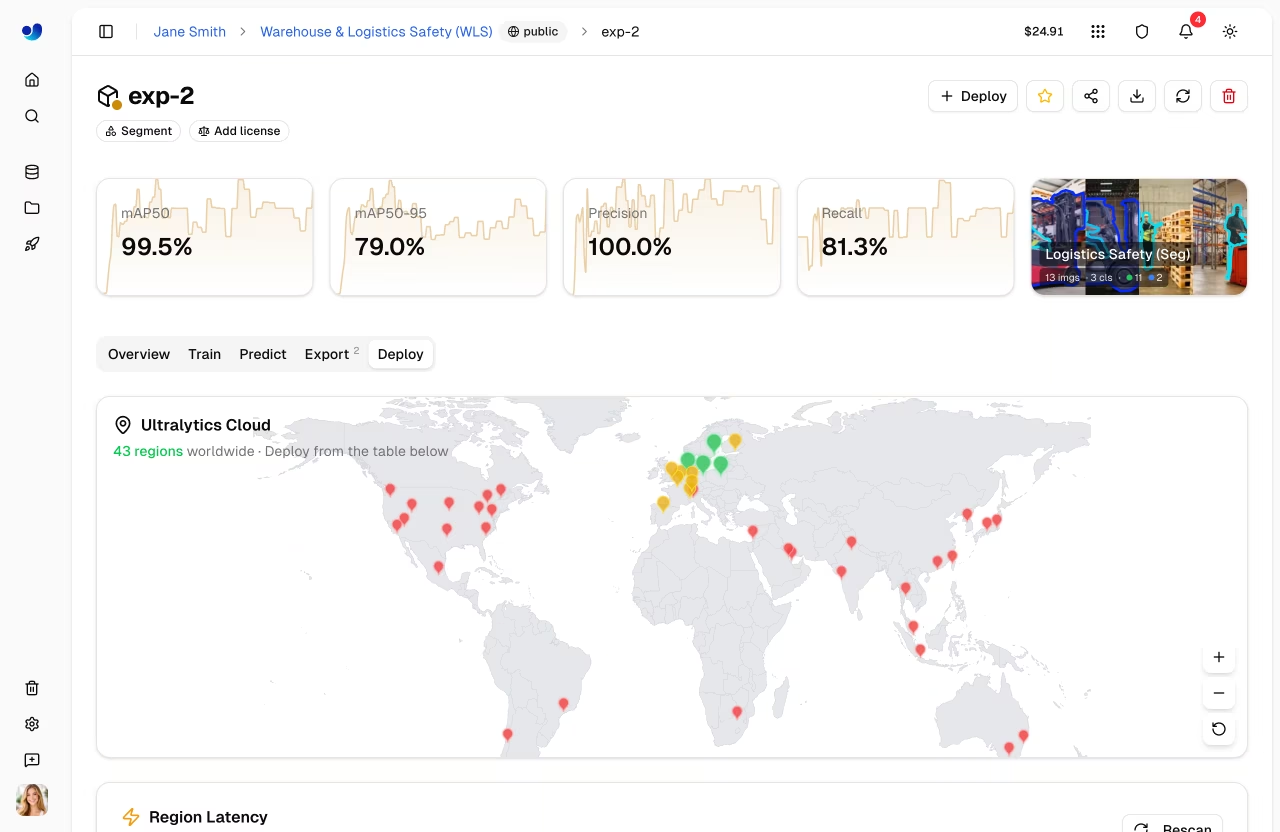
Ultralytics Platform provides comprehensive deployment options for putting your YOLO models into production. Test models with browser-based inference, deploy to dedicated endpoints across 43 global regions, and monitor performance in real-time.
Watch: Get Started with Ultralytics Platform - Deploy
Overview
The Deployment section helps you:
- Test models directly in the browser with the
Predicttab - Deploy to dedicated endpoints in 43 global regions
- Monitor request metrics, logs, and health checks
- Scale to zero when idle (deployments currently run a single active instance)
Deployment Options
Ultralytics Platform offers multiple deployment paths:
| Option | Description | Best For |
|---|---|---|
| Predict Tab | Browser-based inference with image, webcam, and examples | Development, validation |
| Shared Inference | Multi-tenant service across 3 regions | Light usage, testing |
| Dedicated Endpoints | Single-tenant services across 43 regions | Production, low latency |
Workflow
graph LR
    A[✅ Test] --> B[⚙️ Configure]
    B --> C[🌐 Deploy]
    C --> D[📊 Monitor]

    style A fill:#4CAF50,color:#fff
    style B fill:#2196F3,color:#fff
    style C fill:#FF9800,color:#fff
    style D fill:#9C27B0,color:#fff
| Stage | Description |
|---|---|
| Test | Validate model with the Predict tab |
| Configure | Select region and deployment name (deployments use fixed default resources) |
| Deploy | Create a dedicated endpoint from the Deploy tab |
| Monitor | Track requests, latency, errors, and logs in Monitoring |
Architecture
Shared Inference
The shared inference service runs in 3 key regions, automatically routing requests based on your data region:
graph TB
    User[User Request] --> API[Platform API]
    API --> Router{Region Router}
    Router -->|US users| US["US Predict Service<br/>Iowa"]
    Router -->|EU users| EU["EU Predict Service<br/>Belgium"]
    Router -->|AP users| AP["AP Predict Service<br/>Hong Kong"]

    style User fill:#f5f5f5,color:#333
    style API fill:#2196F3,color:#fff
    style Router fill:#FF9800,color:#fff
    style US fill:#4CAF50,color:#fff
    style EU fill:#4CAF50,color:#fff
    style AP fill:#4CAF50,color:#fff
| Region | Location |
|---|---|
| US | Iowa, USA |
| EU | Belgium, Europe |
| AP | Hong Kong, Asia-Pacific |
Dedicated Endpoints
Deploy to 43 regions worldwide on Ultralytics Cloud:
- Americas: 14 regions
- Europe: 13 regions
- Asia-Pacific: 12 regions
- Middle East & Africa: 4 regions
Each endpoint is a single-tenant service with:
- Default resources of
1 CPU,2 GiBmemory,minInstances=0,maxInstances=1 - Scale-to-zero when idle
- Unique endpoint URL
- Independent monitoring, logs, and health checks
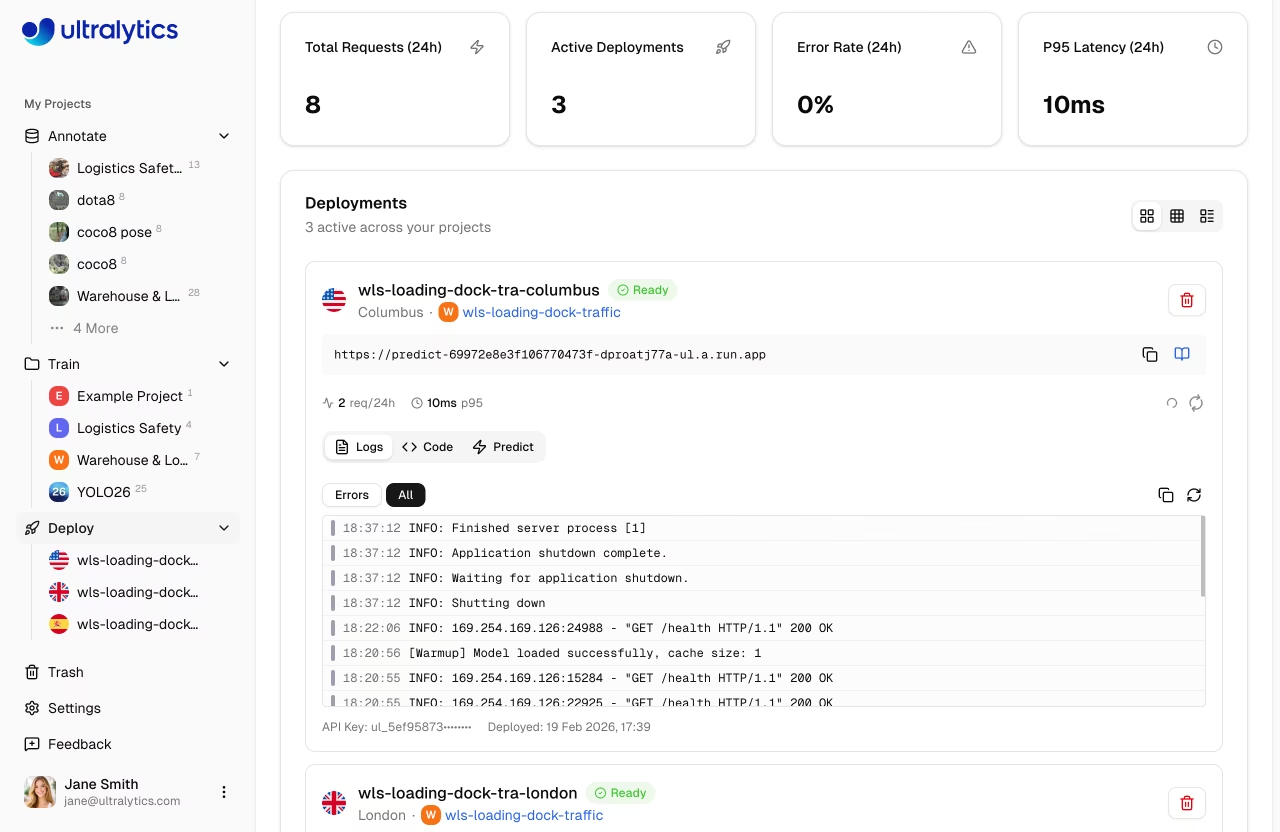
Deployments Page
Access the global deployments page from the sidebar under Deploy. This page shows:
- World map with deployed region pins (interactive map)
- Overview cards: Total Requests (24h), Active Deployments, Error Rate (24h), P95 Latency (24h)
- Deployments list with three view modes: cards, compact, and table
- New Deployment button to create endpoints from any completed model
!!! info "Automatic Polling"
The page polls every 15 seconds normally. When deployments are in a transitional state (`creating`, `deploying`, or `stopping`), polling increases to every 3 seconds for faster feedback.
Key Features
Global Coverage
Deploy close to your users with 43 regions covering:
- North America, South America
- Europe, Middle East, Africa
- Asia Pacific, Oceania
Scaling Behavior
Endpoints currently behave as follows:
- Scale to zero: No cost when idle (default)
- Single active instance:
maxInstancesis currently capped at1on all plans
!!! tip "Cost Savings"
Scale-to-zero is enabled by default (min instances = 0). You only pay for active inference time.
Low Latency
Dedicated endpoints provide:
- Cold start: ~5-15 seconds (cached container), up to ~45 seconds (first deploy)
- Warm inference: 50-200ms (model dependent)
- Regional routing for optimal performance
Health Checks
Each running deployment includes an automatic health check with:
- Live status indicator (healthy/unhealthy)
- Response latency display
- Auto-retry when unhealthy (polls every 20 seconds)
- Manual refresh button
Quick Start
Deploy a model in under 2 minutes:
- Train or upload a model to a project
- Go to the model's Deploy tab
- Select a region from the latency table
- Click Deploy — your endpoint is live
!!! example "Quick Deploy"
```
Model → Deploy tab → Select region → Click Deploy → Endpoint URL ready
```

Once deployed, use the endpoint URL with your API key to send inference requests from any application.
Quick Links
- Inference: Test models in browser
- Endpoints: Deploy dedicated endpoints
- Monitoring: Track deployment performance
FAQ
What's the difference between shared and dedicated inference?
| Feature | Shared | Dedicated |
|---|---|---|
| Latency | Variable | Consistent |
| Cost | Free (included) | Free (basic), usage-based (advanced) |
| Scale | Limited | Scale-to-zero, single instance |
| Regions | 3 | 43 |
| URL | Generic | Custom |
| Rate | 20 req/min | Unlimited |
How long does deployment take?
Dedicated endpoint deployment typically takes 1-2 minutes:
- Image pull (~30s)
- Container start (~30s)
- Health check (~30s)
Can I deploy multiple models?
Yes, each model can have multiple endpoints in different regions. Deployment counts are limited by plan: Free 3, Pro 10, Enterprise unlimited.
What happens when an endpoint is idle?
With scale-to-zero enabled:
- Endpoint scales down after inactivity
- First request triggers cold start
- Subsequent requests are fast
First requests after an idle period trigger a cold start.