
7.9 KiB
| comments | description | keywords |
|---|---|---|
| true | Track all account activity and events on Ultralytics Platform with the activity feed, including training, uploads, and system events. | Ultralytics Platform, activity feed, audit log, notifications, event tracking, activity history |
Activity Feed
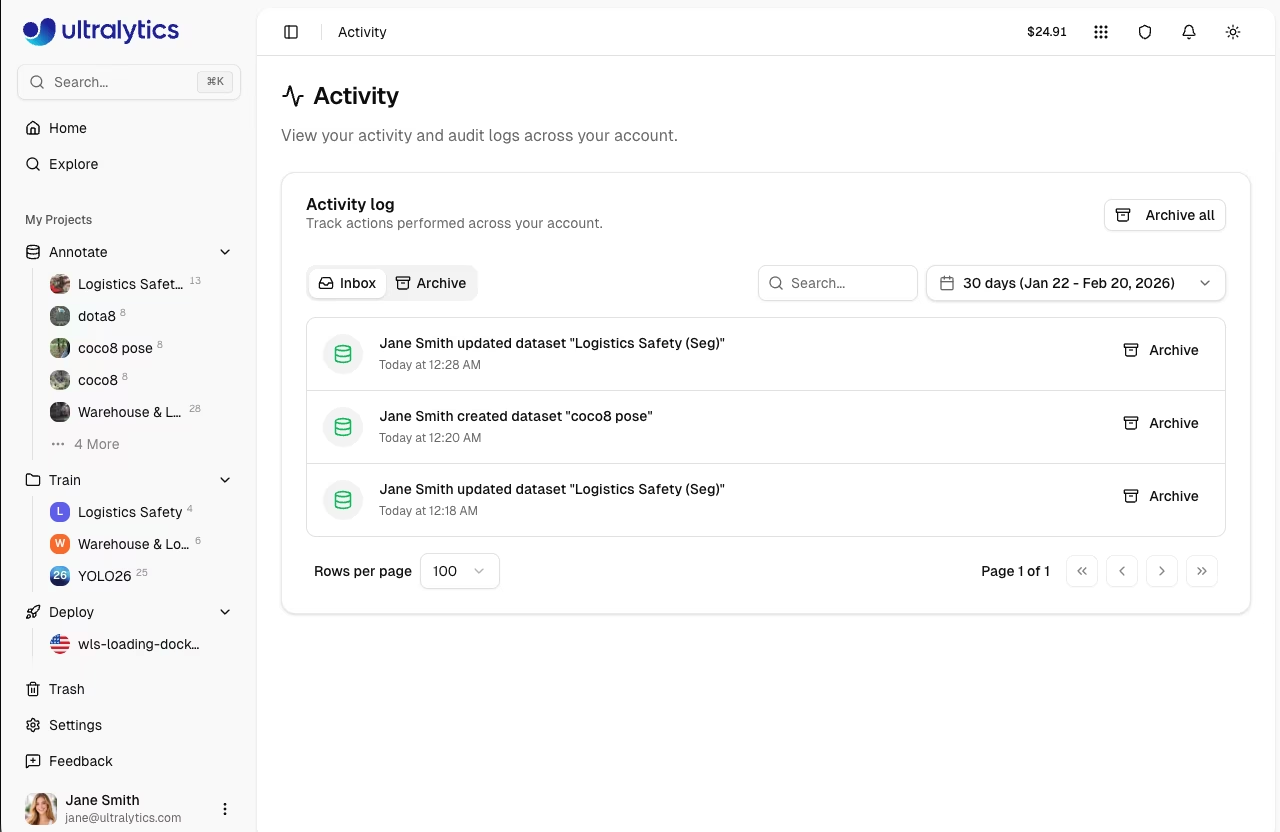
Ultralytics Platform provides a comprehensive activity feed that tracks all events and actions across your account. Monitor training progress and system events in one centralized location.
Overview
The Activity Feed serves as your central hub for:
- Training updates: Job started, completed, failed, or cancelled
- Data changes: Datasets created, modified, or deleted
- Model events: Model creation, exports, and deployments
- Project events: Project creation, updates, and deletion
- API key events: Key creation and revocation
- Settings changes: Profile and account updates
- System alerts: Onboarding and account notifications
Accessing Activity
Navigate to the Activity Feed:
- Click Activity in the sidebar
- Or navigate directly to
/activity

Activity Types
The Platform tracks the following resource types and actions:
| Resource Type | Description | Icon Color |
|---|---|---|
| project | Project events | Blue |
| dataset | Dataset events | Green |
| model | Model events | Purple |
| training | Training job events | Blue/Green/Red/Gray |
| settings | Account settings changes | Gray |
| api_key | API key creation/revocation | Amber |
| export | Model export events | Amber |
| deployment | Deployment events | Blue |
| onboarding | Onboarding completion | Green |
Action Types
Each event includes one of the following action types:
| Action | Description |
|---|---|
| created | Resource was created |
| updated | Resource was modified |
| deleted | Resource was permanently deleted |
| trashed | Resource was moved to trash |
| restored | Resource was restored from trash |
| started | Training or export job was started |
| completed | Training or export job finished successfully |
| failed | Training or export job failed |
| cancelled | Training or export job was cancelled |
| uploaded | Data was uploaded (images, model weights) |
| shared | Resource visibility changed to public |
| unshared | Resource visibility changed to private |
| exported | Model was exported to a deployment format |
| cloned | Resource was cloned to another location |
Inbox and Archive
Organize your activity with two tabs:
Inbox
The Inbox shows recent activity:
- New events appear here automatically
- Unseen events are highlighted with a colored background
- Events are automatically marked as seen when you view the page
- Click Archive on individual events to move them out of Inbox
Archive
Move events to Archive to keep your Inbox clean:
- Click Archive on individual events
- Click Archive all to archive all Inbox events at once
- Access archived events via the
Archivetab - Click Restore on archived events to move them back to Inbox
Search and Filtering
Find specific events quickly:
Search
Use the search bar to find events by resource name or event description.
Date Range
Filter by time period using the date range picker:
- Select a start and end date
- The page defaults to the last 30 days
- Custom date ranges supported

Event Details
Each event displays:
| Field | Description |
|---|---|
| Icon | Resource type indicator |
| Description | What happened (e.g., "Created project my-project") |
| Timestamp | Relative time (e.g., "2 hours ago") |
| Metadata | Additional context when available |
Undo Support
Some actions support undo directly from the Activity feed:
- Settings changes: Click Undo next to a recent settings update event to revert the change
- Undo is available for a short time window after the action
Pagination
The Activity feed supports pagination:
- Default page size: 20 events
- Navigate between pages using the pagination controls
- Page size is configurable via URL query parameter
API Routes
The Activity feed is powered by browser-authenticated routes — it is not exposed as a public API and cannot be accessed with an API key. The route shapes are listed below for reference; to view, mark, or archive activity, use the Activity feed in the platform UI.
!!! note "Browser Session Only"
The routes shown below require an active platform browser session. The `Authorization: Bearer YOUR_API_KEY` header in the examples will not authenticate these routes — they are documented only to describe how the in-app feed talks to the server.
=== "List Activity"
```bash
curl -H "Authorization: Bearer YOUR_API_KEY" \
  https://platform.ultralytics.com/api/activity
```
=== "Filter and Search"
```bash
curl -H "Authorization: Bearer YOUR_API_KEY" \
  "https://platform.ultralytics.com/api/activity?archived=false&search=model&page=1&limit=20"
```
=== "Mark Seen"
```bash
curl -X POST -H "Authorization: Bearer YOUR_API_KEY" \
  -H "Content-Type: application/json" \
  -d '{"all": true}' \
  https://platform.ultralytics.com/api/activity/mark-seen
```
=== "Archive"
```bash
# Archive specific events
curl -X POST -H "Authorization: Bearer YOUR_API_KEY" \
  -H "Content-Type: application/json" \
  -d '{"eventIds": ["event_id_here"], "archive": true}' \
  https://platform.ultralytics.com/api/activity/archive

# Archive all events
curl -X POST -H "Authorization: Bearer YOUR_API_KEY" \
  -H "Content-Type: application/json" \
  -d '{"all": true, "archive": true}' \
  https://platform.ultralytics.com/api/activity/archive
```
FAQ
How long is activity history retained?
Activity history is retained indefinitely for your account. Archived events are also kept permanently.
Can I export my activity history?
Yes, use the GDPR data export feature in Settings > Profile to download all account data including activity history.
What happens to activity when I delete a resource?
The activity event remains in your history with a note that the resource was deleted. You can still see what happened even after deletion.
Does activity work with team workspaces?
Yes, the Activity feed shows events for the currently active workspace. Switch workspaces in the sidebar to see activity for different workspaces.