mirror of
https://github.com/apache/zeppelin
synced 2026-05-24 09:38:26 +00:00
 1c23f21388
### What is this PR for?
fix: broken image URLs in 0.8.0-SNAPSHOT doc
using the path `/asset` (the absolute path) for image URLs is actually invalid. That's because each version has its own image directory. So they should use the relative path. `{{BASE_PATH}}`
```
➜ asf-zeppelin tree site | grep asset
├── assets # root asset, we shouldn't use it in versioned doc.
│ │ ├── assets
│ │ ├── assets
│ │ ├── assets
│ │ ├── assets
│ │ ├── assets
│ │ ├── assets
│ │ ├── assets
│ │ ├── assets
│ │ ├── assets
│ ├── assets
```
### What type of PR is it?
[Bug Fix]
### Todos
DONE
### What is the Jira issue?
[ZEPPELIN-2707](https://issues.apache.org/jira/browse/ZEPPELIN-2707)
### How should this be tested?
1. cd `docs/`
2. build: `bundle exec jekyll build --safe`
3. check whether links in `_site` include `/docs/0.8.0-SNAPSHOT` as prefix or not
### Screenshots (if appropriate)
#### Current
http://zeppelin.apache.org/docs/0.8.0-SNAPSHOT/usage/interpreter/overview.html
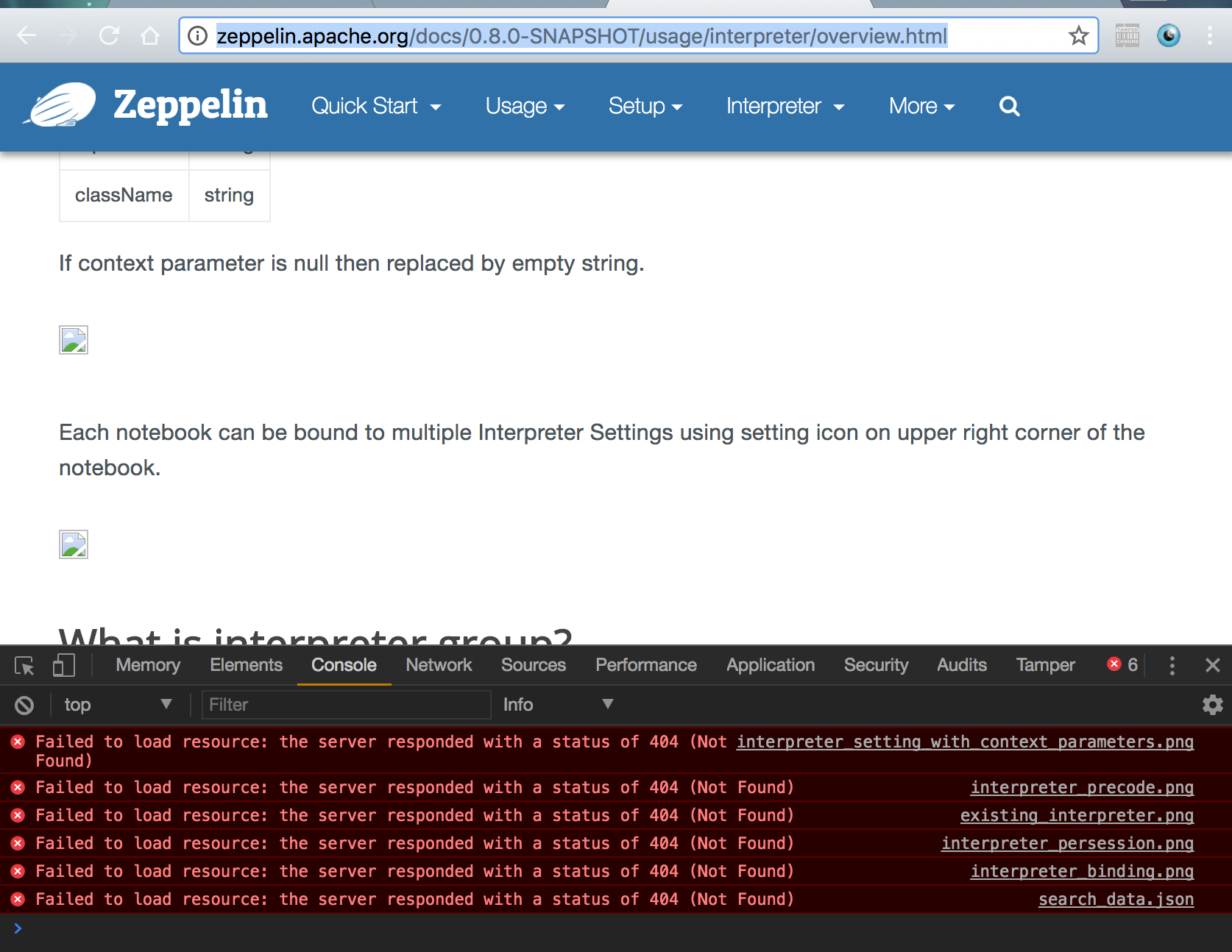
#### After
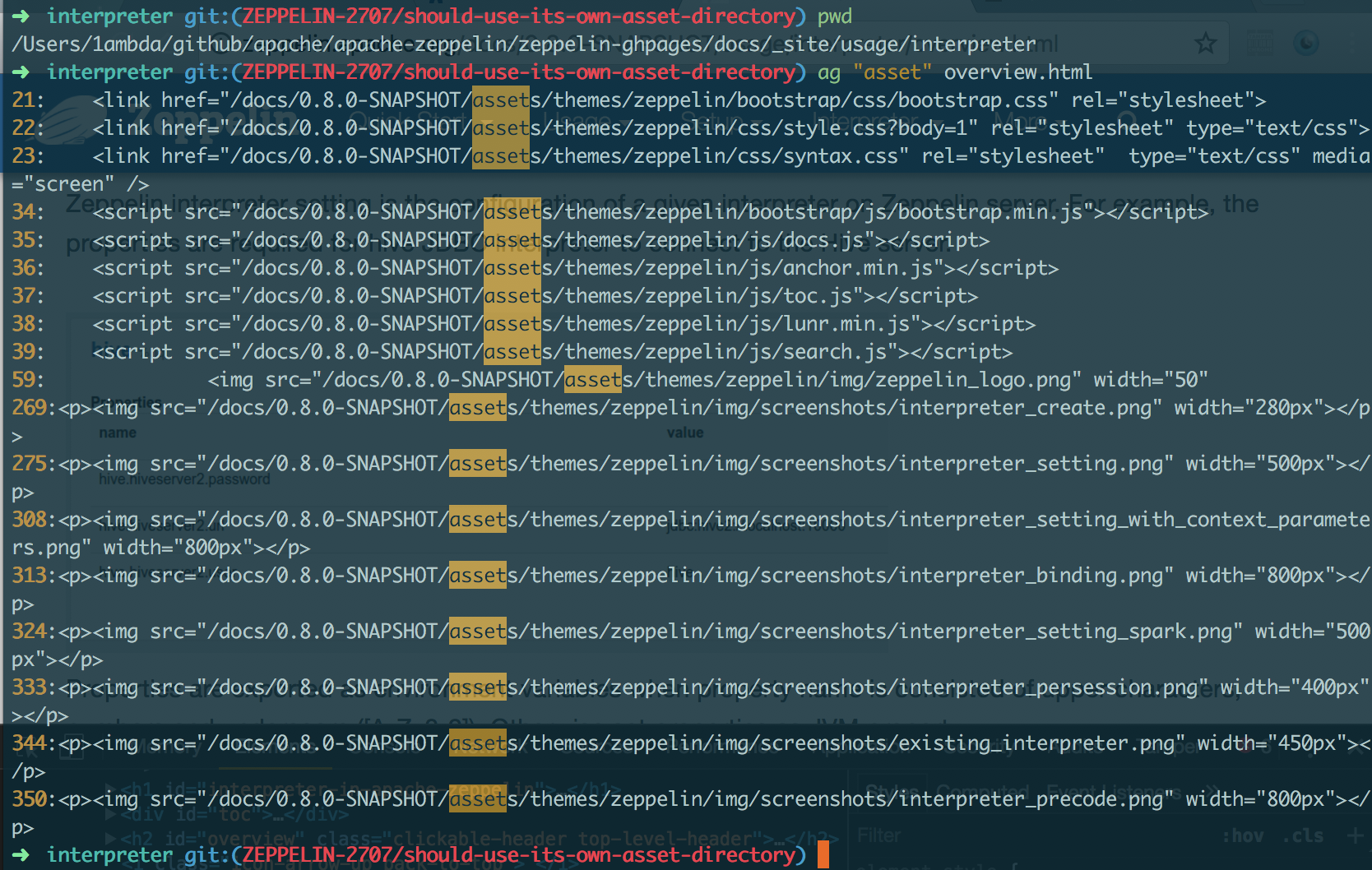
### Questions:
* Does the licenses files need update? - NO
* Is there breaking changes for older versions? - NO
* Does this needs documentation? - NO
Author: 1ambda <1amb4a@gmail.com>
Closes #2450 from 1ambda/ZEPPELIN-2707/should-use-its-own-asset-directory and squashes the following commits:
fb70214a [1ambda] fix: Use its own asset dir


170 lines
6 KiB
Markdown
170 lines
6 KiB
Markdown
---
|
|
layout: page
|
|
title: "Frontend Angular API in Apache Zeppelin"
|
|
description: "In addition to the back-end API to handle Angular objects binding, Apache Zeppelin exposes a simple AngularJS z object on the front-end side to expose the same capabilities."
|
|
group: usage/display_system
|
|
---
|
|
<!--
|
|
Licensed under the Apache License, Version 2.0 (the "License");
|
|
you may not use this file except in compliance with the License.
|
|
You may obtain a copy of the License at
|
|
|
|
http://www.apache.org/licenses/LICENSE-2.0
|
|
|
|
Unless required by applicable law or agreed to in writing, software
|
|
distributed under the License is distributed on an "AS IS" BASIS,
|
|
WITHOUT WARRANTIES OR CONDITIONS OF ANY KIND, either express or implied.
|
|
See the License for the specific language governing permissions and
|
|
limitations under the License.
|
|
-->
|
|
{% include JB/setup %}
|
|
|
|
# Frontend Angular API in Apache Zeppelin
|
|
|
|
<div id="toc"></div>
|
|
|
|
## Basic Usage
|
|
In addition to the [backend Angular API](./angular_backend.html) to handle Angular objects binding, Apache Zeppelin also exposes a simple AngularJS <code>**z**</code> object on the front-end side to expose the same capabilities.
|
|
This <code>**z**</code> object is accessible in the Angular isolated scope for each paragraph.
|
|
|
|
|
|
### Bind / Unbind Variables
|
|
|
|
Through the **`z`**, you can bind / unbind variables to **AngularJS view**.
|
|
Bind a value to an angular object and a **mandatory** target paragraph:
|
|
|
|
```html
|
|
|
|
%angular
|
|
|
|
<form class="form-inline">
|
|
<div class="form-group">
|
|
<label for="superheroId">Super Hero: </label>
|
|
<input type="text" class="form-control" id="superheroId" placeholder="Superhero name ..." ng-model="superhero"></input>
|
|
</div>
|
|
<button type="submit" class="btn btn-primary" ng-click="z.angularBind('superhero',superhero,'20160222-232336_1472609686')"> Bind</button>
|
|
</form>
|
|
|
|
```
|
|
|
|
<img src="{{BASE_PATH}}/assets/themes/zeppelin/img/screenshots/z_angularBind.gif" />
|
|
|
|
<hr/>
|
|
|
|
Unbind/remove a value from angular object and a **mandatory** target paragraph:
|
|
|
|
```html
|
|
|
|
%angular
|
|
|
|
<form class="form-inline">
|
|
<button type="submit" class="btn btn-primary" ng-click="z.angularUnbind('superhero','20160222-232336_1472609686')"> UnBind</button>
|
|
</form>
|
|
|
|
```
|
|
|
|
<img src="{{BASE_PATH}}/assets/themes/zeppelin/img/screenshots/z_angularUnbind.gif" />
|
|
|
|
The signature for the **`z.angularBind() / z.angularUnbind()`** functions are:
|
|
|
|
```javascript
|
|
// Bind
|
|
z.angularBind(angularObjectName, angularObjectValue, paragraphId);
|
|
|
|
// Unbind
|
|
z.angularUnbind(angularObjectName, angularObjectValue, paragraphId);
|
|
|
|
```
|
|
|
|
All the parameters are mandatory.
|
|
|
|
|
|
<br />
|
|
### Run Paragraph
|
|
|
|
You can also trigger paragraph execution by calling **`z.runParagraph()`** function passing the appropriate paragraphId:
|
|
|
|
```html
|
|
|
|
%angular
|
|
|
|
<form class="form-inline">
|
|
<div class="form-group">
|
|
<label for="paragraphId">Paragraph Id: </label>
|
|
<input type="text" class="form-control" id="paragraphId" placeholder="Paragraph Id ..." ng-model="paragraph"></input>
|
|
</div>
|
|
<button type="submit" class="btn btn-primary" ng-click="z.runParagraph(paragraph)"> Run Paragraph</button>
|
|
</form>
|
|
|
|
```
|
|
|
|
<img src="{{BASE_PATH}}/assets/themes/zeppelin/img/screenshots/z_runParagraph.gif" />
|
|
|
|
<br />
|
|
## Overriding dynamic form with Angular Object
|
|
|
|
The front-end Angular Interaction API has been designed to offer richer form capabilities and variable binding. With the existing **Dynamic Form** system you can already create input text, select and checkbox forms but the choice is rather limited and the look & feel cannot be changed.
|
|
|
|
The idea is to create a custom form using plain HTML/AngularJS code and bind actions on this form to push/remove Angular variables to targeted paragraphs using this new API.
|
|
|
|
Consequently if you use the **Dynamic Form** syntax in a paragraph and there is a bound Angular object having the same name as the `${formName}`, the Angular object will have higher priority and the **Dynamic Form** will not be displayed. Example:
|
|
|
|
|
|
<img src="{{BASE_PATH}}/assets/themes/zeppelin/img/screenshots/z_angularJs_overriding_dynamic_form.gif" />
|
|
|
|
|
|
<br />
|
|
## Feature matrix comparison
|
|
|
|
How does the front-end AngularJS API compares to the [backend Angular API](./angular_backend.html)? Below is a comparison matrix for both APIs:
|
|
|
|
<table class="table-configuration">
|
|
<thead>
|
|
<tr>
|
|
<th>Actions</th>
|
|
<th>Front-end API</th>
|
|
<th>Back-end API</th>
|
|
</tr>
|
|
</thead>
|
|
<tr>
|
|
<td>Initiate binding</td>
|
|
<td>z.angularbind(var, initialValue, paragraphId)</td>
|
|
<td>z.angularBind(var, initialValue)</td>
|
|
</tr>
|
|
<tr>
|
|
<td>Update value</td>
|
|
<td>same to ordinary angularjs scope variable, or z.angularbind(var, newValue, paragraphId)</td>
|
|
<td>z.angularBind(var, newValue)</td>
|
|
</tr>
|
|
<tr>
|
|
<td>Watching value</td>
|
|
<td>same to ordinary angularjs scope variable</td>
|
|
<td>z.angularWatch(var, (oldVal, newVal) => ...)</td>
|
|
</tr>
|
|
<tr>
|
|
<td>Destroy binding</td>
|
|
<td>z.angularUnbind(var, paragraphId)</td>
|
|
<td>z.angularUnbind(var)</td>
|
|
</tr>
|
|
<tr>
|
|
<td>Executing Paragraph</td>
|
|
<td>z.runParagraph(paragraphId)</td>
|
|
<td>z.run(paragraphId)</td>
|
|
</tr>
|
|
<tr>
|
|
<td>Executing Paragraph (Specific paragraphs in other notes) (</td>
|
|
<td></td>
|
|
<td>z.run(noteid, paragraphId)</td>
|
|
</tr>
|
|
<tr>
|
|
<td>Executing note</td>
|
|
<td></td>
|
|
<td>z.runNote(noteId)</td>
|
|
</tr>
|
|
<tbody>
|
|
<tbody>
|
|
</table>
|
|
|
|
Both APIs are pretty similar, except for value watching where it is done naturally by AngularJS internals on the front-end and by user custom watcher functions in the back-end.
|
|
|
|
There is also a slight difference in term of scope. Front-end API limits the Angular object binding to a paragraph scope whereas back-end API allows you to bind an Angular object at the global or note scope. This restriction has been designed purposely to avoid Angular object leaks and scope pollution.
|