 901dcb0e47
Signed-off-by: Glenn Jocher <glenn.jocher@ultralytics.com>
Co-authored-by: UltralyticsAssistant <web@ultralytics.com>
Co-authored-by: Glenn Jocher <glenn.jocher@ultralytics.com>
12 KiB
| comments | description | keywords | model_name |
|---|---|---|---|
| true | Master instance segmentation using YOLO26. Learn how to detect, segment and outline objects in images with detailed guides and examples. | instance segmentation, YOLO26, object detection, image segmentation, machine learning, deep learning, computer vision, COCO dataset, Ultralytics | yolo26n-seg |
Instance Segmentation
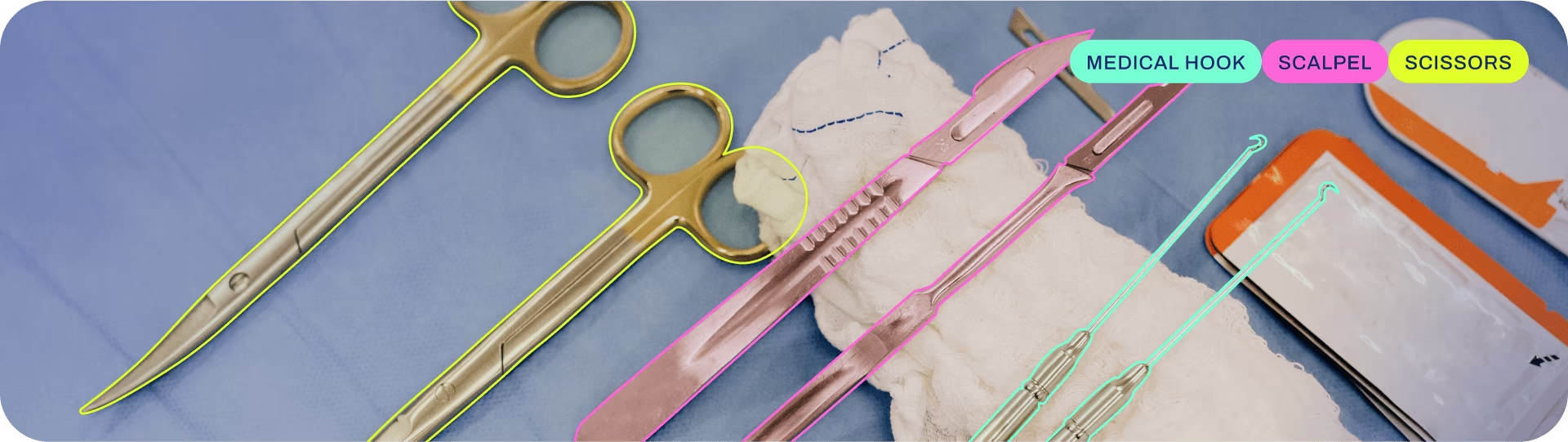
Instance segmentation goes a step further than object detection and involves identifying individual objects in an image and segmenting them from the rest of the image.
The output of an instance segmentation model is a set of masks or contours that outline each object in the image, along with class labels and confidence scores for each object. Instance segmentation is useful when you need to know not only where objects are in an image, but also what their exact shape is.
Watch: Run Segmentation with Pretrained Ultralytics YOLO Model in Python.
!!! tip
YOLO26 Segment models use the `-seg` suffix, i.e., `yolo26n-seg.pt`, and are pretrained on [COCO](https://github.com/ultralytics/ultralytics/blob/main/ultralytics/cfg/datasets/coco.yaml).
Models
YOLO26 pretrained Segment models are shown here. Detect, Segment and Pose models are pretrained on the COCO dataset, while Classify models are pretrained on the ImageNet dataset.
Models download automatically from the latest Ultralytics release on first use.
{% include "macros/yolo-seg-perf.md" %}
- mAPval values are for single-model single-scale on COCO val2017 dataset.
Reproduce byyolo val segment data=coco.yaml device=0 - Speed averaged over COCO val images using an Amazon EC2 P4d instance.
Reproduce byyolo val segment data=coco.yaml batch=1 device=0|cpu - Params and FLOPs values are for the fused model after
model.fuse(), which merges Conv and BatchNorm layers and, for end2end models, removes the auxiliary one-to-many detection head. Pretrained checkpoints retain the full training architecture and may show higher counts.
Train
Train YOLO26n-seg on the COCO8-seg dataset for 100 epochs at image size 640. For a full list of available arguments see the Configuration page.
!!! example
=== "Python"

    ```python
    from ultralytics import YOLO

    # Load a model
    model = YOLO("yolo26n-seg.yaml")  # build a new model from YAML
    model = YOLO("yolo26n-seg.pt")  # load a pretrained model (recommended for training)
    model = YOLO("yolo26n-seg.yaml").load("yolo26n-seg.pt")  # build from YAML and transfer weights

    # Train the model
    results = model.train(data="coco8-seg.yaml", epochs=100, imgsz=640)
    ```

=== "CLI"

    ```bash
    # Build a new model from YAML and start training from scratch
    yolo segment train data=coco8-seg.yaml model=yolo26n-seg.yaml epochs=100 imgsz=640

    # Start training from a pretrained *.pt model
    yolo segment train data=coco8-seg.yaml model=yolo26n-seg.pt epochs=100 imgsz=640

    # Build a new model from YAML, transfer pretrained weights to it and start training
    yolo segment train data=coco8-seg.yaml model=yolo26n-seg.yaml pretrained=yolo26n-seg.pt epochs=100 imgsz=640
    ```
Dataset format
YOLO segmentation dataset format can be found in detail in the Dataset Guide. To convert your existing dataset from other formats (like COCO etc.) to YOLO format, please use JSON2YOLO tool by Ultralytics.
Val
Validate trained YOLO26n-seg model accuracy on the COCO8-seg dataset. No arguments are needed as the model retains its training data and arguments as model attributes.
!!! example
=== "Python"

    ```python
    from ultralytics import YOLO

    # Load a model
    model = YOLO("yolo26n-seg.pt")  # load an official model
    model = YOLO("path/to/best.pt")  # load a custom model

    # Validate the model
    metrics = model.val()  # no arguments needed, dataset and settings remembered
    metrics.box.map  # map50-95(B)
    metrics.box.map50  # map50(B)
    metrics.box.map75  # map75(B)
    metrics.box.maps  # a list containing mAP50-95(B) for each category
    metrics.box.image_metrics  # per-image metrics dictionary for det with precision, recall, F1, TP, FP, and FN
    metrics.seg.map  # map50-95(M)
    metrics.seg.map50  # map50(M)
    metrics.seg.map75  # map75(M)
    metrics.seg.maps  # a list containing mAP50-95(M) for each category
    metrics.seg.image_metrics  # per-image metrics dictionary for seg with precision, recall, F1, TP, FP, and FN
    ```

=== "CLI"

    ```bash
    yolo segment val model=yolo26n-seg.pt  # val official model
    yolo segment val model=path/to/best.pt # val custom model
    ```
Predict
Use a trained YOLO26n-seg model to run predictions on images.
!!! example
=== "Python"

    ```python
    from ultralytics import YOLO

    # Load a model
    model = YOLO("yolo26n-seg.pt")  # load an official model
    model = YOLO("path/to/best.pt")  # load a custom model

    # Predict with the model
    results = model("https://ultralytics.com/images/bus.jpg")  # predict on an image

    # Access the results
    for result in results:
        xy = result.masks.xy  # mask in polygon format
        xyn = result.masks.xyn  # normalized
        masks = result.masks.data  # mask in matrix format (num_objects x H x W)
    ```

=== "CLI"

    ```bash
    yolo segment predict model=yolo26n-seg.pt source='https://ultralytics.com/images/bus.jpg'  # predict with official model
    yolo segment predict model=path/to/best.pt source='https://ultralytics.com/images/bus.jpg' # predict with custom model
    ```
See full predict mode details in the Predict page.
Export
Export a YOLO26n-seg model to a different format like ONNX, CoreML, etc.
!!! example
=== "Python"

    ```python
    from ultralytics import YOLO

    # Load a model
    model = YOLO("yolo26n-seg.pt")  # load an official model
    model = YOLO("path/to/best.pt")  # load a custom-trained model

    # Export the model
    model.export(format="onnx")
    ```

=== "CLI"

    ```bash
    yolo export model=yolo26n-seg.pt format=onnx  # export official model
    yolo export model=path/to/best.pt format=onnx # export custom-trained model
    ```
Available YOLO26-seg export formats are in the table below. You can export to any format using the format argument, i.e., format='onnx' or format='engine'. You can predict or validate directly on exported models, i.e., yolo predict model=yolo26n-seg.onnx. Usage examples are shown for your model after export completes.
{% include "macros/export-table.md" %}
See full export details in the Export page.
FAQ
How do I train a YOLO26 segmentation model on a custom dataset?
To train a YOLO26 segmentation model on a custom dataset, you first need to prepare your dataset in the YOLO segmentation format. You can use tools like JSON2YOLO to convert datasets from other formats. Once your dataset is ready, you can train the model using Python or CLI commands:
!!! example
=== "Python"

    ```python
    from ultralytics import YOLO

    # Load a pretrained YOLO26 segment model
    model = YOLO("yolo26n-seg.pt")

    # Train the model
    results = model.train(data="path/to/your_dataset.yaml", epochs=100, imgsz=640)
    ```

=== "CLI"

    ```bash
    yolo segment train data=path/to/your_dataset.yaml model=yolo26n-seg.pt epochs=100 imgsz=640
    ```
Check the Configuration page for more available arguments.
What is the difference between object detection and instance segmentation in YOLO26?
Object detection identifies and localizes objects within an image by drawing bounding boxes around them, whereas instance segmentation not only identifies the bounding boxes but also delineates the exact shape of each object. YOLO26 instance segmentation models provide masks or contours that outline each detected object, which is particularly useful for tasks where knowing the precise shape of objects is important, such as medical imaging or autonomous driving.
Why use YOLO26 for instance segmentation?
Ultralytics YOLO26 is a state-of-the-art model recognized for its high accuracy and real-time performance, making it ideal for instance segmentation tasks. YOLO26 Segment models come pretrained on the COCO dataset, ensuring robust performance across a variety of objects. Additionally, YOLO supports training, validation, prediction, and export functionalities with seamless integration, making it highly versatile for both research and industry applications.
How do I load and validate a pretrained YOLO segmentation model?
Loading and validating a pretrained YOLO segmentation model is straightforward. Here's how you can do it using both Python and CLI:
!!! example
=== "Python"

    ```python
    from ultralytics import YOLO

    # Load a pretrained model
    model = YOLO("yolo26n-seg.pt")

    # Validate the model
    metrics = model.val()
    print("Mean Average Precision for boxes:", metrics.box.map)
    print("Mean Average Precision for masks:", metrics.seg.map)
    ```

=== "CLI"

    ```bash
    yolo segment val model=yolo26n-seg.pt
    ```
These steps will provide you with validation metrics like Mean Average Precision (mAP), crucial for assessing model performance.
How can I export a YOLO segmentation model to ONNX format?
Exporting a YOLO segmentation model to ONNX format is simple and can be done using Python or CLI commands:
!!! example
=== "Python"

    ```python
    from ultralytics import YOLO

    # Load a pretrained model
    model = YOLO("yolo26n-seg.pt")

    # Export the model to ONNX format
    model.export(format="onnx")
    ```

=== "CLI"

    ```bash
    yolo export model=yolo26n-seg.pt format=onnx
    ```
For more details on exporting to various formats, refer to the Export page.