
8.7 KiB
| comments | description | keywords |
|---|---|---|
| true | Learn about data management in Ultralytics Platform including dataset upload, annotation tools, and statistics visualization for YOLO model training. | Ultralytics Platform, data management, datasets, annotation, YOLO, computer vision, data preparation, labeling |
Data Preparation
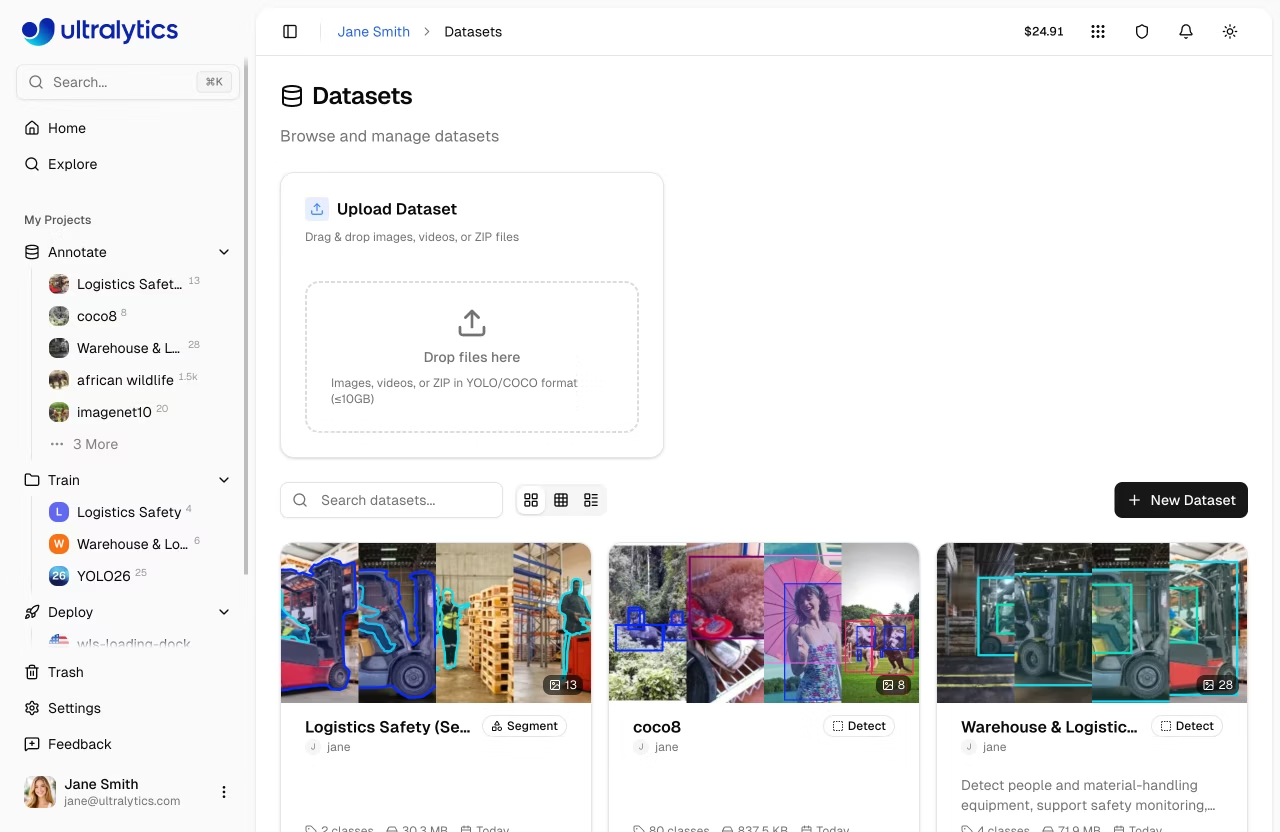
Data preparation is the foundation of successful computer vision models. Ultralytics Platform provides comprehensive tools for managing your training data, from upload through annotation to analysis.
Watch: Get Started with Ultralytics Platform - Data
Overview
The Data section of Ultralytics Platform helps you:
- Upload images, videos, and dataset files (ZIP, TAR including
.tar.gz/.tgz, NDJSON) - Annotate with manual drawing tools and SAM-powered smart labeling — choose from SAM 2.1 or the new SAM 3
- Analyze your data with statistics and visualizations
- Export in NDJSON format for local training
Workflow
graph LR
    A[Upload] --> B[Annotate]
    B --> C[Analyze]
    C --> D[Train]

    style A fill:#4CAF50,color:#fff
    style B fill:#2196F3,color:#fff
    style C fill:#FF9800,color:#fff
    style D fill:#9C27B0,color:#fff
| Stage | Description |
|---|---|
| Upload | Import images, videos, or archives with automatic processing |
| Annotate | Label data with manual tools for all 5 task types, or use SAM annotation for detect, segment, and OBB |
| Analyze | View class distributions, spatial heatmaps, and dimension statistics |
| Export | Download in NDJSON format for offline use |
Supported Tasks
Ultralytics Platform supports all 5 YOLO task types:
| Task | Description | Annotation Tool |
|---|---|---|
| Detect | Object detection with bounding boxes | Rectangle tool |
| Segment | Instance segmentation with pixel masks | Polygon tool |
| Pose | Keypoint estimation with built-in and custom skeleton templates | Keypoint tool |
| OBB | Oriented bounding boxes for rotated objects | Oriented box tool |
| Classify | Image-level classification | Class selector |
!!! info "Task Type Selection"
The task type is set when creating a dataset and determines which annotation tools are available. You can change it later from the dataset header task selector, but incompatible annotations won't be displayed after switching.
Key Features
Smart Storage
Ultralytics Platform uses Content-Addressable Storage (CAS) for efficient data management:
- Deduplication: Identical images stored only once via XXH3-128 hashing
- Integrity: Hash-based addressing ensures data integrity
- Efficiency: Optimized storage and fast processing
Dataset URIs
Reference datasets using the ul:// URI format (see Using Platform Datasets):
yolo train data=ul://username/datasets/my-dataset
This allows training on the platform's datasets from any machine with your API key configured.
!!! example "Use Platform Data from Python"
```python
from ultralytics import YOLO

model = YOLO("yolo26n.pt")
model.train(data="ul://username/datasets/my-dataset", epochs=100)
```
Dataset Versioning
Create immutable NDJSON snapshots of your dataset for reproducible training. Each version captures image counts, class counts, and annotation counts at the time of creation. See Versions Tab for details.
Dataset Tabs
Dataset pages can show up to six tabs, depending on the dataset state and your permissions:
| Tab | Description |
|---|---|
| Images | Browse images in grid, compact, or table view with annotation overlays |
| Classes | View and edit class names, colors, and label counts per class |
| Charts | Automatic statistics: split distribution, class counts, heatmaps |
| Models | Models trained on this dataset with metrics and status |
| Versions | Create and download immutable NDJSON snapshots for reproducible training |
| Errors | Images that failed processing with error details and fix guidance |
Classes and Charts appear when the dataset has images. Errors appears only when processing failures exist. Versions appears for owners, or for non-owners when versions already exist.
Statistics and Visualization
The Charts tab provides automatic analysis including:
- Split Distribution: Donut chart of train/val/test image counts
- Top Classes: Donut chart of most frequent annotation classes
- Image Widths: Histogram of image width distribution
- Image Heights: Histogram of image height distribution
- Points per Instance: Polygon vertex or keypoint count distribution (segment/pose datasets)
- Annotation Locations: 2D heatmap of bounding box center positions
- Image Dimensions: 2D heatmap of width vs height with aspect ratio guide lines
Health and Clustering
Explore your dataset as an interactive 2D scatter plot, detect blurry, overexposed, low-contrast, and near-duplicate images. Brush a region of the plot to filter the gallery by cluster. See Health & Clustering for details.
Quick Links
- Datasets: Upload, manage, and export your training data
- Annotation: Label data with manual and AI-assisted tools
- Cloud Training: Train models on your annotated datasets
- Dataset URI: Use
ul://URIs to train from anywhere
FAQ
What file formats are supported for upload?
Ultralytics Platform supports:
Images: JPEG, PNG, WebP, BMP, TIFF, HEIC, AVIF, JP2, DNG, MPO (max 50MB each)
Videos: MP4, WebM, MOV, AVI, MKV, M4V (max 1GB, frames extracted at 1 FPS, max 100 frames)
Dataset files: ZIP or TAR archives including .tar.gz and .tgz (max 10GB on Free, 20GB on Pro, 50GB on Enterprise) containing images with optional YOLO-format labels, plus NDJSON exports
What is the maximum dataset size?
Storage limits depend on your plan:
| Plan | Storage Limit |
|---|---|
| Free | 100 GB |
| Pro | 500 GB |
| Enterprise | Unlimited |
Individual file limits: Images 50MB, Videos 1GB, datasets 10GB on Free / 20GB on Pro / 50GB on Enterprise
Can I use my Platform datasets for local training?
Yes! Use the dataset URI format to train locally:
=== "CLI"
```bash
export ULTRALYTICS_API_KEY="YOUR_API_KEY"
yolo train model=yolo26n.pt data=ul://username/datasets/my-dataset epochs=100
```
=== "Python"
```python
import os

os.environ["ULTRALYTICS_API_KEY"] = "YOUR_API_KEY"

from ultralytics import YOLO

model = YOLO("yolo26n.pt")
model.train(data="ul://username/datasets/my-dataset", epochs=100)
```
Or export your dataset in NDJSON format for fully offline training.