
15 KiB
| comments | description | keywords |
|---|---|---|
| true | Explore Ultralytics Solutions using YOLO26 for object counting, blurring, security, and more. Enhance efficiency and solve real-world problems with cutting-edge AI. | Ultralytics, YOLO26, object counting, object blurring, security systems, AI solutions, real-time analysis, computer vision applications |
Ultralytics Solutions: Harness YOLO26 to Solve Real-World Problems
Ultralytics Solutions provide cutting-edge applications of YOLO models, offering real-world solutions like object counting, blurring, and security systems, enhancing efficiency and accuracy in diverse industries. Discover the power of YOLO26 for practical, impactful implementations.
Watch: How to Run Ultralytics Solutions from the Command Line (CLI) | Ultralytics YOLO26 🚀
Solutions
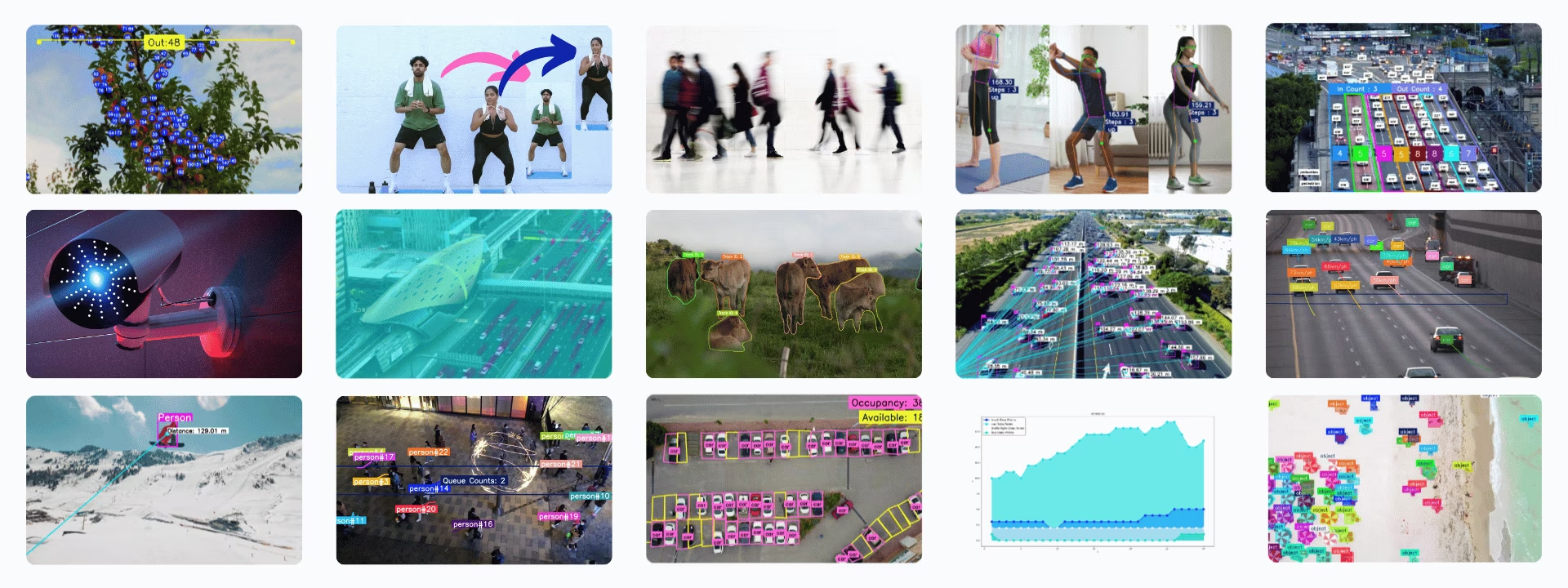
Here's our curated list of Ultralytics solutions that can be used to create awesome computer vision projects.
- Analytics: Conduct comprehensive data analysis to discover patterns and make informed decisions, leveraging YOLO26 for descriptive, predictive, and prescriptive analytics.
- Distance Calculation: Calculate distances between objects using bounding box centroids in YOLO26, essential for spatial analysis.
- Heatmaps: Utilize detection heatmaps to visualize data intensity across a matrix, providing clear insights in computer vision tasks.
- Instance Segmentation with Object Tracking: Implement instance segmentation and object tracking with YOLO26 to achieve precise object boundaries and continuous monitoring.
- Live Inference with Streamlit: Leverage the power of YOLO26 for real-time object detection directly through your web browser with a user-friendly Streamlit interface.
- Object Blurring: Apply object blurring using YOLO26 to protect privacy in image and video processing.
- Object Counting: Learn to perform real-time object counting with YOLO26. Gain the expertise to accurately count objects in live video streams.
- Object Counting in Regions: Count objects in specific regions using YOLO26 for accurate detection in varied areas.
- Object Cropping: Master object cropping with YOLO26 for precise extraction of objects from images and videos.
- Parking Management: Organize and direct vehicle flow in parking areas with YOLO26, optimizing space utilization and user experience.
- Queue Management: Implement efficient queue management systems to minimize wait times and improve productivity using YOLO26.
- Security Alarm System: Create a security alarm system with YOLO26 that triggers alerts upon detecting new objects. Customize the system to fit your specific needs.
- Similarity Search: Enable intelligent image retrieval by combining OpenAI CLIP embeddings with Meta FAISS, allowing natural language queries like "person holding a bag" or "vehicles in motion."
- Speed Estimation: Estimate object speed using YOLO26 and object tracking techniques, crucial for applications like autonomous vehicles and traffic monitoring.
- Track Objects in Zone: Learn how to track objects within specific zones of video frames using YOLO26 for precise and efficient monitoring.
- VisionEye View Objects Mapping: Develop systems that mimic human eye focus on specific objects, enhancing the computer's ability to discern and prioritize details.
- Workouts Monitoring: Discover how to monitor workouts using YOLO26. Learn to track and analyze various fitness routines in real time.
Solutions Arguments
{% from "macros/solutions-args.md" import param_table %} {{ param_table() }}
!!! note "Track args"
Solutions also support some of the arguments from `track`, including parameters such as `conf`, `line_width`, `tracker`, `model`, `show`, `verbose` and `classes`.
{% from "macros/track-args.md" import param_table %} {{ param_table(["tracker", "conf", "iou", "classes", "verbose", "device"]) }}
!!! note "Visualization args"
You can use `show_conf`, `show_labels`, and other mentioned arguments to customize the visualization.
{% from "macros/visualization-args.md" import param_table %} {{ param_table(["show", "line_width", "show_conf", "show_labels"]) }}
Usage of SolutionAnnotator
All Ultralytics Solutions use the separate class SolutionAnnotator, that extends the main Annotator class, and have the following methods:
| Method | Return Type | Description |
|---|---|---|
draw_region() |
None |
Draws a region using specified points, colors, and thickness. |
queue_counts_display() |
None |
Displays queue counts in the specified region. |
display_analytics() |
None |
Displays overall statistics for parking lot management. |
estimate_pose_angle() |
float |
Calculates the angle between three points in an object pose. |
draw_specific_points() |
None |
Draws specific keypoints on the image. |
plot_workout_information() |
None |
Draws a labeled text box on the image. |
plot_angle_and_count_and_stage() |
None |
Visualizes angle, step count, and stage for workout monitoring. |
plot_distance_and_line() |
None |
Displays the distance between centroids and connects them with a line. |
display_objects_labels() |
None |
Annotates bounding boxes with object class labels. |
sweep_annotator() |
None |
Visualize a vertical sweep line and optional label. |
visioneye() |
None |
Maps and connects object centroids to a visual "eye" point. |
adaptive_label() |
None |
Draw a circular or rectangle background shape label in center of a bounding box. |
Working with SolutionResults
Except Similarity Search, each Solution call returns a list of SolutionResults objects.
- For object counting, the results include
in_count,out_count, andclasswise_count.
!!! example "SolutionResults"
```python
import cv2

from ultralytics import solutions

im0 = cv2.imread("path/to/img")

region_points = [(20, 400), (1080, 400), (1080, 360), (20, 360)]

counter = solutions.ObjectCounter(
    show=True,  # display the output
    region=region_points,  # pass region points
    model="yolo26n.pt",  # model="yolo26n-obb.pt" for object counting with OBB model.
    # classes=[0, 2],  # count specific classes i.e. person and car with COCO pretrained model.
    # tracker="botsort.yaml"  # Choose trackers i.e "bytetrack.yaml"
)
results = counter(im0)
print(results.in_count)  # display in_counts
print(results.out_count)  # display out_counts
print(results.classwise_count)  # display classwise_count
```
SolutionResults object have the following attributes:
| Attribute | Type | Description |
|---|---|---|
plot_im |
np.ndarray |
Image with visual overlays such as counts, blur effects, or solution-specific enhancements. |
in_count |
int |
Total number of objects detected entering the defined zone in the video stream. |
out_count |
int |
Total number of objects detected exiting the defined zone in the video stream. |
classwise_count |
Dict[str, int] |
Dictionary recording class-wise in/out object counts for advanced analytics. |
queue_count |
int |
Number of objects currently within a predefined queue or waiting area (suitable for queue management). |
workout_count |
int |
Total number of workout repetitions completed during exercise tracking. |
workout_angle |
float |
Calculated joint or pose angle during workout for form assessment. |
workout_stage |
str |
Current workout stage or movement phase (e.g., 'up', 'down'). |
pixels_distance |
float |
Pixel-based distance between two objects or points e.g., bounding boxes. (Suitable for distance calculation). |
available_slots |
int |
Number of unoccupied slots in a monitored area (suitable for parking management). |
filled_slots |
int |
Number of occupied slots in a monitored area. (suitable for parking management) |
email_sent |
bool |
Indicates whether a notification or alert email has been successfully sent (suitable for security alarm). |
total_tracks |
int |
Total number of unique object tracks observed during video analysis. |
region_counts |
Dict[str, int] |
Object counts within user-defined regions or zones. |
speed_dict |
Dict[str, float] |
Track-wise dictionary of calculated object speeds, useful for velocity analysis. |
total_crop_objects |
int |
Total number of cropped object images generated by the ObjectCropper solution. |
speed |
Dict[str, float] |
Dictionary containing performance metrics for tracking and solution processing. |
For more details, refer to the SolutionResults class documentation.
Solutions Usage via CLI
!!! tip "Command Info"
Most of the Solutions can be used directly through the command-line interface, including:

`Count`, `Crop`, `Blur`, `Workout`, `Heatmap`, `Isegment`, `Visioneye`, `Speed`, `Queue`, `Analytics`, `Inference`, `Trackzone`

**Syntax**

    yolo SOLUTIONS SOLUTION_NAME ARGS

- **SOLUTIONS** is a required keyword.
- **SOLUTION_NAME** is one of: `['count', 'crop', 'blur', 'workout', 'heatmap', 'isegment', 'queue', 'speed', 'analytics', 'trackzone', 'inference', 'visioneye']`.
- **ARGS** (optional) are custom `arg=value` pairs, such as `show_in=True`, to override default settings.
yolo solutions count show=True # for object counting

yolo solutions count source="path/to/video.mp4" # specify video file path
Contribute to Our Solutions
We welcome contributions from the community! If you've mastered a particular aspect of Ultralytics YOLO that's not yet covered in our solutions, we encourage you to share your expertise. Writing a guide is a great way to give back to the community and help us make our documentation more comprehensive and user-friendly.
To get started, please read our Contributing Guide for guidelines on how to open up a Pull Request (PR) 🛠️. We look forward to your contributions!
Let's work together to make the Ultralytics YOLO ecosystem more robust and versatile 🙏!
FAQ
How can I use Ultralytics YOLO for real-time object counting?
Ultralytics YOLO26 can be used for real-time object counting by leveraging its advanced object detection capabilities. You can follow our detailed guide on Object Counting to set up YOLO26 for live video stream analysis. Simply install YOLO26, load your model, and process video frames to count objects dynamically.
What are the benefits of using Ultralytics YOLO for security systems?
Ultralytics YOLO26 enhances security systems by offering real-time object detection and alert mechanisms. By employing YOLO26, you can create a security alarm system that triggers alerts when new objects are detected in the surveillance area. Learn how to set up a Security Alarm System with YOLO26 for robust security monitoring.
How can Ultralytics YOLO improve queue management systems?
Ultralytics YOLO26 can significantly improve queue management systems by accurately counting and tracking people in queues, thus helping to reduce wait times and optimize service efficiency. Follow our detailed guide on Queue Management to learn how to implement YOLO26 for effective queue monitoring and analysis.
Can Ultralytics YOLO be used for workout monitoring?
Yes, Ultralytics YOLO26 can be effectively used for monitoring workouts by tracking and analyzing fitness routines in real-time. This allows for precise evaluation of exercise form and performance. Explore our guide on Workouts Monitoring to learn how to set up an AI-powered workout monitoring system using YOLO26.
How does Ultralytics YOLO help in creating heatmaps for data visualization?
Ultralytics YOLO26 can generate heatmaps to visualize data intensity across a given area, highlighting regions of high activity or interest. This feature is particularly useful in understanding patterns and trends in various computer vision tasks. Learn more about creating and using Heatmaps with YOLO26 for comprehensive data analysis and visualization.