mirror of
https://github.com/Narcooo/inkos
synced 2026-04-21 14:37:16 +00:00

438 lines
25 KiB
Markdown
438 lines
25 KiB
Markdown
<p align="center">
|
||
<img src="assets/logo.svg" width="120" height="120" alt="InkOS Logo">
|
||
<img src="assets/inkos-text.svg" width="240" height="65" alt="InkOS">
|
||
</p>
|
||
|
||
<h1 align="center">Autonomous Novel Writing AI Agent</h1>
|
||
|
||
<p align="center">
|
||
<a href="https://www.npmjs.com/package/@actalk/inkos"><img src="https://img.shields.io/npm/v/@actalk/inkos.svg?color=cb3837&logo=npm" alt="npm version"></a>
|
||
<a href="LICENSE"><img src="https://img.shields.io/badge/License-AGPL%20v3-blue.svg" alt="License: AGPL-3.0"></a>
|
||
<a href="https://github.com/Narcooo/inkos/stargazers"><img src="https://img.shields.io/github/stars/Narcooo/inkos?style=flat&logo=github&color=yellow" alt="GitHub stars"></a>
|
||
<a href="https://www.npmjs.com/package/@actalk/inkos"><img src="https://img.shields.io/npm/dm/@actalk/inkos?color=cb3837&logo=npm&label=downloads" alt="npm downloads"></a>
|
||
<a href="https://clawhub.ai/narcooo/inkos"><img src="https://img.shields.io/badge/🦞%20ClawHub-Skill-FF6B35?labelColor=1a1a1a" alt="ClawHub Skill"></a>
|
||
</p>
|
||
|
||
<p align="center">
|
||
<a href="README.md">中文</a> | English | <a href="README.ja.md">日本語</a>
|
||
</p>
|
||
|
||
---
|
||
|
||
Open-source AI Agent that autonomously writes, audits, and revises novels — with human review gates that keep you in control. Supports LitRPG, Progression Fantasy, Isekai, Romantasy, Sci-Fi, and more. Continuation, spinoff, fanfic, and style imitation workflows built in.
|
||
|
||
**InkOS Studio 2.0 is here!** — run `inkos` to launch the local web workbench. Book management, chapter review & editing, real-time writing progress, market radar, analytics, AI detection, style analysis, genre management, daemon control, truth file editing — everything the CLI does, now visual.
|
||
|
||
**InkOS TUI is here!** — run `inkos tui` to launch a full-screen interactive dashboard. Conversational creation, natural-language book operations, slash command autocomplete, themed animations — TUI, Studio, and OpenClaw share the same interaction kernel.
|
||
|
||
**Native English novel writing now supported!** — 10 built-in English genre profiles with dedicated pacing rules, fatigue word lists, and audit dimensions. Set `--lang en` and go.
|
||
|
||
## Quick Start
|
||
|
||
### Install
|
||
|
||
```bash
|
||
npm i -g @actalk/inkos
|
||
```
|
||
|
||
### Use via OpenClaw 🦞
|
||
|
||
InkOS is published as an [OpenClaw](https://clawhub.ai/narcooo/inkos) Skill, callable by any compatible agent (Claude Code, OpenClaw, etc.):
|
||
|
||
```bash
|
||
clawhub install inkos # Install from ClawHub
|
||
```
|
||
|
||
If you installed via npm or cloned the repo, `skills/SKILL.md` is already included — 🦞 can read it directly without a separate ClawHub install.
|
||
|
||
Once installed, Claw should prefer the shared interaction entry:
|
||
|
||
```bash
|
||
inkos interact --json --message "continue the current book, but keep the pacing tighter"
|
||
```
|
||
|
||
This routes through the same conversation executor used by the project TUI, so OpenClaw, TUI, and Studio stay on the same control brain. The JSON payload includes:
|
||
- parsed request
|
||
- assistant response text
|
||
- updated interaction session
|
||
- execution state
|
||
- pending decision
|
||
- recent events
|
||
|
||
Atomic commands (`plan chapter` / `compose chapter` / `draft` / `audit` / `revise` / `write next`) are still available, but they are now lower-level tools rather than the preferred OpenClaw entry. You can also browse it on [ClawHub](https://clawhub.ai) by searching `inkos`.
|
||
|
||
### Configure
|
||
|
||
**Option 1: Global config (recommended, one-time setup)**
|
||
|
||
```bash
|
||
inkos config set-global \
|
||
--lang en \
|
||
--provider <openai|anthropic|custom> \
|
||
--base-url <API endpoint> \
|
||
--api-key <your API key> \
|
||
--model <model name>
|
||
|
||
# provider: openai / anthropic / custom (use custom for OpenAI-compatible proxies)
|
||
# base-url: your API provider URL
|
||
# api-key: your API key
|
||
# model: your model name
|
||
```
|
||
|
||
`--lang en` sets English as the default writing language for all projects. Saved to `~/.inkos/.env`. New projects just work without extra config.
|
||
|
||
**Option 2: Per-project `.env`**
|
||
|
||
```bash
|
||
inkos init my-novel # Initialize project
|
||
# Edit my-novel/.env
|
||
```
|
||
|
||
```bash
|
||
# Required
|
||
INKOS_LLM_PROVIDER= # openai / anthropic / custom (use custom for any OpenAI-compatible API)
|
||
INKOS_LLM_BASE_URL= # API endpoint
|
||
INKOS_LLM_API_KEY= # API Key
|
||
INKOS_LLM_MODEL= # Model name
|
||
|
||
# Language (defaults to global setting or genre default)
|
||
# INKOS_DEFAULT_LANGUAGE=en # en or zh
|
||
|
||
# Optional
|
||
# INKOS_LLM_TEMPERATURE=0.7 # Temperature
|
||
# INKOS_LLM_MAX_TOKENS=8192 # Max output tokens
|
||
# INKOS_LLM_THINKING_BUDGET=0 # Anthropic extended thinking budget
|
||
```
|
||
|
||
Project `.env` overrides global config. Skip it if no override needed.
|
||
|
||
**Option 3: Multi-model routing (optional)**
|
||
|
||
Assign different models to different agents — balance quality and cost:
|
||
|
||
```bash
|
||
# Assign different models/providers to different agents
|
||
inkos config set-model writer <model> --provider <provider> --base-url <url> --api-key-env <ENV_VAR>
|
||
inkos config set-model auditor <model> --provider <provider>
|
||
inkos config show-models # View current routing
|
||
```
|
||
|
||
Agents without explicit overrides fall back to the global model.
|
||
|
||
### v1.2 Update
|
||
|
||
**Unified Interaction Kernel + TUI Dashboard + Studio Assistant**
|
||
|
||
- **Shared Interaction Runtime**: TUI, Studio, `inkos interact`, and OpenClaw Skill share a single NL understanding + execution kernel, supporting 15+ intents (write, revise, rewrite, rename, export, switch book, etc.)
|
||
- **Ink TUI Dashboard**: `inkos` launches a full-screen interactive dashboard (Ink + React) with conversational creation, slash command autocomplete, themed animations, and bilingual i18n
|
||
- **Studio Assistant Panel**: right-side AI assistant panel connects to the shared interaction kernel — natural language book operations (rename, write, audit, export) with real-time execution status
|
||
- **Conversational Book Creation**: brainstorm book settings through natural language dialogue, one-click create when draft is ready
|
||
- **Book-wide Entity Rename**: `rename Lin Jin to Zhang San` or `/rename Lin Jin => Zhang San` — scans all chapters + truth files in one pass
|
||
- **`inkos interact`**: shared interaction JSON endpoint for OpenClaw / external agent integration
|
||
- **Thinking Model Temperature Clamp**: kimi-k2.5 and similar thinking models auto-clamped to temperature=1, compatible with per-call temperature overrides
|
||
- **Studio Dead Code Cleanup**: removed unused shadcn components and dependencies, -2800 lines
|
||
|
||
### Write Your First Book
|
||
|
||
English is the default for English genre profiles. Pick a genre and go:
|
||
|
||
```bash
|
||
inkos book create --title "The Last Delver" --genre litrpg # LitRPG novel (English by default)
|
||
inkos write next my-book # Write next chapter (full pipeline: draft → audit → revise)
|
||
inkos status # Check status
|
||
inkos review list my-book # Review drafts
|
||
inkos review approve-all my-book # Batch approve
|
||
inkos export my-book --format epub # Export EPUB (read on phone/Kindle)
|
||
```
|
||
|
||
Language is set per-genre by default. Override explicitly with `--lang en` or `--lang zh`. Use `inkos genre list` to see all available genres and their default languages.
|
||
|
||
<p align="center">
|
||
<img src="assets/screenshot-terminal.png" width="700" alt="Terminal screenshot">
|
||
</p>
|
||
|
||
---
|
||
|
||
## English Genre Profiles
|
||
|
||
InkOS ships with 10 English-native genre profiles. Each includes genre-specific rules, pacing, fatigue word detection, and audit dimensions:
|
||
|
||
| Genre | Key Mechanics |
|
||
|-------|--------------|
|
||
| **LitRPG** | Numerical system, power scaling, stat progression |
|
||
| **Progression Fantasy** | Power scaling, no numerical system required |
|
||
| **Isekai** | Era research, world contrast, cultural fish-out-of-water |
|
||
| **Cultivation** | Power scaling, realm progression |
|
||
| **System Apocalypse** | Numerical system, survival mechanics |
|
||
| **Dungeon Core** | Numerical system, power scaling, territory management |
|
||
| **Romantasy** | Emotional arcs, dual POV pacing |
|
||
| **Sci-Fi** | Era research, tech consistency |
|
||
| **Tower Climber** | Numerical system, floor progression |
|
||
| **Cozy Fantasy** | Low-stakes pacing, comfort-first tone |
|
||
|
||
Also supports 5 Chinese web novel genres (xuanhuan, xianxia, urban, horror, other) for bilingual creators.
|
||
|
||
Every genre includes a **fatigue word list** (e.g., "delve", "tapestry", "testament", "intricate", "pivotal" for LitRPG) — the auditor flags these automatically so your prose doesn't read like every other AI-generated novel.
|
||
|
||
---
|
||
|
||
## Key Features
|
||
|
||
### 33-Dimension Audit + De-AI-ification
|
||
|
||
The Continuity Auditor agent checks every draft across 33 dimensions: character memory, resource continuity, hook payoff, outline adherence, narrative pacing, emotional arcs, and more. Built-in AI-tell detection automatically catches "LLM voice" — overused words, monotonous sentence patterns, excessive summarization. Failed audits trigger an automatic revision loop.
|
||
|
||
De-AI-ification rules are baked into the Writer agent's prompts: fatigue word lists, banned patterns, style fingerprint injection — reducing AI traces at the source. `revise --mode anti-detect` runs dedicated anti-detection rewriting on existing chapters.
|
||
|
||
### Style Cloning
|
||
|
||
`inkos style analyze` examines reference text and extracts a statistical fingerprint (sentence length distribution, word frequency patterns, rhythm profiles) plus an LLM-readable style guide. `inkos style import` injects this fingerprint into a book — all future chapters adopt the style, and the Reviser audits against it.
|
||
|
||
### Creative Brief
|
||
|
||
`inkos book create --brief my-ideas.md` — pass your brainstorming notes, worldbuilding doc, or character sheets. The Architect agent builds from your brief (generating `story_bible.md` and `book_rules.md`) instead of inventing from scratch, and persists the brief into `story/author_intent.md` so the book's long-horizon intent does not disappear after initialization.
|
||
|
||
### Input Governance Control Surface
|
||
|
||
Every book now has two long-lived Markdown control docs:
|
||
|
||
- `story/author_intent.md`: what this book should become over the long horizon
|
||
- `story/current_focus.md`: what the next 1-3 chapters should pull attention back toward
|
||
|
||
Before writing, you can run:
|
||
|
||
```bash
|
||
inkos plan chapter my-book --context "Pull attention back to the mentor conflict first"
|
||
inkos compose chapter my-book
|
||
```
|
||
|
||
This generates `story/runtime/chapter-XXXX.intent.md`, `context.json`, `rule-stack.yaml`, and `trace.json`. `intent.md` is the human-readable contract; the others are execution/debug artifacts. `plan` / `compose` only compile local documents and state, so they can run before you finish API key setup.
|
||
|
||
### Length Governance
|
||
|
||
`draft`, `write next`, and `revise` now share the same conservative length governor:
|
||
|
||
- `--words` sets a target band, not an exact hard promise
|
||
- Chinese chapters default to `zh_chars`; English chapters default to `en_words`
|
||
- If the chapter drifts outside the soft band, InkOS may run one corrective normalization pass (compress or expand) instead of hard-cutting prose
|
||
- If the chapter still misses the hard range after that one pass, InkOS still saves it, but surfaces a visible length warning and telemetry in the result and chapter index
|
||
|
||
### Continuation Writing
|
||
|
||
`inkos import chapters` imports existing novel text, auto reverse-engineers all 7 truth files (world state, character matrix, resource ledger, plot hooks, etc.), supports `Chapter N` and custom split patterns, and resumable import. After import, `inkos write next` seamlessly continues the story.
|
||
|
||
### Fan Fiction
|
||
|
||
`inkos fanfic init --from source.txt --mode canon` creates a fanfic book from source material. Four modes: canon (faithful continuation), au (alternate universe), ooc (out of character), cp (ship-focused). Includes a canon importer, fanfic-specific audit dimensions, and information boundary controls to keep lore consistent.
|
||
|
||
### Multi-Model Routing
|
||
|
||
Different agents can use different models and providers. Writer on Claude (stronger creative), Auditor on GPT-4o (cheaper and fast), Radar on a local model (zero cost). `inkos config set-model` configures per-agent; unconfigured agents fall back to the global model.
|
||
|
||
### Daemon Mode + Notifications
|
||
|
||
`inkos up` starts an autonomous background loop that writes chapters on a schedule. The pipeline runs fully unattended for non-critical issues, pausing for human review when needed. Notifications via Telegram and Webhook (HMAC-SHA256 signing + event filtering). Logs to `inkos.log` (JSON Lines), `-q` for quiet mode.
|
||
|
||
### Local Model Compatibility
|
||
|
||
Supports any OpenAI-compatible endpoint (`--provider custom`). Stream auto-fallback — when SSE isn't supported, InkOS retries with sync mode automatically. Fallback parser handles non-standard output from smaller models, and partial content recovery kicks in on stream interruption.
|
||
|
||
### Reliability
|
||
|
||
Every chapter creates an automatic state snapshot — `inkos write rewrite` rolls back any chapter to its pre-write state. The Writer outputs a pre-write checklist (context scope, resources, pending hooks, risks) and a post-write settlement table; the Auditor cross-validates both. File locking prevents concurrent writes. Post-write validator includes cross-chapter repetition detection and 11 hard rules with auto spot-fix.
|
||
|
||
The hook system uses Zod schema validation — `lastAdvancedChapter` must be an integer, `status` can only be open/progressing/deferred/resolved. JSON deltas from the LLM are processed through `applyRuntimeStateDelta` (immutable update) and `validateRuntimeState` (structural check) before persistence. Corrupted data is rejected, not propagated.
|
||
|
||
User-configured `INKOS_LLM_MAX_TOKENS` now acts as a global cap on all API calls. Reserved keys in `llm.extra` (max_tokens, temperature, etc.) are automatically stripped to prevent accidental overrides.
|
||
|
||
---
|
||
|
||
## How It Works
|
||
|
||
Each chapter is produced by multiple agents in sequence, with zero human intervention:
|
||
|
||
<p align="center">
|
||
<img src="assets/screenshot-pipeline.png" width="800" alt="Pipeline diagram">
|
||
</p>
|
||
|
||
| Agent | Responsibility |
|
||
|-------|---------------|
|
||
| **Radar** | Scans platform trends and reader preferences to inform story direction (pluggable, skippable) |
|
||
| **Planner** | Reads author intent + current focus + memory retrieval results, produces chapter intent (must-keep / must-avoid) |
|
||
| **Composer** | Selects relevant context from all truth files by relevance, compiles rule stack and runtime artifacts |
|
||
| **Architect** | Plans chapter structure: outline, scene beats, pacing targets |
|
||
| **Writer** | Produces prose from the composed context (length-governed, dialogue-driven) |
|
||
| **Observer** | Over-extracts 9 categories of facts from the chapter text (characters, locations, resources, relationships, emotions, information, hooks, time, physical state) |
|
||
| **Reflector** | Outputs a JSON delta (not full markdown); code-layer applies Zod schema validation then immutable write |
|
||
| **Normalizer** | Single-pass compress/expand to bring chapter length into the target band |
|
||
| **Continuity Auditor** | Validates the draft against 7 canonical truth files, 33-dimension check |
|
||
| **Reviser** | Fixes issues found by the auditor — auto-fixes critical problems, flags others for human review |
|
||
|
||
If the audit fails, the pipeline automatically enters a revise → re-audit loop until all critical issues are resolved.
|
||
|
||
### Canonical Truth Files
|
||
|
||
Every book maintains 7 truth files as the single source of truth:
|
||
|
||
| File | Purpose |
|
||
|------|---------|
|
||
| `current_state.md` | World state: character locations, relationships, knowledge, emotional arcs |
|
||
| `particle_ledger.md` | Resource accounting: items, money, supplies with quantities and decay tracking |
|
||
| `pending_hooks.md` | Open plot threads: foreshadowing planted, promises to readers, unresolved conflicts |
|
||
| `chapter_summaries.md` | Per-chapter summaries: characters, key events, state changes, hook dynamics |
|
||
| `subplot_board.md` | Subplot progress board: A/B/C line status tracking |
|
||
| `emotional_arcs.md` | Emotional arcs: per-character emotion tracking and growth |
|
||
| `character_matrix.md` | Character interaction matrix: encounter records, information boundaries |
|
||
|
||
The Continuity Auditor checks every draft against these files. If a character "remembers" something they never witnessed, or pulls a weapon they lost two chapters ago, the auditor catches it.
|
||
|
||
Since 0.6.0, the authoritative source for truth files has moved from markdown to `story/state/*.json` (Zod schema validated). The Settler no longer outputs full markdown files — it produces a JSON delta that is immutably applied and structurally validated before persistence. Markdown files are retained as human-readable projections. Existing books auto-migrate on first run.
|
||
|
||
On Node 22+, a SQLite temporal memory database (`story/memory.db`) is automatically enabled, supporting relevance-based retrieval of historical facts, hooks, and chapter summaries — preventing context bloat from full-file injection.
|
||
|
||
<p align="center">
|
||
<img src="assets/screenshot-state.png" width="800" alt="Truth files snapshot">
|
||
</p>
|
||
|
||
### Control Surface and Runtime Artifacts
|
||
|
||
Alongside the 7 truth files, InkOS splits guardrails from customization into reviewable control docs:
|
||
|
||
- `story/author_intent.md`: long-horizon author intent
|
||
- `story/current_focus.md`: near-term steering
|
||
- `story/runtime/chapter-XXXX.intent.md`: chapter goal, keep/avoid list, conflict resolution
|
||
- `story/runtime/chapter-XXXX.context.json`: the actual context selected for this chapter
|
||
- `story/runtime/chapter-XXXX.rule-stack.yaml`: priority layers and override relationships
|
||
- `story/runtime/chapter-XXXX.trace.json`: compilation trace for this chapter
|
||
|
||
That means briefs, outline nodes, book rules, and current requests are no longer mashed into one prompt blob; InkOS compiles them first, then writes.
|
||
|
||
### Writing Rule System
|
||
|
||
The Writer agent has ~25 universal writing rules (character craft, narrative technique, logical consistency, language constraints, de-AI-ification), applicable to all genres.
|
||
|
||
On top of that, each genre has dedicated rules (prohibitions, language constraints, pacing, audit dimensions), and each book has its own `book_rules.md` (protagonist personality, numerical caps, custom prohibitions), `story_bible.md` (worldbuilding), `author_intent.md` (long-horizon direction), and `current_focus.md` (near-term steering). `volume_outline.md` still acts as the default plan, but in v2 input governance it no longer automatically overrides the current chapter intent.
|
||
|
||
## Usage Modes
|
||
|
||
InkOS provides three interaction modes, all sharing the same atomic operations:
|
||
|
||
### 1. Full Pipeline (One Command)
|
||
|
||
```bash
|
||
inkos write next my-book # Draft → audit → auto-revise, all in one
|
||
inkos write next my-book --count 5 # Write 5 chapters in sequence
|
||
```
|
||
|
||
`write next` now uses the `plan -> compose -> write` governance chain by default. If you need the older prompt-assembly path, set this explicitly in `inkos.json`:
|
||
|
||
```json
|
||
{
|
||
"inputGovernanceMode": "legacy"
|
||
}
|
||
```
|
||
|
||
The default is now `v2`. `legacy` remains available as an explicit fallback.
|
||
|
||
### 2. Atomic Commands (Composable, External Agent Friendly)
|
||
|
||
```bash
|
||
inkos plan chapter my-book --context "Focus on the mentor conflict first" --json
|
||
inkos compose chapter my-book --json
|
||
inkos draft my-book --context "Focus on the dungeon boss encounter and party dynamics" --json
|
||
inkos audit my-book 31 --json
|
||
inkos revise my-book 31 --json
|
||
```
|
||
|
||
Each command performs a single operation independently. `--json` outputs structured data. `plan` / `compose` govern inputs; `draft` / `audit` / `revise` handle prose and quality checks. They can be called by external AI agents via `exec`, or used in scripts.
|
||
|
||
### 3. Natural Language Agent Mode
|
||
|
||
```bash
|
||
inkos agent "Write a LitRPG novel where the MC is a healer class in a dungeon world"
|
||
inkos agent "Write the next chapter, focus on the boss fight and loot distribution"
|
||
inkos agent "Create a progression fantasy about a mage who can only use one spell"
|
||
```
|
||
|
||
18 built-in tools (write_draft, plan_chapter, compose_chapter, audit_chapter, revise_chapter, scan_market, create_book, update_author_intent, update_current_focus, get_book_status, read_truth_files, list_books, write_full_pipeline, web_fetch, import_style, import_canon, import_chapters, write_truth_file), with the LLM deciding call order via tool-use. The recommended agent flow is: adjust the control surface first, then `plan` / `compose`, then choose draft-only or full-pipeline writing.
|
||
|
||
## CLI Reference
|
||
|
||
| Command | Description |
|
||
|---------|-------------|
|
||
| `inkos init [name]` | Initialize project (omit name to init current directory) |
|
||
| `inkos book create` | Create a new book (`--genre`, `--chapter-words`, `--target-chapters`, `--brief <file>`, `--lang en/zh`) |
|
||
| `inkos book update [id]` | Update book settings (`--chapter-words`, `--target-chapters`, `--status`, `--lang`) |
|
||
| `inkos book list` | List all books |
|
||
| `inkos book delete <id>` | Delete a book and all its data (`--force` to skip confirmation) |
|
||
| `inkos genre list/show/copy/create` | View, copy, or create genres |
|
||
| `inkos plan chapter [id]` | Generate the next chapter's `intent.md` (`--context` / `--context-file` for current steering) |
|
||
| `inkos compose chapter [id]` | Generate the next chapter's `context.json`, `rule-stack.yaml`, and `trace.json` |
|
||
| `inkos write next [id]` | Full pipeline: write next chapter (`--words` to override, `--count` for batch, `-q` quiet mode) |
|
||
| `inkos write rewrite [id] <n>` | Rewrite chapter N (restores state snapshot, `--force` to skip confirmation) |
|
||
| `inkos draft [id]` | Write draft only (`--words` to override word count, `-q` quiet mode) |
|
||
| `inkos audit [id] [n]` | Audit a specific chapter |
|
||
| `inkos revise [id] [n]` | Revise a specific chapter |
|
||
| `inkos agent <instruction>` | Natural language agent mode |
|
||
| `inkos review list [id]` | Review drafts |
|
||
| `inkos review approve-all [id]` | Batch approve |
|
||
| `inkos status [id]` | Project status |
|
||
| `inkos export [id]` | Export book (`--format txt/md/epub`, `--output <path>`, `--approved-only`) |
|
||
| `inkos fanfic init` | Create a fanfic book from source material (`--from`, `--mode canon/au/ooc/cp`) |
|
||
| `inkos config set-global` | Set global LLM config (~/.inkos/.env) |
|
||
| `inkos config set-model <agent> <model>` | Per-agent model override (`--base-url`, `--provider`, `--api-key-env`) |
|
||
| `inkos config show-models` | Show current model routing |
|
||
| `inkos doctor` | Diagnose setup issues (API connectivity test + provider compatibility hints) |
|
||
| `inkos detect [id] [n]` | AIGC detection (`--all` for all chapters, `--stats` for statistics) |
|
||
| `inkos style analyze <file>` | Analyze reference text to extract style fingerprint |
|
||
| `inkos style import <file> [id]` | Import style fingerprint into a book |
|
||
| `inkos import chapters [id] --from <path>` | Import existing chapters for continuation (`--split`, `--resume-from`) |
|
||
| `inkos analytics [id]` / `inkos stats [id]` | Book analytics (audit pass rate, top issues, chapter ranking, token usage) |
|
||
| `inkos studio` | Start web workbench (`-p` for port, default 4567) |
|
||
| `inkos up / down` | Start/stop daemon (`-q` quiet mode, auto-writes `inkos.log`) |
|
||
|
||
`[id]` is auto-detected when the project has only one book. All commands support `--json` for structured output. `draft` / `write next` / `plan chapter` / `compose chapter` accept `--context` for steering, and `--words` overrides the target chapter size. `book create` supports `--brief <file>` to pass a creative brief — the Architect builds from your ideas instead of generating from scratch. `plan chapter` / `compose chapter` do not require a live LLM, so you can inspect governed inputs before finishing API setup.
|
||
|
||
## Roadmap
|
||
|
||
- [x] ~~`packages/studio` Web UI workbench (Vite + React + Hono)~~ — shipped, run `inkos studio`
|
||
- [ ] Interactive fiction (branching narrative + reader choices)
|
||
- [ ] Partial chapter intervention (rewrite half a chapter + cascade truth file updates)
|
||
- [ ] Custom agent plugin system
|
||
|
||
## Contributing
|
||
|
||
Contributions welcome. Open an issue or PR.
|
||
|
||
Development is moving quickly. More features and writing-quality improvements will keep landing. Feedback, feature requests, and project follow-up are all welcome. The goal is to build the strongest AI novel-writing Agent.
|
||
|
||
```bash
|
||
pnpm install
|
||
pnpm dev # Watch mode for all packages
|
||
pnpm test # Run tests
|
||
pnpm typecheck # Type-check without emitting
|
||
```
|
||
|
||
## Star History
|
||
|
||
<a href="https://www.star-history.com/#Narcooo/inkos&type=date&legend=top-left">
|
||
<picture>
|
||
<source media="(prefers-color-scheme: dark)" srcset="https://api.star-history.com/svg?repos=Narcooo/inkos&type=date&theme=dark&legend=top-left" />
|
||
<source media="(prefers-color-scheme: light)" srcset="https://api.star-history.com/svg?repos=Narcooo/inkos&type=date&legend=top-left" />
|
||
<img alt="Star History Chart" src="https://api.star-history.com/svg?repos=Narcooo/inkos&type=date&legend=top-left" />
|
||
</picture>
|
||
</a>
|
||
|
||
## Repobeats
|
||
|
||
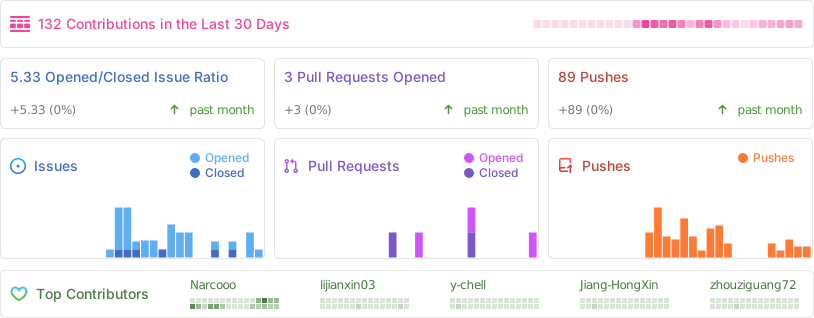
|
||
|
||
## Contributors
|
||
|
||
<a href="https://github.com/Narcooo/inkos/graphs/contributors">
|
||
<img src="https://contrib.rocks/image?repo=Narcooo/inkos" />
|
||
</a>
|
||
|
||
## License
|
||
|
||
[AGPL-3.0](LICENSE)
|