
4.6 KiB
Mobile device management (MDM)
MDM features are not ready for production and are currently in development. These features are disabled by default.
MDM features allow you to manage macOS updates and macOS settings on your hosts.
To use MDM features you have to connect Fleet to Apple Push Certificates Portal. See how here.
Controls
macOS updates
Fleet uses Nudge to encourage the installation of macOS updates.
When a minimum version and deadline is saved in Fleet, the end user sees the below window until their macOS version is at or above the minimum version.
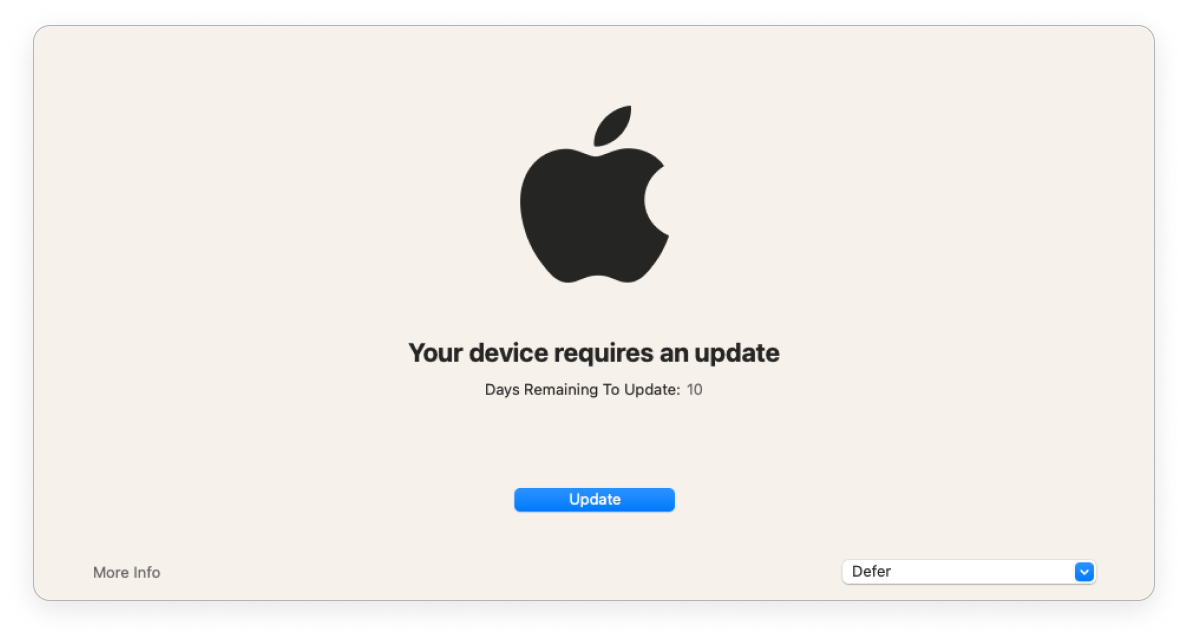
As the deadline gets closer, Fleet provides stronger encouragement.
If the end user has more than 1 day until the deadline, the window is shown everyday. The end user can defer the update and close the window. They’ll see the window again the next day.
If there is less than 1 day, the window is shown every 2 hours. The end user can defer and they'll see the window again in 2 hours.
If the end user is past the deadline, Fleet opens the window. The end user can't close the window.
Apple Push Notification Service (APNs)
To connect Fleet to Apple, get these four files using the Fleet UI or the fleetctl command-line interface: An APNs certificate, APNs private key, Simple Certificate Enrollment Protocol (SCEP) certificate, and SCEP private key.
To do this, choose the "Fleet UI" or "fleetctl" method and follow the steps below.
Fleet UI:
- Head to the Settings > Integrations > Mobile device management (MDM) page. Users with the admin role can access the settings pages.
- Follow the instructions under Apple Push Certificates Portal.
fleetctl CLI:
- Run
fleetctl generate mdm-apple --email <email> --org <org>. - Follow the on-screen instructions.
Take note of the Apple ID you use to sign into Apple Push Certificates Portal. You'll need to use the same Apple ID when renewing your APNs certificate. Apple requires that APNs certificates are renewed once every year. To renew, see the APNs Renewal section .
APNs Renewal
Apple requires that APNs certificates are renewed once every year. You can see the certificate's renewal date and other important APNs information using the Fleet UI or the fleetctl command-line interface:
Fleet UI:
- Head to the Settings > Integrations > Mobile device management (MDM) page. Users with the admin role can access the settings pages.
- Look at the Apple Push Certificates Portal section.
fleetctl CLI:
- Run
fleetctl get mdm-apple. - Look at the on-screen information.
How to renew the certificate if it's expired or about to expire:
- Run the
fleetctl generate mdm-apple --email <email> --org <org>command. Make sure you use the same Apple ID email address that you used when generating the original certificate. - Sign in to Apple Push Certificates Portal using the same Apple ID you used to get your original certificate. If you don't use the same Apple ID, you will have to turn MDM off and back on for all macOS hosts.
- In the Settings > Integrations > Mobile device management (MDM) page, under Apple Push Certificates portal, find the serial number of your current certificate. In Apple Push Certificates Portal, click Renew next to the certificate that has the matching serial number. If you don't renew and get a new certificate, you will have to turn MDM off and back on for all macOS hosts.
Apple Business Manager (ABM)
Available in Fleet Premium
Connect Fleet to your ABM account to automatically enroll macOS hosts to Fleet when they’re first unboxed.
To connect Fleet to ABM, get these four files using the Fleet UI or the fleetctl command-line interface: An ABM certificate, private key and server token.
To do this, choose the "Fleet UI" or "fleetctl" method and follow the steps below.
Fleet UI:
- In the Fleet UI, head to the Settings > Integrations > Mobile device management (MDM) page. Users with the admin role can access the settings pages.
- Follow the instructions under Apple Business Manager.
fleetctl CLI:
- Run
fleetctl generate mdm-apple-bm. - Follow the on-screen instructions.
ABM Renewal
The Apple Business Manager server token expires after a year or whenever the account that downloaded the token has their password changed. To renew the token, follow the instructions documented in this FAQ.