mirror of
https://github.com/fleetdm/fleet
synced 2026-04-21 21:47:20 +00:00
 c9d97d01ce
We're keeping the tested version at 6 for now until we have a CI matrix
to test multiple versions. We run both 6.x and 7.x in production and if
we shipped 7+ code we'd break things.

This PR also fixes a spot I missed when mentioning MySQL version
compatibility.
650 lines
28 KiB
Markdown
650 lines
28 KiB
Markdown
# Reference architectures
|
|
|
|
## The Fleet binary
|
|
|
|
The Fleet application contains two single static binaries which provide web based administration, a REST API, and a [CLI interface](https://fleetdm.com/guides/fleetctl).
|
|
|
|
The `fleet` binary contains:
|
|
- The [Fleet TLS web server](https://fleetdm.com/docs/configuration/fleet-server-configuration) (no external webserver is required but it supports a proxy if desired)
|
|
- The Fleet web interface
|
|
- The Fleet application management [REST API](https://fleetdm.com/docs/using-fleet/rest-api)
|
|
- The Fleet osquery API endpoints
|
|
|
|
The `fleetctl` binary is the CLI interface which allows management of your deployment, scriptable live queries, and easy integration into your existing logging, alerting, reporting, and management infrastructure.
|
|
|
|
Both binaries are available for download from our [repo](https://github.com/fleetdm/fleet/releases).
|
|
|
|
Once you've downloaded the binaries, extract the files to your desired location:
|
|
|
|
```
|
|
tar -xf fleet_v*_linux.tar.gz # Extract the Fleet binary
|
|
sudo cp fleet_v*_linux/fleet /usr/bin/ # Copy the the Fleet binary to /usr/bin
|
|
fleet version # Sanity check to make sure it runs as expected
|
|
```
|
|
|
|
## Infrastructure dependencies
|
|
|
|
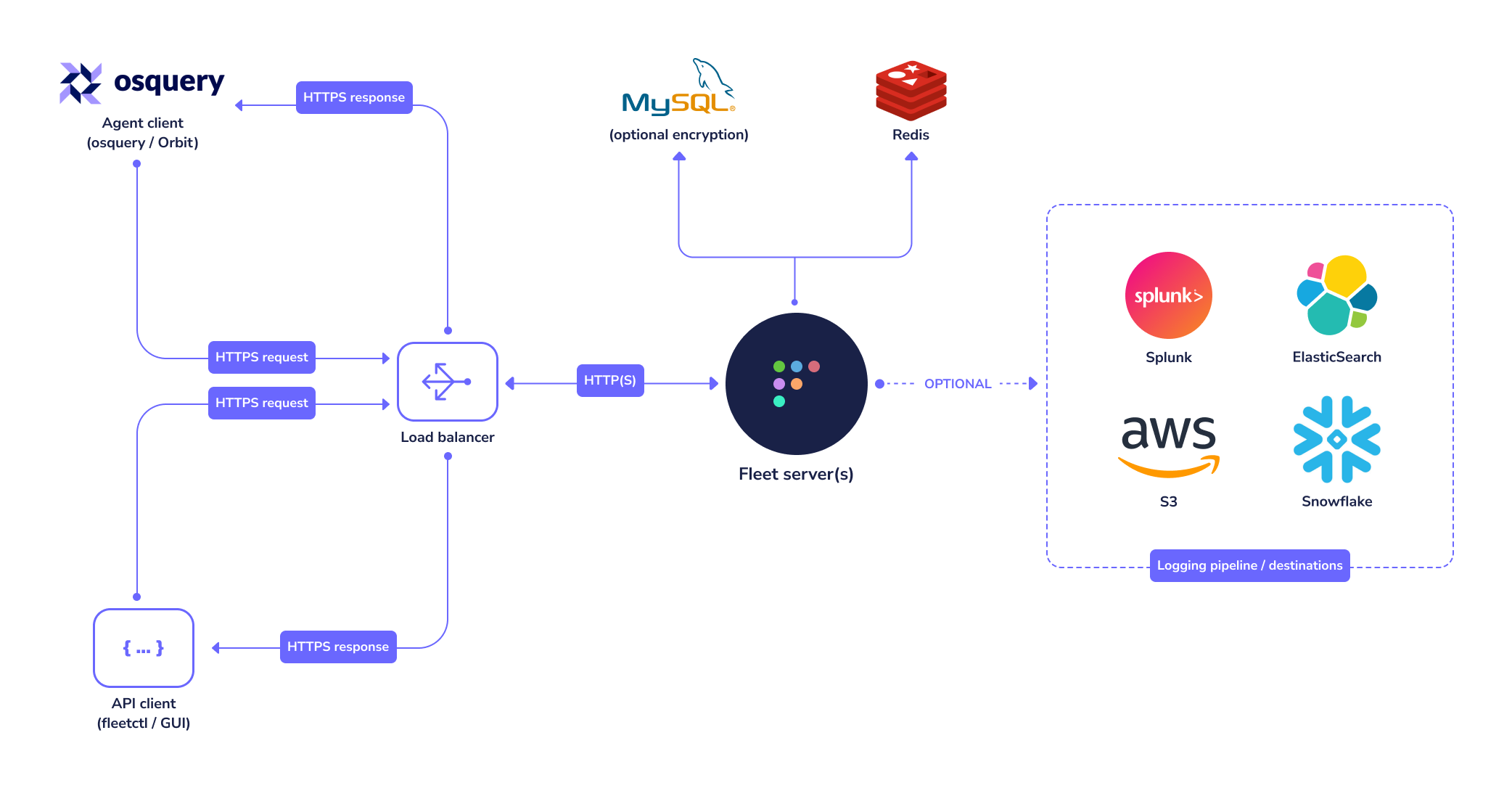
Fleet currently has three infrastructure dependencies: MySQL, Redis, and a TLS certificate.
|
|
|
|
|
|
|
|
### MySQL
|
|
|
|
Fleet uses MySQL extensively as its main database. Many cloud providers (such as [AWS](https://aws.amazon.com/rds/mysql/) and [GCP](https://cloud.google.com/sql/)) host reliable MySQL services which you may consider for this purpose. A well-supported MySQL [Docker image](https://hub.docker.com/_/mysql/) also exists if you would rather run MySQL in a container.
|
|
For more information on how to configure the `fleet` binary to use the correct MySQL instance, see the [MySQL configuration](https://fleetdm.com/docs/configuration/fleet-server-configuration#mysql) documentation.
|
|
|
|
Fleet requires at least MySQL version 8.0.44, and is tested using the InnoDB storage engine [with versions 8.0.44, 8.4.8, and 9.5.0](https://github.com/fleetdm/fleet/blob/main/.github/workflows/test-go.yaml#L73-L90). MySQL 9.6.0 is currently incompatible.
|
|
|
|
There are many "drop-in replacements" for MySQL available. If you'd like to experiment with some bleeding-edge technology and use Fleet with one of these alternative database servers, we think that's awesome! Please be aware they are not officially supported and that it is very important to set up a dev environment to thoroughly test new releases.
|
|
|
|
Fleet supports single-writer database setups: one writable primary with read replicas. Multi-writer or group-replication MySQL setups are not supported.
|
|
|
|
> If you use multiple databases per database server for multiple Fleet instances, you'll need to provision more resources for your database server to ensure performance. You can experiment with finding the right resourcing for your needs.
|
|
|
|
### Redis
|
|
|
|
Fleet uses Redis to ingest and queue the results of distributed queries, cache data, etc. Many cloud providers (such as [AWS](https://aws.amazon.com/elasticache/) and [GCP](https://console.cloud.google.com/launcher/details/click-to-deploy-images/redis)) host reliable Redis services which you may consider for this purpose. A well supported Redis [Docker image](https://hub.docker.com/_/redis/) also exists if you would rather run Redis in a container. For more information on how to configure the `fleet` binary to use the correct Redis instance, see the [Redis configuration](https://fleetdm.com/docs/configuration/fleet-server-configuration#redis) documentation.
|
|
|
|
## Systemd
|
|
|
|
### Run with systemd
|
|
|
|
Once you've verified that you can run Fleet in your shell, you'll likely want to keep Fleet running in the background and after the server reboots. To do that we recommend using [systemd](https://coreos.com/os/docs/latest/getting-started-with-systemd.html).
|
|
|
|
Below is a sample unit file, assuming a `fleet` user exists on the system. Any user with sufficient
|
|
permissions to execute the binary, open the configuration files, and write the log files can be
|
|
used. It is also possible to run as `root`, though as with any other web server it is discouraged
|
|
to run Fleet as `root`.
|
|
|
|
```systemd
|
|
|
|
[Unit]
|
|
Description=Fleet
|
|
After=network.target
|
|
|
|
[Service]
|
|
User=fleet
|
|
Group=fleet
|
|
LimitNOFILE=8192
|
|
ExecStart=/usr/local/bin/fleet serve \
|
|
--mysql_address=127.0.0.1:3306 \
|
|
--mysql_database=fleet \
|
|
--mysql_username=root \
|
|
--mysql_password=toor \
|
|
--redis_address=127.0.0.1:6379 \
|
|
--server_cert=/tmp/server.cert \
|
|
--server_key=/tmp/server.key \
|
|
--logging_json
|
|
|
|
[Install]
|
|
WantedBy=multi-user.target
|
|
```
|
|
|
|
Once you created the file, you need to move it to `/etc/systemd/system/fleet.service` and start the service.
|
|
|
|
```sh
|
|
sudo mv fleet.service /etc/systemd/system/fleet.service
|
|
sudo systemctl start fleet.service
|
|
sudo systemctl status fleet.service
|
|
|
|
sudo journalctl -u fleet.service -f
|
|
```
|
|
|
|
### Making changes
|
|
|
|
Sometimes you'll need to update the systemd unit file defining the service. To do that, first open /etc/systemd/system/fleet.service in a text editor, and make your modifications.
|
|
|
|
Then, run
|
|
|
|
```sh
|
|
sudo systemctl daemon-reload
|
|
sudo systemctl restart fleet.service
|
|
```
|
|
|
|
## TLS certificate
|
|
|
|
In order for osqueryd clients to connect, the connection to Fleet must use TLS. The TLS connection may be terminated by Fleet itself, or by a proxy serving traffic to Fleet.
|
|
|
|
- The CNAME or one of the Subject Alternate Names (SANs) on the certificate must match the hostname that osquery clients use to connect to the server/proxy.
|
|
- If you intend to have your Fleet instance on a subdomain, your certificate can have a wildcard SAN. So `fleet.example.com` should match a SAN of `*.example.com`
|
|
- If self-signed certificates are used, the full certificate chain must be provided to osquery via the `--tls_server_certs` flag.
|
|
- If Fleet terminates TLS, consider using an ECDSA (rather than RSA) certificate, as RSA certificates have been associated with [performance problems in Fleet due to Go's standard library TLS implementation](https://github.com/fleetdm/fleet/issues/655).
|
|
|
|
|
|
## Using a proxy
|
|
|
|
In enterprise environments where Fleet operates behind a proxy, you may need to configure proxy settings to enable services requiring outbound traffic, such as [vulnerability processing](https://fleetdm.com/docs/using-fleet/vulnerability-processing#vulnerability-processing) or [device management](https://fleetdm.com/device-management). Fleet automatically uses the `HTTP_PROXY`, `HTTPS_PROXY`, and `NO_PROXY` environment variables.
|
|
|
|
For example, to configure the proxy in a systemd service file:
|
|
|
|
```systemd
|
|
[Service]
|
|
Environment="HTTP_PROXY=http(s)://PROXY_URL:PORT/"
|
|
Environment="HTTPS_PROXY=http(s)://PROXY_URL:PORT/"
|
|
Environment="NO_PROXY=localhost,127.0.0.1,::1"
|
|
```
|
|
|
|
## Public IPs of devices
|
|
|
|
Fleet attempts to deduce the public IP of devices from well-known HTTP headers received on requests made by Fleet's agent (fleetd).
|
|
|
|
The HTTP request headers are checked in the following order:
|
|
1. If `True-Client-IP` header is set, then Fleet will extract its value.
|
|
2. If `X-Real-IP` header is set, then Fleet will extract its value.
|
|
3. If `X-Forwarded-For` header is set, then Fleet will extract the first comma-separated value.
|
|
4. If none of the above headers are present in the HTTP request then Fleet will attempt to use the remote address of the TCP connection (note that on deployments with ingress proxies the remote address seen by Fleet is the IP of the ingress proxy).
|
|
|
|
|
|
## Reference configuration strategies
|
|
|
|
You can easily run Fleet on a single VPS that would be capable of supporting hundreds if not thousands of hosts, but
|
|
this page details an [opinionated view](https://github.com/fleetdm/fleet/tree/main/infrastructure/dogfood/terraform/aws-tf-module) of running Fleet in a production environment, as
|
|
well as different configuration strategies to enable High Availability (HA).
|
|
|
|
### Availability components
|
|
|
|
There are a few strategies that can be used to ensure high availability:
|
|
- Database HA
|
|
- Traffic load balancing
|
|
|
|
#### Database HA
|
|
|
|
Fleet recommends RDS Aurora MySQL when running on AWS with [backups](https://docs.aws.amazon.com/AmazonRDS/latest/AuroraUserGuide/Aurora.Managing.Backups.html) turned on. It is also
|
|
possible to dynamically scale read replicas to increase performance and [enable database fail-over](https://docs.aws.amazon.com/AmazonRDS/latest/AuroraUserGuide/Concepts.AuroraHighAvailability.html).
|
|
It is also possible to use [Aurora Global](https://docs.aws.amazon.com/AmazonRDS/latest/AuroraUserGuide/aurora-global-database.html) to
|
|
span multiple regions for more advanced configurations (_not included in the [reference terraform](https://github.com/fleetdm/fleet/tree/main/infrastructure/dogfood/terraform/aws-tf-module)_).
|
|
|
|
In some cases adding a read replica can increase database performance for specific access patterns. In scenarios when automating the API or with `fleetctl`, there can be benefits to read performance.
|
|
|
|
**Note: Fleet servers need to talk to a writer in the same datacenter. Cross region replication can be used for failover but writes need to be local.**
|
|
|
|
#### Traffic load balancing
|
|
Load balancing enables distributing request traffic over many instances of the backend application. Using [AWS Application
|
|
Load Balancer](https://docs.aws.amazon.com/elasticloadbalancing/latest/application/introduction.html) can also [offload SSL termination](https://docs.aws.amazon.com/elasticloadbalancing/latest/application/create-https-listener.html), freeing Fleet to spend the majority of its allocated compute dedicated
|
|
to its core functionality.
|
|
|
|
_**Note if using [terraform reference architecture](https://github.com/fleetdm/fleet/tree/main/infrastructure/dogfood/terraform/aws-tf-module) all configurations can dynamically scale based on load(cpu/memory) and all configurations
|
|
assume On-Demand pricing (savings are available through Reserved Instances). Calculations do not take into account NAT gateway charges or other networking related ingress/egress costs.**_
|
|
|
|
### Cloud providers
|
|
|
|
#### Render
|
|
|
|
(Or any other PaaS)
|
|
|
|
###### Up to 300 hosts
|
|
|
|
See https://fleetdm.com/docs/deploy/deploy-fleet#render
|
|
|
|
|
|
|
|
#### AWS
|
|
|
|
##### Example configuration breakpoints
|
|
|
|
###### [Up to 5000 hosts](https://calculator.aws/#/estimate?id=cc26267f829536383e9b1b449ca0c56f0e844084)
|
|
|
|
| Fleet instances | CPU Units | RAM |
|
|
| --------------- | -------------- | --- |
|
|
| 6 Fargate tasks | 1024 CPU Units | 4GB |
|
|
|
|
| Dependencies | Version | Instance type | Nodes |
|
|
| ------------ |-------------------------| --------------- | ----- |
|
|
| Redis | 7.x | cache.t4g.small | 3 |
|
|
| MySQL | 8.0.mysql_aurora.3.08.2 | db.t4g.medium | 2 |
|
|
|
|
###### [Up to 10000 hosts](https://calculator.aws/#/estimate?id=5ea231525450b1cd4fa847f4564351d2c17d2ee2)
|
|
|
|
| Fleet instances | CPU Units | RAM |
|
|
| --------------- | -------------- | --- |
|
|
| 8 Fargate tasks | 1024 CPU Units | 4GB |
|
|
|
|
| Dependencies | Version | Instance type | Nodes |
|
|
| ------------ |-------------------------| ---------------- | ----- |
|
|
| Redis | 7.x | cache.t4g.medium | 3 |
|
|
| MySQL | 8.0.mysql_aurora.3.08.2 | db.t4g.large | 2 |
|
|
|
|
###### [Up to 25000 hosts](https://calculator.aws/#/estimate?id=4700e7a36ef34b84ae9ad4f444690f1df2ca3753)
|
|
|
|
| Fleet instances | CPU Units | RAM |
|
|
| ---------------- | -------------- | --- |
|
|
| 10 Fargate tasks | 1024 CPU Units | 4GB |
|
|
|
|
| Dependencies | Version | Instance type | Nodes |
|
|
| ------------ |-------------------------| --------------- | ----- |
|
|
| Redis | 7.x | cache.r6g.large | 3 |
|
|
| MySQL | 8.0.mysql_aurora.3.08.2 | db.r6g.large | 2 |
|
|
|
|
###### [Up to 50000 hosts](https://calculator.aws/#/estimate?id=3887d782a8f6cfeb9e0463686b5629aeb4cd678e)
|
|
|
|
| Fleet instances | CPU Units | RAM |
|
|
| ---------------- | -------------- | --- |
|
|
| 15 Fargate tasks | 1024 CPU Units | 4GB |
|
|
|
|
| Dependencies | Version | Instance type | Nodes |
|
|
| ------------ |-------------------------| --------------- | ----- |
|
|
| Redis | 7.x | cache.r6g.large | 3 |
|
|
| MySQL | 8.0.mysql_aurora.3.08.2 | db.r6g.xlarge | 3 |
|
|
|
|
###### [Up to 80000 hosts](https://calculator.aws/#/estimate?id=7d0dee9241aff55fc733a9eead816baea14aee21)
|
|
|
|
| Fleet instances | CPU Units | RAM |
|
|
| ---------------- | -------------- | --- |
|
|
| 20 Fargate tasks | 1024 CPU Units | 4GB |
|
|
|
|
| Dependencies | Version | Instance type | Nodes |
|
|
| ------------ |-------------------------| --------------- | ----- |
|
|
| Redis | 7.x | cache.r6g.large | 3 |
|
|
| MySQL | 8.0.mysql_aurora.3.08.2 | db.r6g.2xlarge | 3 |
|
|
|
|
###### [Up to 100000 hosts](https://calculator.aws/#/estimate?id=cd17a0dda5e1ee5f919ac0a2a0ea8a6e1557e307)
|
|
|
|
| Fleet instances | CPU Units | RAM |
|
|
| ---------------- | -------------- | --- |
|
|
| 25 Fargate tasks | 1024 CPU Units | 4GB |
|
|
|
|
| Dependencies | Version | Instance type | Nodes |
|
|
| ------------ |-------------------------| --------------- | ----- |
|
|
| Redis | 7.x | cache.r6g.large | 3 |
|
|
| MySQL | 8.0.mysql_aurora.3.08.2 | db.r6g.2xlarge | 3 |
|
|
|
|
###### [Up to 150000 hosts](https://calculator.aws/#/estimate?id=a53e31063df9e5941b0c4b019b03ca2bd226fd48)
|
|
|
|
| Fleet instances | CPU Units | RAM |
|
|
| ---------------- | -------------- | --- |
|
|
| 40 Fargate tasks | 1024 CPU Units | 4GB |
|
|
|
|
| Dependencies | Version | Instance type | Nodes |
|
|
| ------------ |-------------------------| --------------- | ----- |
|
|
| Redis | 7.x | cache.r6g.large | 3 |
|
|
| MySQL | 8.0.mysql_aurora.3.08.2 | db.r6g.4xlarge | 3 |
|
|
|
|
###### [Up to 300000 hosts](https://calculator.aws/#/estimate?id=1f54ccc80e27a78f192b0e9db02ab957eff0c26c)
|
|
|
|
| Fleet instances | CPU Units | RAM |
|
|
| ---------------- | -------------- | --- |
|
|
| 70 Fargate tasks | 1024 CPU Units | 4GB |
|
|
|
|
| Dependencies | Version | Instance type | Nodes |
|
|
| ------------ |-------------------------| ---------------- | ----- |
|
|
| Redis | 7.x | cache.r6g.xlarge | 3 |
|
|
| MySQL | 8.0.mysql_aurora.3.08.2 | db.r6g.8xlarge | 3 |
|
|
|
|
|
|
AWS reference architecture can be found in the [reference terraform](https://github.com/fleetdm/fleet-terraform/tree/main/example). This configuration includes:
|
|
|
|
- VPC
|
|
- Subnets
|
|
- Public & Private
|
|
- ACLs
|
|
- Security Groups
|
|
- ECS as the container orchestrator
|
|
- Fargate for underlying compute
|
|
- Task roles via IAM
|
|
- RDS Aurora MySQL 8
|
|
- Elasticache Redis Engine
|
|
- Firehose osquery log destination
|
|
- S3 bucket sync to allow further ingestion/processing
|
|
- Carves/software stored in an S3 bucket
|
|
|
|
Additional addons are available such as:
|
|
- [Monitoring via Cloudwatch alarms](https://github.com/fleetdm/fleet-terraform/tree/main/addons/monitoring)
|
|
- [Cloudfront for software installers](https://github.com/fleetdm/fleet-terraform/tree/main/addons/cloudfront-software-installers)
|
|
|
|
Some AWS services used in the provider reference architecture are billed as pay-per-use such as Firehose. This means that osquery scheduled report frequency can have a direct correlation to how much these services cost, something to keep in mind when configuring Fleet in AWS.
|
|
|
|
###### AWS Terraform CI/CD IAM permissions
|
|
The following permissions are the minimum required to apply AWS terraform resources:
|
|
```JSON
|
|
{
|
|
"Version": "2012-10-17",
|
|
"Statement": [
|
|
{
|
|
"Effect": "Allow",
|
|
"Action": [
|
|
"ec2:*",
|
|
"cloudwatch:*",
|
|
"s3:*",
|
|
"lambda:*",
|
|
"ecs:*",
|
|
"rds:*",
|
|
"rds-data:*",
|
|
"secretsmanager:*",
|
|
"pi:*",
|
|
"ecr:*",
|
|
"iam:*",
|
|
"aps:*",
|
|
"vpc:*",
|
|
"kms:*",
|
|
"elasticloadbalancing:*",
|
|
"ce:*",
|
|
"cur:*",
|
|
"logs:*",
|
|
"cloudformation:*",
|
|
"ssm:*",
|
|
"sns:*",
|
|
"elasticache:*",
|
|
"application-autoscaling:*",
|
|
"acm:*",
|
|
"route53:*",
|
|
"dynamodb:*",
|
|
"kinesis:*",
|
|
"firehose:*"
|
|
],
|
|
"Resource": "*"
|
|
}
|
|
]
|
|
}
|
|
```
|
|
|
|
#### GCP
|
|
|
|
GCP reference architecture can be found in [the Fleet repository](https://github.com/fleetdm/fleet/tree/main/infrastructure/dogfood/terraform/gcp). This configuration includes:
|
|
|
|
- Cloud Run (Fleet backend)
|
|
- Cloud SQL MySQL 8.0 (Fleet database)
|
|
- Memorystore Redis (Fleet cache & live report orchestrator)
|
|
|
|
GCP support for add/install software and file carve features is coming soon. Get [community support](https://chat.osquery.io/c/fleet).
|
|
|
|
##### Example configuration breakpoints
|
|
###### [Up to 1000 hosts](https://cloud.google.com/products/calculator/#id=59670518-9af4-4044-af4a-cc100a9bed2f)
|
|
|
|
| Fleet instances | CPU | RAM |
|
|
| --------------- | --- | --- |
|
|
| 2 Cloud Run | 1 | 2GB |
|
|
|
|
| Dependencies | Version | Instance type |
|
|
| ------------ |-----------------------| ------------- |
|
|
| Redis | MemoryStore Redis 7 | M1 Basic |
|
|
| MySQL | Cloud SQL for MySQL 8 | db-standard-1 |
|
|
|
|
###### [Up to 25000 hosts](https://cloud.google.com/products/calculator/#id=fadbb96c-967c-4397-9921-743d75b98d42)
|
|
|
|
| Fleet instances | CPU | RAM |
|
|
| --------------- | --- | --- |
|
|
| 10 Cloud Run | 1 | 2GB |
|
|
|
|
| Dependencies | Version | Instance type |
|
|
| ------------ |-----------------------| ------------- |
|
|
| Redis | MemoryStore Redis 7 | M1 2GB |
|
|
| MySQL | Cloud SQL for MySQL 8 | db-standard-4 |
|
|
|
|
|
|
###### [Up to 150000 hosts](https://cloud.google.com/products/calculator/#id=baff774c-d294-491f-a9da-dd97bbfa8ef2)
|
|
|
|
| Fleet instances | CPU | RAM |
|
|
| --------------- | ----- | --- |
|
|
| 30 Cloud Run | 1 CPU | 2GB |
|
|
|
|
| Dependencies | Version | Instance type | Nodes |
|
|
| ------------ |-----------------------| ------------- | ----- |
|
|
| Redis | MemoryStore Redis 7 | M1 4GB | 1 |
|
|
| MySQL | Cloud SQL for MySQL 8 | db-highmem-16 | 1 |
|
|
|
|
#### Azure
|
|
|
|
Coming soon. Get [community support](https://chat.osquery.io/c/fleet).
|
|
|
|
#### Render
|
|
|
|
Using [Render's IAC](https://render.com/docs/infrastructure-as-code) see [the repository](https://github.com/edwardsb/fleet-on-render) for full details.
|
|
```yaml
|
|
services:
|
|
- name: fleet
|
|
plan: standard
|
|
type: web
|
|
env: docker
|
|
healthCheckPath: /healthz
|
|
envVars:
|
|
- key: FLEET_MYSQL_ADDRESS
|
|
fromService:
|
|
name: fleet-mysql
|
|
type: pserv
|
|
property: hostport
|
|
- key: FLEET_MYSQL_DATABASE
|
|
fromService:
|
|
name: fleet-mysql
|
|
type: pserv
|
|
envVarKey: MYSQL_DATABASE
|
|
- key: FLEET_MYSQL_PASSWORD
|
|
fromService:
|
|
name: fleet-mysql
|
|
type: pserv
|
|
envVarKey: MYSQL_PASSWORD
|
|
- key: FLEET_MYSQL_USERNAME
|
|
fromService:
|
|
name: fleet-mysql
|
|
type: pserv
|
|
envVarKey: MYSQL_USER
|
|
- key: FLEET_REDIS_ADDRESS
|
|
fromService:
|
|
name: fleet-redis
|
|
type: pserv
|
|
property: hostport
|
|
- key: FLEET_SERVER_TLS
|
|
value: false
|
|
- key: PORT
|
|
value: 8080
|
|
|
|
- name: fleet-mysql
|
|
type: pserv
|
|
env: docker
|
|
repo: https://github.com/render-examples/mysql
|
|
branch: mysql-5
|
|
disk:
|
|
name: mysql
|
|
mountPath: /var/lib/mysql
|
|
sizeGB: 10
|
|
envVars:
|
|
- key: MYSQL_DATABASE
|
|
value: fleet
|
|
- key: MYSQL_PASSWORD
|
|
generateValue: true
|
|
- key: MYSQL_ROOT_PASSWORD
|
|
generateValue: true
|
|
- key: MYSQL_USER
|
|
value: fleet
|
|
|
|
- name: fleet-redis
|
|
type: pserv
|
|
env: docker
|
|
repo: https://github.com/render-examples/redis
|
|
disk:
|
|
name: redis
|
|
mountPath: /var/lib/redis
|
|
sizeGB: 10
|
|
```
|
|
|
|
##### Digital Ocean
|
|
|
|
Using Digital Ocean's [App Spec](https://docs.digitalocean.com/products/app-platform/concepts/app-spec/) to deploy on the App on the [App Platform](https://docs.digitalocean.com/products/app-platform/)
|
|
```yaml
|
|
alerts:
|
|
- rule: DEPLOYMENT_FAILED
|
|
- rule: DOMAIN_FAILED
|
|
databases:
|
|
- cluster_name: fleet-redis
|
|
engine: REDIS
|
|
name: fleet-redis
|
|
production: true
|
|
version: "6"
|
|
- cluster_name: fleet-mysql
|
|
db_name: fleet
|
|
db_user: fleet
|
|
engine: MYSQL
|
|
name: fleet-mysql
|
|
production: true
|
|
version: "8"
|
|
domains:
|
|
- domain: demo.fleetdm.com
|
|
type: PRIMARY
|
|
envs:
|
|
- key: FLEET_MYSQL_ADDRESS
|
|
scope: RUN_TIME
|
|
value: ${fleet-mysql.HOSTNAME}:${fleet-mysql.PORT}
|
|
- key: FLEET_MYSQL_PASSWORD
|
|
scope: RUN_TIME
|
|
value: ${fleet-mysql.PASSWORD}
|
|
- key: FLEET_MYSQL_USERNAME
|
|
scope: RUN_TIME
|
|
value: ${fleet-mysql.USERNAME}
|
|
- key: FLEET_MYSQL_DATABASE
|
|
scope: RUN_TIME
|
|
value: ${fleet-mysql.DATABASE}
|
|
- key: FLEET_REDIS_ADDRESS
|
|
scope: RUN_TIME
|
|
value: ${fleet-redis.HOSTNAME}:${fleet-redis.PORT}
|
|
- key: FLEET_SERVER_TLS
|
|
scope: RUN_AND_BUILD_TIME
|
|
value: "false"
|
|
- key: FLEET_REDIS_PASSWORD
|
|
scope: RUN_AND_BUILD_TIME
|
|
value: ${fleet-redis.PASSWORD}
|
|
- key: FLEET_REDIS_USE_TLS
|
|
scope: RUN_AND_BUILD_TIME
|
|
value: "true"
|
|
jobs:
|
|
- envs:
|
|
- key: DATABASE_URL
|
|
scope: RUN_TIME
|
|
value: ${fleet-redis.DATABASE_URL}
|
|
image:
|
|
registry: fleetdm
|
|
registry_type: DOCKER_HUB
|
|
repository: fleet
|
|
tag: latest
|
|
instance_count: 1
|
|
instance_size_slug: basic-xs
|
|
kind: PRE_DEPLOY
|
|
name: fleet-migrate
|
|
run_command: fleet prepare --no-prompt=true db
|
|
source_dir: /
|
|
name: fleet
|
|
region: nyc
|
|
services:
|
|
- envs:
|
|
- key: FLEET_VULNERABILITIES_DATABASES_PATH
|
|
scope: RUN_TIME
|
|
value: /home/fleet
|
|
health_check:
|
|
http_path: /healthz
|
|
http_port: 8080
|
|
image:
|
|
registry: fleetdm
|
|
registry_type: DOCKER_HUB
|
|
repository: fleet
|
|
tag: latest
|
|
instance_count: 1
|
|
instance_size_slug: basic-xs
|
|
name: fleet
|
|
routes:
|
|
- path: /
|
|
run_command: fleet serve
|
|
source_dir: /
|
|
```
|
|
|
|
|
|
## Monitoring Fleet
|
|
|
|
### Health checks
|
|
|
|
Fleet exposes a basic health check at the `/healthz` endpoint. This is the interface to use for simple monitoring and load-balancer health checks.
|
|
|
|
The `/healthz` endpoint will return an `HTTP 200` status if the server is running and has healthy connections to MySQL and Redis. If there are any problems, the endpoint will return an `HTTP 500` status. Details about failing checks are logged in the Fleet server logs.
|
|
|
|
Individual checks can be run by providing the `check` URL parameter (e.x., `/healthz?check=mysql` or `/healthz?check=redis`).
|
|
|
|
### Metrics
|
|
|
|
Fleet exposes server metrics in a format compatible with [Prometheus](https://prometheus.io/). A simple example Prometheus configuration is available in [tools/app/prometheus.yml](https://github.com/fleetdm/fleet/blob/194ad5963b0d55bdf976aa93f3de6cabd590c97a/tools/app/prometheus.yml).
|
|
|
|
Prometheus can be configured to use a wide range of service discovery mechanisms within AWS, GCP, Azure, Kubernetes, and more. See the Prometheus [configuration documentation](https://prometheus.io/docs/prometheus/latest/configuration/configuration/) for more information.
|
|
|
|
#### Alerting
|
|
|
|
##### Prometheus
|
|
|
|
Prometheus has built-in support for alerting through [Alertmanager](https://prometheus.io/docs/alerting/latest/overview/).
|
|
|
|
Consider building alerts for
|
|
|
|
- Changes from expected levels of host enrollment
|
|
- Increased latency on HTTP endpoints
|
|
- Increased error levels on HTTP endpoints
|
|
|
|
```
|
|
TODO (Seeking Contributors)
|
|
Add example alerting configurations
|
|
```
|
|
|
|
##### Cloudwatch Alarms
|
|
|
|
Cloudwatch Alarms can be configured to support a wide variety of metrics and anomaly detection mechanisms. There are some example alarms
|
|
in the terraform reference architecture (see `monitoring.tf`).
|
|
|
|
* [Monitoring RDS (MySQL)](https://docs.aws.amazon.com/AmazonRDS/latest/UserGuide/monitoring-cloudwatch.html)
|
|
* [ElastiCache for Redis](https://docs.aws.amazon.com/AmazonElastiCache/latest/red-ug/CacheMetrics.WhichShouldIMonitor.html)
|
|
* [Monitoring ECS](https://docs.aws.amazon.com/AmazonECS/latest/developerguide/cloudwatch-metrics.html)
|
|
* Reference alarms include evaluating healthy targets & response times. We also use target-tracking alarms to manage auto-scaling.
|
|
|
|
#### Graphing
|
|
|
|
Prometheus provides basic graphing capabilities, and integrates tightly with [Grafana](https://prometheus.io/docs/visualization/grafana/) for sophisticated visualizations.
|
|
|
|
### Fleet server performance
|
|
|
|
Fleet is designed to scale to hundreds of thousands of online hosts. The Fleet server scales horizontally to support higher load.
|
|
|
|
#### Horizontal scaling
|
|
|
|
Scaling Fleet horizontally is as simple as running more Fleet server processes connected to the same MySQL and Redis backing stores. Typically, operators front Fleet server nodes with a load balancer that will distribute requests to the servers. All APIs in Fleet are designed to work in this arrangement by simply configuring clients to connect to the load balancer.
|
|
|
|
#### Availability
|
|
|
|
The Fleet/osquery system is resilient to loss of availability. Osquery agents will continue executing the existing configuration and buffering result logs during downtime due to lack of network connectivity, server maintenance, or any other reason. Buffering in osquery can be configured with the `--buffered_log_max` flag.
|
|
|
|
Note that short downtimes are expected during [Fleet server upgrades](https://fleetdm.com/docs/deploying/upgrading-fleet) that require database migrations.
|
|
|
|
#### Debugging performance issues
|
|
|
|
##### MySQL and Redis
|
|
|
|
If performance issues are encountered with the MySQL and Redis servers, use the extensive resources available online to optimize and understand these problems. Please [file an issue](https://github.com/fleetdm/fleet/issues/new/choose) with details about the problem so that Fleet developers can work to fix them.
|
|
|
|
##### Fleet server
|
|
|
|
For performance issues in the Fleet server process, please [file an issue](https://github.com/fleetdm/fleet/issues/new/choose) with details about the scenario, and attach a debug archive. Debug archives can also be submitted confidentially through other support channels.
|
|
|
|
###### Generate debug archive (Fleet 3.4.0+)
|
|
|
|
Use the `fleetctl debug archive` command to generate an archive of Fleet's full suite of debug profiles. See the [fleetctl setup guide](https://fleetdm.com/docs/using-fleet/fleetctl-cli) for details on configuring `fleetctl`.
|
|
|
|
The generated `.tar.gz` archive will be available in the current directory.
|
|
|
|
###### Targeting individual servers
|
|
|
|
In most configurations, the `fleetctl` client is configured to make requests to a load balancer that will proxy the requests to each server instance. This can be problematic when trying to debug a performance issue on a specific server. To target an individual server, create a new `fleetctl` context that uses the direct address of the server.
|
|
|
|
For example:
|
|
|
|
```sh
|
|
fleetctl config set --context server-a --address https://server-a:8080
|
|
fleetctl login --context server-a
|
|
fleetctl debug archive --context server-a
|
|
```
|
|
|
|
###### Confidential information
|
|
|
|
The `fleetctl debug archive` command retrieves information generated by Go's [`net/http/pprof`](https://golang.org/pkg/net/http/pprof/) package. In most scenarios this should not include sensitive information, however it does include command line arguments to the Fleet server. If the Fleet server receives sensitive credentials via CLI argument (not environment variables or config file), this information should be scrubbed from the archive in the `cmdline` file.
|
|
|
|
|
|
|
|
## Community projects
|
|
|
|
Below are some projects created by Fleet community members. These projects provide additional solutions for deploying Fleet. Please submit a pull request if you'd like your project featured.
|
|
|
|
- [CptOfEvilMinions/FleetDM-Automation](https://github.com/CptOfEvilMinions/FleetDM-Automation) - Ansible and Docker code to set up Fleet
|
|
|
|
<meta name="pageOrderInSection" value="400">
|
|
<meta name="description" value="An opinionated view of running Fleet in a production environment, and configuration strategies to enable high availability.">
|