 8fb22579ea
Closes: #12611

Changes:
- Added three new documentation sections `/docs/get-started/`,
`/docs/configuration` and `/docs/rest api/`
- Updated folder names: `/docs/Using-Fleet/` » `/docs/Using Fleet` and
`/docs/deploying` » `/docs/deploy/`
- Moved `/docs/using-fleet/process-events.md` to `/articles` and updated
the meta tags to change it into a guide.
- Added support for a new meta tag: `navSection`. This meta tag is used
to organize pages in the sidebar navigation on fleetdm.com/docs
- Moved `docs/using-fleet/application-security.md` and
`docs/using-fleet/security-audits.md` to the security handbook.
- Moved `docs/deploying/load-testing.md` and
`docs/deploying/debugging.md` to the engineering handbook.
- Moved the following files/folders:
- `docs/using-fleet/configuration-files/` »
`docs/configuration/configuration-files/`
- `docs/deploying/configuration.md` »
`docs/configuration/fleet-server-configuration.md`
    -  `docs/using-fleet/rest-api.md` » `docs/rest-api/rest-api.md`
- `docs/using-fleet/monitoring-fleet.md` » `docs/deploy/rest-api.md`
- Updated filenames:
- `docs/using-fleet/permissions.md` »
`docs/using-fleet/manage-access.md`
- `docs/using-fleet/adding-hosts.md` »
`docs/using-fleet/enroll-hosts.md`
    -  `docs/using-fleet/teams.md` » `docs/using-fleet/segment-hosts.md`
- `docs/using-fleet/fleet-ctl-agent-updates.md` »
`docs/using-fleet/update-agents.md`
- `docs/using-fleet/chromeos.md` »
`docs/using-fleet/enroll-chromebooks.md`
- Updated the generated markdown in `server/fleet/gen_activity_doc.go`
and `server/service/osquery_utils/gen_queries_doc.go`
- Updated the navigation sidebar and mobile dropdown links on docs pages
to group pages by their `navSection` meta tag.
- Updated fleetdm.com/docs not to show pages in the `docs/contributing/`
folder in the sidebar navigation
- Added redirects for docs pages that have moved.

.

---------

Co-authored-by: Mike Thomas <mthomas@fleetdm.com>
Co-authored-by: Rachael Shaw <r@rachael.wtf>
3.8 KiB
Introduction
Fleet is the most widely used open source osquery manager in the world. Fleet enables programmable live queries, streaming logs, and realtime visibility of 100,000+ servers, containers, and laptops. It's especially useful for IT, security, and compliance use cases.
The Fleet application contains two single static binaries which provide web based administration, REST API, and CLI interface to Fleet.
The fleet binary contains:
- The Fleet TLS web server (no external webserver is required but it supports a proxy if desired)
- The Fleet web interface
- The Fleet application management REST API
- The Fleet osquery API endpoints
The fleetctl binary is the CLI interface which allows management of your deployment, scriptable live queries, and easy integration into your existing logging, alerting, reporting, and management infrastructure.
Both binaries are available for download from our repo.
Fleet vs Fleet Sandbox
If you'd like to try Fleet on your laptop, we recommend Fleet Sandbox.
If you want to enroll real hosts or deploy to a more scalable environment, we recommend deploying Fleet to a server.
Infrastructure dependencies
Fleet currently has three infrastructure dependencies: MySQL, Redis, and a TLS certificate.
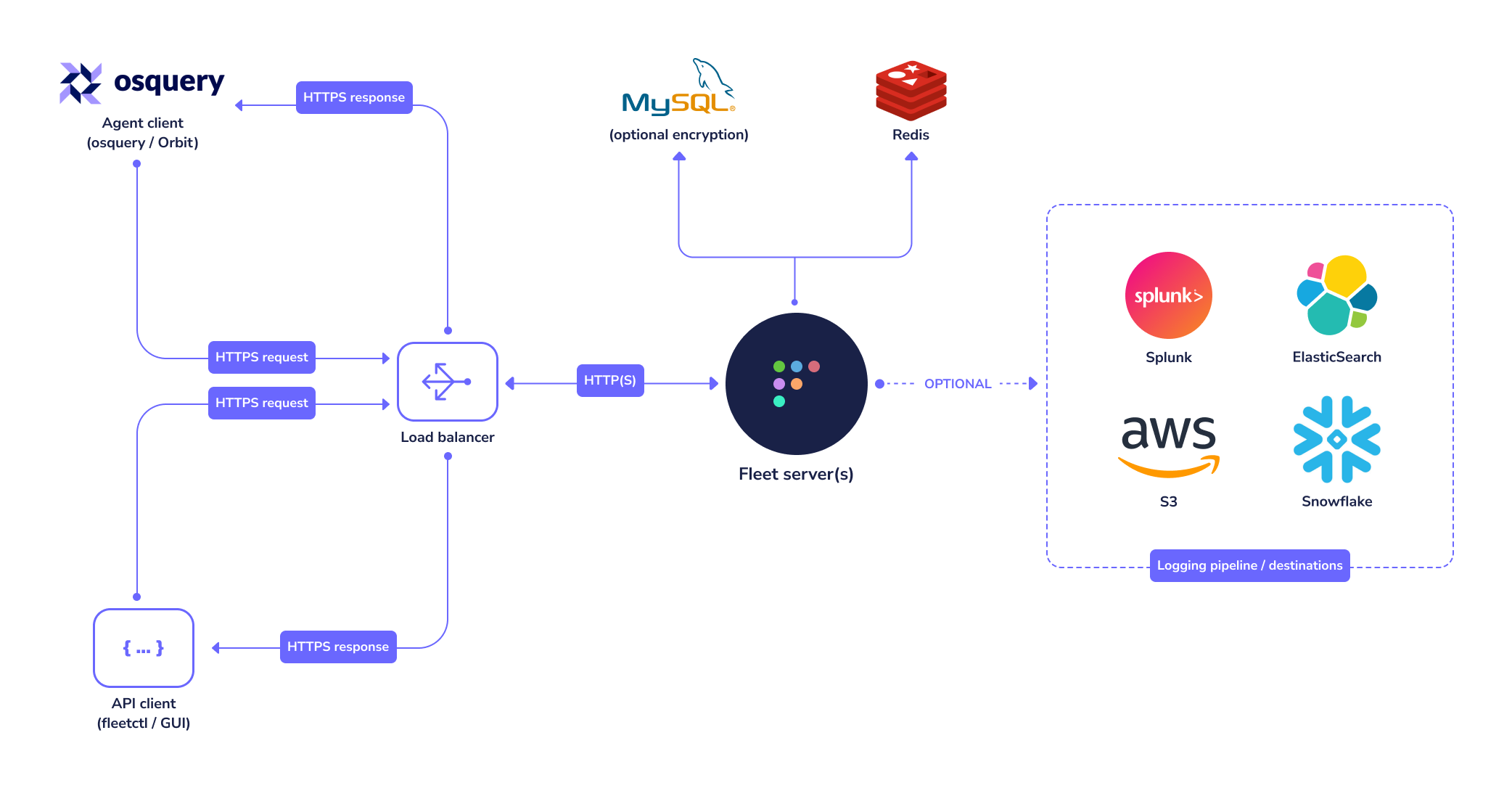
MySQL
Fleet uses MySQL extensively as its main database. Many cloud providers (such as AWS and GCP) host reliable MySQL services which you may consider for this purpose. A well supported MySQL Docker image also exists if you would rather run MySQL in a container. For more information on how to configure the fleet binary to use the correct MySQL instance, see the Configuration document.
Fleet requires at least MySQL version 5.7.
Redis
Fleet uses Redis to ingest and queue the results of distributed queries, cache data, etc. Many cloud providers (such as AWS and GCP) host reliable Redis services which you may consider for this purpose. A well supported Redis Docker image also exists if you would rather run Redis in a container. For more information on how to configure the fleet binary to use the correct Redis instance, see the Configuration document.
TLS certificate
In order for osqueryd clients to connect, the connection to Fleet must use TLS. The TLS connection may be terminated by Fleet itself, or by a proxy serving traffic to Fleet.
- The CNAME or one of the Subject Alternate Names (SANs) on the certificate must match the hostname that osquery clients use to connect to the server/proxy.
- If you intend to have your Fleet instance on a subdomain, your certificate can have a wildcard SAN. So
fleet.example.comshould match a SAN of*.example.com - If self-signed certificates are used, the full certificate chain must be provided to osquery via the
--tls_server_certsflag. - If Fleet terminates TLS, consider using an ECDSA (rather than RSA) certificate, as RSA certificates have been associated with performance problems in Fleet due to Go's standard library TLS implementation.