 88cb3ba352
…/pmv

# Checklist for submitter

If some of the following don't apply, delete the relevant line.

<!-- Note that API documentation changes are now addressed by the
product design team. -->

- [ ] Changes file added for user-visible changes in `changes/`,
`orbit/changes/` or `ee/fleetd-chrome/changes`.
See [Changes
files](https://github.com/fleetdm/fleet/blob/main/docs/Contributing/Committing-Changes.md#changes-files)
for more information.
- [ ] Input data is properly validated, `SELECT *` is avoided, SQL
injection is prevented (using placeholders for values in statements)
- [ ] Added support on fleet's osquery simulator `cmd/osquery-perf` for
new osquery data ingestion features.
- [ ] If paths of existing endpoints are modified without backwards
compatibility, checked the frontend/CLI for any necessary changes
- [ ] If database migrations are included, checked table schema to
confirm autoupdate
- For database migrations:
- [ ] Checked schema for all modified table for columns that will
auto-update timestamps during migration.
- [ ] Confirmed that updating the timestamps is acceptable, and will not
cause unwanted side effects.
- [ ] Ensured the correct collation is explicitly set for character
columns (`COLLATE utf8mb4_unicode_ci`).
- [ ] Added/updated automated tests
- [ ] Manual QA for all new/changed functionality
- For Orbit and Fleet Desktop changes:
- [ ] Make sure fleetd is compatible with the latest released version of
Fleet (see [Must
rule](https://github.com/fleetdm/fleet/blob/main/docs/Contributing/fleetd-development-and-release-strategy.md)).
- [ ] Orbit runs on macOS, Linux and Windows. Check if the orbit
feature/bugfix should only apply to one platform (`runtime.GOOS`).
- [ ] Manual QA must be performed in the three main OSs, macOS, Windows
and Linux.
- [ ] Auto-update manual QA, from released version of component to new
version (see [tools/tuf/test](../tools/tuf/test/README.md)).
- [ ] For unreleased bug fixes in a release candidate, confirmed that
the fix is not expected to adversely impact load test results or alerted
the release DRI if additional load testing is needed.

Co-authored-by: Sam Pfluger <108141731+Sampfluger88@users.noreply.github.com>
5 KiB
Enforce OS updates
Available in Fleet Premium
In Fleet, you can enforce OS updates on your macOS, Windows, iOS, and iPadOS hosts remotely using the Fleet UI, Fleet API, or Fleet's GitOps workflow.
Turning on enforcement
For Apple (macOS, iOS, and iPadOS) hosts, the you can find the list of available OS versions in the Apple Software Lookup Service [here](https://gdmf.apple.com/v2/pmv](https://gdmf.apple.com/v2/pmv). The update will only be enforced if you use a version in that list.
Fleet UI
-
Head to the Controls > OS updates tab.
-
To enforce OS updates for macOS, iOS, or iPadOS, select the platform and set a Minimum version and Deadline.
-
For Windows, select Windows and set a Deadline and Grace period.
Fleet API
Use the modify team endpoint to turn on minimum OS version enforcement. The relevant payload keys in the mdm object are:
macos_updatesios_updatesipados_updateswindows_updates
GitOps
OS version enforcement options are declared within the controls section of a Fleet GitOps YAML file, using the following keys:
End user experience
Apple (macOS, iOS, and iPadOS)
On macOS hosts, when a minimum version is enforced, end users see a native macOS notification (DDM) once per day. Users can choose to update ahead of the deadline or schedule it for that night. 24 hours before the deadline, the notification appears hourly and ignores Do Not Disturb. One hour before the deadline, the notification appears every 30 minutes and then every 10 minutes.
Certain user preferences may suppress macOS update notifications. To prevent users from being surprised by a forced update or unexpected restart, consider communicating OS update deadlines through additional channels.
On iOS and iPadOS hosts, end users will see a notification in their Notification Center after the deadline. They can’t use their iPhone or iPad until the OS update is installed.
If the host was turned off when the deadline passed, the update will be scheduled an hour after it’s turned on.
If you set a past date (ex. yesterday) as the deadline, the end user will immediately be prompted to install the update. If they don't, the update will automatically install in one hour. Similarly, if you set the deadline to today, end users will experience the same behavior if it's after 12 PM (end user local time).
For hosts that use Automated Device Enrollment (ADE), if the device is below the specified minimum version, it will be required to update to the latest version during ADE before device setup and enrollment can proceed. You can find the latest version in the Apple Software Lookup Service here.
Windows
End users are encouraged to update Windows via the native Windows dialog.
| Before deadline | Past deadline | |
|---|---|---|
| End user can defer automatic restart | ✅ | ❌ |
If an end user was on vacation when the deadline passed, the end user is given a grace period (configured) before the host automatically restarts.
Fleet enforces OS updates for quality and feature updates. Read more about the types of Windows OS updates in the Microsoft documentation here.
macOS (below version 14.0)
End users are encouraged to update macOS (via Nudge).
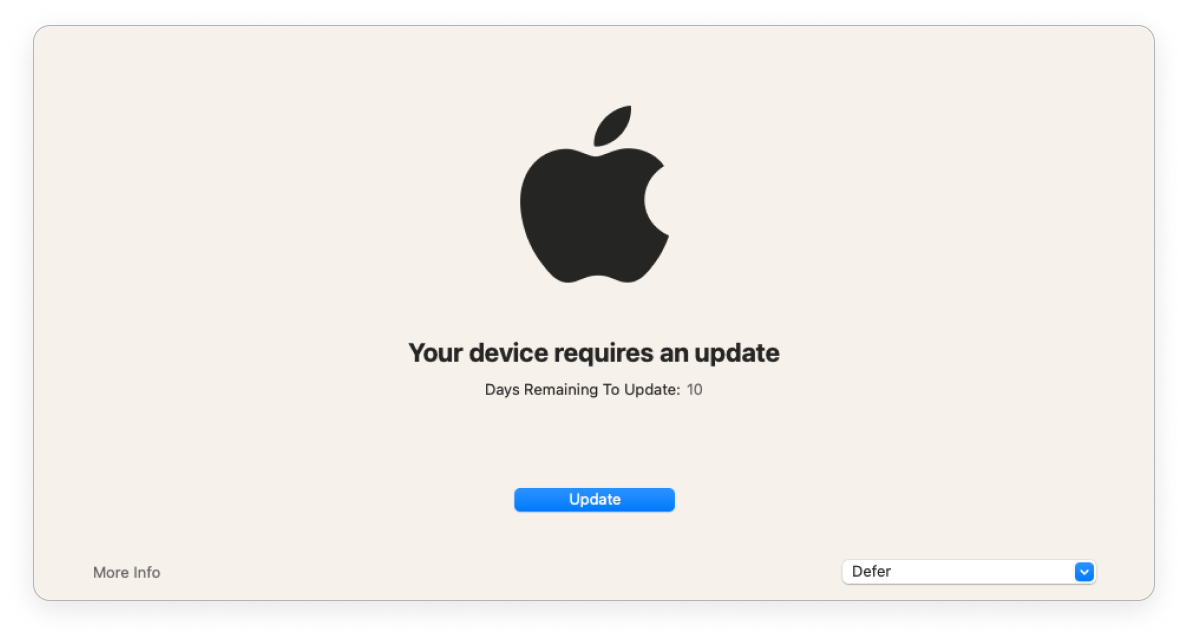
| > 1 day before deadline | < 1 day before deadline | Past deadline | |
|---|---|---|---|
| Nudge window frequency | Once a day at 8pm GMT | Once every 2 hours | Immediately on login |
| End user can defer | ✅ | ✅ | ❌ |
| Nudge window is dismissible | ✅ | ✅ | ❌ |