mirror of
https://github.com/MioMioOS/MioIsland
synced 2026-04-21 13:37:26 +00:00
 aee6e71cad
- Fix brew install command: remove --cask flag, use correct tap path
- Add MioIsland WeChat user group QR code to contact section

Co-Authored-By: Claude Opus 4.6 (1M context) <noreply@anthropic.com>
224 lines
8.5 KiB
Markdown
224 lines
8.5 KiB
Markdown
<div align="center">
|
||
|
||
<img src="marketing/miomio-logo.jpg" width="200" alt="喵喵岛" />
|
||
|
||
# 喵喵岛 MioIsland
|
||
|
||
### 把 AI 编程助手放进 MacBook 刘海里。
|
||
|
||
一只像素猫,帮你盯着所有 Claude Code 会话。
|
||
思考、跑工具、等审批、出错 —— 你不用切窗口就知道。
|
||
|
||
[English](README.md) | 中文
|
||
|
||
[](https://github.com/MioMioOS/MioIsland/stargazers)
|
||
[](https://github.com/MioMioOS/MioIsland/releases)
|
||
[](https://github.com/MioMioOS/MioIsland/releases)
|
||
[](LICENSE.md)
|
||
|
||
**免费开源,没有商业目的。觉得好用请点个 Star。**
|
||
|
||
<a href="https://github.com/MioMioOS/MioIsland/releases"><img src="https://img.shields.io/badge/下载-最新版本-D7FE62?style=for-the-badge&logo=apple&logoColor=black" alt="下载"/></a>
|
||
|
||
</div>
|
||
|
||
---
|
||
|
||
<div align="center">
|
||
|
||
<img src="marketing/island/notch-collapsed.png" width="900" alt="喵喵岛刘海效果"/>
|
||
|
||
*刘海收起时:像素猫 + 状态颜色 + 活跃会话数。一直在视野里,又不遮挡。*
|
||
|
||
</div>
|
||
|
||
## 它能做什么
|
||
|
||
<table>
|
||
<tr>
|
||
<td width="33%"><img src="marketing/island/session-list.png" alt="会话列表"/></td>
|
||
<td width="33%"><img src="marketing/island/buddy-card.png" alt="宠物卡片"/></td>
|
||
<td width="33%"><img src="marketing/island/settings-menu.png" alt="设置菜单"/></td>
|
||
</tr>
|
||
</table>
|
||
|
||
### 一眼看全局
|
||
|
||
刘海里的像素猫会用**颜色**告诉你 Claude 在干什么:紫色思考中、青色跑工具、琥珀色等审批、绿色干完了、红色出错了。展开就能看到所有会话列表,点一下跳到对应终端。
|
||
|
||
### 直接审批权限
|
||
|
||
Claude 想写文件、跑命令?不用切终端 —— 刘海里直接弹出代码差异预览,一键允许或拒绝。
|
||
|
||
### Claude 问你问题?刘海里直接回答
|
||
|
||
AskUserQuestion 的选项以可点击的芯片按钮显示在会话行里,点一下就发送答案。支持多选和自定义输入。
|
||
|
||
### 支持 Codex
|
||
|
||
不只是 Claude Code —— Codex 会话同样自动检测、追踪、显示在列表中。
|
||
|
||
### 自定义你的刘海
|
||
|
||
主题色、字体大小、宽度、位置 —— 全部可调。Live Edit 模式实时预览,改到满意再保存。
|
||
|
||
### 和你的 Claude 宠物互动
|
||
|
||
完整对接 `/buddy` 系统。18 种物种、5 项属性、稀有度星级,全部用 ASCII 像素画渲染在刘海里。
|
||
|
||
### 8-bit 音效
|
||
|
||
每种事件有专属芯片音效。开始、完成、审批、出错 —— 闭着眼也知道发生了什么。每个声音可单独开关。
|
||
|
||
---
|
||
|
||
## 手机遥控:Code Light
|
||
|
||
<div align="center">
|
||
|
||
[](https://apps.apple.com/us/app/code-light/id6761744871)
|
||
|
||
</div>
|
||
|
||
搭配 iPhone 应用 **[Code Light](https://github.com/MioMioOS/CodeLight)**,走到哪都能看 Claude 在干什么:
|
||
|
||
- **灵动岛实时显示** Claude 当前阶段
|
||
- **发消息、发斜杠命令**,精准送达指定终端
|
||
- **手机上新建会话**,Mac 自动启动 Claude
|
||
- **推送通知** —— 任务完成、需要审批、出错,第一时间知道
|
||
- 永久 6 位配对码,扫码或输码秒连
|
||
|
||
> 中国大陆暂不可用(ICP 备案中),其他 147 个国家/地区已上架。
|
||
|
||
---
|
||
|
||
## 🪄 插件市场
|
||
|
||
MioIsland 现在自带**插件系统**,配套的插件市场托管在 **[miomio.chat](https://miomio.chat/plugins)**,你可以浏览和安装第三方插件 —— 主题、氛围音效、伙伴精灵、实用扩展(比如自带的 Stats 和 Music Player)。
|
||
|
||
<div align="center">
|
||
<img src="docs/screenshots/plugins-settings-zh.png" width="720" alt="插件设置页(中文)" />
|
||
</div>
|
||
|
||
**如何安装**:
|
||
|
||
1. 打开 MioIsland **系统设置 → Plugins**
|
||
2. 访问 [miomio.chat/plugins](https://miomio.chat/plugins) 选一个插件,点「安装」
|
||
3. 复制生成的下载地址,粘贴到插件页顶部的 **Install from URL** 输入框
|
||
4. 点「Install」—— MioIsland 会自动下载、校验、加载
|
||
|
||
官方插件(Pair iPhone、Stats)即使删除了仍会保留在列表里,一键重装即可。所有上架插件都经过人工审核后才会向用户开放。
|
||
|
||
如果你是开发者,可以前往 [开发者中心](https://miomio.chat/developer) 提交自己的插件。源代码会镜像到内部 Gitea 用于安全审核,通过后即向所有用户发布。
|
||
|
||
---
|
||
|
||
## 支持的终端
|
||
|
||
| 终端 | 跳转 | 快捷回复 |
|
||
|------|------|---------|
|
||
| **cmux** | workspace 精确跳转 | ✅ |
|
||
| **iTerm2** | AppleScript | ✅ |
|
||
| **Ghostty** | AppleScript | - |
|
||
| **Terminal.app** | 激活 | ✅ |
|
||
| Warp / VS Code / Cursor / Zed / Kitty / WezTerm / Alacritty | 激活 | - |
|
||
|
||
> 推荐搭配 **[cmux](https://cmux.io)** —— 精确跳转 + 快捷回复 + 智能抑制,多会话管理的最佳拍档。
|
||
|
||
---
|
||
|
||
## 安装
|
||
|
||
### Homebrew(推荐)
|
||
|
||
```bash
|
||
brew install xmqywx/codeisland/codeisland
|
||
```
|
||
|
||
cask 会自动处理 Gatekeeper,装完直接双击打开即可。
|
||
|
||
### 手动下载
|
||
|
||
从 [Releases](https://github.com/MioMioOS/MioIsland/releases) 下载最新 `.zip` → 解压 → 拖到「应用程序」。
|
||
|
||
MioIsland 为**未签名**构建,macOS Gatekeeper 会拦截首次打开。二选一:
|
||
|
||
- **右键** `Mio Island.app` → **打开** → 再点**打开**,或者
|
||
- 终端运行一次: `xattr -dr com.apple.quarantine "/Applications/Mio Island.app"`
|
||
|
||
之后双击直接开。
|
||
|
||
系统要求:macOS 15+,带刘海的 MacBook。
|
||
|
||
### HTTP 代理(国内网络受限环境)
|
||
|
||
`设置 → 通用 → Anthropic API Proxy` 可以让 Mio Island 对 Anthropic API 的请求都走你本地的 HTTP 代理(比如 `http://127.0.0.1:7890`)。在本地跑 Clash / V2Ray 的开发者,直连不稳时用得上。
|
||
|
||
**这个设置**会被应用到:
|
||
- ✅ 刘海里的额度条(`RateLimitMonitor` → `api.anthropic.com/api/oauth/usage`)
|
||
- ✅ **MioIsland 启动的所有子进程** —— 包括 Stats 插件的 `claude` CLI、未来任何插件的 shell-out。Mio Island 在启动时给自己的进程 `setenv` 一次 `HTTPS_PROXY` / `HTTP_PROXY` / `ALL_PROXY`,所有子进程自动继承,不需要每个插件单独适配
|
||
- ❌ **不**作用于 CodeLight iPhone 同步(我们自己的服务器 `island.wdao.chat`,直连最快,走代理反而增加延迟和故障点)
|
||
- ❌ **不**作用于第三方插件自己用 `URLSession` 调用外部 API —— 那种走系统偏好设置(系统设置 → 网络 → 代理),不读这里的值
|
||
|
||
**不需要**跑 `launchctl setenv HTTPS_PROXY ...` —— 在 Settings 里填上就够了,作用范围精准只覆盖 MioIsland 自己。不填就是直连。
|
||
|
||
<details>
|
||
<summary><b>从源码构建</b></summary>
|
||
|
||
```bash
|
||
git clone https://github.com/MioMioOS/MioIsland.git
|
||
cd MioIsland
|
||
xcodebuild -project ClaudeIsland.xcodeproj -scheme ClaudeIsland \
|
||
-configuration Release CODE_SIGN_IDENTITY="-" \
|
||
CODE_SIGNING_REQUIRED=NO CODE_SIGNING_ALLOWED=NO \
|
||
DEVELOPMENT_TEAM="" build
|
||
```
|
||
|
||
</details>
|
||
|
||
---
|
||
|
||
## 工作原理
|
||
|
||
1. 首次启动自动安装 Claude Code hooks
|
||
2. Claude 的每个状态变化通过 Unix socket 送到喵喵岛
|
||
3. 权限请求保持 socket 打开,等你在刘海里点允许/拒绝后再回传
|
||
4. 终端跳转通过 AppleScript 匹配工作目录实现
|
||
|
||
不收集任何数据。不联网(除了 iPhone 同步功能)。不需要账号。
|
||
|
||
---
|
||
|
||
## 相关项目
|
||
|
||
| 项目 | 说明 |
|
||
|------|------|
|
||
| [Code Light](https://github.com/MioMioOS/CodeLight) | iPhone 伴侣应用 |
|
||
| [MioServer](https://github.com/MioMioOS/MioServer) | 自托管中继服务器 |
|
||
| [cmux](https://cmux.io) | 推荐的终端复用器 |
|
||
|
||
---
|
||
|
||
## 参与贡献
|
||
|
||
- [提 Bug](https://github.com/MioMioOS/MioIsland/issues) · [提 PR](https://github.com/MioMioOS/MioIsland/pulls) · [建议功能](https://github.com/MioMioOS/MioIsland/issues)
|
||
|
||
每个 PR 我都会亲自 review。
|
||
|
||
## 联系
|
||
|
||
- **邮箱** xmqywx@gmail.com
|
||
|
||
<img src="docs/wechat-qr-kris.jpg" width="140" alt="微信 - Kris" /> <img src="docs/wechat-qr.jpg" width="140" alt="微信 - Carey" /> <img src="docs/wechat-group-qr.jpg" width="140" alt="MioIsland 用户群" />
|
||
|
||
---
|
||
|
||
<div align="center">
|
||
|
||
基于 [Claude Island](https://github.com/farouqaldori/claude-island) 改造。
|
||
|
||
[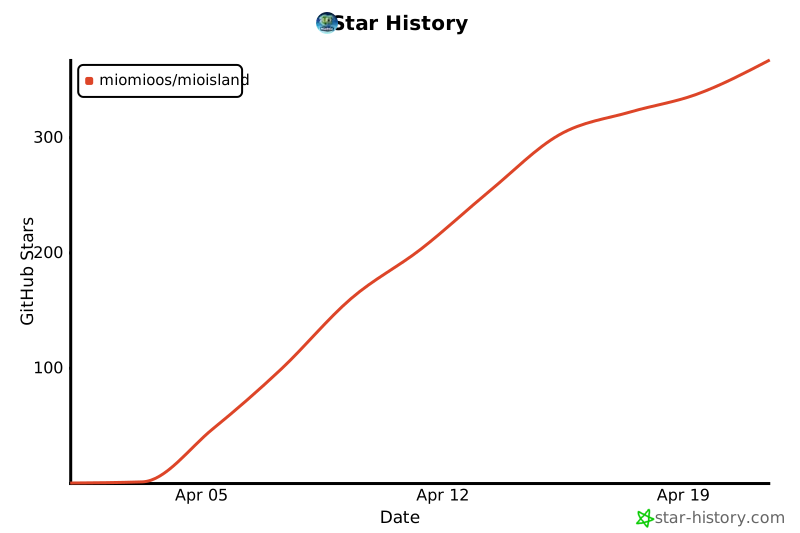](https://star-history.com/#MioMioOS/MioIsland&Date)
|
||
|
||
**CC BY-NC 4.0** — 个人免费,禁止商用。
|
||
|
||
</div>
|