mirror of
https://github.com/MioMioOS/MioIsland
synced 2026-04-21 13:37:26 +00:00
 47a6569e0d
cmux.io 实际会 302 到 mux.coder.com,容易被误以为贴错;cmux.com 是
直连 200 的正确官网。

Co-Authored-By: Claude Opus 4.7 (1M context) <noreply@anthropic.com>
425 lines
23 KiB
Markdown
425 lines
23 KiB
Markdown
<div align="center">
|
||
|
||
<img src="marketing/miomio-logo.jpg" width="200" alt="MioIsland" />
|
||
|
||
# MioIsland
|
||
|
||
**Your AI agents live in the notch.**
|
||
|
||
This is a passion project built purely out of personal interest. It is **free and open-source** with no commercial intentions whatsoever. I welcome everyone to try it out, report bugs, share it with your colleagues, and contribute code. Let's build something great together!
|
||
|
||
这是一个纯粹出于个人兴趣开发的项目,**完全免费开源**,没有任何商业目的。欢迎大家试用、提 Bug、推荐给身边的同事使用,也欢迎贡献代码。一起把它做得更好!
|
||
|
||
English | [中文](README.zh-CN.md)
|
||
|
||
[](https://github.com/MioMioOS/MioIsland/stargazers)
|
||
|
||
[](https://MioMioOS.github.io/MioIsland/)
|
||
[](https://github.com/MioMioOS/MioIsland/releases)
|
||
[](https://github.com/MioMioOS/MioIsland/releases)
|
||
[](LICENSE.md)
|
||
|
||
**If you find this useful, please give it a star! It keeps us motivated to improve.**
|
||
|
||
**如果觉得好用,请点个 Star 支持一下!这是我们持续更新的最大动力。**
|
||
|
||
</div>
|
||
|
||
---
|
||
|
||
<div align="center">
|
||
|
||
## 📱 **[Code Light](https://github.com/MioMioOS/CodeLight)** — your iPhone companion 🐱✨
|
||
|
||
[](https://apps.apple.com/us/app/code-light/id6761744871)
|
||
|
||
> **Note:** Code Light is available on the App Store in 147 countries/regions. **China mainland is currently unavailable** due to pending ICP filing requirements. We are working on it.
|
||
|
||
> ### *Claude is thinking. You're at lunch. **You'll know.***
|
||
|
||
<img src="marketing/codelight/lockscreen-live-activity.jpeg" width="640" alt="Code Light Live Activity on iPhone Lock Screen — pixel cat icon, current Claude phase, last user message and assistant reply, elapsed timer"/>
|
||
|
||
*The same pixel cat that lives in your Mac's notch now lives in your iPhone's **Dynamic Island**. Real-time session phase, latest user question, and Claude's reply preview — right on your lock screen.*
|
||
|
||
</div>
|
||
|
||
<table>
|
||
<tr>
|
||
<td width="20%"><img src="marketing/codelight/macs-list.png" alt="One iPhone, multiple Macs"/></td>
|
||
<td width="20%"><img src="marketing/codelight/sessions.png" alt="Active / Recent / Archived sessions"/></td>
|
||
<td width="20%"><img src="marketing/codelight/commands.png" alt="Built-in slash commands picker"/></td>
|
||
<td width="20%"><img src="marketing/codelight/chat.png" alt="Real-time chat with rich markdown rendering"/></td>
|
||
<td width="20%"><img src="marketing/codelight/settings.png" alt="Self-hosted, multi-server, fully private"/></td>
|
||
</tr>
|
||
<tr>
|
||
<td align="center"><b>🖥️ One iPhone, N Macs</b><br><sub>Switch with one tap</sub></td>
|
||
<td align="center"><b>📋 Active · Recent · Archive</b><br><sub>Three-tab session view</sub></td>
|
||
<td align="center"><b>⚡ Any /slash command</b><br><sub>/model · /cost · /usage…</sub></td>
|
||
<td align="center"><b>💬 Live chat + markdown</b><br><sub>Code blocks · tables · lists</sub></td>
|
||
<td align="center"><b>⚙️ Self-hosted, private</b><br><sub>Zero-knowledge relay</sub></td>
|
||
</tr>
|
||
</table>
|
||
|
||
<div align="center">
|
||
|
||
### What the Code Light Sync module unlocks
|
||
|
||
MioIsland's **Code Light Sync module** turns the notch app into a bidirectional bridge between your Mac, the cloud, and your iPhone:
|
||
|
||
| Feature | What it means for you |
|
||
|---|---|
|
||
| 🏝️ **Real Dynamic Island** | A live ActivityKit activity reflects "what Claude is doing right now" in your iPhone's notch — phase, tool name, elapsed time |
|
||
| 🎯 **Pinpoint terminal routing** | Phone messages land in the **exact** Claude pane you picked. MioIsland walks `ps -Ax` → finds the live `claude --session-id` PID → reads `CMUX_WORKSPACE_ID`/`CMUX_SURFACE_ID` env vars → `cmux send --workspace --surface`. Zero guessing |
|
||
| ⚡ **Slash commands round-trip** | Type `/model`, `/cost`, `/usage`, `/clear` from the phone. MioIsland snapshots the cmux pane, injects the command, diffs the output, and ships it back as a chat message. You see the response as if it were a Claude reply |
|
||
| 🚀 **Remote session launch** | Tap **+** on the phone, pick a launch preset (`claude --dangerously-skip-permissions --chrome`), pick a project — MioIsland spawns a brand-new cmux workspace running that command |
|
||
| 📷 **Image attachments** | Take photos with the iPhone camera; MioIsland downloads the blob and pastes via `NSPasteboard` + AppleScript Cmd+V into the cmux pane |
|
||
| 🔐 **Permanent 6-char pair code** | Each Mac gets a permanent shortCode (lazy-allocated, never rotates). Restart MioIsland — code is the same. Pair another iPhone — same code, same Mac |
|
||
| 🖥️ **One Mac, many iPhones · One iPhone, many Macs** | DeviceLink graph in the server. A Mac can be paired with N iPhones; an iPhone can be paired with M Macs across different backend servers |
|
||
| 🔄 **60-second echo dedup ring** | Phone-injected text doesn't bounce back as a duplicate when MioIsland's JSONL watcher re-detects it |
|
||
| 🌐 **Self-hostable, zero-knowledge** | Run your own CodeLight Server on any VPS. The relay stores only encrypted blobs |
|
||
|
||
</div>
|
||
|
||
> **Status**: Code Light is **live on the [App Store](https://apps.apple.com/us/app/code-light/id6761744871)** (147 countries/regions, China mainland pending ICP filing).
|
||
> The MioIsland Sync module is included in v1.9.0+. ⭐ **[Star MioIsland](https://github.com/MioMioOS/MioIsland)** + ⭐ **[Star Code Light](https://github.com/MioMioOS/CodeLight)** to stay updated.
|
||
|
||
---
|
||
|
||
## 🐱 What MioIsland looks like today
|
||
|
||
<div align="center">
|
||
|
||
<img src="marketing/island/notch-collapsed.png" width="900" alt="MioIsland in the MacBook notch — pixel cat + 'hi' status + 'carey ×3' active session badge"/>
|
||
|
||
*The collapsed notch — pixel cat companion, current status text, and an active-session badge. Always visible, never in the way.*
|
||
|
||
</div>
|
||
|
||
<table>
|
||
<tr>
|
||
<td width="33%"><img src="marketing/island/session-list.png" alt="Expanded session list with two active Claude Code sessions, cmux badges, duration, and live usage bars"/></td>
|
||
<td width="33%"><img src="marketing/island/buddy-card.png" alt="Claude Code buddy card — LEGENDARY Octopus species with 5 stat bars (DBG/PAT/CHS/WIS/SNK), ASCII art sprite, and personality blurb"/></td>
|
||
<td width="33%"><img src="marketing/island/settings-menu.png" alt="MioIsland settings menu — Screen / Notification Sound / Language pickers, Pixel Cat / Smart Suppression / Auto-Collapse / Hooks toggles, Pair iPhone Online status, Launch Presets entry"/></td>
|
||
</tr>
|
||
<tr>
|
||
<td align="center"><b>📋 Live session list</b><br><sub>cmux jump · usage bars</sub></td>
|
||
<td align="center"><b>🐙 Claude Code buddy</b><br><sub>18 species · 5 stats · ASCII art</sub></td>
|
||
<td align="center"><b>⚙️ Compact settings menu</b><br><sub>Sync · presets · accessibility</sub></td>
|
||
</tr>
|
||
</table>
|
||
|
||
---
|
||
|
||
## Features
|
||
|
||
### Dynamic Island Notch
|
||
|
||
The collapsed notch shows everything at a glance:
|
||
|
||
- **Animated buddy** — your Claude Code `/buddy` pet rendered as 16x16 pixel art with wave/dissolve/reassemble animation
|
||
- **Status dot** — color indicates state:
|
||
- 🟦 Cyan = working
|
||
- 🟧 Amber = needs approval
|
||
- 🟩 Green = done / waiting for input
|
||
- 🟣 Purple = thinking
|
||
- 🔴 Red = error, or session unattended >60s
|
||
- 🟠 Orange = session unattended >30s
|
||
- **Project name + status** — carousel rotates task title, tool action, project name
|
||
- **Session count** — `×3` badge showing active sessions
|
||
- **Pixel Cat Mode** — toggle to show the hand-drawn pixel cat instead of your buddy
|
||
|
||
### Session List
|
||
|
||
Expand the notch to see all your Claude Code sessions:
|
||
|
||
- **Pixel cat face** per session with state-specific expressions (blink, eye-dart, heart eyes on done, X eyes on error)
|
||
- **Auto-detected terminal** — shows Ghostty, Warp, iTerm2, cmux, Terminal, VS Code, Cursor, etc.
|
||
- **Task title** — displays your first message or Claude's summary, not just the folder name
|
||
- **Duration badge** — how long each session has been running
|
||
- **Golden jump button** — click to jump to the exact terminal tab (via cmux/Ghostty AppleScript)
|
||
- **Glow dots** with gradient dividers — minimal, clean design
|
||
- **Hover effects** — row highlight + golden terminal icon
|
||
|
||
### Claude Code Buddy Integration
|
||
|
||
Full integration with Claude Code's `/buddy` companion system:
|
||
|
||
- **Accurate stats** — species, rarity, eye style, hat, shiny status, and all 5 stats (DEBUGGING, PATIENCE, CHAOS, WISDOM, SNARK) computed using the exact same Bun.hash + Mulberry32 algorithm as Claude Code
|
||
- **Dynamic salt detection** — reads the actual salt from your Claude Code binary, supports patched installs (any-buddy compatible)
|
||
- **ASCII art sprite** — all 18 buddy species rendered as animated ASCII art with idle animation sequence (blink, fidget), matching Claude Code's terminal display
|
||
- **Buddy card** — left-right layout: ASCII sprite + name on the left, ASCII stat bars `[████████░░]` + personality on the right
|
||
- **Rarity stars** — ★ Common to ★★★★★ Legendary with color coding
|
||
- **18 species supported** — duck, goose, blob, cat, dragon, octopus, owl, penguin, turtle, snail, ghost, axolotl, capybara, cactus, robot, rabbit, mushroom, chonk
|
||
|
||
### Permission Approval
|
||
|
||
Approve or deny Claude Code's permission requests right from the notch:
|
||
|
||
- **Code diff preview** — see exactly what will change before allowing (green/red line highlighting)
|
||
- **File path display** — warning icon + tool name + file being modified
|
||
- **Deny/Allow buttons** — with keyboard hint labels
|
||
- **Hook-based protocol** — responses sent via Unix socket, no terminal switching needed
|
||
|
||
### Pixel Cat Companion
|
||
|
||
A hand-drawn pixel cat with 6 animated states:
|
||
|
||
| State | Expression |
|
||
|-------|-----------|
|
||
| Idle | Black eyes, gentle blink every 90 frames |
|
||
| Working | Eyes dart left/center/right (reading code) |
|
||
| Needs You | Eyes + right ear twitches |
|
||
| Thinking | Closed eyes, breathing nose |
|
||
| Error | Red X eyes |
|
||
| Done | Green heart eyes + green tint overlay |
|
||
|
||
### 8-bit Sound System
|
||
|
||
Chiptune alerts for every event:
|
||
|
||
| Event | Default |
|
||
|-------|---------|
|
||
| Session start | ON |
|
||
| Processing begins | OFF |
|
||
| Needs approval | ON |
|
||
| Approval granted | ON |
|
||
| Approval denied | ON |
|
||
| Session complete | ON |
|
||
| Error | ON |
|
||
| Context compacting | OFF |
|
||
|
||
Each sound can be toggled individually. Global mute and volume control available.
|
||
|
||
### Project Grouping
|
||
|
||
Toggle between flat list and project-grouped view:
|
||
|
||
- Sessions automatically grouped by working directory
|
||
- Collapsible project headers with active count
|
||
- Chevron icons for expand/collapse
|
||
|
||
### Code Light Sync (iPhone companion)
|
||
|
||
MioIsland's **sync module** is the bridge that makes the [Code Light](https://github.com/MioMioOS/CodeLight) iPhone companion possible. Open `Pair iPhone` from the notch menu to begin.
|
||
|
||
<details>
|
||
<summary><b>Technical details (click to expand)</b></summary>
|
||
|
||
#### Pairing
|
||
|
||
Each Mac is identified on the server by a **permanent 6-character `shortCode`** (lazy-allocated on first connect, never rotates). The pairing window shows both:
|
||
- A QR code (scan with the iPhone's camera)
|
||
- The 6-character code in large monospace (type it in if you don't want to scan)
|
||
|
||
Both paths converge on the same `POST /v1/pairing/code/redeem` endpoint. The same code can pair as many iPhones as you want — it never expires, doesn't change when you restart MioIsland, and survives upgrades.
|
||
|
||
#### Phone → terminal routing
|
||
|
||
Phone messages have to land in the **exact** Claude Code terminal that the user picked. MioIsland's `TerminalWriter` does this with zero guessing:
|
||
|
||
1. `ps -Ax` to find the `claude --session-id <UUID>` process matching the message's session tag
|
||
2. `ps -E -p <pid>` to read `CMUX_WORKSPACE_ID` and `CMUX_SURFACE_ID` env vars
|
||
3. `cmux send --workspace <ws> --surface <surf> -- <text>`
|
||
|
||
If the live Claude PID was rotated by a `claude --resume`, a `cwd`-scoped fallback picks the highest-PID cmux-hosted Claude in the same directory. If nothing matches, the message is cleanly dropped — no orphan windows ever get hijacked.
|
||
|
||
For non-cmux terminals (iTerm2, Ghostty, Terminal.app), `TerminalWriter` falls back to AppleScript with the matching workspace title.
|
||
|
||
#### Slash commands with captured output
|
||
|
||
`/model`, `/cost`, `/usage`, `/clear`, `/compact` and friends don't write to Claude's JSONL — their output never reaches the file watcher. MioIsland intercepts these specially:
|
||
|
||
1. Snapshot the cmux pane via `cmux capture-pane`
|
||
2. Inject the slash command via `cmux send`
|
||
3. Poll the pane every 200 ms until output settles
|
||
4. Diff the snapshots and ship the new lines back to the server as a synthetic `terminal_output` message
|
||
|
||
The phone sees the response inline in chat as if `/cost` were a normal Claude reply.
|
||
|
||
#### Remote session launch
|
||
|
||
The phone can ask MioIsland to spawn a brand-new cmux workspace running a configured command. MioIsland defines **launch presets** locally — name + command + icon — and uploads them to the server (using Mac-generated UUIDs as primary keys, so the round-trip works without ID translation).
|
||
|
||
When the phone calls `POST /v1/sessions/launch {macDeviceId, presetId, projectPath}`, the server emits a `session-launch` socket event scoped to this Mac. MioIsland's `LaunchService` looks up the preset locally and runs:
|
||
|
||
```bash
|
||
cmux new-workspace --cwd <projectPath> --command "<preset.command>"
|
||
```
|
||
|
||
Default presets seeded on first launch:
|
||
- `Claude (skip perms)` → `claude --dangerously-skip-permissions`
|
||
- `Claude + Chrome` → `claude --dangerously-skip-permissions --chrome`
|
||
|
||
Add, edit, or remove your own presets from the **Launch Presets** menu in the notch.
|
||
|
||
#### Image attachments
|
||
|
||
Phone-attached images come down as opaque blob IDs (uploaded by the phone via `POST /v1/blobs`). MioIsland downloads each blob, focuses the target cmux pane, writes the image to `NSPasteboard` in NSImage / `public.jpeg` / `.tiff` formats, then `System Events keystroke "v" using {command down}` (with a `CGEvent` fallback). Claude sees `[Image #N]` and the trailing text as a single message.
|
||
|
||
This requires **Accessibility permission** — and because permissions are tracked by the app's signed path, MioIsland auto-installs a copy of itself to `/Applications/Mio Island.app` so the grant survives Debug rebuilds.
|
||
|
||
#### Project path sync
|
||
|
||
MioIsland uploads the unique `cwd` of every active session every 5 minutes. The phone fetches them from `GET /v1/devices/<macDeviceId>/projects` to populate the "Recent Projects" picker in the launch sheet. No manual configuration.
|
||
|
||
#### Echo loop dedup
|
||
|
||
Phone sends → server → MioIsland pastes → Claude writes to JSONL → file watcher sees a "new user message" → would normally re-upload it → phone gets a duplicate. Fixed with a 60 s TTL `(claudeUuid, text)` ring on the Mac: MessageRelay consumes a matching entry before uploading and skips. No server changes, no localId negotiation.
|
||
|
||
#### Multi-iPhone, multi-server
|
||
|
||
A Mac can be paired with multiple iPhones simultaneously — they all share the same `shortCode`. From the iPhone side, one phone can be paired with multiple Macs across different backend servers; the phone's `LinkedMacs` list stores `serverUrl` per Mac and switches connections automatically when you tap into a different one.
|
||
|
||
</details>
|
||
|
||
## 🪄 Plugin Marketplace
|
||
|
||
MioIsland now ships with a **plugin system** and a companion marketplace at **[miomio.chat](https://miomio.chat/plugins)** where you can browse and install third-party plugins for your notch — themes, ambient sounds, animated companions, and utility extensions like the bundled Stats and Music Player.
|
||
|
||
<div align="center">
|
||
<img src="docs/screenshots/plugins-settings-en.png" width="720" alt="Plugin settings (English)" />
|
||
</div>
|
||
|
||
**How to install**:
|
||
|
||
1. Open **System Settings → Plugins** inside MioIsland
|
||
2. Visit [miomio.chat/plugins](https://miomio.chat/plugins), pick a plugin, click *Install*
|
||
3. Copy the generated URL and paste it into the **Install from URL** field
|
||
4. Click *Install* — MioIsland downloads, verifies and loads it automatically
|
||
|
||
Official plugins (Pair iPhone, Stats) always stay in the list even if you remove them, so you can re-enable them with one click. All plugins are manually reviewed for security before they reach the marketplace.
|
||
|
||
If you're a developer, head to the [developer portal](https://miomio.chat/developer) to submit your own plugin. Source code is mirrored to a private Gitea instance for review; approved plugins become downloadable to all users.
|
||
|
||
## Settings
|
||
|
||
| Setting | Description |
|
||
|---------|-------------|
|
||
| **Screen** | Choose which display shows the notch (Auto, Built-in, or specific monitor) |
|
||
| **Notification Sound** | Select alert sound style |
|
||
| **Group by Project** | Toggle between flat list and project-grouped sessions |
|
||
| **Pixel Cat Mode** | Switch notch icon between pixel cat and buddy emoji animation |
|
||
| **Language** | Auto (system) / English / 中文 |
|
||
| **Launch at Login** | Start MioIsland automatically when you log in |
|
||
| **Hooks** | Install/uninstall Claude Code hooks in `~/.claude/settings.json` |
|
||
| **Accessibility** | Grant accessibility permission for terminal window focusing + image-paste keystrokes |
|
||
| **Pair iPhone** | Show the QR + 6-character pairing code for the [Code Light](https://github.com/MioMioOS/CodeLight) iPhone app |
|
||
| **Launch Presets** | Manage the named cmux launch commands the iPhone can trigger remotely |
|
||
|
||
## Terminal Support
|
||
|
||
MioIsland auto-detects your terminal from the process tree:
|
||
|
||
| Terminal | Detection | Jump-to-Tab |
|
||
|----------|-----------|-------------|
|
||
| cmux | Auto | AppleScript (by working directory) |
|
||
| Ghostty | Auto | AppleScript (by working directory) |
|
||
| Warp | Auto | Activate only (no tab API) |
|
||
| iTerm2 | Auto | AppleScript |
|
||
| Terminal.app | Auto | Activate |
|
||
| Alacritty | Auto | Activate |
|
||
| Kitty | Auto | Activate |
|
||
| WezTerm | Auto | Activate |
|
||
| VS Code | Auto | Activate |
|
||
| Cursor | Auto | Activate |
|
||
| Zed | Auto | Activate |
|
||
|
||
> **Recommended: [cmux](https://cmux.com)** — A modern terminal multiplexer built on Ghostty. MioIsland works best with cmux: precise workspace-level jumping, AskUserQuestion quick reply via `cmux send`, and smart popup suppression per workspace tab. If you manage multiple Claude Code sessions, cmux + MioIsland is the ideal combo.
|
||
>
|
||
> **推荐搭配 [cmux](https://cmux.com)** — 基于 Ghostty 的现代终端复用器。MioIsland 与 cmux 配合最佳:精确到 workspace 级别的跳转、AskUserQuestion 快捷回复、智能弹出抑制。多 Claude Code 会话管理的理想组合。
|
||
|
||
## Install
|
||
|
||
### Homebrew (recommended)
|
||
|
||
```bash
|
||
brew install xmqywx/codeisland/codeisland
|
||
```
|
||
|
||
The cask handles Gatekeeper automatically — you can launch the app with a normal double-click right after install.
|
||
|
||
### Manual download
|
||
|
||
Grab the latest `.zip` from [Releases](https://github.com/MioMioOS/MioIsland/releases), unzip, and drag `Mio Island.app` to `/Applications`.
|
||
|
||
MioIsland ships **unsigned**, so macOS Gatekeeper will block the first launch. Do **one** of the following:
|
||
|
||
- **Right-click** `Mio Island.app` → **Open** → click **Open** in the dialog, **or**
|
||
- Run once in Terminal: `xattr -dr com.apple.quarantine "/Applications/Mio Island.app"`
|
||
|
||
Subsequent launches work normally with a double-click.
|
||
|
||
### Requirements
|
||
|
||
- macOS 15+ (Sequoia) — universal binary (Apple Silicon + Intel)
|
||
- MacBook with notch (floating mode available on external displays)
|
||
|
||
### HTTP Proxy (for network-restricted regions)
|
||
|
||
`Settings → General → Anthropic API Proxy` lets you route Mio Island's Anthropic API traffic through a local HTTP proxy (e.g. `http://127.0.0.1:7890`). Useful if you run Clash / V2Ray / similar locally and direct connections to Anthropic's servers are unreliable.
|
||
|
||
**Scope — the setting is applied to:**
|
||
- ✅ The rate-limit bar in the notch (`RateLimitMonitor` → `api.anthropic.com/api/oauth/usage`)
|
||
- ✅ **Every subprocess MioIsland spawns**, including the Stats plugin's `claude` CLI and any future plugin's shell-outs. Mio Island calls `setenv()` on its own process environment at startup, so children inherit `HTTPS_PROXY` / `HTTP_PROXY` / `ALL_PROXY` automatically — no per-plugin opt-in needed.
|
||
- ❌ **Not** applied to CodeLight iPhone sync (our own server `island.wdao.chat` — direct is faster, routing through a user proxy would add latency and a failure point).
|
||
- ❌ **Not** applied to third-party plugins that use their own `URLSession` to reach external APIs. Those honor your system proxy settings (System Preferences → Network → Proxies), not this field.
|
||
|
||
You do **not** need to run `launchctl setenv HTTPS_PROXY ...` — setting the proxy in Settings is scoped to MioIsland and sufficient. Leave the field empty for direct connections.
|
||
|
||
<details>
|
||
<summary><b>Build from Source</b></summary>
|
||
|
||
```bash
|
||
git clone https://github.com/MioMioOS/MioIsland.git
|
||
cd MioIsland
|
||
xcodebuild -project ClaudeIsland.xcodeproj -scheme ClaudeIsland \
|
||
-configuration Release CODE_SIGN_IDENTITY="-" \
|
||
CODE_SIGNING_REQUIRED=NO CODE_SIGNING_ALLOWED=NO \
|
||
DEVELOPMENT_TEAM="" build
|
||
```
|
||
|
||
</details>
|
||
|
||
## How It Works
|
||
|
||
1. **Zero config** — on first launch, MioIsland installs hooks into `~/.claude/settings.json`
|
||
2. **Hook events** — a Python script (`codeisland-state.py`) sends session state to the app via Unix socket (`/tmp/codeisland.sock`)
|
||
3. **Permission approval** — for `PermissionRequest` events, the socket stays open until you click Allow/Deny, then sends the decision back to Claude Code
|
||
4. **Buddy data** — reads `~/.claude.json` for name/personality, runs `buddy-bones.js` with Bun for accurate species/rarity/stats
|
||
5. **Terminal jump** — uses AppleScript to find and focus the correct terminal tab by matching working directory
|
||
|
||
## i18n
|
||
|
||
MioIsland supports English and Chinese with automatic system locale detection. Override in Settings > Language.
|
||
|
||
## Contributing / 参与贡献
|
||
|
||
Contributions are welcome! 欢迎参与!
|
||
|
||
1. **Report bugs / 提交 Bug** — [Open an issue](https://github.com/MioMioOS/MioIsland/issues) with steps to reproduce
|
||
2. **Submit a PR / 提交 PR** — Fork → branch → make changes → open a Pull Request
|
||
3. **Suggest features / 建议功能** — Open an issue tagged `enhancement`
|
||
|
||
I will personally review and merge all PRs. 我会亲自 Review 并合并所有 PR。
|
||
|
||
## Contact / 联系方式
|
||
|
||
Have questions or want to chat? Reach out!
|
||
|
||
有问题或想交流?欢迎联系!
|
||
|
||
- **Email / 邮箱**: xmqywx@gmail.com
|
||
|
||
<img src="docs/wechat-qr-kris.jpg" width="180" alt="WeChat - Kris" /> <img src="docs/wechat-qr.jpg" width="180" alt="WeChat - Carey" /> <img src="docs/wechat-group-qr.jpg" width="180" alt="MioIsland 用户群" />
|
||
|
||
## Credits
|
||
|
||
Forked from [Claude Island](https://github.com/farouqaldori/claude-island) by farouqaldori. Rebuilt with pixel cat animations, buddy integration, cmux support, i18n, and minimal glow-dot design.
|
||
|
||
## Star History
|
||
|
||
[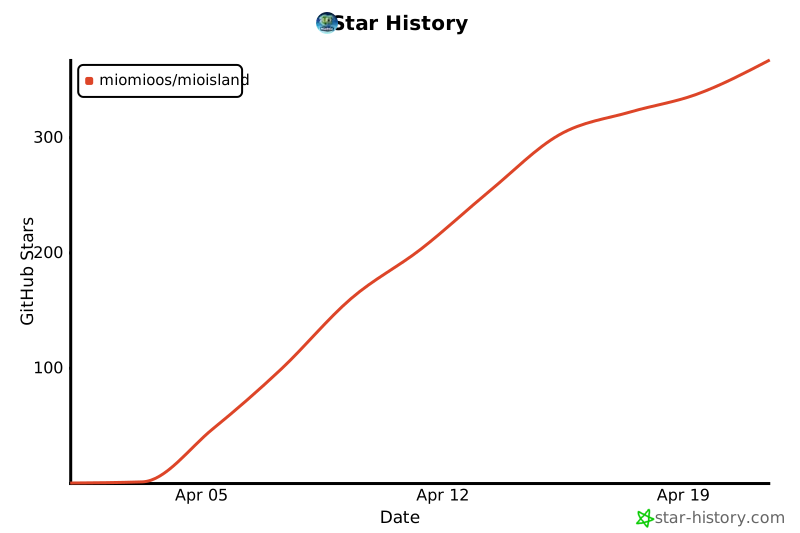](https://star-history.com/#MioMioOS/MioIsland&Date)
|
||
|
||
## License
|
||
|
||
CC BY-NC 4.0 — free for personal use, no commercial use.
|