 2ed59fcf80
Summary:
G'day folks! As promised, I'm spending a bit of my free time seeing what I can do to update and refresh the IGListKit repo on GitHub.

I noticed last night some strange behaviour in that the GitHub Actions CI wasn't running when new commits were merged into the main branch. I discovered the cause of this was because the `CI.yml` file still had `master` in its build rules instead of `main`. And once I noticed that, I noticed there were a lot of other references to the main branch being called `master` in a lot of the documentation.

Thankfully within the documentation, GitHub was smart enough to automatically redirect all of the `master` URLs to `main`, so nothing visibly broke, but I definitely think we should update all of that. :)

I went through the entire repo and did a thorough audit in all of its text files, and updated the main branch name accordingly.

Reviewed By: DimaVartanian

Differential Revision: D42990133

fbshipit-source-id: d6b06c40b1b959990856b46b048895e3c55a9870
5 KiB
Migration
This guide provides details for how to migrate between major versions of IGListKit.
From 2.x to 3.x
For details on all changes in IGListKit 3.0.0, please see the release notes.
NOTE: This release contains a lot of improvements and source-breaking API changes, especially for Swift clients. These are all noted in the full release notes.
"IG" prefix removed for Swift
We have improved how IGListKit APIs get imported into Swift. The IG prefix has been removed for Swift clients. For example, IGListSectionController becomes ListSectionController instead. Along with other interoperability improvements, this makes IGListKit more readable in Swift.
To migrate, use Xcode's Find navigator (command-3), search for IGList, and replace with List.
IGListSectionType removed
In order to make building section controllers even easier, we removed the protocol and absorbed all of the methods into IGListSectionController with default implementations.
numberOfItemsreturns 1 itemdidUpdateToObject:anddidSelectItemAtIndex:do nothingsizeForItemAtIndex:returnsCGSizeZerocellForItemAtIndex:asserts (you must override this method)
In Objective-C, all you need to do is find & remove all uses of IGListSectionType. This includes IGListSectionController and IGListAdapterDataSource implementations.
In Swift, you will also need to add override keywords to all methods.
The compiler should catch all instances that need fixed.
IGListBindingSectionController
If you were using IGListDiff(...) inside a section controller to compute diffs for cells, we recommend that you start using IGListBindingSectionController which wraps this behavior in an elegant and tested API.
Removed IGListCollectionView
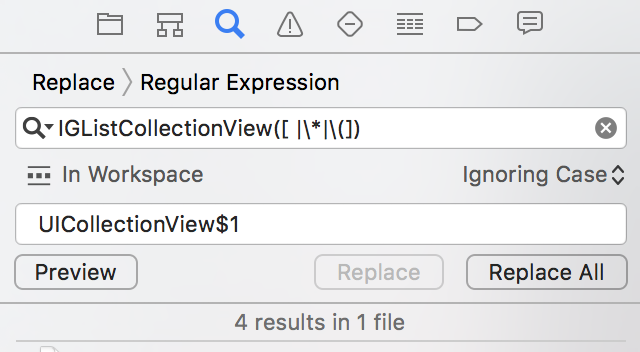
You can simply find regex IGListCollectionView([ |\*|\(]) and replace with regex UICollectionView$1 in your project to fix this.
Removed IGListGridCollectionViewLayout
Start using IGListCollectionViewLayout instead of IGListGridCollectionViewLayout.
scrollDirectionis not yet supported. If you need horizontal scrolling, please useUICollectionViewFlowLayoutor file an issue.- Set
minimumLineSpacingon your section controllers instead of the layout - Set
minimumInteritemSpacingon your section controllers instead of the layout - Return the size of your cells in sizeForItemAtIndex: instead of setting it on the layout.
Item mutations must be wrapped in -[IGListCollectionContext performBatchAnimated:completion:]
To fix some rare crashes, all item mutations must now be performed inside a batch block and done on the IGListBatchContext object instead.
Objective-C
// OLD
self.expanded = YES;
[self.collectionContext insertInSectionController:self atIndexes:[NSIndexSet indexSetWithIndex:]];

// NEW
[self.collectionContext performBatchAnimated:YES updates:^(id<IGListBatchContext> batchContext) {
  self.expanded = YES;
  [batchContext insertInSectionController:self atIndexes:[NSIndexSet indexSetWithIndex:1]];
} completion:nil];
Swift
// OLD
expanded = true
collectionContext?.insert(in: self, at: [0])

// NEW
collectionContext?.performBatch(animated: true, updates: { (batchContext) in
  self.expanded = true
  batchContext.insert(in: self, at: [0])
})
Make sure that your model changes occur inside the update block, alongside the context methods.
From 1.x to 2.x
For details on all changes in IGListKit 2.0.0, please see the release notes.
IGListDiffable Conformance
If you relied on the default NSObject<IGListDiffable> category, you will need to add IGListDiffable conformance to each of your models. To get things working as they did in 1.0, simply add the following to each of your models:
Objective-C
#import <IGListDiffKit/IGListDiffable.h>

// Header
@interface MyModel <IGListDiffable>

// Implementation
- (id<NSObject>)diffIdentifier {
  return self;
}

- (BOOL)isEqualToDiffableObject:(id<IGListDiffable>)object {
  return [self isEqual:object];
}
Swift
import IGListKit

extension MyModel: ListDiffable {
  func diffIdentifier() -> NSObjectProtocol {
    return self
  }

  func isEqual(toDiffableObject object: ListDiffable?) -> Bool {
    return isEqual(object)
  }
}
However we recommend writing more thorough identity and equality checks. Check out our guide to IGListDiffable and Equality for more info.