mirror of
https://github.com/Instagram/IGListKit
synced 2026-05-23 01:08:27 +00:00
 2ed59fcf80
Summary:
G'day folks! As promised, I'm spending a bit of my free time seeing what I can do to update and refresh the IGListKit repo on GitHub.

I noticed last night some strange behaviour in that the GitHub Actions CI wasn't running when new commits were merged into the main branch. I discovered the cause of this was because the `CI.yml` file still had `master` in its build rules instead of `main`. And once I noticed that, I noticed there were a lot of other references to the main branch being called `master` in a lot of the documentation.

Thankfully within the documentation, GitHub was smart enough to automatically redirect all of the `master` URLs to `main`, so nothing visibly broke, but I definitely think we should update all of that. :)

I went through the entire repo and did a thorough audit in all of its text files, and updated the main branch name accordingly.

Reviewed By: DimaVartanian

Differential Revision: D42990133

fbshipit-source-id: d6b06c40b1b959990856b46b048895e3c55a9870
172 lines
7.1 KiB
Markdown
172 lines
7.1 KiB
Markdown
# Getting Started
|
|
|
|
This guide provides a brief overview for how to get started using `IGListKit`.
|
|
|
|
## Creating your first list
|
|
|
|
After installing `IGListKit`, creating a new list is easy.
|
|
|
|
### Creating a section controller
|
|
|
|
Creating a new section controller is simple. Subclass `IGListSectionController` and override at least `cellForItemAtIndex:` and `sizeForItemAtIndex:`.
|
|
|
|
Take a look at [LabelSectionController](https://raw.githubusercontent.com/Instagram/IGListKit/main/Examples/Examples-iOS/IGListKitExamples/SectionControllers/LabelSectionController.swift) for an example section controller that handles a `String` and configures a single cell with a `UILabel`.
|
|
|
|
```swift
|
|
class LabelSectionController: ListSectionController {
|
|
override func sizeForItem(at index: Int) -> CGSize {
|
|
return CGSize(width: collectionContext!.containerSize.width, height: 55)
|
|
}
|
|
|
|
override func cellForItem(at index: Int) -> UICollectionViewCell {
|
|
return collectionContext!.dequeueReusableCell(of: MyCell.self, for: self, at: index)
|
|
}
|
|
}
|
|
```
|
|
|
|
### Creating the UI
|
|
|
|
After creating at least one section controller, you must create a `UICollectionView` and `IGListAdapter`.
|
|
|
|
```swift
|
|
let layout = UICollectionViewFlowLayout()
|
|
let collectionView = UICollectionView(frame: .zero, collectionViewLayout: layout)
|
|
|
|
let updater = ListAdapterUpdater()
|
|
let adapter = ListAdapter(updater: updater, viewController: self)
|
|
adapter.collectionView = collectionView
|
|
```
|
|
|
|
> **Note:** This example is done within a `UIViewController` and uses both a stock `UICollectionViewFlowLayout` and `IGListAdapterUpdater`. You can use your own layout and updater if you need advanced features!
|
|
|
|
### Connecting the data source
|
|
|
|
The last step is the `IGListAdapter`'s data source and returning some data.
|
|
|
|
```swift
|
|
func objects(for listAdapter: ListAdapter) -> [ListDiffable] {
|
|
// this can be anything!
|
|
return [ "Foo", "Bar", 42, "Biz" ]
|
|
}
|
|
|
|
func listAdapter(_ listAdapter: ListAdapter, sectionControllerFor object: Any) -> ListSectionController {
|
|
if object is String {
|
|
return LabelSectionController()
|
|
} else {
|
|
return NumberSectionController()
|
|
}
|
|
}
|
|
|
|
func emptyView(for listAdapter: ListAdapter) -> UIView? {
|
|
return nil
|
|
}
|
|
```
|
|
|
|
After you have created the data source you need to connect it to the `IGListAdapter` by setting its `dataSource` property:
|
|
|
|
```swift
|
|
adapter.dataSource = self
|
|
```
|
|
|
|
You can return an array of _any_ type of data, as long as it conforms to `IGListDiffable`.
|
|
|
|
### Immutability
|
|
|
|
The data should be immutable. If you return mutable objects that you will be editing later, `IGListKit` will not be able to diff the models accurately. This is because the instances have already been changed. Thus, the updates to the objects would be lost. Instead, always return a newly instantiated, immutable object and implement `IGListDiffable`.
|
|
|
|
## Diffing
|
|
|
|
`IGListKit` uses an algorithm adapted from a paper titled [A technique for isolating differences between files](http://dl.acm.org/citation.cfm?id=359467&dl=ACM&coll=DL) by Paul Heckel. This algorithm uses a technique known as the *longest common subsequence* to find a minimal diff between collections in linear time `O(n)`. It finds all **inserts**, **deletes**, **updates**, and **moves** between arrays of data.
|
|
|
|
To add custom, diffable models, you need to conform to the `IGListDiffable` protocol and implement `diffIdentifier()` and `isEqual(toDiffableObject:)`.
|
|
|
|
> **Note:** an object's `diffIdentifier()` should never change. If an object mutates it's `diffIdentifer()` the behavior of IGListKit is undefined (and almost assuredly undesirable).
|
|
|
|
For an example, consider the following model:
|
|
|
|
```swift
|
|
class User {
|
|
let primaryKey: Int
|
|
let name: String
|
|
// implementation, etc
|
|
}
|
|
```
|
|
|
|
The user's `primaryKey` uniquely identifies user data, and the `name` is just the value for that user.
|
|
|
|
Let's say a server returns a `User` object that looks like this:
|
|
|
|
```swift
|
|
let shayne = User(primaryKey: 2, name: "Shayne")
|
|
```
|
|
|
|
But sometime after the client receives `shayne`, someone changes their name:
|
|
|
|
```swift
|
|
let ann = User(primaryKey: 2, name: "Ann")
|
|
```
|
|
|
|
Both `shayne` and `ann` represent the same *unique* data because they share the same `primaryKey`, but they are not *equal* because their names are different.
|
|
|
|
To represent this in `IGListKit`'s diffing, add and implement the `IGListDiffable` protocol:
|
|
|
|
```swift
|
|
extension User: ListDiffable {
|
|
func diffIdentifier() -> NSObjectProtocol {
|
|
return primaryKey
|
|
}
|
|
|
|
func isEqual(toDiffableObject object: Any?) -> Bool {
|
|
if let object = object as? User {
|
|
return name == object.name
|
|
}
|
|
return false
|
|
}
|
|
}
|
|
```
|
|
|
|
The algorithm will skip updating two `User` objects that have the same `primaryKey` and `name`, even if they are different instances! You now avoid unnecessary UI updates in the collection view even when providing new instances.
|
|
|
|
> **Note:** Remember that `isEqual(toDiffableObject:)` should return `false` when you want to reload the cells in the corresponding section controller.
|
|
|
|
### Diffing outside of IGListKit
|
|
|
|
If you want to use the diffing algorithm outside of `IGListAdapter` and `UICollectionView`, you can! The diffing algorithm was built with the flexibility to be used with any models that conform to `IGListDiffable`.
|
|
|
|
```swift
|
|
let result = ListDiff(oldArray: oldUsers, newArray: newUsers, .equality)
|
|
```
|
|
|
|
With this you have all of the deletes, reloads, moves, and inserts! There's even a function to generate `NSIndexPath` results.
|
|
|
|
## Advanced Features
|
|
|
|
### Working Range
|
|
|
|
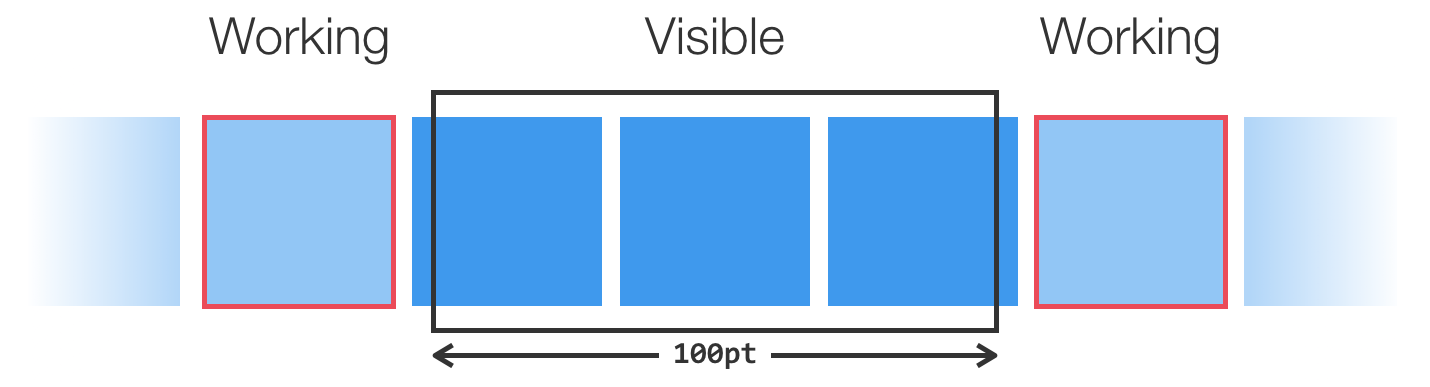
A *working range* is a range of section controllers who aren't yet visible, but are near the screen. Section controllers are notified of their entrance and exit to this range. This concept lets your section controllers **prepare content** before they come on screen (e.g. download images).
|
|
|
|
The `IGListAdapter` must be initialized with a range value in order to work. This value is a multiple of the visible height or width, depending on the scroll-direction.
|
|
|
|
```swift
|
|
let adapter = ListAdapter(updater: ListAdapterUpdater(),
|
|
viewController: self,
|
|
workingRangeSize: 1) // 1 before/after visible objects
|
|
```
|
|
|
|
|
|
|
|
You can set the weak `workingRangeDelegate` on a section controller to receive events.
|
|
|
|
### Supplementary Views
|
|
|
|
Adding supplementary views to section controllers is as simple as setting the (weak) `supplementaryViewSource` and implementing the `IGListSupplementaryViewSource` protocol. This protocol works nearly the same as returning and configuring cells.
|
|
|
|
### Display Delegate
|
|
|
|
Section controllers can set the weak `displayDelegate` delegate to an object, including `self`, to receive display events about a section controller and individual cells.
|
|
|
|
### Custom Updaters
|
|
|
|
The default `IGListAdapterUpdater` should handle any `UICollectionView` update that you need. However, if you find the functionality lacking, or want to perform updates in a very specific way, you can create an object that conforms to the `IGListUpdatingDelegate` protocol and initialize a new `IGListAdapter` with it.
|
|
|
|
Check out the updater `IGListReloadDataUpdater` (used in unit tests) for an example.
|