 f8cd64cb50
### What is this PR for? The aggregation functions interpret NaN columns as 1 which leads to incorrect output being shown in charts. This PR fixes this by correcting the sum, min, max and average aggregation method. ### What type of PR is it? Bug Fix ### Todos ### What is the Jira issue? https://issues.apache.org/jira/browse/ZEPPELIN-3091 ### How should this be tested? * Update the data field of a paragraph results with %table to contain null values, e.g. `"data": "age\tvalue\n19\t4\n20\t3\n21\t7\n22\t9\n23\t20\n24\t24\n25\t44\n26\t77\n27\t94\n28\t103\n29\t97\n20\t5\n20\tnull\n"` The "null" values should be ignored for sum, min, max but included for count (and hence average). ### Screenshots (if appropriate) 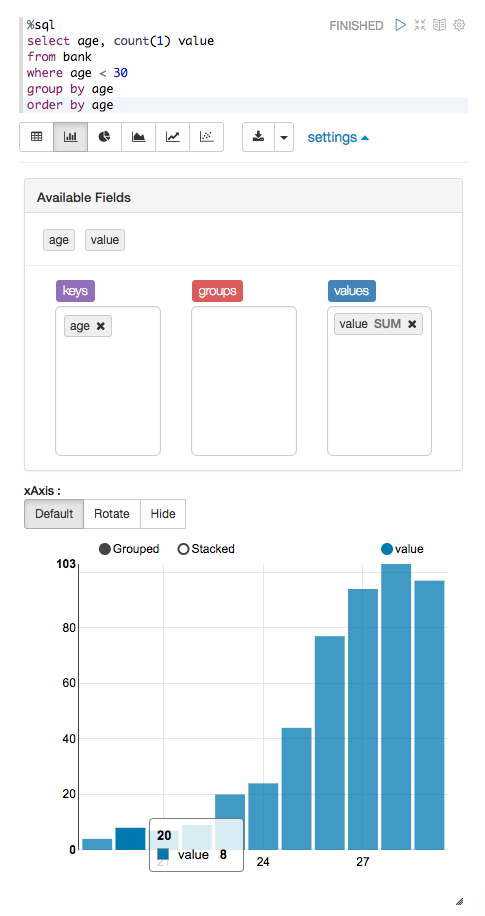 ### Questions: * Does the licenses files need update? No * Is there breaking changes for older versions? No * Does this needs documentation? No Author: Naman Mishra <namanmishra1991@gmail.com> Closes #2696 from namanmishra91/ZEPPELIN-3091 and squashes the following commits: |
||
|---|---|---|
| .. | ||
| e2e | ||
| src | ||
| .babelrc | ||
| .bowerrc | ||
| .editorconfig | ||
| .eslintrc | ||
| bower.json | ||
| Gruntfile.js | ||
| karma.conf.js | ||
| package.json | ||
| pom.xml | ||
| protractor.conf.js | ||
| README.md | ||
| webpack.config.js | ||

Zeppelin Web Application
This is Zeppelin's frontend project.
Development Guide
Local Development
It is recommended to install node 6.0.0+ since Zeppelin uses 6.9.1+ (see creationix/nvm)
All build commands are described in package.json
# install required depepdencies and bower packages (only once)
$ npm install -g yarn
$ yarn install

# build zeppelin-web for production
$ yarn run build

# run frontend application only in dev mode (localhost:9000)
# you need to run zeppelin backend instance also
$ yarn run dev
Supports the following options with using npm environment variable when running the web development mode.
# if you are using a custom port instead of default(8080),
# you must use the 'SERVER_PORT' variable to run the web application development mode
$ SERVER_PORT=YOUR_ZEPPELIN_PORT yarn run dev

# if you want to use a web dev port instead of default(9000),
# you can use the 'WEB_PORT' variable
$ WEB_PORT=YOUR_WEB_DEV_PORT yarn run dev
Testing
# running unit tests
$ yarn run test

# running e2e tests: make sure that zeppelin instance started (localhost:8080)
$ yarn run e2e
- to write unit tests, please refer Angular Test Patterns
- to write e2e tests, please refer Protractor Tutorial
Packaging
If you want to package the zeppelin-web only, simply run this command in this folder.
This will download all the dependencies including node (the binaries in the folder zeppelin-web/node)
$ mvn package
Troubleshooting
Git error
In case of the error ECMDERR Failed to execute "git ls-remote --tags --heads git://xxxxx", exit code of #128
change your git config with git config --global url."https://".insteadOf git://
Proxy issues
Try to add to the .bowerrc file the following content:
  "proxy" : "http://<host>:<port>",
  "https-proxy" : "http://<host>:<port>"
also try to add proxy info to yarn install command:
<execution>
	<id>yarn install</id>
	<goals>
    	<goal>yarn</goal>
    </goals>
    <configuration>
    	<arguments>--proxy=http://<host>:<port> --https-proxy=http://<host>:<port></arguments>
    </configuration>
</execution>
and retry to build again.
Contribute on Zeppelin Web
If you wish to help us and contribute to Zeppelin WebApplication, please look at the overall project contribution guidelines and the more focused Zeppelin WebApplication's documentation.