---
layout: page
title: "Basic Display System in Apache Zeppelin"
description: "There are 3 basic display systems in Apache Zeppelin. By default, Zeppelin prints interpreter responce as a plain text using text display system. With %html directive, Zeppelin treats your output as HTML. You can also simply use %table display system to leverage Zeppelin's built in visualization."
group: usage/display_system
---
{% include JB/setup %}
# Basic Display System in Apache Zeppelin
## Text
By default, Apache Zeppelin prints interpreter response as a plain text using `text` display system.
 You can explicitly say you're using `text` display system.
 ## Html
With `%html` directive, Zeppelin treats your output as HTML
## Html
With `%html` directive, Zeppelin treats your output as HTML
 ### Mathematical expressions
HTML display system automatically formats mathematical expression using [MathJax](https://www.mathjax.org/). You can use
`\\( INLINE EXPRESSION \\)` and `$$ EXPRESSION $$` to format. For example
### Mathematical expressions
HTML display system automatically formats mathematical expression using [MathJax](https://www.mathjax.org/). You can use
`\\( INLINE EXPRESSION \\)` and `$$ EXPRESSION $$` to format. For example
 ## Table
If you have data that row separated by `\n` (newline) and column separated by `\t` (tab) with first row as header row, for example
## Table
If you have data that row separated by `\n` (newline) and column separated by `\t` (tab) with first row as header row, for example
 You can simply use `%table` display system to leverage Zeppelin's built in visualization.
 If table contents start with `%html`, it is interpreted as an HTML.
 > **Note :** Display system is backend independent.
## Network
With the `%network` directive, Zeppelin treats your output as a graph. Zeppelin can leverage the Property Graph Model.
### What is the Labelled Property Graph Model?
A [Property Graph](https://github.com/tinkerpop/gremlin/wiki/Defining-a-Property-Graph) is a graph that has these elements:
* a set of vertices
* each vertex has a unique identifier.
* each vertex has a set of outgoing edges.
* each vertex has a set of incoming edges.
* each vertex has a collection of properties defined by a map from key to value
* a set of edges
* each edge has a unique identifier.
* each edge has an outgoing tail vertex.
* each edge has an incoming head vertex.
* each edge has a label that denotes the type of relationship between its two vertices.
* each edge has a collection of properties defined by a map from key to value.
> **Note :** Display system is backend independent.
## Network
With the `%network` directive, Zeppelin treats your output as a graph. Zeppelin can leverage the Property Graph Model.
### What is the Labelled Property Graph Model?
A [Property Graph](https://github.com/tinkerpop/gremlin/wiki/Defining-a-Property-Graph) is a graph that has these elements:
* a set of vertices
* each vertex has a unique identifier.
* each vertex has a set of outgoing edges.
* each vertex has a set of incoming edges.
* each vertex has a collection of properties defined by a map from key to value
* a set of edges
* each edge has a unique identifier.
* each edge has an outgoing tail vertex.
* each edge has an incoming head vertex.
* each edge has a label that denotes the type of relationship between its two vertices.
* each edge has a collection of properties defined by a map from key to value.
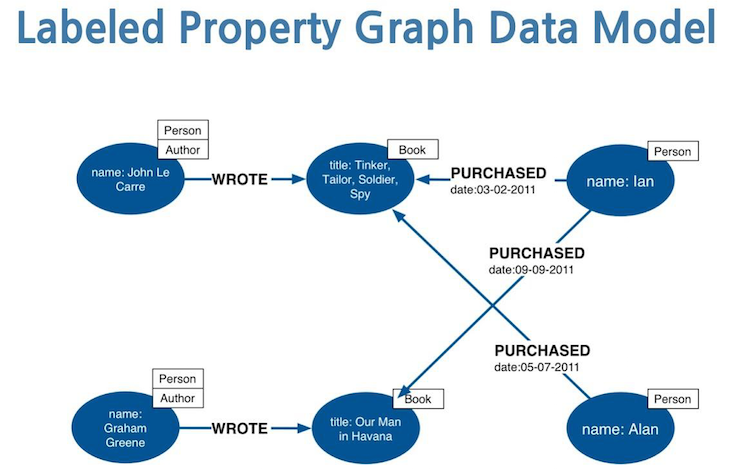
 A [Labelled Property Graph](https://neo4j.com/developer/graph-database/#property-graph) is a Property Graph where the nodes can be tagged with **labels** representing their different roles in the graph model
 ### What are the APIs?
The new NETWORK visualization is based on json with the following params:
* "nodes" (mandatory): list of nodes of the graph every node can have the following params:
* "id" (mandatory): the id of the node (must be unique);
* "label": the main Label of the node;
* "labels": the list of the labels of the node;
* "data": the data attached to the node;
* "edges": list of the edges of the graph;
* "id" (mandatory): the id of the edge (must be unique);
* "source" (mandatory): the id of source node of the edge;
* "target" (mandatory): the id of target node of the edge;
* "label": the main type of the edge;
* "data": the data attached to the edge;
* "labels": a map (K, V) where K is the node label and V is the color of the node;
* "directed": (true/false, default false) wich tells if is directed graph or not;
* "types": a *distinct* list of the edge types of the graph
If you click on a node or edge on the bottom of the paragraph you find a list of entity properties
### What are the APIs?
The new NETWORK visualization is based on json with the following params:
* "nodes" (mandatory): list of nodes of the graph every node can have the following params:
* "id" (mandatory): the id of the node (must be unique);
* "label": the main Label of the node;
* "labels": the list of the labels of the node;
* "data": the data attached to the node;
* "edges": list of the edges of the graph;
* "id" (mandatory): the id of the edge (must be unique);
* "source" (mandatory): the id of source node of the edge;
* "target" (mandatory): the id of target node of the edge;
* "label": the main type of the edge;
* "data": the data attached to the edge;
* "labels": a map (K, V) where K is the node label and V is the color of the node;
* "directed": (true/false, default false) wich tells if is directed graph or not;
* "types": a *distinct* list of the edge types of the graph
If you click on a node or edge on the bottom of the paragraph you find a list of entity properties
 This kind of graph can be easily *flatten* in order to support other visualization formats provided by Zeppelin.
 ### How to use it?
An example of a simple graph
```
%spark
print(s"""
%network {
"nodes": [
{"id": 1},
{"id": 2},
{"id": 3}
],
"edges": [
{"source": 1, "target": 2, "id" : 1},
{"source": 2, "target": 3, "id" : 2},
{"source": 1, "target": 2, "id" : 3},
{"source": 1, "target": 2, "id" : 4},
{"source": 2, "target": 1, "id" : 5},
{"source": 2, "target": 1, "id" : 6}
]
}
""")
```
that will look like:
### How to use it?
An example of a simple graph
```
%spark
print(s"""
%network {
"nodes": [
{"id": 1},
{"id": 2},
{"id": 3}
],
"edges": [
{"source": 1, "target": 2, "id" : 1},
{"source": 2, "target": 3, "id" : 2},
{"source": 1, "target": 2, "id" : 3},
{"source": 1, "target": 2, "id" : 4},
{"source": 2, "target": 1, "id" : 5},
{"source": 2, "target": 1, "id" : 6}
]
}
""")
```
that will look like:
 A little more complex graph:
```
%spark
print(s"""
%network {
"nodes": [{"id": 1, "label": "User", "data": {"fullName":"Andrea Santurbano"}},{"id": 2, "label": "User", "data": {"fullName":"Lee Moon Soo"}},{"id": 3, "label": "Project", "data": {"name":"Zeppelin"}}],
"edges": [{"source": 2, "target": 1, "id" : 1, "label": "HELPS"},{"source": 2, "target": 3, "id" : 2, "label": "CREATE"},{"source": 1, "target": 3, "id" : 3, "label": "CONTRIBUTE_TO", "data": {"oldPR": "https://github.com/apache/zeppelin/pull/1582"}}],
"labels": {"User": "#8BC34A", "Project": "#3071A9"},
"directed": true,
"types": ["HELPS", "CREATE", "CONTRIBUTE_TO"]
}
""")
```
that will look like:
A little more complex graph:
```
%spark
print(s"""
%network {
"nodes": [{"id": 1, "label": "User", "data": {"fullName":"Andrea Santurbano"}},{"id": 2, "label": "User", "data": {"fullName":"Lee Moon Soo"}},{"id": 3, "label": "Project", "data": {"name":"Zeppelin"}}],
"edges": [{"source": 2, "target": 1, "id" : 1, "label": "HELPS"},{"source": 2, "target": 3, "id" : 2, "label": "CREATE"},{"source": 1, "target": 3, "id" : 3, "label": "CONTRIBUTE_TO", "data": {"oldPR": "https://github.com/apache/zeppelin/pull/1582"}}],
"labels": {"User": "#8BC34A", "Project": "#3071A9"},
"directed": true,
"types": ["HELPS", "CREATE", "CONTRIBUTE_TO"]
}
""")
```
that will look like:
