 f0d03655e8
* Studio: add folder browser modal for Custom Folders

The Custom Folders row in the model picker currently only accepts a
typed path. On a remote-served Studio (Colab, shared workstation) that
means the user has to guess or paste the exact server-side absolute
path. A native browser folder picker can't solve this: HTML
`<input type="file" webkitdirectory>` hides the absolute path for
security, and the File System Access API (Chrome/Edge only) returns
handles rather than strings, neither of which the server can act on.

This PR adds a small in-app directory browser that lists paths on the
server and hands the chosen string back to the existing
`POST /api/models/scan-folders` flow.

## Backend

* New endpoint `GET /api/models/browse-folders`:
  * `path` query param (expands `~`, accepts relative or absolute; empty
    defaults to the user's home directory).
  * `show_hidden` boolean to include dotfiles/dotdirs.
  * Returns `{current, parent, entries[], suggestions[]}`. `parent` is
    null at the filesystem root.
  * Immediate subdirectories only (no recursion); files are never
    returned.
  * `entries[].has_models` is a cheap hint: the directory looks like it
    holds models if it is named `models--*` (HF hub cache layout) or
    one of the first 64 children is a .gguf/.safetensors/config.json/
    adapter_config.json or another `models--*` subfolder.
  * Sort order: model-bearing dirs, then plain, then hidden; case-
    insensitive alphabetical within each bucket.
  * Suggestions auto-populate from HOME, the HF cache root, and any
    already-registered scan folders, deduplicated.
  * Error surface: 404 for missing path, 400 for non-directory, 403 on
    permission errors. Auth-required like the other models routes.

* New Pydantic schemas `BrowseEntry` and `BrowseFoldersResponse` in
  `studio/backend/models/models.py`.

## Frontend

* New `FolderBrowser` component
  (`studio/frontend/src/components/assistant-ui/model-selector/folder-browser.tsx`)
  using the existing `Dialog` primitive. Features:
  * Clickable breadcrumb with a `..` row for parent navigation.
  * Quick-pick chips for the server-provided suggestions.
  * `Show hidden` checkbox.
  * In-flight fetch cancellation via AbortController so rapid
    navigation doesn't flash stale results.
  * Badges model-bearing directories inline.

* `chat-api.ts` gains `browseFolders(path?, showHidden?)` and matching
  types.

* `pickers.tsx` adds a folder-magnifier icon next to the existing `Add`
  button. Opening the browser seeds it with whatever the user has
  already typed; confirming fills the text input, leaving the existing
  validation and save flow unchanged.

## What it does NOT change

* The existing text-input flow still works; the browser is additive.
* No new permissions or escalation; the endpoint reads only directories
  the server process is already allowed to read.
* No model scanning or filesystem mutation happens from the browser
  itself -- it just returns basenames for render.

* [pre-commit.ci] auto fixes from pre-commit.com hooks

for more information, see https://pre-commit.ci

* Studio: cap folder-browser entries and expose truncated flag

Pointing the folder browser at a huge directory (``/usr/lib``,
``/proc``, or a synthetic tree with thousands of subfolders) previously
walked the whole listing and stat-probed every child via
``_looks_like_model_dir``. That is both a DoS shape for the server
process and a large-payload surprise for the client.

Introduce a hard cap of 2000 subdirectory entries and a
``truncated: bool`` field on the response. The frontend renders a small
hint below the list when it fires, prompting the user to narrow the
path. Below-cap directories are unchanged.

Verified end-to-end against the live backend with a synthetic tree of
2050 directories: response lands at 2000 entries, ``truncated=true``,
listing finishes in sub-second time (versus tens of seconds if we were
stat-storming).

* Studio: suggest LM Studio / Ollama dirs + 2-level model probe

Three improvements to the folder-browser, driven by actually dropping
an LM Studio-style install (publisher/model/weights.gguf) into the
sandbox and walking the UX:

## 1. Quick-pick chips for other local-LLM tools

`well_known_model_dirs()` (new) returns paths commonly used by
adjacent tools. Only paths that exist are returned so the UI never
shows dead chips.

* LM Studio current + legacy roots + user-configured
  `downloadsFolder` from its `settings.json` (reuses the existing
  `lmstudio_model_dirs()` helper).
* Ollama: `$OLLAMA_MODELS` env override, then `~/.ollama/models`,
  `/usr/share/ollama/.ollama/models`, and `/var/lib/ollama/.ollama/models`
  (the systemd-service install path surfaced in the upstream "where is
  everything?" issue).
* Generic user-choice locations: `~/models`, `~/Models`.

Dedup is stable across all sources.

## 2. Two-level model-bearing probe

LM Studio and Ollama both use `root/publisher/model/weights.gguf`.
The previous `has_models` heuristic only probed one level, so the
publisher dir (whose immediate children are model dirs, not weight
files) was always marked as non-model-bearing. Pulled the direct-
signal logic into `_has_direct_model_signal` and added a grandchild
probe so the classic layout is now recognised.

Still O(PROBE^2) worst-case, still returns immediately for
`models--*` names (HF cache layout) and for any direct weight file.

## 3. model_files_here hint on response body

A leaf model dir (just GGUFs, no subdirs) previously rendered as
`(empty directory)` in the modal, confusing users into thinking the
folder wasn't scannable. Added a `model_files_here` count on the
response (capped at 200) and a small hint row in the modal: `N model
files in this folder. Click "Use this folder" to scan it.`

## Verification

Simulated an LM Studio install by downloading the real 84 MB
`unsloth/SmolLM2-135M-Instruct-Q2_K.gguf` into
`~/.lmstudio/models/unsloth/SmolLM2-135M-Instruct-GGUF/`. Confirmed
end-to-end:

* Home listing suggests `~/.lmstudio/models` as a chip.
* Browsing `~/.lmstudio/models` flags `unsloth` (publisher) as
  `has_models=true` via the 2-level probe.
* Browsing the publisher flags `SmolLM2-135M-Instruct-GGUF` (model
  dir) as `has_models=true`.
* Browsing the model dir returns empty entries but
  `model_files_here=1`, and the frontend renders a hint telling the
  user it is a valid target.

* Studio: one-click scan-folder add + prominent remove + plain search icon

Three small Custom Folders UX fixes after real-use walkthrough:

* **One-click add from the folder browser**. Confirming `Use this
  folder` now submits the path directly to
  `POST /api/models/scan-folders` instead of just populating the text
  input. `handleAddFolder` takes an optional explicit path so the
  submit lands in the same tick as `setFolderInput`, avoiding a
  state-flush race. The typed-path + `Add` button flow is unchanged.

* **Prominent remove X on scan folders**. The per-folder delete
  button was `text-muted-foreground/40` and hidden entirely on
  desktop until hovered (`md:opacity-0 md:group-hover:opacity-100`).
  Dropped the hover-only cloak, bumped color to `text-foreground/70`,
  added a red hover/focus background, and sized the icon up from
  `size-2.5` to `size-3`. Always visible on every viewport.

* **Plain search icon for the Browse button**. `FolderSearchIcon`
  replaced with `Search01Icon` so it reads as a simple "find a
  folder" action alongside the existing `Add01Icon`.

* Studio: align Custom Folders + and X buttons on the same right edge

The Custom Folders header used `px-2.5` with a `p-0.5` icon button,
while each folder row used `px-3` with a `p-1` button. That put the
X icon 4px further from the right edge than the +. Normalised both
rows to `px-2.5` with `p-1` so the two icons share a column.

* Studio: empty-state button opens the folder browser directly

The first-run empty state for Custom Folders was a text link reading
"+ Add a folder to scan for local models" whose click toggled the
text input. That's the wrong default: a user hitting the empty state
usually doesn't know what absolute path to type, which is exactly
what the folder browser is for.

* Reword to "Browse for a models folder" with a search-icon
  affordance so the label matches what the click does.
* Click opens the folder browser modal directly. The typed-path +
  Add button flow is still available via the + icon in the
  section header, so users who know their path keep that option.
* Slightly bump the muted foreground opacity (70 -> hover:foreground)
  so the button reads as a primary empty-state action rather than a
  throwaway hint.

* Studio: Custom Folders header gets a dedicated search + add button pair

The Custom Folders section header had a single toggle button that
flipped between + and X. That put the folder-browser entry point
behind the separate empty-state link. Cleaner layout: two buttons in
the header, search first, then add.

* Search icon (left) opens the folder browser modal directly.
* Plus icon (right) toggles the text-path input (unchanged).
* The first-run empty-state link is removed -- the two header icons
  cover both flows on every state.

Both buttons share the same padding / icon size so they line up with
each other and with the per-folder remove X.

* Studio: sandbox folder browser + bound caps + UX recoveries

PR review fixes for the Custom Folders folder browser. Closes the
high-severity CodeQL path-traversal alert and addresses the codex /
gemini P2 findings.

Backend (studio/backend/routes/models.py):

* New _build_browse_allowlist + _is_path_inside_allowlist sandbox.
  browse_folders now refuses any target that doesn't resolve under
  HOME, HF cache, Studio dirs, registered scan folders, or the
  well-known third-party model dirs. realpath() is used so symlink
  traversal cannot escape the sandbox. Also gates the parent crumb
  so the up-row hides instead of 403'ing.
* _BROWSE_ENTRY_CAP now bounds *visited* iterdir entries, not
  *appended* entries. Dirs full of files (or hidden subdirs when
  show_hidden is False) used to defeat the cap.
* _count_model_files gets the same visited-count fix.
* PermissionError no longer swallowed silently inside the
  enumeration / counter loops -- now logged at debug.

Frontend (folder-browser.tsx, pickers.tsx, chat-api.ts):

* splitBreadcrumb stops mangling literal backslashes inside POSIX
  filenames; only Windows-style absolute paths trigger separator
  normalization. The Windows drive crumb value is now C:/ (drive
  root) instead of C: (drive-relative CWD-on-C).
* browseFolders accepts and forwards an AbortSignal so cancelled
  navigations actually cancel the in-flight backend enumeration.
* On initial-path fetch error, FolderBrowser now falls back to HOME
  instead of leaving the modal as an empty dead end.
* When the auto-add path (one-click "Use this folder") fails, the
  failure now surfaces via toast in addition to the inline
  paragraph (which is hidden when the typed-input panel is closed).

* Studio: rebuild browse target from trusted root for CodeQL clean dataflow

CodeQL's py/path-injection rule kept flagging the post-validation
filesystem operations because the sandbox check lived inside a
helper function (_is_path_inside_allowlist) and CodeQL only does
intra-procedural taint tracking by default. The user-derived
``target`` was still flowing into ``target.exists`` /
``target.is_dir`` / ``target.iterdir``.

The fix: after resolving the user-supplied ``candidate_path``,
locate the matching trusted root from the allowlist and rebuild
``target`` by appending each individually-validated segment to
that trusted root. Each segment is rejected if it isn't a single
safe path component (no separators, no ``..``, no empty/dot).
The downstream filesystem ops now operate on a Path constructed
entirely from ``allowed_roots`` (trusted) plus those validated
segments, so CodeQL's dataflow no longer sees a tainted source.

Behavior is unchanged for all valid inputs -- only the
construction of ``target`` is restructured. Live + unit tests
all pass (58 selected, 7 deselected for Playwright env).

* Studio: walk browse paths from trusted roots for CodeQL

---------

Co-authored-by: pre-commit-ci[bot] <66853113+pre-commit-ci[bot]@users.noreply.github.com>
Co-authored-by: Ubuntu <ubuntu@h100-8-cheapest.us-east5-a.c.unsloth.internal>
|
||
|---|---|---|
| .github | ||
| images | ||
| scripts | ||
| studio | ||
| tests | ||
| unsloth | ||
| unsloth_cli | ||
| .gitattributes | ||
| .gitignore | ||
| .pre-commit-ci.yaml | ||
| .pre-commit-config.yaml | ||
| build.sh | ||
| cli.py | ||
| CODE_OF_CONDUCT.md | ||
| CONTRIBUTING.md | ||
| COPYING | ||
| install.ps1 | ||
| install.sh | ||
| LICENSE | ||
| pyproject.toml | ||
| README.md | ||
| unsloth-cli.py | ||

Run and train AI models with a unified local interface.
Features • Quickstart • Notebooks • Documentation • Reddit
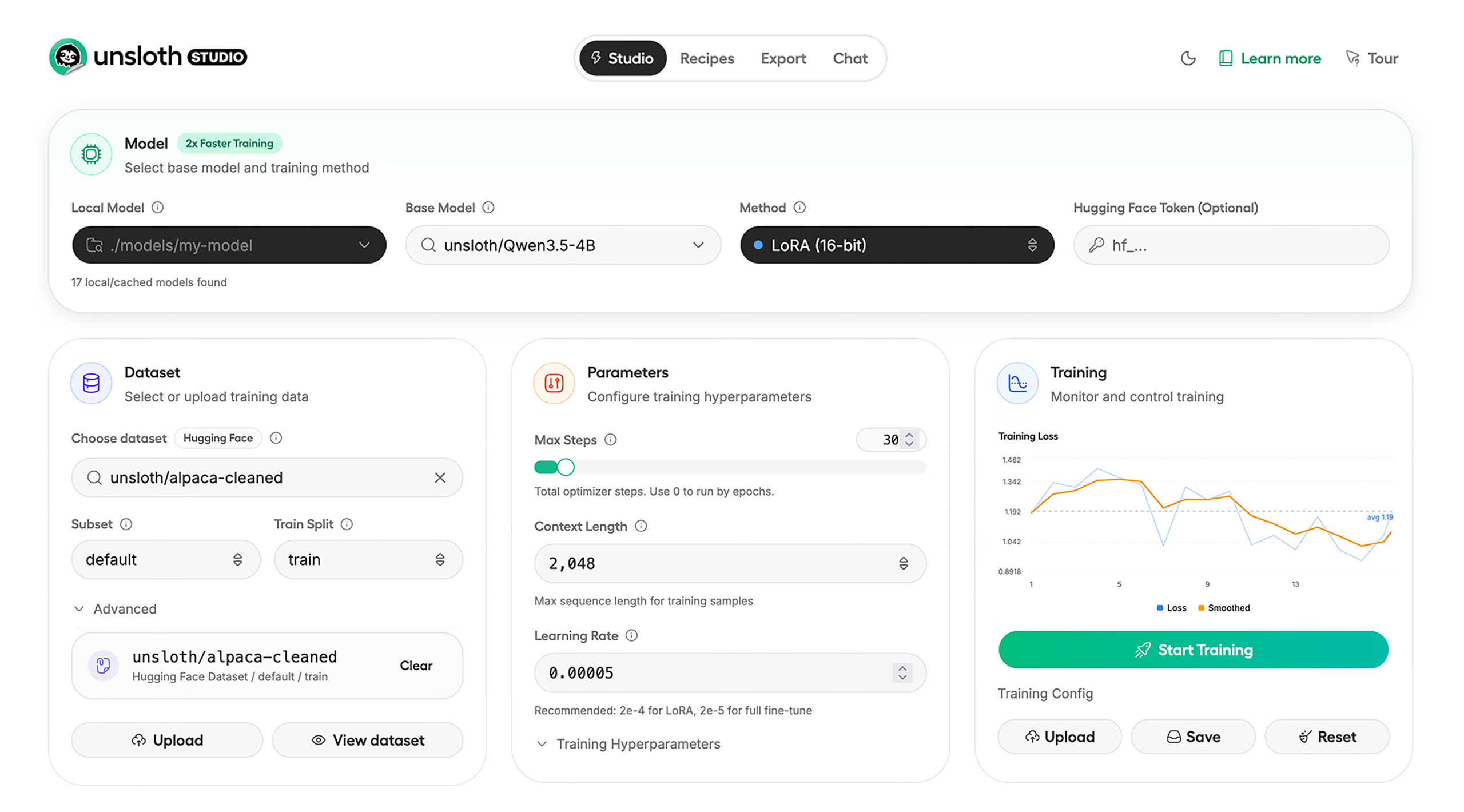
Unsloth Studio (Beta) lets you run and train text, audio, embedding, vision models on Windows, Linux and macOS.
⭐ Features
Unsloth provides several key features for both inference and training:
Inference
- Search + download + run models including GGUF, LoRA adapters, safetensors
- Export models: Save or export models to GGUF, 16-bit safetensors and other formats.
- Tool calling: Support for self-healing tool calling and web search
- Code execution: lets LLMs test code in Claude artifacts and sandbox environments
- Auto-tune inference parameters and customize chat templates.
- We work directly with teams behind gpt-oss, Qwen3, Llama 4, Mistral, Gemma 1-3, and Phi-4, where we’ve fixed bugs that improve model accuracy.
- Upload images, audio, PDFs, code, DOCX and more file types to chat with.
Training
- Train and RL 500+ models up to 2x faster with up to 70% less VRAM, with no accuracy loss.
- Custom Triton and mathematical kernels. See some collabs we did with PyTorch and Hugging Face.
- Data Recipes: Auto-create datasets from PDF, CSV, DOCX etc. Edit data in a visual-node workflow.
- Reinforcement Learning (RL): The most efficient RL library, using 80% less VRAM for GRPO, FP8 etc.
- Supports full fine-tuning, RL, pretraining, 4-bit, 16-bit and, FP8 training.
- Observability: Monitor training live, track loss and GPU usage and customize graphs.
- Multi-GPU training is supported, with major improvements coming soon.
⚡ Quickstart
Unsloth can be used in two ways: through Unsloth Studio, the web UI, or through Unsloth Core, the code-based version. Each has different requirements.
Unsloth Studio (web UI)
Unsloth Studio (Beta) works on Windows, Linux, WSL and macOS.
- CPU: Supported for Chat and Data Recipes currently
- NVIDIA: Training works on RTX 30/40/50, Blackwell, DGX Spark, Station and more
- macOS: Currently supports chat and Data Recipes. MLX training is coming very soon
- AMD: Chat + Data works. Train with Unsloth Core. Studio support is out soon.
- Coming soon: Training support for Apple MLX, AMD, and Intel.
- Multi-GPU: Available now, with a major upgrade on the way
macOS, Linux, WSL:
curl -fsSL https://unsloth.ai/install.sh | sh
Windows:
irm https://unsloth.ai/install.ps1 | iex
Launch
unsloth studio -H 0.0.0.0 -p 8888
Update
To update, use the same install commands as above. Or run (does not work on Windows):
unsloth studio update
Docker
Use our Docker image unsloth/unsloth container. Run:
docker run -d -e JUPYTER_PASSWORD="mypassword" \
  -p 8888:8888 -p 8000:8000 -p 2222:22 \
  -v $(pwd)/work:/workspace/work \
  --gpus all \
  unsloth/unsloth
Developer, Nightly, Uninstall
To see developer, nightly and uninstallation etc. instructions, see advanced installation.
Unsloth Core (code-based)
Linux, WSL:
curl -LsSf https://astral.sh/uv/install.sh | sh
uv venv unsloth_env --python 3.13
source unsloth_env/bin/activate
uv pip install unsloth --torch-backend=auto
Windows:
winget install -e --id Python.Python.3.13
winget install --id=astral-sh.uv  -e
uv venv unsloth_env --python 3.13
.\unsloth_env\Scripts\activate
uv pip install unsloth --torch-backend=auto
For Windows, pip install unsloth works only if you have PyTorch installed. Read our Windows Guide.
You can use the same Docker image as Unsloth Studio.
AMD, Intel:
For RTX 50x, B200, 6000 GPUs: uv pip install unsloth --torch-backend=auto. Read our guides for: Blackwell and DGX Spark.
To install Unsloth on AMD and Intel GPUs, follow our AMD Guide and Intel Guide.
📒 Free Notebooks
Train for free with our notebooks. You can use our new free Unsloth Studio notebook to run and train models for free in a web UI. Read our guide. Add dataset, run, then deploy your trained model.
| Model | Free Notebooks | Performance | Memory use |
|---|---|---|---|
| Gemma 4 (E2B) | ▶️ Start for free | 1.5x faster | 50% less |
| Qwen3.5 (4B) | ▶️ Start for free | 1.5x faster | 60% less |
| gpt-oss (20B) | ▶️ Start for free | 2x faster | 70% less |
| Qwen3.5 GSPO | ▶️ Start for free | 2x faster | 70% less |
| gpt-oss (20B): GRPO | ▶️ Start for free | 2x faster | 80% less |
| Qwen3: Advanced GRPO | ▶️ Start for free | 2x faster | 70% less |
| embeddinggemma (300M) | ▶️ Start for free | 2x faster | 20% less |
| Mistral Ministral 3 (3B) | ▶️ Start for free | 1.5x faster | 60% less |
| Llama 3.1 (8B) Alpaca | ▶️ Start for free | 2x faster | 70% less |
| Llama 3.2 Conversational | ▶️ Start for free | 2x faster | 70% less |
| Orpheus-TTS (3B) | ▶️ Start for free | 1.5x faster | 50% less |
- See all our notebooks for: Kaggle, GRPO, TTS, embedding & Vision
- See all our models and all our notebooks
- See detailed documentation for Unsloth here
🦥 Unsloth News
- Gemma 4: Run and train Google’s new models directly in Unsloth Studio! Blog
- Introducing Unsloth Studio: our new web UI for running and training LLMs. Blog
- Qwen3.5 - 0.8B, 2B, 4B, 9B, 27B, 35-A3B, 112B-A10B are now supported. Guide + notebooks
- Train MoE LLMs 12x faster with 35% less VRAM - DeepSeek, GLM, Qwen and gpt-oss. Blog
- Embedding models: Unsloth now supports ~1.8-3.3x faster embedding fine-tuning. Blog • Notebooks
- New 7x longer context RL vs. all other setups, via our new batching algorithms. Blog
- New RoPE & MLP Triton Kernels & Padding Free + Packing: 3x faster training & 30% less VRAM. Blog
- 500K Context: Training a 20B model with >500K context is now possible on an 80GB GPU. Blog
- FP8 & Vision RL: You can now do FP8 & VLM GRPO on consumer GPUs. FP8 Blog • Vision RL
- gpt-oss by OpenAI: Read our RL blog, Flex Attention blog and Guide.
📥 Advanced Installation
The below advanced instructions are for Unsloth Studio. For Unsloth Core advanced installation, view our docs.
Developer installs: macOS, Linux, WSL:
git clone https://github.com/unslothai/unsloth
cd unsloth
./install.sh --local
unsloth studio -H 0.0.0.0 -p 8888
Then to update :
unsloth studio update
Developer installs: Windows PowerShell:
git clone https://github.com/unslothai/unsloth.git
cd unsloth
Set-ExecutionPolicy -Scope Process -ExecutionPolicy Bypass
.\install.ps1 --local
unsloth studio -H 0.0.0.0 -p 8888
Then to update :
unsloth studio update
Nightly: MacOS, Linux, WSL:
git clone https://github.com/unslothai/unsloth
cd unsloth
git checkout nightly
./install.sh --local
unsloth studio -H 0.0.0.0 -p 8888
Then to launch every time:
unsloth studio -H 0.0.0.0 -p 8888
Nightly: Windows:
Run in Windows Powershell:
git clone https://github.com/unslothai/unsloth.git
cd unsloth
git checkout nightly
Set-ExecutionPolicy -Scope Process -ExecutionPolicy Bypass
.\install.ps1 --local
unsloth studio -H 0.0.0.0 -p 8888
Then to launch every time:
unsloth studio -H 0.0.0.0 -p 8888
Uninstall
You can uninstall Unsloth Studio by deleting its install folder usually located under $HOME/.unsloth/studio on Mac/Linux/WSL and %USERPROFILE%\.unsloth\studio on Windows. Using the rm -rf commands will delete everything, including your history, cache:
- MacOS, WSL, Linux:
rm -rf ~/.unsloth/studio - Windows (PowerShell):
Remove-Item -Recurse -Force "$HOME\.unsloth\studio"
For more info, see our docs.
Deleting model files
You can delete old model files either from the bin icon in model search or by removing the relevant cached model folder from the default Hugging Face cache directory. By default, HF uses:
- MacOS, Linux, WSL:
~/.cache/huggingface/hub/ - Windows:
%USERPROFILE%\.cache\huggingface\hub\
💚 Community and Links
| Type | Links |
|---|---|
 Discord Discord |
Join Discord server |
 r/unsloth Reddit r/unsloth Reddit |
Join Reddit community |
| 📚 Documentation & Wiki | Read Our Docs |
_logo_late_2025.svg) Twitter (aka X) Twitter (aka X) |
Follow us on X |
| 🔮 Our Models | Unsloth Catalog |
| ✍️ Blog | Read our Blogs |
Citation
You can cite the Unsloth repo as follows:
@software{unsloth,
  author = {Daniel Han, Michael Han and Unsloth team},
  title = {Unsloth},
  url = {https://github.com/unslothai/unsloth},
  year = {2023}
}
If you trained a model with 🦥Unsloth, you can use this cool sticker!
License
Unsloth uses a dual-licensing model of Apache 2.0 and AGPL-3.0. The core Unsloth package remains licensed under Apache 2.0, while certain optional components, such as the Unsloth Studio UI are licensed under the open-source license AGPL-3.0.
This structure helps support ongoing Unsloth development while keeping the project open source and enabling the broader ecosystem to continue growing.
Thank You to
- The llama.cpp library that lets users run and save models with Unsloth
- The Hugging Face team and their libraries: transformers and TRL
- The Pytorch and Torch AO team for their contributions
- NVIDIA for their NeMo DataDesigner library and their contributions
- And of course for every single person who has contributed or has used Unsloth!