 b01e9af124
* feat(studio): replace navbar navigation with collapsible sidebar Add an app-wide sidebar with hover-expand and pin-to-dock behavior. Navigation items (Studio, Recipes, Export, Chat) move from the center pill navbar to the sidebar. Chat threads and recipes render as collapsible sub-lists. Navbar simplified to logo + update + close. - Extend SidebarProvider with pinned/hovered state model - New AppSidebar with animated active indicator, sloth profile menu, theme toggle, guided tour, back/forward navigation - Chat page refactored to URL-driven view state via search params - Extract reusable hooks for chat thread and recipe sidebar data - Guard startViewTransition for browser compatibility - Wrap chat deletions in Dexie transaction for data integrity * feat(studio): move logo to sidebar and make navbar overlay - Sidebar is now full-height with logo in SidebarHeader - Collapsed sidebar shows sticker.png, expanded shows full logo - Navbar is absolute-positioned overlay (no layout space) - Main content extends to top, aligning with navbar controls * feat(studio): full-height sidebar with recents, edge-to-edge nav buttons - Sidebar outside max-w-7xl, pinned to left edge - Remove sidebar rounding, menu buttons rounded-md - Nav buttons flush to sidebar edges with no left rounding - Replace collapsible recipes/chat with flat nav items - Add Recents section with chat history (1 item when not on chat, full on chat) - New Chat as first nav item with PencilEdit02Icon - Cursor pointer on all sidebar buttons - Navbar temporarily hidden for screenshots * fix(studio): fix chat scroll, action bar hover, collapsible recents - Fix sticky composer by removing `relative` override on viewport footer - Action bar buttons only show on hover (autohide=always) - Remove floating border/shadow from action bar - Add scroll space above composer for last message actions - Back/forward buttons use router history (stay in-app) - Recents section collapsible with chevron on chat route - Set html/body/#root height for proper h-full chain * fix(studio): address review feedback, clean up unused code - Unhide navbar (was left hidden from screenshot) - Remove unused imports: SidebarMenuSub*, BubbleChatIcon, ColumnInsertIcon - Remove unused vars: recipeItems, activeRecipeId, canCompare, recipesOpen - Include compare query id in active sidebar selection - Use store type for contextUsage instead of inline type - Simplify noop in sidebar.tsx - Remove empty className prop * feat(studio): add mobile sidebar, recent runs section, and misc UX fixes * feat(studio): scaffold settings feature module with dialog store * feat(studio): add tri-state theme store for settings * feat(chat): add clear-all-chats and export-chat-history utils * feat(studio): add settings dialog shell with tab rail * feat(studio): add appearance tab with theme and sidebar pin * feat(studio): add settings general tab with hf token, auto-title, reset prefs * feat(studio): add settings chat tab with export and clear * feat(studio): add api keys tab with list and revoke flow * feat(studio): add create-key form and reveal dialog * feat(studio): add usage examples panel to api keys tab * feat(studio): add settings about tab with update and shutdown * feat(studio): add settings dropdown item and cmd-comma shortcut * feat(studio): remove legacy api-keys route and chat-sheet preference rows * fix(studio): settings dialog a11y + polish pass * feat(studio): inline api key reveal card replacing nested dialog * fix(studio): hide revoked keys from settings list * refactor(studio): strip navbar and hoist training unload guard * feat(studio): explicit sidebar toggle, remove hover-open and pin icons * fix(studio): use SidebarRight01Icon for collapsed sidebar open toggle * fix(studio): address code review findings for settings dialog * feat(studio): collapsible navigate group with standalone new-chat and compare * fix(studio): chat-only standalone actions, use ColumnInsertIcon for compare * fix(studio): sidebar new-chat/compare state reset and icon-mode collapsible * feat(studio): add compact logo assets for sidebar header * Fixed sidebar design * fix(studio): sidebar delete icon hover contrast and sizing * feat(studio): route-gate sidebar recents (chats off /studio, runs on /studio) * feat(studio): add chat search store * feat(studio): add chat search index hook with snapshot-on-open * feat(studio): add chat search command dialog with global shortcut * feat(studio): wire chat search into sidebar * fix(studio): trim hf token on save, add show/hide toggle, commit on close * revert(studio): restore original sidebar/border colors, brighten sidebar * feat(studio): forward overlayClassName through CommandDialog * fix(studio): wrap search dialog in Command context, redesign as flat 635px card * fix(studio): reserve right padding on recent items so delete icon stops overlapping title * fix(studio): skip hf token unmount-commit during reset-prefs reload * chore(studio): drop unused icon import and unreachable runs navigate branch * fix(studio): chat search index filters archived before limit, batches message query, picks up reasoning text * fix(studio): keep CommandEmpty in tree so empty state renders correctly * fix(studio): cap system prompt and chat template textareas so they scroll instead of growing * fix(studio): attach chat-compare tour anchor to sidebar compare button * fix(studio): persist system theme explicitly so next-themes does not clobber on reload * fix(studio): auto-switch to history tab when selecting a recent run from sidebar * UI overhaul: chatbox, scrollbar, sidebar, and compare view UI Changes: - Redesigned the Compare UI with general cleanup - Redesigned the Chatbox UI - Reduced the width of the user chat bubble for improved readability - Narrowed the user chat box across the content page - Adjusted thinking-box text color to be slightly darker - Removed faded text effect from chat messages - Removed faded text effect from the thinking box - Added a small LLM chat safety note at the bottom of the chatbox - Restyled the scrollbar Layout & Behavior: - Reworked the scrollbar to span the full height of the page (no top/bottom padding) and remain persistently visible when content is scrollable, rather than only on hover - Reworked the Configuration sidebar to span full height — removed rounded corners and borders, with the scrollbar adjusted to match the full top-to-bottom layout - Adjusted the top menu and bottom chatbox content areas to work correctly with the new full-page scroll behavior - Made chat content match the chatbox width, with content sliding slightly behind the chatbox when scrolling - Aligned chat text width with the chatbox for visual consistency, including how far the text extends behind the chatbox Fixes: - Fixed the chatbox not auto-expanding when typing multi-line input while bottom-positioned during an active chat (previously only worked before a chat had started) - Fixed positioning and design of the user chat hover menu buttons to match the assistant chat box — now displayed below the chat bubble instead of on the left side * Fix user message layout in thread component * swap code icon * fix compare layout * fix compare pane flex * Sidebar improvements and fixes - Added scrolling support to the sidebar so menus and recent chats no longer get hidden - Recent chats are now always visible in the sidebar, not hidden when in Studio, Recipes, or Export - Recent chat is now deselected when selecting other navigations - Fixed sidebar glitch where browser resize could make the sidebar and expand button disappear completely - Fixed glitch where the open-sidebar hover tooltip appeared above the logo when clicking expand sidebar - Reduced sidebar width on mobile to around 2/3 of the screen (was too wide) - Made the close-sidebar hover tooltip consistent with the rest of the design - Removed sidebar collapse/expand animation - Small adjustment to chat width * Fix route scrolling, polling, and theme sync issues * Fix Studio page scrolling --------- Co-authored-by: sneakr <hauzin@hotmail.com> |
||
|---|---|---|
| .github | ||
| images | ||
| scripts | ||
| studio | ||
| tests | ||
| unsloth | ||
| unsloth_cli | ||
| .gitattributes | ||
| .gitignore | ||
| .pre-commit-ci.yaml | ||
| .pre-commit-config.yaml | ||
| build.sh | ||
| cli.py | ||
| CODE_OF_CONDUCT.md | ||
| CONTRIBUTING.md | ||
| COPYING | ||
| install.ps1 | ||
| install.sh | ||
| LICENSE | ||
| pyproject.toml | ||
| README.md | ||
| unsloth-cli.py | ||

Run and train AI models with a unified local interface.
Features • Quickstart • Notebooks • Documentation • Reddit
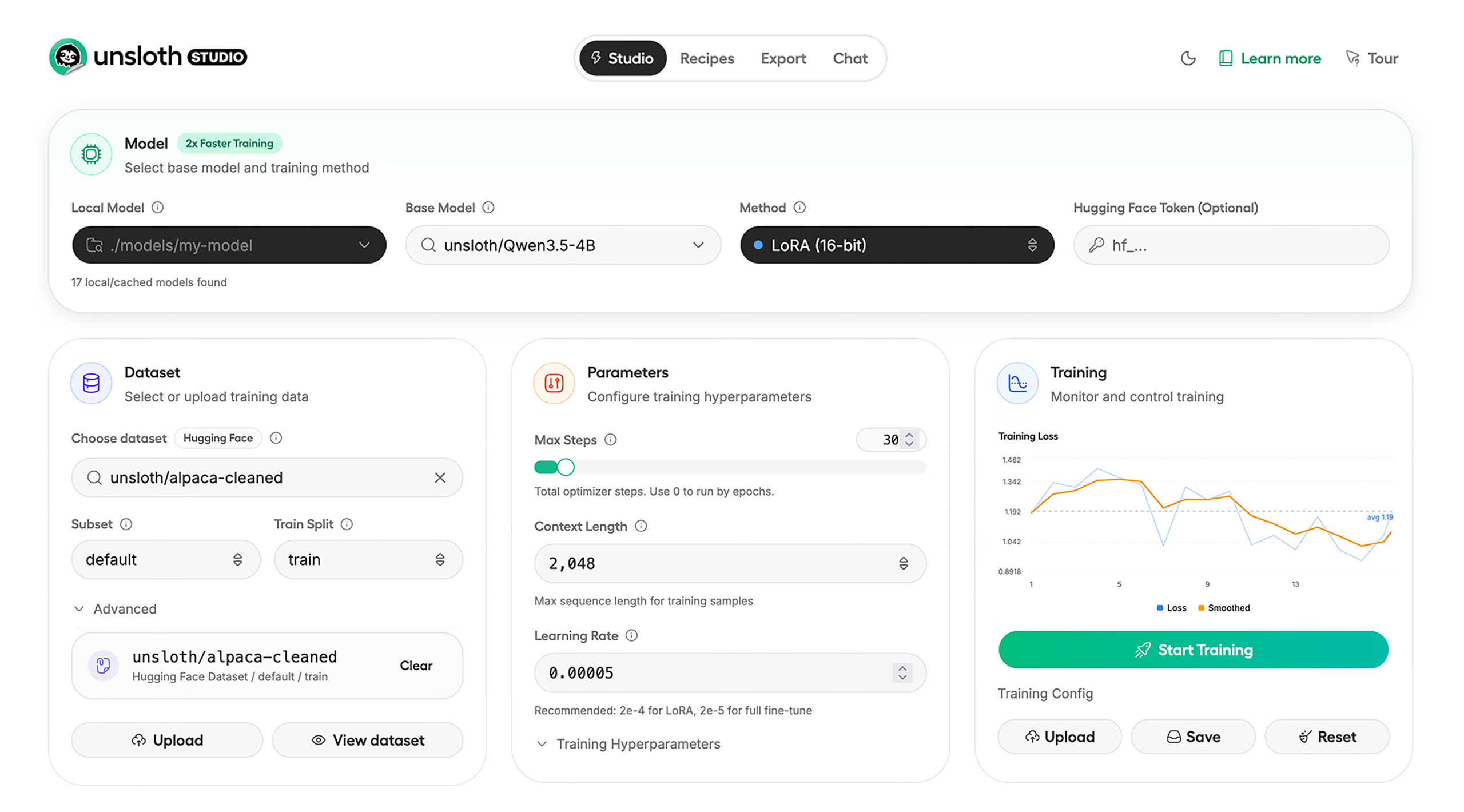
Unsloth Studio (Beta) lets you run and train text, audio, embedding, vision models on Windows, Linux and macOS.
⭐ Features
Unsloth provides several key features for both inference and training:
Inference
- Search + download + run models including GGUF, LoRA adapters, safetensors
- Export models: Save or export models to GGUF, 16-bit safetensors and other formats.
- Tool calling: Support for self-healing tool calling and web search
- Code execution: lets LLMs test code in Claude artifacts and sandbox environments
- Auto-tune inference parameters and customize chat templates.
- We work directly with teams behind gpt-oss, Qwen3, Llama 4, Mistral, Gemma 1-3, and Phi-4, where we’ve fixed bugs that improve model accuracy.
- Upload images, audio, PDFs, code, DOCX and more file types to chat with.
Training
- Train and RL 500+ models up to 2x faster with up to 70% less VRAM, with no accuracy loss.
- Custom Triton and mathematical kernels. See some collabs we did with PyTorch and Hugging Face.
- Data Recipes: Auto-create datasets from PDF, CSV, DOCX etc. Edit data in a visual-node workflow.
- Reinforcement Learning (RL): The most efficient RL library, using 80% less VRAM for GRPO, FP8 etc.
- Supports full fine-tuning, RL, pretraining, 4-bit, 16-bit and, FP8 training.
- Observability: Monitor training live, track loss and GPU usage and customize graphs.
- Multi-GPU training is supported, with major improvements coming soon.
⚡ Quickstart
Unsloth can be used in two ways: through Unsloth Studio, the web UI, or through Unsloth Core, the code-based version. Each has different requirements.
Unsloth Studio (web UI)
Unsloth Studio (Beta) works on Windows, Linux, WSL and macOS.
- CPU: Supported for Chat and Data Recipes currently
- NVIDIA: Training works on RTX 30/40/50, Blackwell, DGX Spark, Station and more
- macOS: Currently supports chat and Data Recipes. MLX training is coming very soon
- AMD: Chat + Data works. Train with Unsloth Core. Studio support is out soon.
- Coming soon: Training support for Apple MLX, AMD, and Intel.
- Multi-GPU: Available now, with a major upgrade on the way
macOS, Linux, WSL:
curl -fsSL https://unsloth.ai/install.sh | sh
Windows:
irm https://unsloth.ai/install.ps1 | iex
Launch
unsloth studio -H 0.0.0.0 -p 8888
Update
To update, use the same install commands as above. Or run (does not work on Windows):
unsloth studio update
Docker
Use our Docker image unsloth/unsloth container. Run:
docker run -d -e JUPYTER_PASSWORD="mypassword" \
  -p 8888:8888 -p 8000:8000 -p 2222:22 \
  -v $(pwd)/work:/workspace/work \
  --gpus all \
  unsloth/unsloth
Developer, Nightly, Uninstall
To see developer, nightly and uninstallation etc. instructions, see advanced installation.
Unsloth Core (code-based)
Linux, WSL:
curl -LsSf https://astral.sh/uv/install.sh | sh
uv venv unsloth_env --python 3.13
source unsloth_env/bin/activate
uv pip install unsloth --torch-backend=auto
Windows:
winget install -e --id Python.Python.3.13
winget install --id=astral-sh.uv  -e
uv venv unsloth_env --python 3.13
.\unsloth_env\Scripts\activate
uv pip install unsloth --torch-backend=auto
For Windows, pip install unsloth works only if you have PyTorch installed. Read our Windows Guide.
You can use the same Docker image as Unsloth Studio.
AMD, Intel:
For RTX 50x, B200, 6000 GPUs: uv pip install unsloth --torch-backend=auto. Read our guides for: Blackwell and DGX Spark.
To install Unsloth on AMD and Intel GPUs, follow our AMD Guide and Intel Guide.
📒 Free Notebooks
Train for free with our notebooks. You can use our new free Unsloth Studio notebook to run and train models for free in a web UI. Read our guide. Add dataset, run, then deploy your trained model.
| Model | Free Notebooks | Performance | Memory use |
|---|---|---|---|
| Gemma 4 (E2B) | ▶️ Start for free | 1.5x faster | 50% less |
| Qwen3.5 (4B) | ▶️ Start for free | 1.5x faster | 60% less |
| gpt-oss (20B) | ▶️ Start for free | 2x faster | 70% less |
| Qwen3.5 GSPO | ▶️ Start for free | 2x faster | 70% less |
| gpt-oss (20B): GRPO | ▶️ Start for free | 2x faster | 80% less |
| Qwen3: Advanced GRPO | ▶️ Start for free | 2x faster | 70% less |
| embeddinggemma (300M) | ▶️ Start for free | 2x faster | 20% less |
| Mistral Ministral 3 (3B) | ▶️ Start for free | 1.5x faster | 60% less |
| Llama 3.1 (8B) Alpaca | ▶️ Start for free | 2x faster | 70% less |
| Llama 3.2 Conversational | ▶️ Start for free | 2x faster | 70% less |
| Orpheus-TTS (3B) | ▶️ Start for free | 1.5x faster | 50% less |
- See all our notebooks for: Kaggle, GRPO, TTS, embedding & Vision
- See all our models and all our notebooks
- See detailed documentation for Unsloth here
🦥 Unsloth News
- Gemma 4: Run and train Google’s new models directly in Unsloth Studio! Blog
- Introducing Unsloth Studio: our new web UI for running and training LLMs. Blog
- Qwen3.5 - 0.8B, 2B, 4B, 9B, 27B, 35-A3B, 112B-A10B are now supported. Guide + notebooks
- Train MoE LLMs 12x faster with 35% less VRAM - DeepSeek, GLM, Qwen and gpt-oss. Blog
- Embedding models: Unsloth now supports ~1.8-3.3x faster embedding fine-tuning. Blog • Notebooks
- New 7x longer context RL vs. all other setups, via our new batching algorithms. Blog
- New RoPE & MLP Triton Kernels & Padding Free + Packing: 3x faster training & 30% less VRAM. Blog
- 500K Context: Training a 20B model with >500K context is now possible on an 80GB GPU. Blog
- FP8 & Vision RL: You can now do FP8 & VLM GRPO on consumer GPUs. FP8 Blog • Vision RL
- gpt-oss by OpenAI: Read our RL blog, Flex Attention blog and Guide.
📥 Advanced Installation
The below advanced instructions are for Unsloth Studio. For Unsloth Core advanced installation, view our docs.
Developer installs: macOS, Linux, WSL:
git clone https://github.com/unslothai/unsloth
cd unsloth
./install.sh --local
unsloth studio -H 0.0.0.0 -p 8888
Then to update :
unsloth studio update
Developer installs: Windows PowerShell:
git clone https://github.com/unslothai/unsloth.git
cd unsloth
Set-ExecutionPolicy -Scope Process -ExecutionPolicy Bypass
.\install.ps1 --local
unsloth studio -H 0.0.0.0 -p 8888
Then to update :
unsloth studio update
Nightly: MacOS, Linux, WSL:
git clone https://github.com/unslothai/unsloth
cd unsloth
git checkout nightly
./install.sh --local
unsloth studio -H 0.0.0.0 -p 8888
Then to launch every time:
unsloth studio -H 0.0.0.0 -p 8888
Nightly: Windows:
Run in Windows Powershell:
git clone https://github.com/unslothai/unsloth.git
cd unsloth
git checkout nightly
Set-ExecutionPolicy -Scope Process -ExecutionPolicy Bypass
.\install.ps1 --local
unsloth studio -H 0.0.0.0 -p 8888
Then to launch every time:
unsloth studio -H 0.0.0.0 -p 8888
Uninstall
You can uninstall Unsloth Studio by deleting its install folder usually located under $HOME/.unsloth/studio on Mac/Linux/WSL and %USERPROFILE%\.unsloth\studio on Windows. Using the rm -rf commands will delete everything, including your history, cache:
- MacOS, WSL, Linux:
rm -rf ~/.unsloth/studio - Windows (PowerShell):
Remove-Item -Recurse -Force "$HOME\.unsloth\studio"
For more info, see our docs.
Deleting model files
You can delete old model files either from the bin icon in model search or by removing the relevant cached model folder from the default Hugging Face cache directory. By default, HF uses:
- MacOS, Linux, WSL:
~/.cache/huggingface/hub/ - Windows:
%USERPROFILE%\.cache\huggingface\hub\
💚 Community and Links
| Type | Links |
|---|---|
 Discord Discord |
Join Discord server |
 r/unsloth Reddit r/unsloth Reddit |
Join Reddit community |
| 📚 Documentation & Wiki | Read Our Docs |
_logo_late_2025.svg) Twitter (aka X) Twitter (aka X) |
Follow us on X |
| 🔮 Our Models | Unsloth Catalog |
| ✍️ Blog | Read our Blogs |
Citation
You can cite the Unsloth repo as follows:
@software{unsloth,
  author = {Daniel Han, Michael Han and Unsloth team},
  title = {Unsloth},
  url = {https://github.com/unslothai/unsloth},
  year = {2023}
}
If you trained a model with 🦥Unsloth, you can use this cool sticker!
License
Unsloth uses a dual-licensing model of Apache 2.0 and AGPL-3.0. The core Unsloth package remains licensed under Apache 2.0, while certain optional components, such as the Unsloth Studio UI are licensed under the open-source license AGPL-3.0.
This structure helps support ongoing Unsloth development while keeping the project open source and enabling the broader ecosystem to continue growing.
Thank You to
- The llama.cpp library that lets users run and save models with Unsloth
- The Hugging Face team and their libraries: transformers and TRL
- The Pytorch and Torch AO team for their contributions
- NVIDIA for their NeMo DataDesigner library and their contributions
- And of course for every single person who has contributed or has used Unsloth!