 7252410ccc
* studio: stream export worker output into the export dialog

The Export Model dialog only showed a spinner on the "Exporting..."
button while the worker subprocess was doing the actual heavy lifting.
For Merged to 16bit and GGUF / Llama.cpp exports this meant several
minutes (or more, for large models) of opaque silence, with no way to
tell whether save_pretrained_merged, convert_hf_to_gguf.py, or
llama-quantize was making progress.

This adds a live terminal-style output panel inside the export dialog,
rendered just above the Cancel / Start Export buttons and scrollable
with auto-follow-tail. It shows stdout and stderr from both the worker
process itself and any child process it spawns (GGUF converter,
llama-quantize), coloured by stream.

Backend

- core/export/worker.py: new _setup_log_capture(resp_queue) installed
  before LogConfig.setup_logging. It saves the original stdout/stderr
  fds, creates pipes, os.dup2's the write ends onto fds 1 and 2 (so
  every child process inherits the redirected fds), and spins up two
  daemon reader threads. Each thread reads bytes from a pipe, echoes
  them back to the original fd (so the server console keeps working),
  splits on \n and \r, and forwards each line to the resp queue as
  {"type":"log","stream":"stdout|stderr","line":...,"ts":...}.
  PYTHONUNBUFFERED=1 is set so nested Python converters flush
  immediately.

- core/export/orchestrator.py:
  - Thread-safe ring buffer (collections.deque, maxlen 4000) with a
    monotonically increasing seq counter. clear_logs(),
    get_logs_since(cursor), get_current_log_seq(), is_export_active().
  - _wait_response handles rtype == "log" by appending to the buffer
    and continuing the wait loop. Status messages are also surfaced as
    a "status" stream so users see high level progress alongside raw
    subprocess output.
  - load_checkpoint, _run_export, and cleanup_memory now wrap their
    bodies with the existing self._lock (previously unused), clear the
    log buffer at the start of each op, and flip _export_active in a
    try/finally so the SSE endpoint can detect idle.

- routes/export.py:
  - Wrapped every sync orchestrator call (load_checkpoint,
    cleanup_memory, export_merged_model, export_base_model,
    export_gguf, export_lora_adapter) in asyncio.to_thread so the
    FastAPI event loop stays free during long exports. Without this
    the new SSE endpoint could not be served concurrently with the
    blocking export POST.
  - New GET /api/export/logs/stream SSE endpoint. Honors
    Last-Event-ID and a since query param for reconnect, emits log /
    heartbeat / complete / error events, uses the id field to carry
    the log seq so clients can resume cleanly. On first connect
    without an explicit cursor it starts from the current seq so old
    lines from a previous run are not replayed.

Frontend

- features/export/api/export-api.ts: streamExportLogs() helper that
  authFetches the SSE endpoint and parses id / event / data fields
  manually (same pattern as streamTrainingProgress in train-api.ts).

- features/export/components/export-dialog.tsx:
  - Local useExportLogs(exporting) hook that opens the SSE stream on
    exporting transitions to true, accumulates up to 4000 lines in
    component state, and aborts on cleanup.
  - New scrollable output panel rendered above DialogFooter, only
    shown for Merged to 16bit and GGUF / Llama.cpp (LoRA adapter is
    a fast disk write with nothing to show). Dark terminal styling
    (bg-black/85, emerald text, rose for stderr, sky for status),
    max-height 14rem, auto-scrolls to the bottom on new output but
    stops following if the user scrolls up. A small streaming / idle
    indicator is shown next to the panel title.
  - DialogContent widens from sm:max-w-lg to sm:max-w-2xl when the
    output panel is visible so the logs have room to breathe.

Verified

- Python smoke test (tests/smoke_export_log_capture.py): spawns a
  real mp.get_context("spawn") process, installs _setup_log_capture,
  confirms that parent stdout prints, parent stderr prints, AND a
  child subprocess invoked via subprocess.run (both its stdout and
  stderr) are all captured in the resp queue. Passes.
- Orchestrator log helpers tested in isolation: _append_log,
  get_logs_since (with and without a cursor), clear_logs not
  resetting seq so reconnecting clients still progress. Passes.
- routes.export imports cleanly in the studio venv and /logs/stream
  shows up in router.routes.
- bun run build: tsc -b plus vite build, no TypeScript errors.

No existing export behavior is changed. If the subprocess, the SSE
endpoint, or the frontend hook fails, the export itself still runs to
completion the same way it did before, with or without logs visible.

* [pre-commit.ci] auto fixes from pre-commit.com hooks

for more information, see https://pre-commit.ci

* export dialog: trim bootstrap noise, scope logs per screen, show realpath

Several follow-ups to the live export log work:

1. Worker bootstrap noise (transformers venv activation, Unsloth banner,
   "Top GGUF/hub models" lists, vision detection, 2k-step weight load
   bar) is dropped from the export-dialog stream. A threading.Event
   gate in worker.py defaults closed and only opens once _handle_export
   actually starts; until then the reader thread still echoes lines to
   the saved console fd for debugging but does not push them onto the
   resp_queue. The orchestrator already spawns a fresh subprocess for
   every checkpoint load, so the gate is naturally reset between runs.

2. tqdm in non-tty mode defaults to a 10s mininterval, which makes
   multi-step bars look frozen in the panel. Set TQDM_MININTERVAL=0.5
   in the worker env so any tqdm-driven progress emits more often.

3. The dialog's useExportLogs hook now also clears its line buffer
   when exportMethod or open changes, so re-opening the dialog into a
   different action's screen no longer shows the previous action's
   saved output. A useElapsedSeconds tick + "Working Xs" badge in the
   log header gives users a visible sign that long single-step phases
   (cache copies, GGUF conversion) are still running when no new lines
   are arriving.

4. ExportBackend.export_{merged,base,gguf,lora} now return
   (success, message, output_path); the worker forwards output_path on
   each export_*_done response, the orchestrator's _run_export passes
   it to routes/export.py, which surfaces it via
   ExportOperationResponse.details.output_path. The dialog's Export
   Complete screen renders the resolved on-disk realpath under "Saved
   to" so users can find their exported model directly.

* fix(cli): unpack 3-tuple return from export backend

ExportOrchestrator.export_{merged,base,gguf,lora} now return
(success, message, output_path) so the studio dialog can show
the on-disk realpath. The CLI still unpacked 2 values, so every
`unsloth export --format ...` crashed with ValueError before
reporting completion. Update the four call sites and surface
output_path via a "Saved to:" echo.

* fix(studio): anchor export log SSE cursor at run start

The export dialog SSE defaulted its cursor to get_current_log_seq()
at connect time, so any line emitted between the POST that kicks
off the export and the client opening the stream was buffered with
seqs 1..k and then skipped (seq <= cursor). Long-running exports
looked silent during their first seconds.

Snapshot _log_seq into _run_start_seq inside clear_logs() and
expose it via get_run_start_seq(). The SSE default cursor now uses
that snapshot, so every line emitted since the current run began
is reachable regardless of when the client connects. Old runs
still can't leak in because their seqs are <= the snapshot.

* fix(studio): reconnect export log SSE on stream drop

useExportLogs launched streamExportLogs once per exporting
transition and recorded any drop in .catch(). Long GGUF exports
behind a proxy with an idle kill-timeout would silently lose the
stream for the rest of the run even though the backend already
supports Last-Event-ID resume. The "retry: 3000" directive emitted
by the backend is only meaningful to native EventSource; this
hook uses a manual fetch + ReadableStream parse so it had no
effect.

Wrap streamExportLogs in a retry loop that tracks lastSeq from
ExportLogEvent.id and passes it as since on reconnect. Backoff is
exponential with jitter, capped at 5s, reset on successful open.
The loop stops on explicit backend `complete` event or on effect
cleanup.

* fix(studio): register a second command so Typer keeps `export` as a subcommand

The CLI export unpacking tests wrap `unsloth_cli.commands.export.export`
in a fresh Typer app with a single registered command. Typer flattens a
single-command app into that command, so the test's
`runner.invoke(cli_app, ["export", ckpt, out, ...])` treats the leading
`"export"` token as an unexpected extra positional argument -- every
parametrized case failed with:

    Got unexpected extra argument (.../out)

Register a harmless `noop` second command so Typer preserves subcommand
routing and the tests actually exercise the 3-tuple unpack path they
were written to guard.

Before: 4 failed
After:  4 passed

---------

Co-authored-by: pre-commit-ci[bot] <66853113+pre-commit-ci[bot]@users.noreply.github.com>
Co-authored-by: studio-install <studio@local.install>
Co-authored-by: Roland Tannous <115670425+rolandtannous@users.noreply.github.com>
Co-authored-by: Lee Jackson <130007945+Imagineer99@users.noreply.github.com>
Co-authored-by: Roland Tannous <rolandtannous@gravityq.ai>
|
||
|---|---|---|
| .github | ||
| images | ||
| scripts | ||
| studio | ||
| tests | ||
| unsloth | ||
| unsloth_cli | ||
| .gitattributes | ||
| .gitignore | ||
| .pre-commit-ci.yaml | ||
| .pre-commit-config.yaml | ||
| build.sh | ||
| cli.py | ||
| CODE_OF_CONDUCT.md | ||
| CONTRIBUTING.md | ||
| COPYING | ||
| install.ps1 | ||
| install.sh | ||
| LICENSE | ||
| pyproject.toml | ||
| README.md | ||
| unsloth-cli.py | ||

Run and train AI models with a unified local interface.
Features • Quickstart • Notebooks • Documentation • Reddit
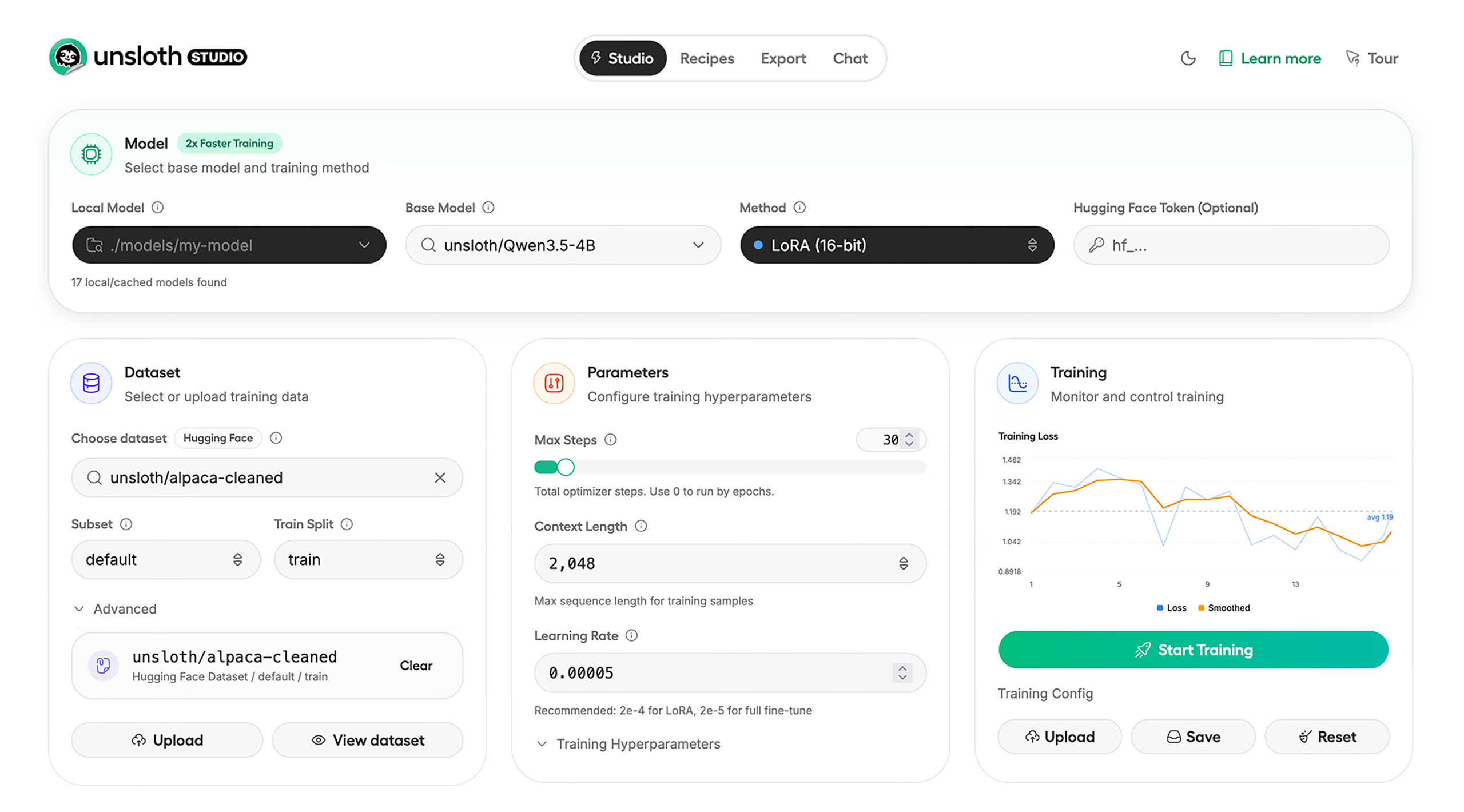
Unsloth Studio (Beta) lets you run and train text, audio, embedding, vision models on Windows, Linux and macOS.
⭐ Features
Unsloth provides several key features for both inference and training:
Inference
- Search + download + run models including GGUF, LoRA adapters, safetensors
- Export models: Save or export models to GGUF, 16-bit safetensors and other formats.
- Tool calling: Support for self-healing tool calling and web search
- Code execution: lets LLMs test code in Claude artifacts and sandbox environments
- Auto-tune inference parameters and customize chat templates.
- We work directly with teams behind gpt-oss, Qwen3, Llama 4, Mistral, Gemma 1-3, and Phi-4, where we’ve fixed bugs that improve model accuracy.
- Upload images, audio, PDFs, code, DOCX and more file types to chat with.
Training
- Train and RL 500+ models up to 2x faster with up to 70% less VRAM, with no accuracy loss.
- Custom Triton and mathematical kernels. See some collabs we did with PyTorch and Hugging Face.
- Data Recipes: Auto-create datasets from PDF, CSV, DOCX etc. Edit data in a visual-node workflow.
- Reinforcement Learning (RL): The most efficient RL library, using 80% less VRAM for GRPO, FP8 etc.
- Supports full fine-tuning, RL, pretraining, 4-bit, 16-bit and, FP8 training.
- Observability: Monitor training live, track loss and GPU usage and customize graphs.
- Multi-GPU training is supported, with major improvements coming soon.
⚡ Quickstart
Unsloth can be used in two ways: through Unsloth Studio, the web UI, or through Unsloth Core, the code-based version. Each has different requirements.
Unsloth Studio (web UI)
Unsloth Studio (Beta) works on Windows, Linux, WSL and macOS.
- CPU: Supported for Chat and Data Recipes currently
- NVIDIA: Training works on RTX 30/40/50, Blackwell, DGX Spark, Station and more
- macOS: Currently supports chat and Data Recipes. MLX training is coming very soon
- AMD: Chat + Data works. Train with Unsloth Core. Studio support is out soon.
- Coming soon: Training support for Apple MLX, AMD, and Intel.
- Multi-GPU: Available now, with a major upgrade on the way
macOS, Linux, WSL:
curl -fsSL https://unsloth.ai/install.sh | sh
Windows:
irm https://unsloth.ai/install.ps1 | iex
Launch
unsloth studio -H 0.0.0.0 -p 8888
Update
To update, use the same install commands as above. Or run (does not work on Windows):
unsloth studio update
Docker
Use our Docker image unsloth/unsloth container. Run:
docker run -d -e JUPYTER_PASSWORD="mypassword" \
  -p 8888:8888 -p 8000:8000 -p 2222:22 \
  -v $(pwd)/work:/workspace/work \
  --gpus all \
  unsloth/unsloth
Developer, Nightly, Uninstall
To see developer, nightly and uninstallation etc. instructions, see advanced installation.
Unsloth Core (code-based)
Linux, WSL:
curl -LsSf https://astral.sh/uv/install.sh | sh
uv venv unsloth_env --python 3.13
source unsloth_env/bin/activate
uv pip install unsloth --torch-backend=auto
Windows:
winget install -e --id Python.Python.3.13
winget install --id=astral-sh.uv  -e
uv venv unsloth_env --python 3.13
.\unsloth_env\Scripts\activate
uv pip install unsloth --torch-backend=auto
For Windows, pip install unsloth works only if you have PyTorch installed. Read our Windows Guide.
You can use the same Docker image as Unsloth Studio.
AMD, Intel:
For RTX 50x, B200, 6000 GPUs: uv pip install unsloth --torch-backend=auto. Read our guides for: Blackwell and DGX Spark.
To install Unsloth on AMD and Intel GPUs, follow our AMD Guide and Intel Guide.
📒 Free Notebooks
Train for free with our notebooks. You can use our new free Unsloth Studio notebook to run and train models for free in a web UI. Read our guide. Add dataset, run, then deploy your trained model.
| Model | Free Notebooks | Performance | Memory use |
|---|---|---|---|
| Gemma 4 (E2B) | ▶️ Start for free | 1.5x faster | 50% less |
| Qwen3.5 (4B) | ▶️ Start for free | 1.5x faster | 60% less |
| gpt-oss (20B) | ▶️ Start for free | 2x faster | 70% less |
| Qwen3.5 GSPO | ▶️ Start for free | 2x faster | 70% less |
| gpt-oss (20B): GRPO | ▶️ Start for free | 2x faster | 80% less |
| Qwen3: Advanced GRPO | ▶️ Start for free | 2x faster | 70% less |
| embeddinggemma (300M) | ▶️ Start for free | 2x faster | 20% less |
| Mistral Ministral 3 (3B) | ▶️ Start for free | 1.5x faster | 60% less |
| Llama 3.1 (8B) Alpaca | ▶️ Start for free | 2x faster | 70% less |
| Llama 3.2 Conversational | ▶️ Start for free | 2x faster | 70% less |
| Orpheus-TTS (3B) | ▶️ Start for free | 1.5x faster | 50% less |
- See all our notebooks for: Kaggle, GRPO, TTS, embedding & Vision
- See all our models and all our notebooks
- See detailed documentation for Unsloth here
🦥 Unsloth News
- Gemma 4: Run and train Google’s new models directly in Unsloth Studio! Blog
- Introducing Unsloth Studio: our new web UI for running and training LLMs. Blog
- Qwen3.5 - 0.8B, 2B, 4B, 9B, 27B, 35-A3B, 112B-A10B are now supported. Guide + notebooks
- Train MoE LLMs 12x faster with 35% less VRAM - DeepSeek, GLM, Qwen and gpt-oss. Blog
- Embedding models: Unsloth now supports ~1.8-3.3x faster embedding fine-tuning. Blog • Notebooks
- New 7x longer context RL vs. all other setups, via our new batching algorithms. Blog
- New RoPE & MLP Triton Kernels & Padding Free + Packing: 3x faster training & 30% less VRAM. Blog
- 500K Context: Training a 20B model with >500K context is now possible on an 80GB GPU. Blog
- FP8 & Vision RL: You can now do FP8 & VLM GRPO on consumer GPUs. FP8 Blog • Vision RL
- gpt-oss by OpenAI: Read our RL blog, Flex Attention blog and Guide.
📥 Advanced Installation
The below advanced instructions are for Unsloth Studio. For Unsloth Core advanced installation, view our docs.
Developer installs: macOS, Linux, WSL:
git clone https://github.com/unslothai/unsloth
cd unsloth
./install.sh --local
unsloth studio -H 0.0.0.0 -p 8888
Then to update :
unsloth studio update
Developer installs: Windows PowerShell:
git clone https://github.com/unslothai/unsloth.git
cd unsloth
Set-ExecutionPolicy -Scope Process -ExecutionPolicy Bypass
.\install.ps1 --local
unsloth studio -H 0.0.0.0 -p 8888
Then to update :
unsloth studio update
Nightly: MacOS, Linux, WSL:
git clone https://github.com/unslothai/unsloth
cd unsloth
git checkout nightly
./install.sh --local
unsloth studio -H 0.0.0.0 -p 8888
Then to launch every time:
unsloth studio -H 0.0.0.0 -p 8888
Nightly: Windows:
Run in Windows Powershell:
git clone https://github.com/unslothai/unsloth.git
cd unsloth
git checkout nightly
Set-ExecutionPolicy -Scope Process -ExecutionPolicy Bypass
.\install.ps1 --local
unsloth studio -H 0.0.0.0 -p 8888
Then to launch every time:
unsloth studio -H 0.0.0.0 -p 8888
Uninstall
You can uninstall Unsloth Studio by deleting its install folder usually located under $HOME/.unsloth/studio on Mac/Linux/WSL and %USERPROFILE%\.unsloth\studio on Windows. Using the rm -rf commands will delete everything, including your history, cache:
- MacOS, WSL, Linux:
rm -rf ~/.unsloth/studio - Windows (PowerShell):
Remove-Item -Recurse -Force "$HOME\.unsloth\studio"
For more info, see our docs.
Deleting model files
You can delete old model files either from the bin icon in model search or by removing the relevant cached model folder from the default Hugging Face cache directory. By default, HF uses:
- MacOS, Linux, WSL:
~/.cache/huggingface/hub/ - Windows:
%USERPROFILE%\.cache\huggingface\hub\
💚 Community and Links
| Type | Links |
|---|---|
 Discord Discord |
Join Discord server |
 r/unsloth Reddit r/unsloth Reddit |
Join Reddit community |
| 📚 Documentation & Wiki | Read Our Docs |
_logo_late_2025.svg) Twitter (aka X) Twitter (aka X) |
Follow us on X |
| 🔮 Our Models | Unsloth Catalog |
| ✍️ Blog | Read our Blogs |
Citation
You can cite the Unsloth repo as follows:
@software{unsloth,
  author = {Daniel Han, Michael Han and Unsloth team},
  title = {Unsloth},
  url = {https://github.com/unslothai/unsloth},
  year = {2023}
}
If you trained a model with 🦥Unsloth, you can use this cool sticker!
License
Unsloth uses a dual-licensing model of Apache 2.0 and AGPL-3.0. The core Unsloth package remains licensed under Apache 2.0, while certain optional components, such as the Unsloth Studio UI are licensed under the open-source license AGPL-3.0.
This structure helps support ongoing Unsloth development while keeping the project open source and enabling the broader ecosystem to continue growing.
Thank You to
- The llama.cpp library that lets users run and save models with Unsloth
- The Hugging Face team and their libraries: transformers and TRL
- The Pytorch and Torch AO team for their contributions
- NVIDIA for their NeMo DataDesigner library and their contributions
- And of course for every single person who has contributed or has used Unsloth!