 55d24d7c49
* feat(studio): editable context length with Apply/Reset for GGUF model settings Previously the Context Length field was read-only and the backend hardcoded `-c 0`, ignoring custom values entirely. KV Cache Dtype also triggered an immediate model reload with no way to cancel. Backend: - llama_cpp.py: pass the actual n_ctx value to `-c` instead of always 0 - models/inference.py: relax max_seq_length to 0..1048576 (0 = model default) so GGUF models with large context windows are supported Frontend: - chat-runtime-store: add customContextLength and loadedKvCacheDtype state fields for dirty tracking - chat-settings-sheet: make Context Length an editable number input, stop KV Cache Dtype from auto-reloading, show Apply/Reset buttons when either setting has been changed - use-chat-model-runtime: send customContextLength as max_seq_length in the load request, reset after successful load * fix: preserve maxSeqLength for non-GGUF models in load request customContextLength ?? 0 sent max_seq_length=0 for non-GGUF models, breaking the finetuning/inference path that needs the slider value. Now uses a three-way branch: - customContextLength set: use it (user edited GGUF context) - GGUF without custom: 0 (model's native context) - Non-GGUF: maxSeqLength from the sampling slider * fix: keep max_seq_length default at 4096 for non-GGUF callers Only relax the bounds (ge=0 for GGUF's "model default" mode, le=1048576 for large context windows). The default stays at 4096 so API callers that omit max_seq_length still get a sane value for non-GGUF models. * [pre-commit.ci] auto fixes from pre-commit.com hooks for more information, see https://pre-commit.ci * fix(studio): rename trust remote code toggle and hide when no model selected - Rename "Trust remote code" to "Enable custom code" - Shorten subtitle to "Only enable if sure" - Hide the toggle when no model is loaded (already hidden for GGUFs) * fix: restore ge=128 for max_seq_length validation Keep the minimum at 128 so the API rejects nonsensical values. GGUF path now sends the model's native context length (from ggufContextLength) instead of 0 when the user has not customized it. The upper bound stays at 1048576 for large-context GGUF models. * feat(studio): replace Context Length input with slider Use a ParamSlider (512 to model's native context, step 512) instead of a small number input. Shows "Max" when at the model's native context length. Consistent with the other slider controls in the settings panel. * feat(studio): add editable number input alongside Context Length slider The slider and number input stay synced -- dragging the slider updates the number, typing a number moves the slider. The input also accepts values beyond the slider range for power users who need custom context lengths larger than the model default. * fix(studio): widen context length input and use 1024 step for slider Make the number input wider (100px) so large values like 262144 are fully visible. Change slider step from 512 to 1024 and min from 512 to 1024. * fix(studio): context length number input increments by 1024 * fix(studio): cap context length input at model's native max Adds max attribute and clamps typed/incremented values so the context length cannot exceed the GGUF model's reported context window. * fix(studio): point "What's new" link to changelog page Changed from /blog to /docs/new/changelog. * fix(studio): preserve custom context length after Apply, remove stale subtitle - After a reload with a custom context length, keep the user's value in the UI instead of snapping back to the model's native max. ggufContextLength always reports the model's native metadata value regardless of what -c was passed, so we need to preserve customContextLength when it differs from native. - Remove "Reload to apply." from KV Cache Dtype subtitle since the Apply/Reset buttons now handle this. * feat(studio): auto-enable Search and Code tools when model supports them Previously toolsEnabled and codeToolsEnabled stayed false after loading a model even if it reported supports_tools=true. Now both toggles are automatically enabled when the loaded model supports tool calling, matching the existing behavior for reasoning. * fix(studio): auto-enable tools in autoLoadSmallestModel path The suggestion cards trigger autoLoadSmallestModel which bypasses selectModel entirely. It was hardcoding toolsEnabled: false and codeToolsEnabled: false even when the model supports tool calling. Now both are set from the load response, matching the selectModel behavior. Also sets kvCacheDtype/loadedKvCacheDtype for dirty tracking consistency. * fix(studio): re-read tool flags after auto-loading model The runtime state was captured once at the start of the chat adapter's run(), before autoLoadSmallestModel() executes. After auto-load enables tools in the store, the request was still built with the stale snapshot that had toolsEnabled=false. Now re-reads the store after auto-load so the first message includes tools. * fix(studio): re-read entire runtime state after auto-load, not just tools The runtime snapshot (including params.checkpoint, model id, and all tool/reasoning flags) was captured once before auto-load. After autoLoadSmallestModel sets the checkpoint and enables tools, the request was still built with stale params (empty checkpoint, tools disabled). Now re-reads the full store state after auto-load so the first message has the correct model, tools, and reasoning flags. * feat(studio): add Hugging Face token field in Preferences Adds a password input under Configuration > Preferences for users to enter their HF token. The token is persisted in localStorage and passed to all model validate/load/download calls, replacing the previously hardcoded null. This enables downloading gated and private models. * fix(studio): use model native context for GGUF auto-load, show friendly errors The auto-load paths and selectModel for GGUF were sending max_seq_length=4096 which now actually limits the context window (since we fixed the backend to respect n_ctx). Changed to send 0 for GGUF, which means "use model's native context size". Also replaced generic "An internal error occurred" messages with user-friendly descriptions for known errors like context size exceeded and lost connections. LoadRequest validation changed to ge=0 to allow the GGUF "model default" signal. The frontend slider still enforces min=128 for non-GGUF models. * [pre-commit.ci] auto fixes from pre-commit.com hooks for more information, see https://pre-commit.ci * fix(studio): filter out FP8 models from model search results Hide models matching *-FP8-* or *FP8-Dynamic* from both the recommended list and HF search results. These models are not yet supported in the inference UI. --------- Co-authored-by: Daniel Han <danielhanchen@users.noreply.github.com> Co-authored-by: pre-commit-ci[bot] <66853113+pre-commit-ci[bot]@users.noreply.github.com> |
||
|---|---|---|
| .github | ||
| images | ||
| scripts | ||
| studio | ||
| tests | ||
| unsloth | ||
| unsloth_cli | ||
| .gitattributes | ||
| .gitignore | ||
| .pre-commit-ci.yaml | ||
| .pre-commit-config.yaml | ||
| build.sh | ||
| cli.py | ||
| CODE_OF_CONDUCT.md | ||
| CONTRIBUTING.md | ||
| COPYING | ||
| install.ps1 | ||
| install.sh | ||
| LICENSE | ||
| pyproject.toml | ||
| README.md | ||
| unsloth-cli.py | ||

Run and train AI models with a unified local interface.
Features • Quickstart • Notebooks • Documentation • Reddit
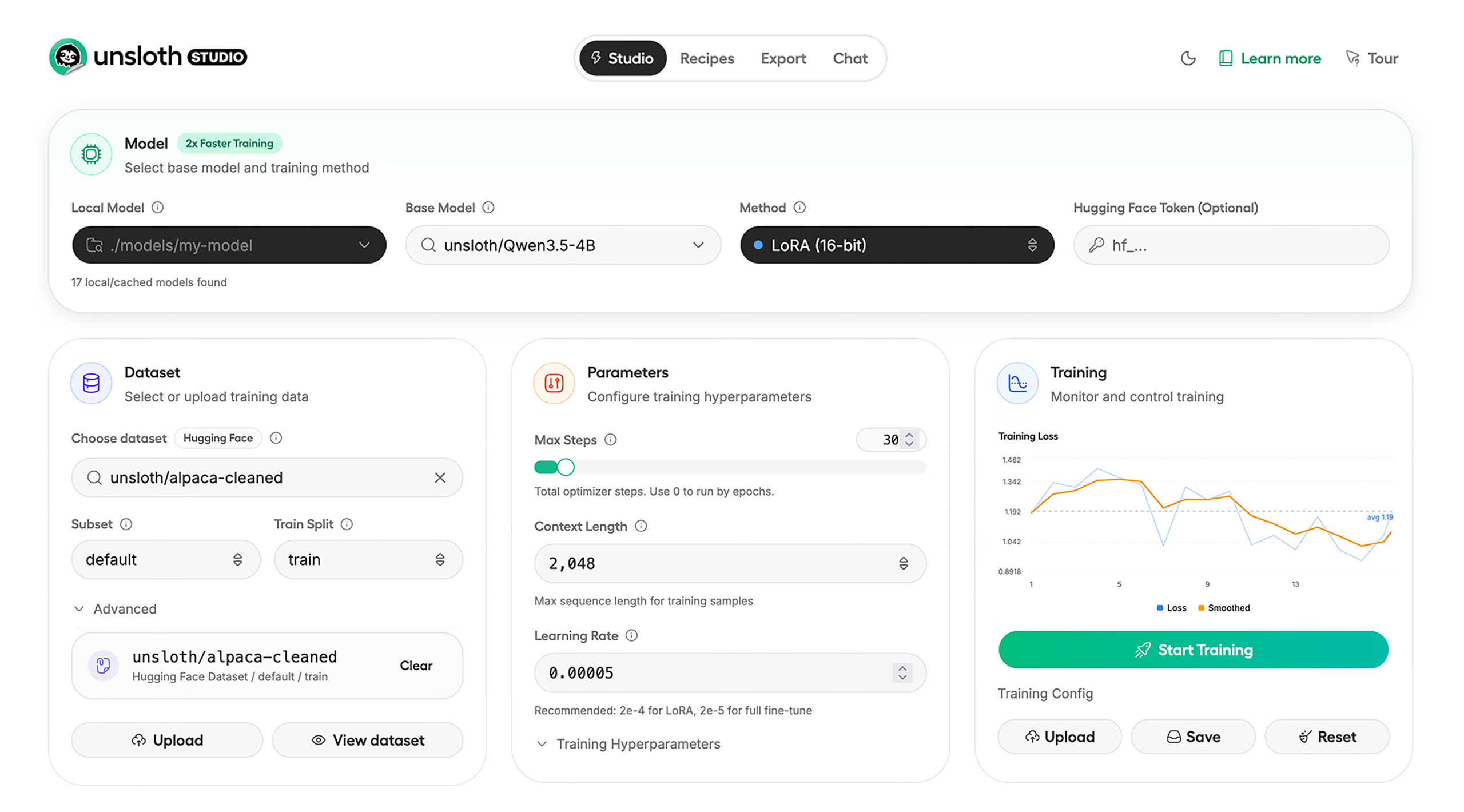
Unsloth Studio (Beta) lets you run and train text, audio, embedding, vision models on Windows, Linux and macOS.
⭐ Features
Unsloth provides several key features for both inference and training:
Inference
- Search + download + run models including GGUF, LoRA adapters, safetensors
- Export models: Save or export models to GGUF, 16-bit safetensors and other formats.
- Tool calling: Support for self-healing tool calling and web search
- Code execution: lets LLMs test code in Claude artifacts and sandbox environments
- Auto-tune inference parameters and customize chat templates.
- We work directly with teams behind gpt-oss, Qwen3, Llama 4, Mistral, Gemma 1-3, and Phi-4, where we’ve fixed bugs that improve model accuracy.
- Upload images, audio, PDFs, code, DOCX and more file types to chat with.
Training
- Train and RL 500+ models up to 2x faster with up to 70% less VRAM, with no accuracy loss.
- Custom Triton and mathematical kernels. See some collabs we did with PyTorch and Hugging Face.
- Data Recipes: Auto-create datasets from PDF, CSV, DOCX etc. Edit data in a visual-node workflow.
- Reinforcement Learning (RL): The most efficient RL library, using 80% less VRAM for GRPO, FP8 etc.
- Supports full fine-tuning, RL, pretraining, 4-bit, 16-bit and, FP8 training.
- Observability: Monitor training live, track loss and GPU usage and customize graphs.
- Multi-GPU training is supported, with major improvements coming soon.
⚡ Quickstart
Unsloth can be used in two ways: through Unsloth Studio, the web UI, or through Unsloth Core, the code-based version. Each has different requirements.
Unsloth Studio (web UI)
Unsloth Studio (Beta) works on Windows, Linux, WSL and macOS.
- CPU: Supported for Chat and Data Recipes currently
- NVIDIA: Training works on RTX 30/40/50, Blackwell, DGX Spark, Station and more
- macOS: Currently supports chat and Data Recipes. MLX training is coming very soon
- AMD: Chat + Data works. Train with Unsloth Core. Studio support is out soon.
- Coming soon: Training support for Apple MLX, AMD, and Intel.
- Multi-GPU: Available now, with a major upgrade on the way
macOS, Linux, WSL:
curl -fsSL https://unsloth.ai/install.sh | sh
If you don't have curl, use wget. Launch after setup via:
source unsloth_studio/bin/activate
unsloth studio -H 0.0.0.0 -p 8888
Windows:
irm https://unsloth.ai/install.ps1 | iex
Launch after setup via:
& .\unsloth_studio\Scripts\unsloth.exe studio -H 0.0.0.0 -p 8888
Docker
Use our Docker image unsloth/unsloth container. Run:
docker run -d -e JUPYTER_PASSWORD="mypassword" \
  -p 8888:8888 -p 8000:8000 -p 2222:22 \
  -v $(pwd)/work:/workspace/work \
  --gpus all \
  unsloth/unsloth
macOS, Linux, WSL developer installs:
curl -LsSf https://astral.sh/uv/install.sh | sh
uv venv unsloth_studio --python 3.13
source unsloth_studio/bin/activate
uv pip install unsloth --torch-backend=auto
unsloth studio setup
unsloth studio -H 0.0.0.0 -p 8888
Windows PowerShell developer installs:
winget install -e --id Python.Python.3.13
winget install --id=astral-sh.uv  -e
uv venv unsloth_studio --python 3.13
.\unsloth_studio\Scripts\activate
uv pip install unsloth --torch-backend=auto
unsloth studio setup
unsloth studio -H 0.0.0.0 -p 8888
Nightly - MacOS, Linux, WSL:
curl -LsSf https://astral.sh/uv/install.sh | sh
git clone --filter=blob:none https://github.com/unslothai/unsloth.git unsloth_studio
cd unsloth_studio
uv venv --python 3.13
source .venv/bin/activate
uv pip install -e . --torch-backend=auto
unsloth studio setup
unsloth studio -H 0.0.0.0 -p 8888
Then to launch every time:
cd unsloth_studio
source .venv/bin/activate
unsloth studio -H 0.0.0.0 -p 8888
Nightly - Windows:
Run in Windows Powershell:
winget install -e --id Python.Python.3.13
winget install --id=astral-sh.uv  -e
git clone --filter=blob:none https://github.com/unslothai/unsloth.git unsloth_studio
cd unsloth_studio
uv venv --python 3.13
.\.venv\Scripts\activate
uv pip install -e . --torch-backend=auto
unsloth studio setup
unsloth studio -H 0.0.0.0 -p 8888
Then to launch every time:
cd unsloth_studio
.\.venv\Scripts\activate
unsloth studio -H 0.0.0.0 -p 8888
Unsloth Core (code-based)
Linux, WSL:
curl -LsSf https://astral.sh/uv/install.sh | sh
uv venv unsloth_env --python 3.13
source unsloth_env/bin/activate
uv pip install unsloth --torch-backend=auto
Windows:
winget install -e --id Python.Python.3.13
winget install --id=astral-sh.uv  -e
uv venv unsloth_env --python 3.13
.\unsloth_env\Scripts\activate
uv pip install unsloth --torch-backend=auto
For Windows, pip install unsloth works only if you have PyTorch installed. Read our Windows Guide.
You can use the same Docker image as Unsloth Studio.
AMD, Intel:
For RTX 50x, B200, 6000 GPUs: uv pip install unsloth --torch-backend=auto. Read our guides for: Blackwell and DGX Spark.
To install Unsloth on AMD and Intel GPUs, follow our AMD Guide and Intel Guide.
✨ Free Notebooks
Train for free with our notebooks. Read our guide. Add dataset, run, then deploy your trained model.
| Model | Free Notebooks | Performance | Memory use |
|---|---|---|---|
| Qwen3.5 (4B) | ▶️ Start for free | 1.5x faster | 60% less |
| gpt-oss (20B) | ▶️ Start for free | 2x faster | 70% less |
| Qwen3.5 GSPO | ▶️ Start for free | 2x faster | 70% less |
| gpt-oss (20B): GRPO | ▶️ Start for free | 2x faster | 80% less |
| Qwen3: Advanced GRPO | ▶️ Start for free | 2x faster | 70% less |
| Gemma 3 (4B) Vision | ▶️ Start for free | 1.7x faster | 60% less |
| embeddinggemma (300M) | ▶️ Start for free | 2x faster | 20% less |
| Mistral Ministral 3 (3B) | ▶️ Start for free | 1.5x faster | 60% less |
| Llama 3.1 (8B) Alpaca | ▶️ Start for free | 2x faster | 70% less |
| Llama 3.2 Conversational | ▶️ Start for free | 2x faster | 70% less |
| Orpheus-TTS (3B) | ▶️ Start for free | 1.5x faster | 50% less |
- See all our notebooks for: Kaggle, GRPO, TTS, embedding & Vision
- See all our models and all our notebooks
- See detailed documentation for Unsloth here
🦥 Unsloth News
- Introducing Unsloth Studio: our new web UI for running and training LLMs. Blog
- Qwen3.5 - 0.8B, 2B, 4B, 9B, 27B, 35-A3B, 112B-A10B are now supported. Guide + notebooks
- Train MoE LLMs 12x faster with 35% less VRAM - DeepSeek, GLM, Qwen and gpt-oss. Blog
- Embedding models: Unsloth now supports ~1.8-3.3x faster embedding fine-tuning. Blog • Notebooks
- New 7x longer context RL vs. all other setups, via our new batching algorithms. Blog
- New RoPE & MLP Triton Kernels & Padding Free + Packing: 3x faster training & 30% less VRAM. Blog
- 500K Context: Training a 20B model with >500K context is now possible on an 80GB GPU. Blog
- FP8 & Vision RL: You can now do FP8 & VLM GRPO on consumer GPUs. FP8 Blog • Vision RL
- gpt-oss by OpenAI: Read our RL blog, Flex Attention blog and Guide.
💚 Community and Links
| Type | Links |
|---|---|
 Discord Discord |
Join Discord server |
 r/unsloth Reddit r/unsloth Reddit |
Join Reddit community |
| 📚 Documentation & Wiki | Read Our Docs |
_logo_late_2025.svg) Twitter (aka X) Twitter (aka X) |
Follow us on X |
| 🔮 Our Models | Unsloth Catalog |
| ✍️ Blog | Read our Blogs |
Citation
You can cite the Unsloth repo as follows:
@software{unsloth,
  author = {Daniel Han, Michael Han and Unsloth team},
  title = {Unsloth},
  url = {https://github.com/unslothai/unsloth},
  year = {2023}
}
If you trained a model with 🦥Unsloth, you can use this cool sticker!
License
Unsloth uses a dual-licensing model of Apache 2.0 and AGPL-3.0. The core Unsloth package remains licensed under Apache 2.0, while certain optional components, such as the Unsloth Studio UI are licensed under the open-source license AGPL-3.0.
This structure helps support ongoing Unsloth development while keeping the project open source and enabling the broader ecosystem to continue growing.
Thank You to
- The llama.cpp library that lets users run and save models with Unsloth
- The Hugging Face team and their libraries: transformers and TRL
- The Pytorch and Torch AO team for their contributions
- NVIDIA for their NeMo DataDesigner library and their contributions
- And of course for every single person who has contributed or has used Unsloth!