 1a4ca5eca8
* Fix grad-accum model_accepts_loss_kwargs detection for vision wrappers

Replace the source-string rewrite of Trainer.__init__ with an instance-level
accepts_loss_kwargs shadow applied on the loaded model. Covers:

  1. Unsloth-compiled forward -> True, so HF Trainer does not double-scale
     on top of unsloth_fixed_cross_entropy's num_items_in_batch division.
  2. Stock forward on a conditional-generation wrapper (Gemma3n, Gemma3
     pre-4.57, Qwen-VL family, etc.) where the outer class has no
     accepts_loss_kwargs but the inner .model declares False -> False.
     This is the case that reproduces issue #4982 under trust_remote_code
     or UNSLOTH_COMPILE_DISABLE, where the previous fix's outer-attr
     check walked past the inner model and fell through to signature
     inspection.
  3. Text LMs without any explicit accepts_loss_kwargs -> leave HF default.

The previous .replace()-based patch silently no-ops on transformers 4.48
through 4.52 (variable named model, not unwrapped_model) and is fragile
against any upstream reformat. The new helper walks the PEFT / HF wrapper
chain, finds the first class that declares accepts_loss_kwargs on its own
class dict (type(m).__dict__, not hasattr, to avoid PEFT __getattr__
forwarding), and setattr-shadows that value at every wrapper level so
HF Trainer's hasattr(unwrapped_model, ...) check picks it up at whichever
level accelerate.unwrap_model returns.

Also adds an unconditional post-init clamp of
accelerator.gradient_accumulation_steps = 1 to work around the
transformers 5.0 through 5.5 GradientAccumulationPlugin regression that
makes accelerator.backward divide loss by GA on top of training_step's
own /GA division. Fixed upstream in 5.6.0.dev0; no-op on 4.x and 5.6+.

* [pre-commit.ci] auto fixes from pre-commit.com hooks

for more information, see https://pre-commit.ci

* Trim comments

* Address review: cover PEFT-after-load and custom compile location

Two review findings from 3/20 reviewers:

1. [3 of 20 reviewers] apply_accepts_loss_kwargs_fix was called from the
   loaders before get_peft_model wraps the base model, so on transformers
   4.48-4.52 (which does hasattr on the outer model) the instance shadow
   on the base model was lost after PEFT wrapping. Fix: also call it from
   the wrapped Trainer.__init__ so it runs on whatever model the user
   actually hands to Trainer, which is always the final wrapped form.

2. [1 of 20 reviewers] _forward_is_unsloth_compiled hard-coded the
   substrings "unsloth_compiled" / "unsloth_cache" in the co_filename
   check, which misclassifies compiled forwards when
   UNSLOTH_COMPILE_LOCATION is set to a custom directory. Fix: new
   _unsloth_compile_cache_leaves helper that reads the env var and
   matches the basename against path components, honoring both the
   default and any user override.

Verified locally:
- PEFT-after-load simulation: HF's hasattr(peft, "accepts_loss_kwargs")
  now returns True after our init wrapper runs, and value resolves to
  False on Gemma3n-style inner wrappers.
- Custom UNSLOTH_COMPILE_LOCATION simulation: compiled detection returns
  True for /tmp/my_custom_cache/compiled.py when the env var is set.
- End-to-end Gemma-3 270m + LoRA SFT unchanged: loss 4.9626, grad-norm
  matches prior run, all 4 wrapper levels now carry the shadowed attr.

---------

Co-authored-by: pre-commit-ci[bot] <66853113+pre-commit-ci[bot]@users.noreply.github.com>
|
||
|---|---|---|
| .github | ||
| images | ||
| scripts | ||
| studio | ||
| tests | ||
| unsloth | ||
| unsloth_cli | ||
| .gitattributes | ||
| .gitignore | ||
| .pre-commit-ci.yaml | ||
| .pre-commit-config.yaml | ||
| build.sh | ||
| cli.py | ||
| CODE_OF_CONDUCT.md | ||
| CONTRIBUTING.md | ||
| COPYING | ||
| install.ps1 | ||
| install.sh | ||
| LICENSE | ||
| pyproject.toml | ||
| README.md | ||
| unsloth-cli.py | ||

Run and train AI models with a unified local interface.
Features • Quickstart • Notebooks • Documentation • Reddit
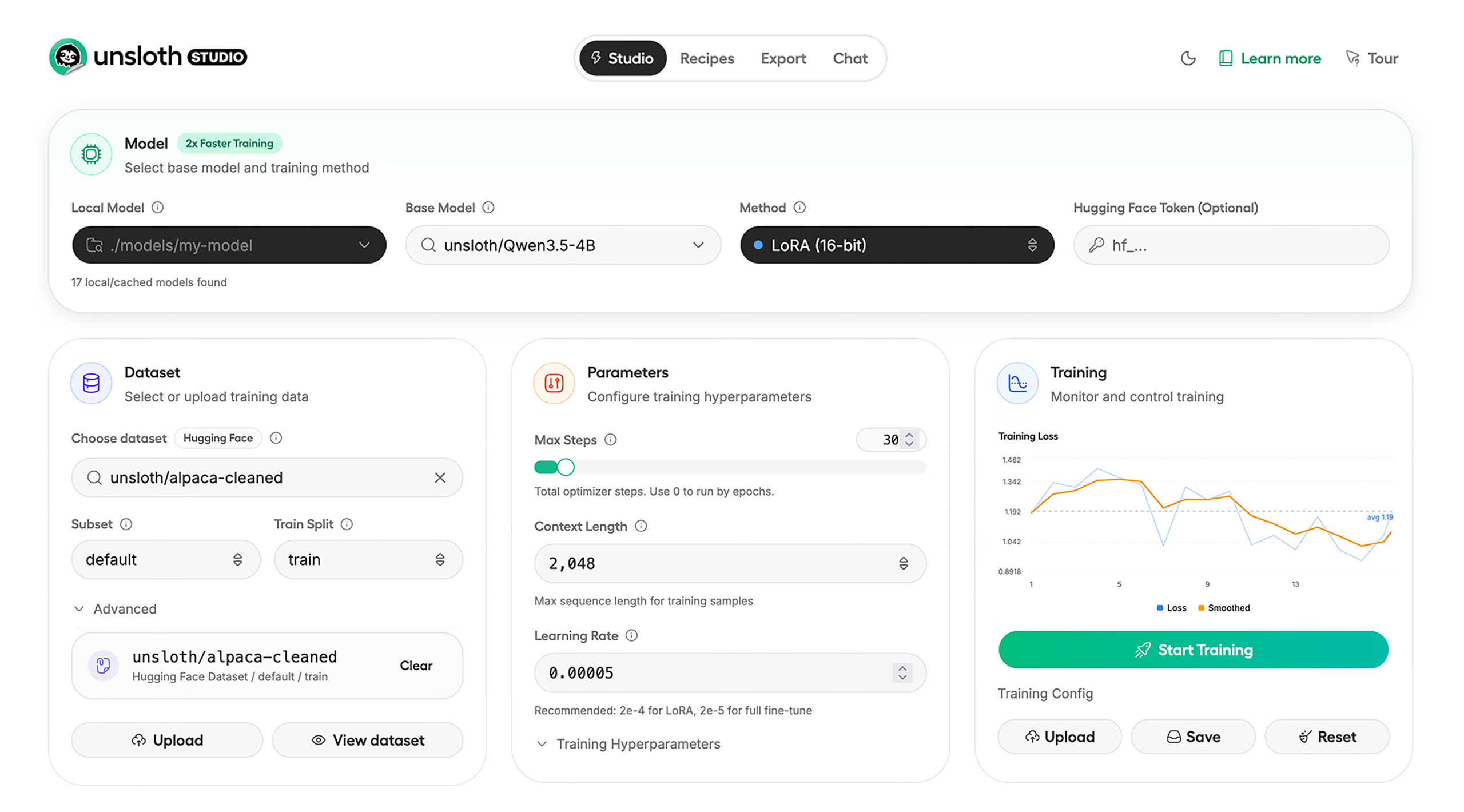
Unsloth Studio (Beta) lets you run and train text, audio, embedding, vision models on Windows, Linux and macOS.
⭐ Features
Unsloth provides several key features for both inference and training:
Inference
- Search + download + run models including GGUF, LoRA adapters, safetensors
- Export models: Save or export models to GGUF, 16-bit safetensors and other formats.
- Tool calling: Support for self-healing tool calling and web search
- Code execution: lets LLMs test code in Claude artifacts and sandbox environments
- Auto-tune inference parameters and customize chat templates.
- We work directly with teams behind gpt-oss, Qwen3, Llama 4, Mistral, Gemma 1-3, and Phi-4, where we’ve fixed bugs that improve model accuracy.
- Upload images, audio, PDFs, code, DOCX and more file types to chat with.
Training
- Train and RL 500+ models up to 2x faster with up to 70% less VRAM, with no accuracy loss.
- Custom Triton and mathematical kernels. See some collabs we did with PyTorch and Hugging Face.
- Data Recipes: Auto-create datasets from PDF, CSV, DOCX etc. Edit data in a visual-node workflow.
- Reinforcement Learning (RL): The most efficient RL library, using 80% less VRAM for GRPO, FP8 etc.
- Supports full fine-tuning, RL, pretraining, 4-bit, 16-bit and, FP8 training.
- Observability: Monitor training live, track loss and GPU usage and customize graphs.
- Multi-GPU training is supported, with major improvements coming soon.
⚡ Quickstart
Unsloth can be used in two ways: through Unsloth Studio, the web UI, or through Unsloth Core, the code-based version. Each has different requirements.
Unsloth Studio (web UI)
Unsloth Studio (Beta) works on Windows, Linux, WSL and macOS.
- CPU: Supported for Chat and Data Recipes currently
- NVIDIA: Training works on RTX 30/40/50, Blackwell, DGX Spark, Station and more
- macOS: Currently supports chat and Data Recipes. MLX training is coming very soon
- AMD: Chat + Data works. Train with Unsloth Core. Studio support is out soon.
- Coming soon: Training support for Apple MLX, AMD, and Intel.
- Multi-GPU: Available now, with a major upgrade on the way
macOS, Linux, WSL:
curl -fsSL https://unsloth.ai/install.sh | sh
Windows:
irm https://unsloth.ai/install.ps1 | iex
Launch
unsloth studio -H 0.0.0.0 -p 8888
Update
To update, use the same install commands as above. Or run (does not work on Windows):
unsloth studio update
Docker
Use our Docker image unsloth/unsloth container. Run:
docker run -d -e JUPYTER_PASSWORD="mypassword" \
  -p 8888:8888 -p 8000:8000 -p 2222:22 \
  -v $(pwd)/work:/workspace/work \
  --gpus all \
  unsloth/unsloth
Developer, Nightly, Uninstall
To see developer, nightly and uninstallation etc. instructions, see advanced installation.
Unsloth Core (code-based)
Linux, WSL:
curl -LsSf https://astral.sh/uv/install.sh | sh
uv venv unsloth_env --python 3.13
source unsloth_env/bin/activate
uv pip install unsloth --torch-backend=auto
Windows:
winget install -e --id Python.Python.3.13
winget install --id=astral-sh.uv  -e
uv venv unsloth_env --python 3.13
.\unsloth_env\Scripts\activate
uv pip install unsloth --torch-backend=auto
For Windows, pip install unsloth works only if you have PyTorch installed. Read our Windows Guide.
You can use the same Docker image as Unsloth Studio.
AMD, Intel:
For RTX 50x, B200, 6000 GPUs: uv pip install unsloth --torch-backend=auto. Read our guides for: Blackwell and DGX Spark.
To install Unsloth on AMD and Intel GPUs, follow our AMD Guide and Intel Guide.
📒 Free Notebooks
Train for free with our notebooks. You can use our new free Unsloth Studio notebook to run and train models for free in a web UI. Read our guide. Add dataset, run, then deploy your trained model.
| Model | Free Notebooks | Performance | Memory use |
|---|---|---|---|
| Gemma 4 (E2B) | ▶️ Start for free | 1.5x faster | 50% less |
| Qwen3.5 (4B) | ▶️ Start for free | 1.5x faster | 60% less |
| gpt-oss (20B) | ▶️ Start for free | 2x faster | 70% less |
| Qwen3.5 GSPO | ▶️ Start for free | 2x faster | 70% less |
| gpt-oss (20B): GRPO | ▶️ Start for free | 2x faster | 80% less |
| Qwen3: Advanced GRPO | ▶️ Start for free | 2x faster | 70% less |
| embeddinggemma (300M) | ▶️ Start for free | 2x faster | 20% less |
| Mistral Ministral 3 (3B) | ▶️ Start for free | 1.5x faster | 60% less |
| Llama 3.1 (8B) Alpaca | ▶️ Start for free | 2x faster | 70% less |
| Llama 3.2 Conversational | ▶️ Start for free | 2x faster | 70% less |
| Orpheus-TTS (3B) | ▶️ Start for free | 1.5x faster | 50% less |
- See all our notebooks for: Kaggle, GRPO, TTS, embedding & Vision
- See all our models and all our notebooks
- See detailed documentation for Unsloth here
🦥 Unsloth News
- Gemma 4: Run and train Google’s new models directly in Unsloth Studio! Blog
- Introducing Unsloth Studio: our new web UI for running and training LLMs. Blog
- Qwen3.5 - 0.8B, 2B, 4B, 9B, 27B, 35-A3B, 112B-A10B are now supported. Guide + notebooks
- Train MoE LLMs 12x faster with 35% less VRAM - DeepSeek, GLM, Qwen and gpt-oss. Blog
- Embedding models: Unsloth now supports ~1.8-3.3x faster embedding fine-tuning. Blog • Notebooks
- New 7x longer context RL vs. all other setups, via our new batching algorithms. Blog
- New RoPE & MLP Triton Kernels & Padding Free + Packing: 3x faster training & 30% less VRAM. Blog
- 500K Context: Training a 20B model with >500K context is now possible on an 80GB GPU. Blog
- FP8 & Vision RL: You can now do FP8 & VLM GRPO on consumer GPUs. FP8 Blog • Vision RL
- gpt-oss by OpenAI: Read our RL blog, Flex Attention blog and Guide.
📥 Advanced Installation
The below advanced instructions are for Unsloth Studio. For Unsloth Core advanced installation, view our docs.
Developer installs: macOS, Linux, WSL:
git clone https://github.com/unslothai/unsloth
cd unsloth
./install.sh --local
unsloth studio -H 0.0.0.0 -p 8888
Then to update :
unsloth studio update
Developer installs: Windows PowerShell:
git clone https://github.com/unslothai/unsloth.git
cd unsloth
Set-ExecutionPolicy -Scope Process -ExecutionPolicy Bypass
.\install.ps1 --local
unsloth studio -H 0.0.0.0 -p 8888
Then to update :
unsloth studio update
Nightly: MacOS, Linux, WSL:
git clone https://github.com/unslothai/unsloth
cd unsloth
git checkout nightly
./install.sh --local
unsloth studio -H 0.0.0.0 -p 8888
Then to launch every time:
unsloth studio -H 0.0.0.0 -p 8888
Nightly: Windows:
Run in Windows Powershell:
git clone https://github.com/unslothai/unsloth.git
cd unsloth
git checkout nightly
Set-ExecutionPolicy -Scope Process -ExecutionPolicy Bypass
.\install.ps1 --local
unsloth studio -H 0.0.0.0 -p 8888
Then to launch every time:
unsloth studio -H 0.0.0.0 -p 8888
Uninstall
You can uninstall Unsloth Studio by deleting its install folder usually located under $HOME/.unsloth/studio on Mac/Linux/WSL and %USERPROFILE%\.unsloth\studio on Windows. Using the rm -rf commands will delete everything, including your history, cache:
- MacOS, WSL, Linux:
rm -rf ~/.unsloth/studio - Windows (PowerShell):
Remove-Item -Recurse -Force "$HOME\.unsloth\studio"
For more info, see our docs.
Deleting model files
You can delete old model files either from the bin icon in model search or by removing the relevant cached model folder from the default Hugging Face cache directory. By default, HF uses:
- MacOS, Linux, WSL:
~/.cache/huggingface/hub/ - Windows:
%USERPROFILE%\.cache\huggingface\hub\
💚 Community and Links
| Type | Links |
|---|---|
 Discord Discord |
Join Discord server |
 r/unsloth Reddit r/unsloth Reddit |
Join Reddit community |
| 📚 Documentation & Wiki | Read Our Docs |
_logo_late_2025.svg) Twitter (aka X) Twitter (aka X) |
Follow us on X |
| 🔮 Our Models | Unsloth Catalog |
| ✍️ Blog | Read our Blogs |
Citation
You can cite the Unsloth repo as follows:
@software{unsloth,
  author = {Daniel Han, Michael Han and Unsloth team},
  title = {Unsloth},
  url = {https://github.com/unslothai/unsloth},
  year = {2023}
}
If you trained a model with 🦥Unsloth, you can use this cool sticker!
License
Unsloth uses a dual-licensing model of Apache 2.0 and AGPL-3.0. The core Unsloth package remains licensed under Apache 2.0, while certain optional components, such as the Unsloth Studio UI are licensed under the open-source license AGPL-3.0.
This structure helps support ongoing Unsloth development while keeping the project open source and enabling the broader ecosystem to continue growing.
Thank You to
- The llama.cpp library that lets users run and save models with Unsloth
- The Hugging Face team and their libraries: transformers and TRL
- The Pytorch and Torch AO team for their contributions
- NVIDIA for their NeMo DataDesigner library and their contributions
- And of course for every single person who has contributed or has used Unsloth!