mirror of
https://github.com/ultralytics/ultralytics
synced 2026-04-21 14:07:18 +00:00

161 lines
No EOL
11 KiB
Text
161 lines
No EOL
11 KiB
Text
{
|
|
"cells": [
|
|
{
|
|
"cell_type": "markdown",
|
|
"metadata": {
|
|
"id": "PN1cAxdvd61e"
|
|
},
|
|
"source": [
|
|
"<div align=\"center\">\n",
|
|
"\n",
|
|
" <a href=\"https://ultralytics.com/yolo\" target=\"_blank\">\n",
|
|
" <img width=\"1024\", src=\"https://raw.githubusercontent.com/ultralytics/assets/main/yolov8/banner-yolov8.png\"></a>\n",
|
|
"\n",
|
|
" [中文](https://docs.ultralytics.com/zh/) | [한국어](https://docs.ultralytics.com/ko/) | [日本語](https://docs.ultralytics.com/ja/) | [Русский](https://docs.ultralytics.com/ru/) | [Deutsch](https://docs.ultralytics.com/de/) | [Français](https://docs.ultralytics.com/fr/) | [Español](https://docs.ultralytics.com/es/) | [Português](https://docs.ultralytics.com/pt/) | [Türkçe](https://docs.ultralytics.com/tr/) | [Tiếng Việt](https://docs.ultralytics.com/vi/) | [العربية](https://docs.ultralytics.com/ar/)\n",
|
|
"\n",
|
|
" <a href=\"https://github.com/ultralytics/ultralytics/actions/workflows/ci.yml\"><img src=\"https://github.com/ultralytics/ultralytics/actions/workflows/ci.yml/badge.svg\" alt=\"Ultralytics CI\"></a>\n",
|
|
" <a href=\"https://console.paperspace.com/github/ultralytics/ultralytics\"><img src=\"https://assets.paperspace.io/img/gradient-badge.svg\" alt=\"Run on Gradient\"/></a>\n",
|
|
" <a href=\"https://colab.research.google.com/github/ultralytics/ultralytics/blob/main/examples/object_tracking.ipynb\"><img src=\"https://colab.research.google.com/assets/colab-badge.svg\" alt=\"Open In Colab\"></a>\n",
|
|
" <a href=\"https://www.kaggle.com/models/ultralytics/yolo26\"><img src=\"https://kaggle.com/static/images/open-in-kaggle.svg\" alt=\"Open In Kaggle\"></a>\n",
|
|
" <a href=\"https://ultralytics.com/discord\"><img alt=\"Discord\" src=\"https://img.shields.io/discord/1089800235347353640?logo=discord&logoColor=white&label=Discord&color=blue\"></a>\n",
|
|
"\n",
|
|
"Welcome to the Ultralytics YOLO26 🚀 notebook! <a href=\"https://github.com/ultralytics/ultralytics\">YOLO26</a> is the latest version of the YOLO (You Only Look Once) AI models developed by <a href=\"https://ultralytics.com\">Ultralytics</a>. This notebook serves as the starting point for exploring the various resources available to help you get started with YOLO26 and understand its features and capabilities.\n",
|
|
"\n",
|
|
"YOLO26 models are fast, accurate, and easy to use, making them ideal for various object detection and image segmentation tasks. They can be trained on large datasets and run on diverse hardware platforms, from CPUs to GPUs.\n",
|
|
"\n",
|
|
"We hope that the resources in this notebook will help you get the most out of YOLO26. Please browse the YOLO26 <a href=\"https://docs.ultralytics.com/modes/track/\"> Tracking Docs</a> for details, raise an issue on <a href=\"https://github.com/ultralytics/ultralytics\">GitHub</a> for support, and join our <a href=\"https://ultralytics.com/discord\">Discord</a> community for questions and discussions!\n",
|
|
"\n",
|
|
"</div>"
|
|
]
|
|
},
|
|
{
|
|
"cell_type": "markdown",
|
|
"metadata": {
|
|
"id": "o68Sg1oOeZm2"
|
|
},
|
|
"source": [
|
|
"# Setup\n",
|
|
"\n",
|
|
"pip install `ultralytics` and [dependencies](https://github.com/ultralytics/ultralytics/blob/main/pyproject.toml) and check software and hardware.\n",
|
|
"\n",
|
|
"[](https://pypi.org/project/ultralytics/) [](https://clickpy.clickhouse.com/dashboard/ultralytics) [](https://pypi.org/project/ultralytics/)"
|
|
]
|
|
},
|
|
{
|
|
"cell_type": "code",
|
|
"execution_count": 1,
|
|
"metadata": {
|
|
"colab": {
|
|
"base_uri": "https://localhost:8080/"
|
|
},
|
|
"id": "9dSwz_uOReMI",
|
|
"outputId": "ed8c2370-8fc7-4e4e-f669-d0bae4d944e9"
|
|
},
|
|
"outputs": [
|
|
{
|
|
"name": "stdout",
|
|
"output_type": "stream",
|
|
"text": [
|
|
"Ultralytics 8.3.174 🚀 Python-3.11.13 torch-2.6.0+cu124 CUDA:0 (Tesla T4, 15095MiB)\n",
|
|
"Setup complete ✅ (2 CPUs, 12.7 GB RAM, 42.2/112.6 GB disk)\n"
|
|
]
|
|
}
|
|
],
|
|
"source": [
|
|
"!uv pip install ultralytics\n",
|
|
"import ultralytics\n",
|
|
"\n",
|
|
"ultralytics.checks()"
|
|
]
|
|
},
|
|
{
|
|
"cell_type": "markdown",
|
|
"metadata": {
|
|
"id": "m7VkxQ2aeg7k"
|
|
},
|
|
"source": [
|
|
"# Ultralytics Object Tracking\n",
|
|
"\n",
|
|
"[Ultralytics YOLO11](https://github.com/ultralytics/ultralytics/) instance segmentation involves identifying and outlining individual objects in an image, providing a detailed understanding of spatial distribution. Unlike semantic segmentation, it uniquely labels and precisely delineates each object, crucial for tasks like object detection and medical imaging.\n",
|
|
"\n",
|
|
"There are two types of instance segmentation tracking available in the Ultralytics package:\n",
|
|
"\n",
|
|
"- **Instance Segmentation with Class Objects:** Each class object is assigned a unique color for clear visual separation.\n",
|
|
"\n",
|
|
"- **Instance Segmentation with Object Tracks:** Every track is represented by a distinct color, facilitating easy identification and tracking.\n",
|
|
"\n",
|
|
"## Samples\n",
|
|
"\n",
|
|
"| Instance Segmentation | Instance Segmentation + Object Tracking |\n",
|
|
"|:---------------------------------------------------------------------------------------------------------------------------------------:|:------------------------------------------------------------------------------------------------------------------------------------------------------------:|\n",
|
|
"| 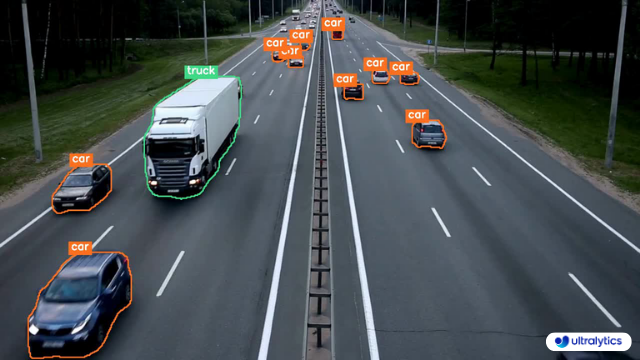 | 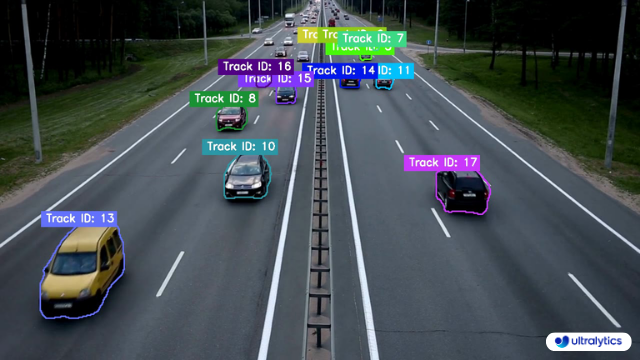 |\n",
|
|
"| Ultralytics Instance Segmentation 😍 | Ultralytics Instance Segmentation with Object Tracking 🔥 |"
|
|
]
|
|
},
|
|
{
|
|
"cell_type": "markdown",
|
|
"metadata": {
|
|
"id": "-ZF9DM6e6gz0"
|
|
},
|
|
"source": [
|
|
"## CLI\n",
|
|
"\n",
|
|
"Command-Line Interface (CLI) example."
|
|
]
|
|
},
|
|
{
|
|
"cell_type": "code",
|
|
"execution_count": null,
|
|
"metadata": {
|
|
"id": "-XJqhOwo6iqT"
|
|
},
|
|
"outputs": [],
|
|
"source": [
|
|
"!yolo track source=\"/path/to/video.mp4\" save=True"
|
|
]
|
|
},
|
|
{
|
|
"cell_type": "markdown",
|
|
"metadata": {
|
|
"id": "XRcw0vIE6oNb"
|
|
},
|
|
"source": [
|
|
"## Python\n",
|
|
"\n",
|
|
"Python Instance Segmentation and Object tracking example."
|
|
]
|
|
},
|
|
{
|
|
"cell_type": "code",
|
|
"execution_count": null,
|
|
"metadata": {
|
|
"id": "Cx-u59HQdu2o"
|
|
},
|
|
"outputs": [],
|
|
"source": "from collections import defaultdict\n\nimport cv2\n\nfrom ultralytics import YOLO\n\n# Dictionary to store tracking history with default empty lists\ntrack_history = defaultdict(lambda: [])\n\n# Load the YOLO model with segmentation capabilities\nmodel = YOLO(\"yolo26n-seg.pt\")\n\n# Open the video file\ncap = cv2.VideoCapture(\"path/to/video.mp4\")\n\n# Retrieve video properties: width, height, and frames per second\nw, h, fps = (int(cap.get(x)) for x in (cv2.CAP_PROP_FRAME_WIDTH, cv2.CAP_PROP_FRAME_HEIGHT, cv2.CAP_PROP_FPS))\n\n# Initialize video writer to save the output video with the specified properties\nout = cv2.VideoWriter(\"instance-segmentation-object-tracking.avi\", cv2.VideoWriter_fourcc(*\"MJPG\"), fps, (w, h))\n\nwhile True:\n # Read a frame from the video\n ret, im0 = cap.read()\n if not ret:\n print(\"Video frame is empty or video processing has been successfully completed.\")\n break\n\n # Perform object tracking on the current frame\n results = model.track(im0, persist=True)\n\n # Plot results with instance-colored masks (each track_id gets a unique color)\n im0 = results[0].plot(color_mode=\"instance\", line_width=2)\n\n # Write the annotated frame to the output video\n out.write(im0)\n # Display the annotated frame\n cv2.imshow(\"instance-segmentation-object-tracking\", im0)\n\n # Exit the loop if 'q' is pressed\n if cv2.waitKey(1) & 0xFF == ord(\"q\"):\n break\n\n# Release the video writer and capture objects, and close all OpenCV windows\nout.release()\ncap.release()\ncv2.destroyAllWindows()"
|
|
},
|
|
{
|
|
"cell_type": "markdown",
|
|
"metadata": {
|
|
"id": "QrlKg-y3fEyD"
|
|
},
|
|
"source": "# Additional Resources\n\n## Community Support\n\nFor more information on using tracking with Ultralytics, you can explore the comprehensive [Ultralytics Tracking Docs](https://docs.ultralytics.com/modes/track/). This guide covers everything from basic concepts to advanced techniques, ensuring you get the most out of tracking and visualization.\n\n## Ultralytics ⚡ Resources\n\nAt Ultralytics, we are committed to providing cutting-edge AI solutions. Here are some key resources to learn more about our company and get involved with our community:\n\n- [Ultralytics HUB](https://ultralytics.com/hub): Simplify your AI projects with Ultralytics HUB, our no-code tool for effortless YOLO training and deployment.\n- [Ultralytics Licensing](https://ultralytics.com/license): Review our licensing terms to understand how you can use our software in your projects.\n- [About Us](https://ultralytics.com/about): Discover our mission, vision, and the story behind Ultralytics.\n- [Join Our Team](https://ultralytics.com/work): Explore career opportunities and join our team of talented professionals.\n\n## YOLO26 🚀 Resources\n\nYOLO26 is the latest evolution in the YOLO series, offering state-of-the-art performance in object detection and image segmentation. Here are some essential resources to help you get started with YOLO26:\n\n- [GitHub](https://github.com/ultralytics/ultralytics): Access the YOLO26 repository on GitHub, where you can find the source code, contribute to the project, and report issues.\n- [Docs](https://docs.ultralytics.com/): Explore the official documentation for YOLO26, including installation guides, tutorials, and detailed API references.\n- [Discord](https://ultralytics.com/discord): Join our Discord community to connect with other users, share your projects, and get help from the Ultralytics team.\n\nThese resources are designed to help you leverage the full potential of Ultralytics' offerings and YOLO26. Whether you're a beginner or an experienced developer, you'll find the information and support you need to succeed."
|
|
}
|
|
],
|
|
"metadata": {
|
|
"accelerator": "GPU",
|
|
"colab": {
|
|
"gpuType": "T4",
|
|
"provenance": []
|
|
},
|
|
"kernelspec": {
|
|
"display_name": "Python 3",
|
|
"name": "python3"
|
|
},
|
|
"language_info": {
|
|
"name": "python"
|
|
}
|
|
},
|
|
"nbformat": 4,
|
|
"nbformat_minor": 0
|
|
} |