---
title: Migrating from NextAuth to Better Auth
description: >-
Guide for migrating your LobeHub deployment from NextAuth authentication to
Better Auth, including simple and full migration options.
tags:
- Authentication Service
- Better Auth
- NextAuth
- Migration
---
# Migrating from NextAuth to Better Auth
This guide helps you migrate your existing NextAuth-based LobeHub deployment to Better Auth.
Better Auth is the recommended authentication solution for LobeHub. It offers simpler configuration, more SSO providers, and better self-hosting support.
**Important Notice**:
- **Always backup your database first!** For Neon users, create a backup via [Fork Branch](https://neon.tech/docs/manage/branches#create-a-branch)
- LobeHub is not responsible for any data loss or issues that may occur during the migration process
- This guide is intended for users with development experience; not recommended for users without technical background
- If you have any questions, feel free to ask in our [Discord](https://discord.com/invite/AYFPHvv2jT) community or [GitHub Issue](https://github.com/lobehub/lobehub/issues)
## Choose Your Migration Path
| Method | Best For | User Impact | Data Preserved |
| ------------------------------------- | ------------------------------ | ---------------------- | ------------------------------------ |
| [Simple Migration](#simple-migration) | Small deployments (≤ 10 users) | Users need to re-login | Chat history, settings |
| [Full Migration](#full-migration) | Large deployments | Seamless for users | Everything including SSO connections |
**Note**: NextAuth never supported email/password login, so there are no password hashes to migrate. The main benefit of full migration is preserving SSO connections (Google, GitHub, etc.).
## Environment Variable Migration Reference
### General Variables
| NextAuth (Old) | Better Auth (New) | Notes |
| -------------------------------- | -------------------- | -------------------------------------------------------- |
| `NEXT_PUBLIC_ENABLE_NEXT_AUTH` | *(Deprecated)* | No longer needed, Better Auth auto-enables with database |
| `NEXT_AUTH_SECRET` | `AUTH_SECRET` | Session encryption key |
| `AUTH_URL` | `APP_URL` | Application URL (for OAuth callbacks) |
| `NEXT_AUTH_SSO_PROVIDERS` | `AUTH_SSO_PROVIDERS` | SSO provider list (comma-separated) |
| `NEXT_AUTH_SSO_SESSION_STRATEGY` | *(Deprecated)* | No longer needed, Better Auth uses DB sessions |
### SSO Provider Variables
SSO provider environment variables follow the same format: `AUTH__ID` and `AUTH__SECRET`.
| NextAuth (Old) | Better Auth (New) | Notes |
| ----------------------------------- | ------------------------------ | ------------------- |
| `AUTH_GITHUB_ID` | `AUTH_GITHUB_ID` | ✅ Unchanged |
| `AUTH_GITHUB_SECRET` | `AUTH_GITHUB_SECRET` | ✅ Unchanged |
| `AUTH_GOOGLE_ID` | `AUTH_GOOGLE_ID` | ✅ Unchanged |
| `AUTH_GOOGLE_SECRET` | `AUTH_GOOGLE_SECRET` | ✅ Unchanged |
| `AUTH_AUTH0_ID` | `AUTH_AUTH0_ID` | ✅ Unchanged |
| `AUTH_AUTH0_SECRET` | `AUTH_AUTH0_SECRET` | ✅ Unchanged |
| `AUTH_AUTH0_ISSUER` | `AUTH_AUTH0_ISSUER` | ✅ Unchanged |
| `AUTH_AUTHENTIK_ID` | `AUTH_AUTHENTIK_ID` | ✅ Unchanged |
| `AUTH_AUTHENTIK_SECRET` | `AUTH_AUTHENTIK_SECRET` | ✅ Unchanged |
| `AUTH_AUTHENTIK_ISSUER` | `AUTH_AUTHENTIK_ISSUER` | ✅ Unchanged |
| `microsoft-entra-id` | `microsoft` | ⚠️ Provider renamed |
| `AUTH_MICROSOFT_ENTRA_ID_ID` | `AUTH_MICROSOFT_ID` | ⚠️ Variable renamed |
| `AUTH_MICROSOFT_ENTRA_ID_SECRET` | `AUTH_MICROSOFT_SECRET` | ⚠️ Variable renamed |
| `AUTH_MICROSOFT_ENTRA_ID_TENANT_ID` | `AUTH_MICROSOFT_TENANT_ID` | ⚠️ Variable renamed |
| `AUTH_MICROSOFT_ENTRA_ID_BASE_URL` | `AUTH_MICROSOFT_AUTHORITY_URL` | ⚠️ Variable renamed |
**Note**: Microsoft Entra ID provider name changed from `microsoft-entra-id` to `microsoft`, and the environment variable prefix changed from `AUTH_MICROSOFT_ENTRA_ID_` to `AUTH_MICROSOFT_`.
### New Feature Variables
Better Auth supports additional features with these new environment variables:
| Environment Variable | Description |
| ------------------------- | ----------------------------------------- |
| `AUTH_ALLOWED_EMAILS` | Email whitelist (restrict registration) |
| `AUTH_EMAIL_VERIFICATION` | Enable email verification (set to `1`) |
| `AUTH_ENABLE_MAGIC_LINK` | Enable magic link login (set to `1`) |
| `EMAIL_SERVICE_PROVIDER` | Email provider (`nodemailer` or `resend`) |
## Simple Migration
For small self-hosted deployments, the simplest approach is to let users re-login with their SSO accounts.
**Casdoor Users**: If you use Casdoor as your identity provider, please read
the [email\_not\_found Error](#email_not_found-error) section first to
understand email configuration requirements.
**Limitation**: This method loses SSO connection data. Use [Full Migration](#full-migration) to preserve SSO connections.
Although SSO connections will be lost, users can manually re-bind social accounts through the profile page after logging in.
**Example scenario**: If your previous account had two SSO accounts linked:
- Primary email (Google): `a@google.com`
- Secondary email (Microsoft): `b@outlook.com`
After migrating, logging in with `b@outlook.com` will create a **new user** instead of linking to your existing account.
### Steps
1. **Update Environment Variables**
Remove NextAuth variables and add Better Auth variables:
```bash
# Remove these
# NEXT_AUTH_SECRET=xxx
# AUTH_xxx related NextAuth provider configs
# Add these
AUTH_SECRET=your-secret-key # openssl rand -base64 32
# Optional: Enable Google SSO (example)
AUTH_SSO_PROVIDERS=google
AUTH_GOOGLE_ID=your-google-client-id
AUTH_GOOGLE_SECRET=your-google-client-secret
```
See [Authentication Service Configuration](/docs/self-hosting/auth) for complete environment variables and SSO provider setup.
2. **Redeploy LobeHub**
Deploy the new version with Better Auth enabled.
3. **Notify Users**
Inform users to log in again with their previous SSO account. Chat history and settings will be preserved since user IDs remain the same.
This method is quick and requires minimal setup. Users just need to re-login with their existing SSO provider.
## Full Migration
For larger deployments or when you need to preserve SSO connections, use the migration script. This migrates data from the `nextauth_accounts` table to the Better Auth `accounts` table.
**Important Notice**:
- **Always backup your database first!** For Neon users, create a backup via [Fork Branch](https://neon.tech/docs/manage/branches#create-a-branch)
- Migration scripts must be **run locally after cloning the repository**, not in the deployment environment
- Due to the high-risk nature of user data migration, **we do not provide automatic migration during deployment**
- Always use dry-run mode first to verify the script runs successfully before executing
- Always verify in a test environment before operating on production database
### Prerequisites
**Environment Requirements:**
- Node.js 18+
- Git (for cloning the repository)
- pnpm (for installing dependencies)
**Preparation:**
1. Clone the LobeHub repository and install dependencies:
```bash
git clone https://github.com/lobehub/lobehub.git
cd lobehub
pnpm install
```
2. Prepare the database connection string
3. Ensure database schema is up to date
If you've been on an older version for a while, your database schema may be outdated. Run this in the cloned repository:
```bash
DATABASE_URL=your-database-url pnpm db:migrate
```
### Step 1: Configure Migration Script Environment Variables
Create a `.env` file in the project root (the script will automatically load it) with all environment variables:
```bash
# ============================================
# Migration mode: test or prod
# Recommended: Start with test mode to verify on a test database,
# then switch to prod after confirming everything works
# ============================================
NEXTAUTH_TO_BETTERAUTH_MODE=test
# ============================================
# Database connection (uses corresponding variable based on mode)
# TEST_ prefix for test environment, PROD_ prefix for production
# ============================================
TEST_NEXTAUTH_TO_BETTERAUTH_DATABASE_URL=postgresql://user:pass@test-host:5432/testdb
PROD_NEXTAUTH_TO_BETTERAUTH_DATABASE_URL=postgresql://user:pass@prod-host:5432/proddb
# ============================================
# Database driver (optional)
# neon: Neon serverless driver (default)
# node: node-postgres driver
# ============================================
NEXTAUTH_TO_BETTERAUTH_DATABASE_DRIVER=neon
# ============================================
# Batch size (optional)
# Number of records to process per batch, default is 300
# ============================================
NEXTAUTH_TO_BETTERAUTH_BATCH_SIZE=300
# ============================================
# Dry Run mode (optional)
# Set to 1 to only print logs without modifying the database
# Recommended: Enable for first run, disable after verification
# ============================================
NEXTAUTH_TO_BETTERAUTH_DRY_RUN=1
```
### Step 2: Dry-Run Verification (Test Environment)
```bash
# Run migration (NEXTAUTH_TO_BETTERAUTH_DRY_RUN=1, only logs without modifying database)
npx tsx scripts/nextauth-to-betterauth/index.ts
```
Review the output logs, confirm no issues, then proceed to the next step.
### Step 3: Execute Migration and Verify (Test Environment)
Update `.env` to set `NEXTAUTH_TO_BETTERAUTH_DRY_RUN` to `0`, then execute:
```bash
# Execute migration
npx tsx scripts/nextauth-to-betterauth/index.ts
# Verify the migration
npx tsx scripts/nextauth-to-betterauth/verify.ts
```
After verifying the test environment migration is successful, proceed to the next step.
### Step 4: Dry-Run Verification (Production Environment)
1. Update `.env` file:
- Change `NEXTAUTH_TO_BETTERAUTH_MODE` to `prod`
- Change `NEXTAUTH_TO_BETTERAUTH_DRY_RUN` back to `1`
2. Run the script:
```bash
# Run migration (dry-run mode to verify)
npx tsx scripts/nextauth-to-betterauth/index.ts
```
Review the output logs, confirm no issues, then proceed to the next step.
### Step 5: Execute Migration and Verify (Production Environment)
Update `.env` to set `NEXTAUTH_TO_BETTERAUTH_DRY_RUN` to `0`, then execute:
```bash
# Execute migration
npx tsx scripts/nextauth-to-betterauth/index.ts
# Verify the migration
npx tsx scripts/nextauth-to-betterauth/verify.ts
```
### Step 6: Configure Better Auth and Redeploy
After migration is complete, follow [Simple Migration - Step 1](#steps) to configure Better Auth environment variables and redeploy.
For complete Better Auth configuration, see [Authentication Service Configuration](/docs/self-hosting/auth), including all supported SSO providers and email service configuration.
## What Gets Migrated
| Data | Simple Migration | Full Migration |
| -------------------------------------- | ---------------- | -------------- |
| User accounts | ✅ (via re-login) | ✅ |
| SSO connections (Google, GitHub, etc.) | ❌ | ✅ |
| Chat history | ✅ | ✅ |
| User settings | ✅ | ✅ |
**Note**: Sessions and verification tokens are not migrated as they are temporary data. Users will need to log in again after migration.
## Troubleshooting
### Clear browser data before accessing
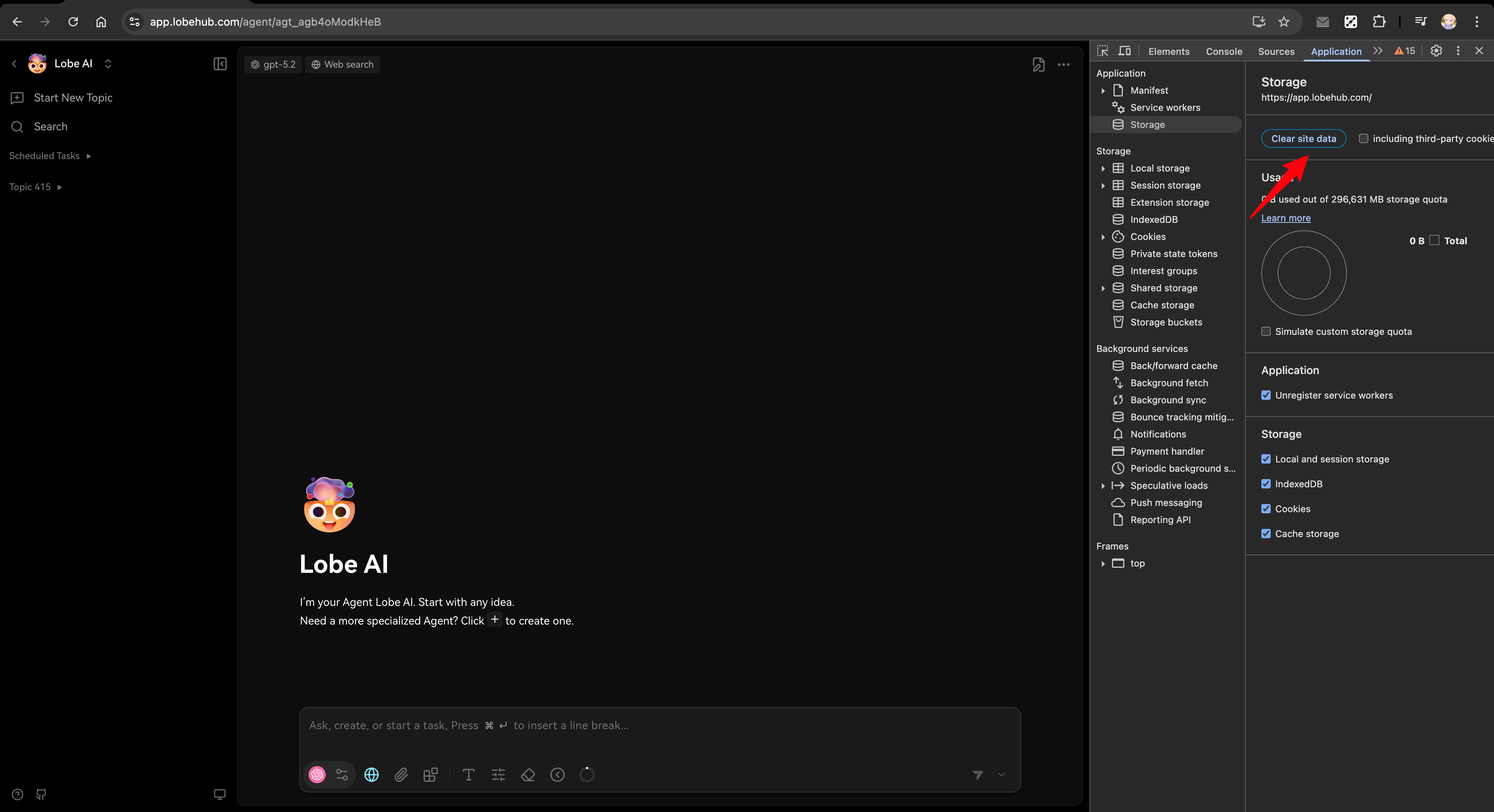
After migration, if you encounter login issues, try clearing your browser's site data first:
1. Open browser DevTools (F12 or right-click → Inspect)
2. Go to Application tab → Storage → Clear site data
3. Refresh the page and try again
### Users can't log in after migration
- Check that `AUTH_SECRET` is set correctly
- Verify database connection is working
- Ensure SSO provider is configured in `AUTH_SSO_PROVIDERS`
### SSO users can't connect
- For simple migration: Users need to log in again with their SSO account
- For full migration: Verify the SSO provider is configured in `AUTH_SSO_PROVIDERS` with the same provider ID
### Migration script fails
- Check database connection string
- Review script logs for specific errors
- Ensure the `nextauth_accounts` table exists in your database
### column "xxx" of relation "users" does not exist
This error occurs because the database schema is outdated. Run `pnpm db:migrate` to update the database structure before running the migration script.
### email\_not\_found error
If you see a redirect to `signin?callbackUrl=...&error=email_not_found`, it means LobeHub cannot get the user's email.
**Important**: Better Auth currently **requires user email** for authentication. All SSO providers must be configured to return email information, otherwise users cannot log in.
Common causes:
**Cause 1: SSO connection not requesting email permission**
When configuring SSO connections (e.g., GitHub in Auth0), make sure to enable **Email Address** permission in the Attributes section. LobeHub requires user email for authentication.
**Cause 2: User email not configured in identity provider**
For identity providers like Casdoor or Logto, users may not have an email configured.
**Note for Casdoor Users**: Casdoor does not require users to have an email configured, but LobeHub strongly depends on email for authentication. If you find migration difficult due to many users without email addresses, we recommend staying on [v2.0.0-next.344](https://github.com/lobehub/lobehub/releases/tag/v2.0.0-next.344) for now. We plan to provide a self-service migration feature in the future, where users without email will be redirected to a bind-email page when they log in.
Solution:
1. First configure the Webhook in LobeHub to sync user data from the identity provider:
- [Casdoor Webhook Configuration](/docs/self-hosting/auth/providers/casdoor)
- [Logto Webhook Configuration](/docs/self-hosting/auth/providers/logto)
2. Then configure the user's email in the identity provider's admin console
3. The user data will be synced to LobeHub via Webhook, and the user can then log in
## Related Reading