## Summary

Cleans up dead code and unused dependencies identified by [knip](https://knip.dev/). All removals were individually verified to have zero imports or references across the codebase. No functional changes.

**Deleted 9 unused files:**
- `packages/api/src/clickhouse/__tests__/clickhouse.V1_DEPRECATED_test.ts` — skipped deprecated test
- `packages/api/src/utils/email.ts` — empty stub functions, never imported
- `packages/api/src/utils/queue.ts` — unused utility class
- `packages/app/src/Checkbox.tsx` — replaced by Mantine Checkbox, never imported
- `packages/app/src/components/DBSearchPageFilters/index.ts` — dead barrel file (shadowed by sibling `.tsx`)
- `packages/app/src/components/Sources/index.ts` — dead barrel file (all consumers import submodules directly)
- `packages/app/src/components/WhereLanguageControlled.tsx` — unused component
- `packages/app/src/TabBarWithContent.tsx` — unused component
- `packages/app/src/vsc-dark-plus.ts` — unused Prism theme

**Removed 14 unused dependencies** from `packages/api`, `packages/app`, and `packages/common-utils` (e.g. `semver`, `react-query`, `react-sortable-hoc`, `@microsoft/fetch-event-source`, `store2`, `uuid`, etc.)

**Removed 17 unused devDependencies** across root, api, app, and common-utils (e.g. `@nx/workspace`, `@typescript-eslint/eslint-plugin`, `@typescript-eslint/parser`, `@types/semver`, `@types/react-table`, `rimraf`, `supertest`, `ts-node`, `tsc-alias`, `tsconfig-paths`, etc.)

**Replaced `react-papaparse` with `papaparse`** — code imports `papaparse` directly, not the React wrapper. Added `@types/papaparse` since the package doesn't bundle its own types.

**Cleaned up unused exports:**
- Trimmed barrel files (`AppNav/index.ts`, `SearchInput/index.ts`) to only re-export what's actually consumed
- Removed duplicate named exports where only the default export is used (`DBRowTableFieldWithPopover`, `DBRowTableRowButtons`)
- Un-exported interfaces and constants that are only used locally (`DBRowTableFieldWithPopoverProps`, `DBRowTableIconButtonProps`, `DBRowTableRowButtonsProps`, `BASE_URL`, `makeHandler`)
- Removed stale `supertest` from `allowModules` in `common-utils/eslint.config.mjs`

### How to test locally or on Vercel

1. `yarn install` — lockfile should resolve cleanly
2. `yarn workspace @hyperdx/common-utils ci:lint` — should pass (the only package where lint+tsc fully passes on this branch)
3. `npx knip` — should show reduced issue counts vs. main

### References

- Related PRs: #1973 (knip CI workflow)
## Summary

- **Link colors**: Override `--mantine-color-anchor` in ClickStack so links use blue in light mode and yellow in dark mode instead of Mantine's default primary color derivation.
- **Checkbox & Radio**: Use `vars` overrides to apply ClickStack accent color to active checkboxes and radios, with contrasting icon colors for readability in both themes.
- **Slider styling**: Replace inline `styles` with semantic tokens (`--color-slider-bar`, `--color-slider-thumb`, `--color-slider-dot`, etc.) and CSS modules for consistent 6px solid dot marks and token-based thumb/mark colors across both ClickStack and HyperDX themes.
- **Subtle Button variant**: Add `variant="subtle"` support to `Button` in both themes (transparent background, hover highlight, standard text color).
- **Docs**: Update `code_style.md` to document `variant="subtle"` as accepted for both `Button` and `ActionIcon`.

### Before

<img width="3896" height="1296" alt="image" src="https://github.com/user-attachments/assets/5a2f109a-88e3-46a1-8e38-95d51dfd5a6b" />

<img width="1806" height="2570" alt="image" src="https://github.com/user-attachments/assets/70cf6786-a487-477b-868f-7f2a18746053" />


### After

<img width="3596" height="1358" alt="image" src="https://github.com/user-attachments/assets/0ad3b885-e6b8-4edd-aade-97516740ed6b" />

<img width="1874" height="2684" alt="image" src="https://github.com/user-attachments/assets/fa00f2cc-49f8-4bd3-8379-3665b760bd4e" />


## Test plan

- [ ] Verify links are blue in ClickStack light mode and yellow in dark mode
- [ ] Verify checkboxes and radio buttons use the accent color when active in both themes
- [ ] Verify checkbox icon is dark in dark mode for contrast
- [ ] Verify slider marks are solid 6px dots, with correct colors in both modes
- [ ] Verify slider thumb uses theme-appropriate colors
- [ ] Verify `<Button variant="subtle">` renders correctly in both themes
- [ ] Verify no visual regressions in HyperDX theme slider styling
## Summary

This PR improves auto-complete in the following ways

1. Auto-complete suggestions will not appear after `AS`, since it is assumed that a user will not want to type an existing column or function name as a column alias
2. Accepting an auto-complete suggestion will replace characters after the cursor if they match the accepted suggestion. This is nice when, for example, I have typed `ResourceAttributes[]` and my cursor is before the `]` - accepting a suggestion will now replace the trailing `]` instead of leaving it be (in which case it would be duplicated after inserting the suggestion).

### Screenshots or video

https://github.com/user-attachments/assets/9577393c-6bfa-410b-b5ba-2ba6b00bc26b

### How to test locally or on Vercel

This can be tested in the preview environment.

### References


- Linear Issue: Closes HDX-2612
- Related PRs:
## Summary

This PR fixes a bug which caused searches with the defaultSelectExpression to be saved with an empty `select` value, resulting in no select value appearing when loading the saved search.

The fix is to save the default select expression when there is no select value in the `searchedConfig` value (from the URL params), which corresponds to the case in which the default select expression is shown on the (non-saved) search page.

### Screenshots or video

Before:

https://github.com/user-attachments/assets/2b578dab-2085-4e64-a79c-c2e6e8f085fa

After:

https://github.com/user-attachments/assets/bf713b86-a454-4fc8-9ed7-5370e2e665e0

### How to test locally or on Vercel

You can reproduce the behavior in the preview environment following the video demo above.

### References


- Linear Issue: Closes HDX-3298
- Related PRs:
## Summary

This PR fixes text index detection for indexes with quoted tokenizer arguments:

```
TYPE text(tokenizer = 'splitByNonAlpha')
```

### Screenshots or video

### How to test locally or on Vercel

The unit tests demonstrate the fix.

### References


- Linear Issue: Closes HDX-3812
- Related PRs:
## Summary

#1960 added support for OpenAI's chat completions api.

This change switches to using [OpenAI's new Responses API](https://developers.openai.com/api/docs/guides/migrate-to-responses) instead.

### How to test locally or on Vercel

### How to test locally
1. Set env vars:
`AI_PROVIDER=openai AI_API_KEY= AI_BASE_URL=<> AI_MODEL_NAME=<> AI_REQUEST_HEADERS={"X-Client-Id":"","X-Username":"", AI_ADDITIONAL_OPTIONS = {API_TYPE: "responses"}}`
3. Open Hyperdx's chart explorer and use the AI assistant chart builder
   - e.g. "show me error count by service in the last hour"
4. Confirm the assistant returns a valid chart config.

### References


- Linear Issue:
- Related PRs:
## Summary

This PR improves dashboard filters

1. Dashboard filters can now have an associated WHERE condition which filters the rows from which filter values will be queried.
2. Multiple values can now be selected for a single dashboard filter

### Screenshots or video

Multiple values can now be selected for a single filters:

<img width="544" height="77" alt="Screenshot 2026-03-23 at 12 31 02 PM" src="https://github.com/user-attachments/assets/2390a2d7-8514-4eb8-ac3c-db102a5df99b" />

Filters now have an optional condition, which filters the values which show up in the dropdown:

<img width="451" height="476" alt="Screenshot 2026-03-23 at 12 30 44 PM" src="https://github.com/user-attachments/assets/eed7f69e-466e-42fd-93f1-c27bfbc06204" />

<img width="265" height="94" alt="Screenshot 2026-03-23 at 12 30 54 PM" src="https://github.com/user-attachments/assets/2ba46e33-a44a-45ea-a6bf-fb71f5373e46" />

This also applies to Preset Dashboard Filters

<img width="726" height="908" alt="Screenshot 2026-03-23 at 12 33 34 PM" src="https://github.com/user-attachments/assets/df648feb-32e2-4f5e-80e5-409e0443b38e" />

### How to test locally or on Vercel

This can be partially tested in the preview environment, but testing the following requires running locally

1. Preset dashboard filters
2. External API support

### References


- Linear Issue: Closes HDX-3631 Closes HDX-2987
- Related PRs:
## Summary

The cleanup logic only removed demo sources where connection === 'local', or the db != 'otel_v2'. Now removes all Demo/ClickPy sources by name before recreating them, and reuses an existing demo connection instead of creating duplicates.

### References

- Linear Issue: HDX-3800
## Summary
- Section expand/collapse is now tracked in URL query params (`collapsed`/`expanded`) instead of persisting to the DB on every chevron click
- The DB-stored `collapsed` field on `DashboardContainer` becomes the default fallback — what viewers see when opening a dashboard fresh (no URL state)
- Chevron click updates URL state only (per-viewer, shareable via link)
- "Collapse by Default" / "Expand by Default" menu action in the section header saves to the DB (via `setDashboard`), setting the default for all viewers
- `SectionHeader` now accepts separate `collapsed`/`defaultCollapsed` props and `onToggle`/`onToggleDefaultCollapsed` handlers
- Adds 7 unit tests for `SectionHeader`
Implements Drew's [review feedback on PR #1926](https://github.com/hyperdxio/hyperdx/pull/1926#discussion_r2966166505):
> IMO, expanding/collapsing should not be persisted to the dashboard UNLESS this option is used. [...] I think it would be nice to persist normal expand collapse states in the URL, and then fallback to the default state (saved in the DB based on this option here) if there is no URL state.
## Demo
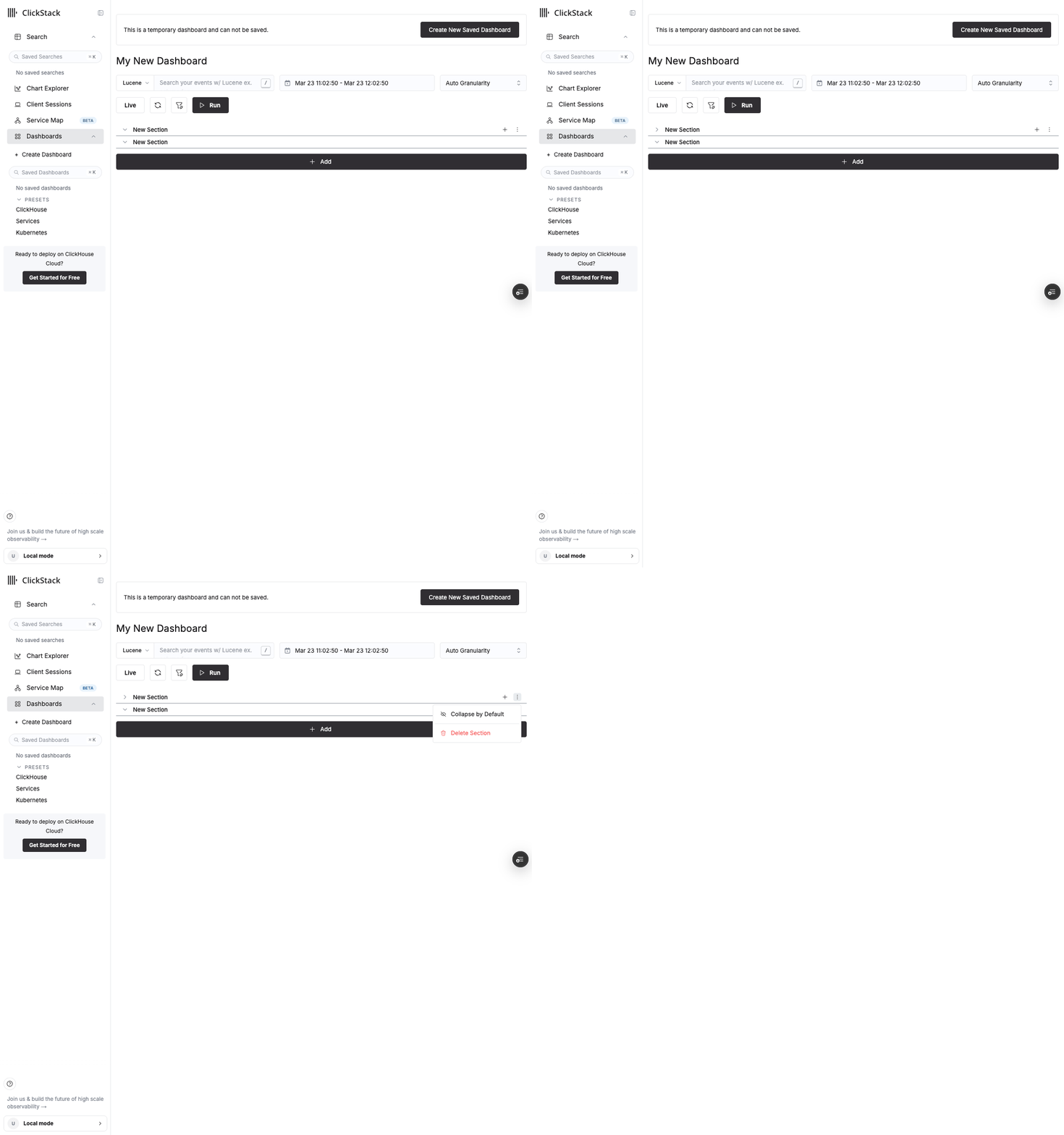
Shows: expanded sections → chevron click collapses first section (URL updates to `?collapsed=...`) → menu shows "Collapse by Default" (DB action, separate from view state)
## Test plan
- [x] Open a dashboard with sections — collapse/expand via chevron click, verify URL updates (`?collapsed=...` / `?expanded=...`) without saving to DB
- [x] Copy the URL with collapse state and open in a new tab — verify sections reflect the URL state
- [x] Open the section menu and click "Collapse by Default" — verify this saves to DB (persists after page refresh without URL params)
- [x] Verify "Expand by Default" / "Collapse by Default" label reflects the DB default, not current view state
- [x] Run `yarn ci:unit --testPathPatterns='SectionHeader'` — all 7 tests pass
🤖 Generated with [Claude Code](https://claude.com/claude-code)
## Summary
Adds a column toggle button (+ / - icon) next to the "Show Distribution" button in each filter group header on the search page. Clicking the button adds or removes the filter's field from the `SELECT` statement, and the table reflects the change immediately.
### Changes
- **`FilterGroup`** (`DBSearchPageFilters.tsx`): Added `onColumnToggle` and `isColumnDisplayed` props. Renders an `ActionIcon` with `IconPlus` (add) or `IconMinus` (remove) between the distribution toggle and the pin field button.
- **`NestedFilterGroup`**: Passes the new column toggle props through to child `FilterGroup` components.
- **`DBSearchPage.tsx`**: Passes `toggleColumn` and `displayedColumns` to `DBSearchPageFilters`, reusing the existing `toggleColumn` callback that manages the `SELECT` form field.
### Screenshots or video
| Before | After |
| :----- | :---- |
| Only distribution and pin buttons in filter header | New +/- column button appears between distribution and pin buttons |
### How to test locally or on Vercel
1. Navigate to the Search page
2. Open the filter panel on the left side
3. Find any filter group and hover over the header area — a `+` icon should appear next to the distribution chart icon
4. Click the `+` icon — the field should be added to the `SELECT` input and appear as a column in the results table
5. Click the `-` icon (now shown since the column is displayed) — the field should be removed from `SELECT` and the column disappears
### References
- Linear Issue: HDX-3770
Linear Issue: [HDX-3770](https://linear.app/clickhouse/issue/HDX-3770/telstra-add-column-from-filter-panel-in-dbsearchpage)
<div><a href="https://cursor.com/agents/bc-11d702b5-a58e-485c-982f-61d990e45091"><picture><source media="(prefers-color-scheme: dark)" srcset="https://cursor.com/assets/images/open-in-web-dark.png"><source media="(prefers-color-scheme: light)" srcset="https://cursor.com/assets/images/open-in-web-light.png"><img alt="Open in Web" width="114" height="28" src="https://cursor.com/assets/images/open-in-web-dark.png"></picture></a> <a href="https://cursor.com/background-agent?bcId=bc-11d702b5-a58e-485c-982f-61d990e45091"><picture><source media="(prefers-color-scheme: dark)" srcset="https://cursor.com/assets/images/open-in-cursor-dark.png"><source media="(prefers-color-scheme: light)" srcset="https://cursor.com/assets/images/open-in-cursor-light.png"><img alt="Open in Cursor" width="131" height="28" src="https://cursor.com/assets/images/open-in-cursor-dark.png"></picture></a> </div>
Co-authored-by: Cursor Agent <199161495+cursoragent@users.noreply.github.com>
Co-authored-by: github-actions[bot] <41898282+github-actions[bot]@users.noreply.github.com>
## Summary

Adds [Knip](https://knip.dev) to the monorepo to detect unused files, dependencies, and exports. The goal is to reduce dead code over time and prevent new unused code from accumulating.

**What's included:**
- Root-level `knip.json` configured for all three workspaces (`packages/app`, `packages/api`, `packages/common-utils`)
- `yarn knip` and `yarn knip:ci` scripts for local and CI usage
- GitHub Action (`.github/workflows/knip.yml`) that runs on every PR to `main`, compares results against the base branch, and posts a summary comment showing any increase or decrease in unused code
- Removed the previous app-only `packages/app/knip.json` in favor of the monorepo-wide config

**How the CI workflow works:**
1. Runs Knip on the PR branch
2. Checks out `main` and runs Knip there
3. Compares issue counts per category and posts/updates a PR comment with a diff table

This is additive — Knip runs as an informational check and does not block PRs.
## Summary
- Replace the "Add New Tile" button and overflow "Add Section" menu item with a unified "Add" dropdown at the bottom of the dashboard
- Dropdown contains "New Tile" and "New Section" — creative actions only
- "Import Dashboard" stays in the overflow menu alongside Export, Delete, and other management actions
- Follows the Grafana/Datadog pattern of a single entry point for adding content, which scales to future container types (tabs, groups)

## Test plan
- [x] Click "Add" button at bottom of dashboard → dropdown opens upward with "New Tile" and "New Section"
- [x] Click "New Tile" → tile editor opens (same as before)
- [x] Click "New Section" → new section appears on dashboard
- [x] Overflow menu still contains "Import Dashboard" with contextual label
- [x] E2E tests pass (updated page object for two-click dropdown flow)

🤖 Generated with [Claude Code](https://claude.com/claude-code)
## Summary
Improve the materialized column optimization by allowing it to be applied when `WITH` clauses are expression aliases (i.e., `isSubquery: false`). Previously, any `WITH` clause would disable this optimization. This change ensures that materialized columns are still considered for performance benefits when the `WITH` clause does not represent a subquery.

### Screenshots or video


| Before | After |
| :----- | :---- |
|        |       |

### How to test locally or on Vercel


1. Create a ClickHouse table with a materialized column, e.g.:
   ```sql
   ALTER TABLE otel_logs ADD COLUMN awesome_attribute String MATERIALIZED LogAttributes['awesome_attribute']
   ```
2. Open the Explore view for logs (`/search`)
3. Add a filter for `awesome_attribute` (or `LogAttributes['awesome_attribute']`)
4. Inspect the POST body of `/clickhouse-proxy` requests in the network tab:
    - Before fix: The histogram (time chart) query contains `LogAttributes['awesome_attribute']` (full map scan), while the search results query correctly uses `awesome_attribute`.
    - After fix: Both the histogram and search results queries use `awesome_attribute` (the materialized column).


### References


- Linear Issue: #1957
- Related PRs:
## Summary

- **Replace QEMU-emulated multi-platform builds with native ARM64 runners** for both `release.yml` and `release-nightly.yml`, significantly speeding up CI build times
- Each architecture (amd64/arm64) now builds in parallel on native hardware, then a manifest-merge job combines them into a multi-arch Docker tag using `docker buildx imagetools create`
- Migrate from raw Makefile `docker buildx build` commands to `docker/build-push-action@v6` for better GHA integration

## Changes

### `.github/workflows/release.yml`
- Removed QEMU setup entirely
- Replaced single `release` matrix job with per-image build+publish job pairs:
  - `build-otel-collector` / `publish-otel-collector` (runners: `ubuntu-latest` / `ubuntu-latest-arm64`)
  - `build-app` / `publish-app` (runners: `Large-Runner-x64-32` / `Large-Runner-ARM64-32`)
  - `build-local` / `publish-local` (runners: `Large-Runner-x64-32` / `Large-Runner-ARM64-32`)
  - `build-all-in-one` / `publish-all-in-one` (runners: `Large-Runner-x64-32` / `Large-Runner-ARM64-32`)
- Added `check_version` job to centralize skip-if-exists logic (replaces per-image `docker manifest inspect` in Makefile)
- Removed `check_release_app_pushed` artifact upload/download — `publish-app` now outputs `app_was_pushed` directly
- Scoped GHA build cache per image+arch (e.g. `scope=app-amd64`) to avoid collisions
- All 4 images build in parallel (8 build jobs total), then 4 manifest-merge jobs, then downstream notifications

### `.github/workflows/release-nightly.yml`
- Same native runner pattern (no skip logic since nightly always rebuilds)
- 8 build + 4 publish jobs running in parallel
- Slack failure notification and OTel trace export now depend on publish jobs

### `Makefile`
- Removed `release-*` and `release-*-nightly` targets (lines 203-361) — build logic moved into workflow YAML
- Local `build-*` targets preserved for developer use

## Architecture

Follows the same pattern as `release-ee.yml` in the EE repo:

```
check_changesets → check_version
                        │
    ┌───────────────────┼───────────────────┬───────────────────┐
    v                   v                   v                   v
build-app(x2)   build-otel(x2)    build-local(x2)    build-aio(x2)
    │                   │                   │                   │
publish-app      publish-otel       publish-local      publish-aio
    │                   │                   │                   │
    └─────────┬─────────┴───────────────────┴───────────────────┘
              v
     notify_helm_charts / notify_clickhouse_clickstack
              │
     otel-cicd-action
```

## Notes

- `--squash` flag dropped — it's an experimental Docker feature incompatible with `build-push-action` in multi-platform mode. `sbom` and `provenance` are preserved via action params.
- Per-arch intermediate tags (e.g. `hyperdx/hyperdx:2.21.0-amd64`) remain visible on DockerHub — this is standard practice.
- Dual DockerHub namespace tagging (`hyperdx/*` + `clickhouse/clickstack-*`) preserved.


## Sample Run
https://github.com/hyperdxio/hyperdx/actions/runs/23362835749
## Summary

Closes [HDX-3784](https://linear.app/clickhouse/issue/HDX-3784/increase-discoverability-of-trace-sources)

- **Context-aware icons for all source kinds**: The data source dropdown now shows icons for every source type — `IconLogs` for logs, `IconConnection` for traces, `IconDeviceLaptop` for sessions, and `IconChartLine` for metrics. Falls back to `IconStack` when no source is selected.
- **Inline source actions**: "Create New Source" and "Edit Sources" actions are now part of the dropdown itself under an "Actions" group with a labeled separator, replacing the separate gear icon menu (`SourceEditMenu`).
- **Dependency update**: Updated `@tabler/icons-react` from v3.5.0 to v3.40.0 to get `IconConnection`.
- **Fix: source management regression when `HDX_LOCAL_DEFAULT_SOURCES` is set**: Before this PR, there were two ways to create/edit sources: (1) options inside the dropdown, which were hidden when `HDX_LOCAL_DEFAULT_SOURCES` is set, and (2) a gear icon button next to the dropdown, which was always visible. This PR removed the gear icon and kept only the dropdown options, but they were still configured to hide when `HDX_LOCAL_DEFAULT_SOURCES` is set — leaving users with no way to manage sources. Fixed by removing that guard so the dropdown options always appear.

<img width="1236" height="492" alt="image" src="https://github.com/user-attachments/assets/6999626b-685b-4037-a003-b09018cfbadf" />

<img width="426" height="240" alt="Screenshot 2026-03-20 at 17 49 30" src="https://github.com/user-attachments/assets/28aaef44-7574-4c54-b721-b2a3a79b3507" />

## Changes

- `packages/app/src/components/SourceSelect.tsx` -- Dynamic left icon based on selected source kind (all 4 kinds: log, trace, session, metric), `onEdit` prop, grouped action items with icons, `renderOption` for source kind and action item icons. Removed `hasLocalDefaultSources` guard so source management actions are always available.
- `packages/app/src/components/SelectControlled.tsx` -- Added `onEdit` callback support, fixed `selected` check to handle grouped data.
- `packages/app/src/DBSearchPage.tsx` -- Removed `SourceEditMenu` component, added `onEditSources` callback, wired `onEdit` to `SourceSelectControlled`.
- `packages/app/styles/SourceSelectControlled.module.scss` -- Group label separator styling with semantic `--color-border` token.
- `packages/app/package.json` -- Updated `@tabler/icons-react` to `^3.39.0`.

## Test plan

- [ ] Select a log source and verify `IconLogs` appears as the left icon
- [ ] Select a trace source and verify `IconConnection` appears as the left icon
- [ ] Select a session source and verify `IconDeviceLaptop` appears as the left icon
- [ ] Select a metric source and verify `IconChartLine` appears as the left icon
- [ ] Verify each source in the dropdown shows its corresponding kind icon
- [ ] Open the dropdown and verify "Create New Source" and "Edit Sources" appear under the "Actions" group with icons
- [ ] Click "Create New Source" and verify the modal opens
- [ ] Click "Edit Sources" and verify navigation to edit (local mode: modal, cloud mode: /team)
- [ ] Verify the gear icon menu is no longer present next to the select
- [ ] **With `NEXT_PUBLIC_HDX_LOCAL_DEFAULT_SOURCES` set**: verify "Create New Source" and "Edit Sources" still appear in the dropdown and work correctly
## Summary

- Override Mantine's `--mantine-color-text` CSS variable to use our semantic `--color-text` token in both themes (hyperdx and clickstack), for both dark and light modes.
- Ensures all Mantine components that rely on `--mantine-color-text` use the correct theme-aware text color.
- Overrides are placed in the `/* Mantine Overrides */` section at the end of each theme mixin, consistent with the existing `--mantine-color-body` override.

## Test plan

- [ ] Verify text color in Mantine components matches the theme's `--color-text` in dark mode (both themes)
- [ ] Verify text color in Mantine components matches the theme's `--color-text` in light mode (both themes)


Made with [Cursor](https://cursor.com)
## Summary

The node commands to start the API server and alert task are duplicated across 4+ files, each hardcoding the build output path and node require flags. When the build process changed (esbuild introduction/revert per HDX-2690), the downstream operator and helm chart broke because their entrypoint commands were stale.

This PR introduces `packages/api/bin/hyperdx`, a single shell script that is the **sole source of truth** for how to launch API and task processes. It resolves the build directory relative to its own location, applies the correct node flags (`-r @hyperdx/node-opentelemetry/build/src/tracing`), and exposes two subcommands:

- `hyperdx api` -- starts the API server
- `hyperdx task <name>` -- runs a named task (e.g., `check-alerts`)

All Dockerfiles and entry scripts now delegate to this script instead of inlining the node command. Future build changes only need updating in one place.

### How to test locally or on Vercel

1. **Build the standalone API image** and confirm the entrypoint works:
   ```bash
   docker build . -f packages/api/Dockerfile -t hyperdx-api-test:latest --target prod
   docker run -d --name hdx-api-test -p 18000:8000 hyperdx-api-test:latest
   sleep 5
   docker logs hdx-api-test 2>&1 | head -30
   # Should show OpenTelemetry init + MongoStore error (expected without Mongo)
   # No "file not found" or "permission denied" errors
   docker stop hdx-api-test && docker rm hdx-api-test
   ```
2. **Build and run the all-in-one image** for a full integration test:
   ```bash
   make build-local
   docker run -d --name hdx-aio-test -p 18080:8080 -p 18000:8000 hyperdx/hyperdx-local:2.21.0
   # Wait up to 90s for startup, then:
   curl -sf http://localhost:18080/api/health  # should return {"data":"OK",...}
   curl -sf http://localhost:18000/health       # should return {"data":"OK",...}
   docker exec hdx-aio-test sh -c "ps aux"
   # Confirm API, APP, and ALERT-TASK processes are running via the hyperdx script
   docker stop hdx-aio-test && docker rm hdx-aio-test
   ```
3. **Build the prod image** to confirm the entry script changes are valid:
   ```bash
   make build-app
   ```

**Testing performed:** All three Docker image targets were built and verified locally. The standalone API image started node via `hyperdx api` correctly (crashed on missing MongoDB as expected). The all-in-one image passed health checks on both `localhost:18080/api/health` and `localhost:18000/health`, with all three processes (API, APP, ALERT-TASK) confirmed running inside the container using the new entry point script.

### References

- Linear Issue: [HDX-2712](https://linear.app/clickhouse/issue/HDX-2712/use-a-single-entry-point-script-for-both-hyperdx-api-and-alert-job)
- Related PRs: HDX-2690 (root cause), HDX-2815 (downstream helm chart follow-up)
- **Follow-up needed:** Update helm chart cron job template and operator template in `ClickHouse/ClickStack-helm-charts` to use `./packages/api/bin/hyperdx task check-alerts`

Made with [Cursor](https://cursor.com)
## Summary
Adds the authoring experience for dashboard sections (create, rename, delete, manage tiles) and introduces a polymorphic `DashboardContainer` abstraction that future-proofs the schema for tabs and groups.
Builds on #1900 (core collapsible sections mechanics). Closes#1897.
### Schema: `DashboardSection` → `DashboardContainer`
- Renamed `DashboardSectionSchema` → `DashboardContainerSchema` with a new `type` field (`'section'` for now, extensible to `'group'` / `'tab'` later)
- `sectionId` → `containerId` on tiles
- `sections` → `containers` on dashboards
- Updated across all packages: common-utils types, API Mongoose model, app types, import/export utils
### Authoring UX
| Action | How |
|---|---|
| **Create section** | Dashboard `...` overflow menu → "Add Section" |
| **Rename section** | Click the title text directly (Kibana-style inline editing) |
| **Delete section** | Hover section header → `...` → Delete Section (tiles become ungrouped, not deleted) |
| **Collapse/expand** | Click section header chevron |
| **Toggle default state** | Hover header → `...` → Collapse/Expand by Default |
| **Add tile to section** | Hover section header → `+` button opens tile editor pre-assigned to that section |
| **Move tile to section** | Hover tile → grid icon → pick target section from dropdown |
| **Move tile out** | Same dropdown → "(Ungrouped)" |

### UX polish (informed by best practices research)
- **Click-to-rename** — click section title text to edit inline (no menu navigation needed)
- **Hover-only controls** — `...` menu and `+` button only appear on section header hover, keeping view mode clean
- **"Add Section" demoted** — moved from equal-sized button to dashboard overflow menu (section creation is less frequent than tile creation)
- **"Move to Section" reordered** — placed before delete button for discoverability, uses `IconLayoutList` instead of `IconFolders`
### What's NOT in this PR (follow-up work)
- **Drag tiles between sections** — needs `react-dnd` custom drag layer; data model already supports it (`containerId` update)
- **Reorder sections** — needs sortable list library; data model supports it (array order)
- **Tabs / Groups** — new container types; just add to the `type` enum and build UIs
## Test plan
- [x] 30 unit tests pass (16 existing schema/grouping + 14 new authoring operations)
- [x] All 110 dashboard tests pass unchanged
- [x] ESLint clean
- [x] No TypeScript errors in changed files
- [x] Backward compatible — dashboards without containers render exactly as before
🤖 Generated with [Claude Code](https://claude.com/claude-code)
== Motivation ==

Time histograms on the search page silently drop data past an hour/minute boundary when the source `timestampValueExpression` includes a `toStartOf*` expression for primary key optimization.

== Details ==

When `convertToTimeChartConfig` aligns the date range to granularity it sets `dateRangeEndInclusive: false`, which is correct for the raw timestamp column (end was rounded up, so `<` gives equivalent coverage). But `timeFilterExpr` applies that same `<` uniformly to every expression in a compound `timestampValueExpression`. With a range ending at `04:08`, this yields `toStartOfHour(ts) < toStartOfHour(04:08)` = `< 04:00` — excluding the entire `04:xx` hour.

The coarse filter exists only for index pruning; the raw column already enforces exact bounds. Making it wider by one interval is harmless, making it narrower drops real rows.

== Testing ==

- `yarn jest renderChartConfig.test.ts` — 54 passed, 29 snapshots passed
- Added cases for `toStartOfHour` with exclusive end, compound expr with exclusive end, and exclusive start
## Summary

This PR adds the Spectral linter for linting our OpenAPI spec, with rules preventing fields with missing examples or descriptions, which are often enforced in the Control Plane repo.

This PR also resolves lint errors that were already present.

### Screenshots or video

### How to test locally or on Vercel

Run `make ci-lint` to lint the openapi specs

### References


- Linear Issue: Closes HDX-3768
- Related PRs:
## Summary

Some Distributed tables refer to "local" tables which are not available on the local node. To read metadata (primary key, skip indexes) for such distributed tables, we can read from `cluster(<cluster with local tables>, system, <metadata table>)` instead of the local system tables.

### Screenshots or video

After adding the distributed table as a source, we can see that the order by optimization and the skip index detection are working as intended, indicating that the cluster() queries are working and fetching the required metadata:

<img width="2099" height="624" alt="Screenshot 2026-03-19 at 8 39 48 AM" src="https://github.com/user-attachments/assets/1f8384fb-8ae1-4549-9432-e4359ac72e02" />

### How to test locally or on Vercel

<details>
<summary>First, setup two clusters</summary>

- docker compose: https://pastila.clickhouse.com/?003644f9/c65444330e3601726c00b7cc9e095e71#7W62EjQox6MnTj0vCGL0AA==GCM
- config.xml: https://pastila.clickhouse.com/?002ee55c/d82248e8db633b3fbaf14cee2ee51b0e#royNZZ4snbBpZUd8xulw5w==GCM
- config-2.xml: https://pastila.clickhouse.com/?009f57b4/cf1d51fa36eee025f17beda4da6621fa#KBbHphEhcS+1m7mBqNfY4A==GCM
- config-3.xml: https://pastila.clickhouse.com/?003115c7/e984fc157de834095bedea86bc698dca#1rEmfXnq6H0tiT4qNgayNg==GCM
- keeper.xml: https://pastila.clickhouse.com/?005dc0a8/1599254d15dbac2868f04f5ab33125c2#R90W3HfA3J0yeTNf9hrDNQ==GCM

</details>

<details>
<summary>Then setup the local and distributed tables</summary>

```sql
CREATE TABLE default.otel_logs_toStartOf on cluster hdx_cluster_2
(
    `Timestamp` DateTime64(9) CODEC(Delta(8), ZSTD(1)),
    `TimestampTime` DateTime DEFAULT toDateTime(Timestamp),
    `TraceId` String CODEC(ZSTD(1)),
    `SpanId` String CODEC(ZSTD(1)),
    `TraceFlags` UInt8,
    `SeverityText` LowCardinality(String) CODEC(ZSTD(1)),
    `SeverityNumber` UInt8,
    `ServiceName` LowCardinality(String) CODEC(ZSTD(1)),
    `Body` String CODEC(ZSTD(1)),
    `ResourceSchemaUrl` LowCardinality(String) CODEC(ZSTD(1)),
    `ResourceAttributes` Map(LowCardinality(String), String) CODEC(ZSTD(1)),
    `ScopeSchemaUrl` LowCardinality(String) CODEC(ZSTD(1)),
    `ScopeName` String CODEC(ZSTD(1)),
    `ScopeVersion` LowCardinality(String) CODEC(ZSTD(1)),
    `ScopeAttributes` Map(LowCardinality(String), String) CODEC(ZSTD(1)),
    `LogAttributes` Map(LowCardinality(String), String) CODEC(ZSTD(1)),
    INDEX idx_trace_id TraceId TYPE bloom_filter(0.001) GRANULARITY 1,
    INDEX idx_res_attr_key mapKeys(ResourceAttributes) TYPE bloom_filter(0.01) GRANULARITY 1,
    INDEX idx_res_attr_value mapValues(ResourceAttributes) TYPE bloom_filter(0.01) GRANULARITY 1,
    INDEX idx_scope_attr_key mapKeys(ScopeAttributes) TYPE bloom_filter(0.01) GRANULARITY 1,
    INDEX idx_scope_attr_value mapValues(ScopeAttributes) TYPE bloom_filter(0.01) GRANULARITY 1,
    INDEX idx_log_attr_key mapKeys(LogAttributes) TYPE bloom_filter(0.01) GRANULARITY 1,
    INDEX idx_log_attr_value mapValues(LogAttributes) TYPE bloom_filter(0.01) GRANULARITY 1,
    INDEX idx_body Body TYPE tokenbf_v1(32768, 3, 0) GRANULARITY 8
)
ENGINE = MergeTree
PARTITION BY toDate(TimestampTime)
PRIMARY KEY (toStartOfMinute(TimestampTime), ServiceName, TimestampTime)
ORDER BY (toStartOfMinute(TimestampTime), ServiceName, TimestampTime, Timestamp)
TTL TimestampTime + toIntervalDay(30)
SETTINGS index_granularity = 8192, ttl_only_drop_parts = 1;

CREATE TABLE default.otel_logs_toStartOf_distributed on cluster hdx_cluster
(
    `Timestamp` DateTime64(9) CODEC(Delta(8), ZSTD(1)),
    `TimestampTime` DateTime DEFAULT toDateTime(Timestamp),
    `TraceId` String CODEC(ZSTD(1)),
    `SpanId` String CODEC(ZSTD(1)),
    `TraceFlags` UInt8,
    `SeverityText` LowCardinality(String) CODEC(ZSTD(1)),
    `SeverityNumber` UInt8,
    `ServiceName` LowCardinality(String) CODEC(ZSTD(1)),
    `Body` String CODEC(ZSTD(1)),
    `ResourceSchemaUrl` LowCardinality(String) CODEC(ZSTD(1)),
    `ResourceAttributes` Map(LowCardinality(String), String) CODEC(ZSTD(1)),
    `ScopeSchemaUrl` LowCardinality(String) CODEC(ZSTD(1)),
    `ScopeName` String CODEC(ZSTD(1)),
    `ScopeVersion` LowCardinality(String) CODEC(ZSTD(1)),
    `ScopeAttributes` Map(LowCardinality(String), String) CODEC(ZSTD(1)),
    `LogAttributes` Map(LowCardinality(String), String) CODEC(ZSTD(1))
)
ENGINE = Distributed('hdx_cluster_2', 'default', 'otel_logs_toStartOf', rand());

ALTER TABLE otel_logs_toStartOf ON CLUSTER hdx_cluster_2 ADD INDEX text_idx(Body)
	TYPE text(tokenizer=splitByNonAlpha, preprocessor=lower(Body))
	SETTINGS enable_full_text_index=1;

ALTER TABLE otel_logs_toStartOf ON CLUSTER hdx_cluster_2 MATERIALIZE INDEX text_idx;
```
</details>

<details>
<summary>To test text index detection, first enable full text indexes locally in your users.xml file</summary>

```xml
<clickhouse>
    <profiles>
        <default>
            ...
            <enable_full_text_index>1</enable_full_text_index>
        </default>
    </profiles>
    ...
<clickhouse>
```
</details>

### References


- Linear Issue:
- Related PRs:
## Summary

Large refactor changing the TSource type to a true discriminated union. This means that the expected fields for `kind: 'log'` will differ from those for `'trace', 'session', 'metrics'`.  This avoids the current laissez faire source type that currently exists, and required extensive changes across the api and app packages. Also includes a nice addition to `useSource` - you can now specify a `kind` field, which will properly infer the type of the returned source.

This also makes use of discriminators in mongoose. This does change a bit of the way that we create and update sources. Obvious changes to sources have also been made, namely making `timeValueExpression` required on sources. Care has been taken to avoid requiring a migration.

### How to test locally or on Vercel

1. `yarn dev`
2. Play around with the app, especially around source creation, source edits, and loading existing sources from a previous version

### References

- Linear Issue: References HDX-3352
- Related PRs:

Ref: HDX-3352
## Summary

Fixes an AppNav crash caused by blank or whitespace-only user names. The user menu now normalizes the display name before generating avatar initials and includes a regression test for both whitespace-heavy and blank inputs.

### How to test locally or on Vercel

1. Open the app with a user whose name is blank or contains only whitespace and confirm the AppNav renders instead of crashing.
2. Run `cd packages/app && yarn ci:unit src/components/__tests__/AppNavUserMenu.test.tsx`.
3. Optionally run `make ci-lint` and `make ci-unit` to compare against current repo-wide CI status.

### References

- Linear Issue: https://linear.app/clickhouse/issue/HDX-3732/bug-app-crashed-at-the-appnav-component
- Related PRs: None
## Summary
- escape service name values when generating the Services page SQL filter to prevent malformed queries when names contain quotes
- switch from string interpolation to `SqlString.format` with a raw left-hand expression and escaped right-hand value

## Why
- service names containing apostrophes/single quotes broke ClickHouse query parsing, causing the Services page to error

Linear: https://linear.app/clickhouse/issue/HDX-3277/service-page-quote-escape-bug
## Summary

This PR adds lint rules disallowing Date.now() and new Date(), which can cause unnecessary re-renders.

### Screenshots or video

No behavior changes are expected.

### How to test locally or on Vercel

This can be tested in the preview environment - it is an app-only change

### References


- Linear Issue: Closes HDX-2187
- Related PRs:
## Summary

This change updates the return type of queryTableMetadata (and therefore `getTableMetadata()` and `useTableMetadata()`) to include `undefined`, since the lookup can return undefined when the provided table does not exist. This required adding undefined checks at a few call sites.

### Screenshots or video

There are no behavior changes expected, other than fewer error logs on a few pages where CTEs are used (eg. K8s dashboard).

### How to test locally or on Vercel

This can be tested in the preview environment.

### References


- Linear Issue: n/a
- Related PRs:
## Summary

- Adds a new `variant="link"` for `Button` and `ActionIcon` that renders as a plain text link — no background, no border, no padding. Text is muted by default and brightens on hover (adapts to light/dark mode).
- Adds a **Brand** theme switcher to the Storybook toolbar so stories can be previewed in both HyperDX and ClickStack themes.
- Documents the new variant in `code_style.md` and adds comprehensive Storybook stories.

## Changes

| File | What |
|------|------|
| `themes/hyperdx/mantineTheme.ts` | `link` variant for Button (`vars` + `classNames`) and ActionIcon (`vars` + `classNames`) |
| `themes/clickstack/mantineTheme.ts` | Same for ClickStack theme |
| `styles/variants.module.scss` | Hover color transition and transparent disabled state for link variants |
| `stories/Button.stories.tsx` | Link variant in CustomVariants, DisabledStates, LoadingStates |
| `stories/ActionIcon.stories.tsx` | Link variant in CustomVariants, DisabledStates, LoadingStates |
| `.storybook/preview.tsx` | Brand theme switcher (HyperDX / ClickStack) in toolbar |
| `agent_docs/code_style.md` | Documented link variant usage and guidelines |

## Test plan

- [ ] Verify `variant="link"` renders without background/border/padding in Storybook
- [ ] Verify hover brightens text in both light and dark modes
- [ ] Verify disabled state shows reduced opacity with no background
- [ ] Switch brand theme in Storybook toolbar and confirm both HyperDX and ClickStack render correctly


Made with [Cursor](https://cursor.com)
## Summary

Adds duration labels next to each **span** bar in the trace waterfall timeline so users can read the duration at a glance without hovering the tooltip.

## Changes

### Timeline chart

- **TimelineChartRowEvents**
  - Renders a duration label (e.g. `12ms`, `1.2s`) **outside** each bar using `position: absolute`, so it doesn’t affect layout.
  - **Placement:** Label is on the **right** of the bar when most of the bar is before the timeline midpoint, and on the **left** when most of the bar is past the midpoint (based on bar center vs. `maxVal / 2`), to keep it in the emptier side.
  - Uses existing `renderMs()` from `TimelineChart/utils` for formatting.
  - Wraps each bar in a container with `overflow: visible` so the duration label is not clipped by the bar’s `text-truncate` (overflow hidden).
  - **TTimelineEvent** now supports optional `showDuration?: boolean`. When `false`, the duration label is hidden (default is to show).

### DBTraceWaterfallChart

- When building timeline events, sets `showDuration: type !== SourceKind.Log` so **log** rows do not show a duration (only spans do).

## Screenshots
<img width="1293" height="1187" alt="Screenshot 2026-03-11 at 18 36 34" src="https://github.com/user-attachments/assets/da04c317-a0bd-45d7-b0cc-f298564fb850" />


## Testing

- Open a trace with multiple spans and at least one correlated log; confirm duration appears beside span bars (left or right by midpoint) and does not appear beside log rows.

### References

- Closes HDX-3671
## Summary
Transforms the Event Deltas heatmap from a hard-to-interpret linear visualization into an actionable tool for latency analysis. Addresses a well-known limitation where log-normal latency distributions compress into the bottom few pixels of a linear-scale heatmap.
## Changes
### `DBHeatmapChart.tsx`
- **Log-spaced y-axis buckets**: Bucket by `log(value)` via ClickHouse `widthBucket(log(val), log(min), log(max), N)` instead of raw linear buckets. Reveals multi-modal distributions and latency bands.
- **Sqrt color mapping**: Replace `log(count)/log(20)` with `sqrt(count)/sqrt(max)` for less aggressive compression and better visual separation between sparse and dense regions.
- **Quantile lower bound + actual max upper bound**: Lower bound uses `quantile(0.01)` (log) / `quantile(0.001)` (linear) to avoid near-zero outliers stretching the axis. Upper bound uses actual `max()` so that latency spikes (typically <1% of spans) remain visible — log scale handles wide ranges naturally.
- **Color legend**: Small gradient bar component showing low-to-high count mapping.
- **Fully opaque viridis palette**: Removed transparency from colors so they work in both dark and light themes.
- **`scaleType` prop**: `HeatmapContainer` accepts `'log' | 'linear'` (default `'log'`).
### `Search/DBSearchHeatmapChart.tsx`
- **Log/Linear toggle**: `SegmentedControl` next to the heatmap form, defaulting to Log. Stored in component state.
- Passes `scaleType` through to `DBHeatmapChart`.
### `__tests__/heatmapBuckets.test.ts` (new)
- 17 unit tests covering bucket boundary computation, effectiveMin capping, widthBucket behavior, and regression tests proving the old p99 max hid latency spikes.
## Test plan
- [x] All unit tests pass with no regressions
- [x] ESLint clean
- [x] Manual: Open Event Deltas — heatmap should show log-spaced y-axis with visible latency bands
- [x] Manual: Toggle to Linear — y-axis should revert to uniform spacing
- [x] Manual: Color legend visible below the heatmap
- [x] Manual: Verify heatmap looks good in both dark and light themes
- [x] Manual: Verify latency spikes >1s are visible on the heatmap (not hidden by range capping)
## Out of scope (follow-up issues)
- #1910 — Symlog scale for zero-inclusive metrics
- #1911 — Hover tooltip with percentile context
- #1912 — Adaptive bucket density
- #1914 — Overflow bucket indicators (would enable smart quantile-based range clamping without hiding spikes)
Closes#1909🤖 Generated with [Claude Code](https://claude.com/claude-code)
Co-authored-by: github-actions[bot] <41898282+github-actions[bot]@users.noreply.github.com>
## Summary

This PR updates Raw SQL charts with support for dashboard filters, using the $__filters macro.

Lucene global filters require a Source to be included in the ChartConfig, for schema introspection and the `implicitColumnExpression` value. To support Lucene filters, this PR also updates the RawSqlChartConfig type to include optional `source`, `implicitColumnExpression`, and `from` properties. Only `source` is saved in the database. The external API has been updated to accept the `source` field for raw SQL charts as well.

Dashboard import/export has also been updated to support source mapping for raw sql charts with sources.

### Screenshots or video

Both the global filter and the drop-down filters are applied:

<img width="683" height="574" alt="Screenshot 2026-03-17 at 10 57 36 AM" src="https://github.com/user-attachments/assets/280ba0b5-55f7-4107-a55c-eeb1497ac7de" />

To render Lucene conditions, we require Source information (the `from` and `implicitColumnExpression` fields). When a source is not set, filters are therefore not applied:

<img width="782" height="618" alt="Screenshot 2026-03-17 at 10 54 41 AM" src="https://github.com/user-attachments/assets/3ad19ea7-12ee-4334-abe2-8985a0be952c" />

Similarly, if the `$__filters` macro is not used, then the filters are not applied

<img width="704" height="292" alt="Screenshot 2026-03-17 at 10 56 33 AM" src="https://github.com/user-attachments/assets/e1169e4a-2f64-4cd2-bc05-f699fecef8c1" />

Import:

<img width="993" height="669" alt="Screenshot 2026-03-17 at 3 35 16 PM" src="https://github.com/user-attachments/assets/6ebe20c0-19e2-4e90-95d0-8b02c2af0612" />

### How to test locally or on Vercel

This can be tested in the preview environment.
1. Create a saved dashboard and add some filters.
2. Create a raw sql tile, with or without the $__filters macro
3. Try selecting filters, deselecting filters, and applying global SQL and Lucene filters
4. Inspect the generated queries in the console.

### References


- Linear Issue: Closes HDX-3694
- Related PRs:
## Summary
- The sidenav footer was using `position: absolute` with a `linear-gradient` overlay that visually faded/cut off the right border line of the cloud banner
- Replaced the overlay approach with a normal flex child (`flex-shrink: 0`) so the footer sits below the scroll area without obscuring anything
- Restored the gradient fade as a `::before` pseudo-element positioned above the footer, preserving the visual transition without overlapping content
- Removed the compensating `padding-bottom: 80px` on the onboarding section and the now-unnecessary `pointer-events` overrides

### Before and after

<img width="1112" height="408" alt="image" src="https://github.com/user-attachments/assets/83f6b28e-e42f-4bce-89a7-5ee2e89d9a9f" />


## Test plan
- [ ] Verify the sidenav footer (help button + user menu) renders correctly at the bottom
- [ ] Verify the cloud banner / onboarding checklist is fully visible without any fade effect
- [ ] Verify scrolling the sidenav works correctly when there are many saved searches/dashboards
- [ ] Verify collapsed sidenav still looks correct
- **`getRecentAlertHistories`**: Add interval-based `createdAt` lower bound to `$match` (scans only `limit * interval` instead of the full 30-day TTL window) and insert `$sort: { createdAt: -1 }` before `$group` to enable the streaming group optimization using the existing `{ alert: 1, createdAt: -1 }` index. For a 1-minute alert with limit 20, this reduces the scan from ~43k docs to ~20 docs (~2,160x).
- **`getPreviousAlertHistories`**: Add a new `{ alert: 1, group: 1, createdAt: -1 }` compound index and align the `$sort` stage to match it, so the `$group`/`$first` pattern can leverage the index directly. Also add a 7-day `createdAt` lower bound to the `$match` stage (~4x scan reduction vs. 30-day TTL).
- Update tests to use `Date.now()`-relative timestamps and pass the new `interval` parameter.
## Summary

This PR extends Raw SQL Charts to support [macros that are supported by the Grafana ClickHouse plugin](https://github.com/grafana/clickhouse-datasource?tab=readme-ov-file#macros).

Query Params and Macros are also now included as auto-complete suggestions in the SQL Editor.

### Screenshots or video

<img width="1434" height="1080" alt="Screenshot 2026-03-16 at 12 53 03 PM" src="https://github.com/user-attachments/assets/07f753e4-28f1-43f4-8add-f123dae0b12a" />

### How to test locally or on Vercel

This can be tested in Vercel preview - just reference the supported macros in a raw SQL chart.

### References


- Linear Issue: Closes HDX-3651
- Related PRs:
## Summary

This PR updates the `getTableMetadata` and `getSkipIndices` functions to handle distributed tables by looking up primary keys and indexes (respectively) from the underlying local table (since the distributed table does not have them).

- Source config inference works again
- The default order by optimization (adding `toStartOfXX()` to the search page order by when it's present in the primary key) now correctly applies when querying a distributed table source
- The date range filter now correctly filters on both `toStartOfXX(TimestampTime)` and `TimestampTime` when `toStartOfXX(TimestampTime)` is present in the primary key of the local table.
- Source schema preview now shows both the distributed table and the local table, when the source is defined by a distributed table.
- Text indexes are now detected correctly for distributed tables


### Screenshots or video

https://github.com/user-attachments/assets/d1c60964-99f0-4470-9378-a812f963c692

When text index is present, hasAllTokens is used:
<img width="848" height="139" alt="Screenshot 2026-03-16 at 10 55 24 AM" src="https://github.com/user-attachments/assets/2bd780dc-291d-495f-bd12-c636988648c1" />

### How to test locally or on Vercel

<details>
<summary>Testing locally, you'll need to create a distributed logs table with a local table that has a timestamp optimization:</summary>


```sql
CREATE TABLE default.otel_logs_toStartOf on cluster hdx_cluster
(
    `Timestamp` DateTime64(9) CODEC(Delta(8), ZSTD(1)),
    `TimestampTime` DateTime DEFAULT toDateTime(Timestamp),
    `TraceId` String CODEC(ZSTD(1)),
    `SpanId` String CODEC(ZSTD(1)),
    `TraceFlags` UInt8,
    `SeverityText` LowCardinality(String) CODEC(ZSTD(1)),
    `SeverityNumber` UInt8,
    `ServiceName` LowCardinality(String) CODEC(ZSTD(1)),
    `Body` String CODEC(ZSTD(1)),
    `ResourceSchemaUrl` LowCardinality(String) CODEC(ZSTD(1)),
    `ResourceAttributes` Map(LowCardinality(String), String) CODEC(ZSTD(1)),
    `ScopeSchemaUrl` LowCardinality(String) CODEC(ZSTD(1)),
    `ScopeName` String CODEC(ZSTD(1)),
    `ScopeVersion` LowCardinality(String) CODEC(ZSTD(1)),
    `ScopeAttributes` Map(LowCardinality(String), String) CODEC(ZSTD(1)),
    `LogAttributes` Map(LowCardinality(String), String) CODEC(ZSTD(1)),
    INDEX idx_trace_id TraceId TYPE bloom_filter(0.001) GRANULARITY 1,
    INDEX idx_res_attr_key mapKeys(ResourceAttributes) TYPE bloom_filter(0.01) GRANULARITY 1,
    INDEX idx_res_attr_value mapValues(ResourceAttributes) TYPE bloom_filter(0.01) GRANULARITY 1,
    INDEX idx_scope_attr_key mapKeys(ScopeAttributes) TYPE bloom_filter(0.01) GRANULARITY 1,
    INDEX idx_scope_attr_value mapValues(ScopeAttributes) TYPE bloom_filter(0.01) GRANULARITY 1,
    INDEX idx_log_attr_key mapKeys(LogAttributes) TYPE bloom_filter(0.01) GRANULARITY 1,
    INDEX idx_log_attr_value mapValues(LogAttributes) TYPE bloom_filter(0.01) GRANULARITY 1,
    INDEX idx_body Body TYPE tokenbf_v1(32768, 3, 0) GRANULARITY 8
)
ENGINE = MergeTree
PARTITION BY toDate(TimestampTime)
PRIMARY KEY (toStartOfMinute(TimestampTime), ServiceName, TimestampTime)
ORDER BY (toStartOfMinute(TimestampTime), ServiceName, TimestampTime, Timestamp)
TTL TimestampTime + toIntervalDay(30)
SETTINGS index_granularity = 8192, ttl_only_drop_parts = 1;

CREATE TABLE default.otel_logs_toStartOf_distributed on cluster hdx_cluster
(
    `Timestamp` DateTime64(9) CODEC(Delta(8), ZSTD(1)),
    `TimestampTime` DateTime DEFAULT toDateTime(Timestamp),
    `TraceId` String CODEC(ZSTD(1)),
    `SpanId` String CODEC(ZSTD(1)),
    `TraceFlags` UInt8,
    `SeverityText` LowCardinality(String) CODEC(ZSTD(1)),
    `SeverityNumber` UInt8,
    `ServiceName` LowCardinality(String) CODEC(ZSTD(1)),
    `Body` String CODEC(ZSTD(1)),
    `ResourceSchemaUrl` LowCardinality(String) CODEC(ZSTD(1)),
    `ResourceAttributes` Map(LowCardinality(String), String) CODEC(ZSTD(1)),
    `ScopeSchemaUrl` LowCardinality(String) CODEC(ZSTD(1)),
    `ScopeName` String CODEC(ZSTD(1)),
    `ScopeVersion` LowCardinality(String) CODEC(ZSTD(1)),
    `ScopeAttributes` Map(LowCardinality(String), String) CODEC(ZSTD(1)),
    `LogAttributes` Map(LowCardinality(String), String) CODEC(ZSTD(1))
)
ENGINE = Distributed('hdx_cluster', 'default', 'otel_logs_toStartOf', rand());

ALTER TABLE otel_logs_toStartOf ON CLUSTER hdx_cluster ADD INDEX text_idx(Body)
	TYPE text(tokenizer=splitByNonAlpha, preprocessor=lower(Body))
	SETTINGS enable_full_text_index=1;

ALTER TABLE otel_logs_toStartOf ON CLUSTER hdx_cluster MATERIALIZE INDEX text_idx;
```
</details>

<details>
<summary>To test text index detection, first enable full text indexes locally in your users.xml file</summary>

```xml
<clickhouse>
    <profiles>
        <default>
            ...
            <enable_full_text_index>1</enable_full_text_index>
        </default>
    </profiles>
    ...
<clickhouse>
```
</details>

### References


- Linear Issue: Closes HDX-3703
- Related PRs:
## Summary

ClickStack embedded seemed to sometimes show `http://localhost:8123` instead of `window.location.origin` in the onboarding connection form. These changes should harden the behavior to show `window.location.origin`
## Summary
- Adds data model support for collapsible sections: `DashboardSection` schema with `id`, `title`, `collapsed` fields
- Tiles can optionally reference a section via `sectionId`
- Dashboards gain an optional `sections` array
- `SectionHeader` component renders a clickable bar with chevron toggle and tile count when collapsed
- Per-section `ReactGridLayout` grids: collapsed sections don't mount tiles at all, so no queries fire (lazy loading)
- Fully backward compatible — dashboards without sections render exactly as before
## Architecture
Uses a **multi-grid** approach: each section gets its own `ReactGridLayout` instance. This avoids the y-offset shifting complexity of a single-grid approach and gives us lazy loading for free (collapsed sections = unmounted tiles = no API calls).
Key tradeoff: cross-section drag-and-drop is not supported in this PR — that's addressed in the follow-up authoring UX issue (#1897).
## Test plan
- [x] 13 new tests covering schema validation, backward compatibility, tile grouping, and lazy loading filtering
- [x] All 93 existing dashboard tests pass unchanged
- [x] ESLint clean (no errors)
- [x] TypeScript compiles without errors in changed files
Closes#1896🤖 Generated with [Claude Code](https://claude.com/claude-code)
## Summary

Closes HDX-2701

Enables horizontal scrolling on the search results table so that column content is no longer clipped when the viewport is narrower than the total column widths, and improves table header styling, resize interactions, and scrollbar aesthetics.

### Changes

- **Dynamic `minWidth` on the table element** — Computes the sum of all column widths from TanStack Table's sizing state (substituting a 200px minimum for the flexible last column) and sets it as an inline `min-width` on the `<table>`. When the container is narrower than this threshold, the table overflows and the wrapper scrolls horizontally. When wider, `width: 100%` ensures the table fills the container normally.
- **Dynamic last column width** — Uses a `ResizeObserver` to track container width and computes the last column size as the remaining space after all other columns, instead of using the `UNDEFINED_WIDTH` sentinel. This ensures the last column fills remaining space responsively while respecting a 200px minimum.
- **Minimum column width** — Added `MIN_COLUMN_WIDTH` (50px) via TanStack Table's `defaultColumn.minSize` to prevent columns from being resized below a usable size. Explicitly set `minSize: 32` on the expand button column to prevent it from inheriting the 50px default.
- **Last column resizing** — Removed the `!isLast` guard so the last column now has a resize handle, making all columns consistently resizable.
- **Resize handle redesign** — Replaced the `IconGripVertical` drag icon with a minimal 1px vertical line using a CSS `::after` pseudo-element, styled with the new `--color-border-emphasis` token.
- **`min-width: 0` on flex containers** — Added `miw={0}` to the `DBSearchPage` results and pattern containers so flex children can shrink below their content size, allowing overflow to trigger scrolling.
- **Consolidate utility classes into SCSS module** — Moved `overflow: auto`, `height: 100%`, and `font-size` from inline Bootstrap utility classes into `.tableWrapper`, and moved `width: 100%` into `.table` in `LogTable.module.scss`.
- **Replace `Button` with `UnstyledButton` for sort headers** — Replaced Mantine `Button` with `UnstyledButton` for column sort headers, with custom SCSS that only darkens text on hover (no background).
- **Consolidate header styles into `TableHeader.module.scss`** — Moved `.cursorColResize` from `Table.module.scss` and `.headerCellWithAction`/`.headerRemoveButton` from `LogTable.module.scss` into a new `TableHeader.module.scss`, co-located with `TableHeader.tsx`.
- **Refactor `CsvExportButton`** — Removed the `UnstyledButton` wrapper around `CSVDownloader` to eliminate invalid `<a>` inside `<button>` markup. The `CSVDownloader` is now the root element with inline flex styling.
- **New `--color-border-emphasis` design token** — Added a slightly more prominent border color token for UI elements like resize handles, defined across HyperDX and ClickStack themes in both light and dark modes.
- **Global thin scrollbar styling** — Added app-wide custom scrollbar styles in `globals.css` for both WebKit and Firefox, providing thin (6px), rounded, semi-transparent scrollbars using theme color tokens.

### Files changed

- `packages/app/src/components/DBRowTable.tsx` — Added `containerWidth` tracking via `ResizeObserver`; added `tableMinWidth` and `lastColumnWidth` computations; set inline `minWidth` on table; added `defaultColumn.minSize`; moved utility classes to SCSS
- `packages/app/src/DBSearchPage.tsx` — Added `miw={0}` to results and pattern container Flex wrappers
- `packages/app/src/components/DBTable/TableHeader.tsx` — Replaced `Button` with `UnstyledButton`; removed `IconGripVertical`; enabled last column resizing; consolidated all style imports to `TableHeader.module.scss`
- `packages/app/src/components/DBTable/TableHeader.module.scss` *(new)* — Styles for `.sortButton`, `.resizer` (with `::after` pseudo-element line), `.headerCellWithAction`, and `.headerRemoveButton`
- `packages/app/src/components/CsvExportButton.tsx` — Removed `UnstyledButton` wrapper; `CSVDownloader` is now the root element with flex layout
- `packages/app/src/components/ExpandableRowTable.tsx` — Added `minSize: 32` to expand button column to prevent inheriting 50px default
- `packages/app/src/components/Table.module.scss` — Removed `.cursorColResize` (moved to `TableHeader.module.scss`)
- `packages/app/src/tableUtils.tsx` — Added `MIN_LAST_COLUMN_WIDTH` and `MIN_COLUMN_WIDTH` constants
- `packages/app/src/theme/themes/hyperdx/_tokens.scss` — Added `--color-border-emphasis` token
- `packages/app/src/theme/themes/clickstack/_tokens.scss` — Added `--color-border-emphasis` token
- `packages/app/src/theme/semanticColorsGrouped.ts` — Registered `color-border-emphasis` in borders group
- `packages/app/styles/LogTable.module.scss` — Added `overflow`, `height`, `font-size` to `.tableWrapper`; added `width: 100%` to `.table`; removed header styles (moved to `TableHeader.module.scss`)
- `packages/app/styles/globals.css` — Added global thin scrollbar styles for WebKit and Firefox

## Test plan

- [x] Open the Search page with multiple columns selected (e.g. Timestamp, ServiceName, SeverityText, Body, ScopeName)
- [x] Narrow the browser window — verify a horizontal scrollbar appears and columns are not cut off
- [x] Scroll horizontally — verify all column content is accessible
- [x] Widen the browser window — verify the table fills the container and no unnecessary scrollbar appears
- [x] Verify the last column still expands to fill remaining space on wide viewports
- [x] Resize columns via drag handles — verify horizontal scroll adjusts dynamically and columns cannot be resized below ~50px
- [x] Resize the **last** column — verify it now has a resize handle and works correctly
- [x] Verify the resize handle appears as a thin vertical line (not the old grip icon)
- [x] Hover over column sort headers — verify text darkens with no background change
- [x] Hover over column headers with remove button — verify remove button appears on hover
- [x] Click "Download table as CSV" — verify it works without layout issues
- [x] Verify scrollbars across the app are thin, rounded, and semi-transparent
- [x] Verify wrap lines toggle still works correctly
- [x] Switch to Event Patterns analysis mode — verify no layout regressions
- [x] Check the table in other contexts (Dashboard tiles, Pattern side panel) to confirm no layout regressions
## Summary

- Enable multiple agents/developers to run `make dev-int` simultaneously from different git worktrees without Docker port conflicts
- Compute a deterministic port offset (0-99) from the worktree directory name via `cksum`, giving each worktree its own isolated Docker Compose project and port range
- Switch `.env.test` files to use `${HDX_CI_*:-default}` variable expansion (powered by `dotenv-expand`) so test processes connect to the correct dynamic ports

## How it works

Each worktree gets a unique **slot** derived from its directory name. All service ports are offset by that slot:

| Service         | Base port | Example (slot 68) |
|-----------------|-----------|-------------------|
| ClickHouse HTTP | 18123     | 18191             |
| MongoDB         | 39999     | 40067             |
| API test server | 19000     | 19068             |
| OpAMP           | 14320     | 14388             |

Docker Compose project names are also unique (`int-<slot>`), isolating containers and networks.

Backward compatible — when no `HDX_CI_*` env vars are set, all ports fall back to their original defaults.

## Changes

- **Makefile**: Added `HDX_CI_SLOT` computation and dynamic project names/ports for all `dev-int` targets
- **docker-compose.ci.yml**: Ports use `${HDX_CI_*:-default}` env vars; removed unused OTel collector published port; removed hardcoded network name (auto-generated from project name)
- **packages/api/.env.test** / **packages/common-utils/.env.test**: Ports use `${HDX_CI_*:-default}` expansion syntax
- **packages/api/jest.config.js** / **packages/common-utils/jest.int.config.js**: Switched from `dotenv/config` to `dotenv-expand/config` to enable variable expansion
- **packages/api/package.json** / **packages/common-utils/package.json**: Added `dotenv-expand` devDependency
- **agent_docs/development.md**: Documented multi-agent worktree support

## Testing

Ran full Alert integration test suite (`make dev-int FILE=alerts`) — **6 test suites, 150 tests passed** on slot 68 with dynamic ports.