# 改善 GitHub 项目代码质量:重构
或许你应该知道了,重构是怎样的,你也知道重构能带来什么。在我刚开始学重构和设计模式的时候,我需要去找一些好的示例,以便于我更好的学习。有时候不得不创造一些更好的场景,来实现这些功能。
有一天,我发现当我需要我一次又一次地重复讲述某些内容,于是我就计划着把这些应该掌握的技能放到 GitHub 上,也就有了 [Artisan Stack](https://github.com/phodal-archive/artisanstack.github.io) 计划。
每个程序员都不可避免地是一个 Coder,一个没有掌握好技能的 Coder,算不上是手工艺人,但是手工艺人,需要有创造性的方法。
## 为什么重构?
> 为了更好的代码。
在经历了一年多的工作之后,我平时的主要工作就是修 Bug。刚开始的时候觉得无聊,后来才发现修 Bug 需要更好的技术。有时候你可能要面对着一坨一坨的代码,有时候你可能要花几天的时间去阅读代码。而你重写那几十行代码可能只会花上你不到一天的时间。但是如果你没办法理解当时为什么这么做,你的修改只会带来更多的 Bug。修 Bug,更多的是维护代码。还是前人总结的那句话对:
> 写代码容易,读代码难。
假设我们写这些代码只要半天,而别人读起来要一天。为什么不试着用一天的时候去写这些代码,让别人花半天或者更少的时间来理解。
如果你的代码已经上线,虽然是一坨坨的。但是不要轻易尝试``没有测试的重构``。
从前端开始的原因在于,写得一坨坨且最不容易测试的代码都在前端。
让我们来看看我们的第一个训练,相当有挑战性。
## 重构 uMarkdown
代码及 setup 请见 GitHub:[js-refactor](https://github.com/artisanstack/js-refactor)
### 代码说明
``uMarkdown`` 是一个用于将 Markdown 转化为HTML的库。代码看上去就像一个很典型的过程代码:
```javascript
/* code */
while ((stra = micromarkdown.regexobject.code.exec(str)) !== null) {
str = str.replace(stra[0], '\n' + micromarkdown.htmlEncode(stra[1]).replace(/\n/gm, '
').replace(/\ /gm, ' ') + '\n');
}
/* headlines */
while ((stra = micromarkdown.regexobject.headline.exec(str)) !== null) {
count = stra[1].length;
str = str.replace(stra[0], '' + stra[2] + '' + '\n');
}
/* mail */
while ((stra = micromarkdown.regexobject.mail.exec(str)) !== null) {
str = str.replace(stra[0], '' + stra[1] + '');
}
```
选这个做重构的开始,不仅仅是因为之前在写 [EchoesWorks](https://github.com/phodal/echoesworks) 的时候进行了很多的重构。而且它更适合于``重构到设计模式``的理论。让我们在重构完之后,给作者进行 pull request 吧。
Markdown 的解析过程,有点类似于``Pipe and Filters``模式(架构模式)。
Filter 即我们在代码中看到的正规表达式集:
```javascript
regexobject: {
headline: /^(\#{1,6})([^\#\n]+)$/m,
code: /\s\`\`\`\n?([^`]+)\`\`\`/g
```
他会匹配对应的 Markdown 类型,随后进行替换和处理。而``str``,就是管理口的输入和输出。
他会匹配对应的 Markdown 类型,随后进行替换和处理。而``str``,就是管理口的输入和输出。
接着,我们就可以对其进行简单的重构。
(PS:推荐用 WebStrom 来做重构,自带重构功能)
作为一个示例,我们先提出 codeHandler 方法,即将上面的
```javascript
/* code */
while ((stra = micromarkdown.regexobject.code.exec(str)) !== null) {
str = str.replace(stra[0], '\n' + micromarkdown.htmlEncode(stra[1]).replace(/\n/gm, '
').replace(/\ /gm, ' ') + '\n');
}
```
提取方法成
```javascript
codeFilter: function (str, stra) {
return str.replace(stra[0], '\n' + micromarkdown.htmlEncode(stra[1]).replace(/\n/gm, '
').replace(/\ /gm, ' ') + '\n');
},
```
while 语句就成了
```javascript
while ((stra = regexobject.code.exec(str)) !== null) {
str = this.codeFilter(str, stra);
}
```
然后,运行所有的测试。
```
grunt test
```
同理我们就可以 ``mail``、``headline`` 等方法进行重构。接着就会变成类似于下面的代码,
```javascript
/* code */
while ((execStr = regExpObject.code.exec(str)) !== null) {
str = codeHandler(str, execStr);
}
/* headlines */
while ((execStr = regExpObject.headline.exec(str)) !== null) {
str = headlineHandler(str, execStr);
}
/* lists */
while ((execStr = regExpObject.lists.exec(str)) !== null) {
str = listHandler(str, execStr);
}
/* tables */
while ((execStr = regExpObject.tables.exec(str)) !== null) {
str = tableHandler(str, execStr, strict);
}
```
然后你也看到了,上面有一堆重复的代码,接着让我们用 JavaScript 的``奇技淫巧``,即apply方法,把上面的重复代码变成。
```javascript
['code', 'headline', 'lists', 'tables', 'links', 'mail', 'url', 'smlinks', 'hr'].forEach(function (type) {
while ((stra = regexobject[type].exec(str)) !== null) {
str = that[(type + 'Handler')].apply(that, [stra, str, strict]);
}
});
```
进行测试,blabla,都是过的。
```javascript
Markdown
✓ should parse h1~h3
✓ should parse link
✓ should special link
✓ should parse font style
✓ should parse code
✓ should parse ul list
✓ should parse ul table
✓ should return correctly class name
```
快来试试吧,[https://github.com/artisanstack/js-refactor](https://github.com/artisanstack/js-refactor)
是时候讨论这个 Refactor 利器了,最初看到这个重构的过程是从 ThoughtWorks 郑大晔校开始的,只是之前对于 Java 的另外一个编辑器 Eclipse 的坏感。。这些在目前已经不是很重要了,试试这个公司里面应用广泛的编辑器。
## Intellij Idea 重构
开发的流程大致就是这样子的,测试先行算是推荐的。
编写测试->功能代码->修改测试->重构
上次在和 buddy 聊天的时候,才知道测试在功能简单的时候是后行的,在功能复杂不知道怎么下手的时候是先行的。
开始之前请原谅我对于 Java 语言的一些无知,然后,看一下我写的 Main 函数:
```java
package com.phodal.learing;
public class Main {
public static void main(String[] args) {
int c=new Cal().add(1,2);
int d=new Cal2().sub(2,1);
System.out.println("Hello,s");
System.out.println(c);
System.out.println(d);
}
}
```
代码写得还好(自我感觉),先不管 Cal 和 Cal2 两个类。大部分都能看懂,除了 c, d 不知道他们表达的是什么意思,于是。
### Rename
**快捷键:Shift+F6**
**作用:重命名**
- 把光标丢到 int c 中的 c,按下 Shift + F6,输入 result_add
- 把光标移到 int d 中的 d,按下 Shift + F6,输入 result_sub
于是就有
```java
package com.phodal.learing;
public class Main {
public static void main(String[] args) {
int result_add=new Cal().add(1,2);
int result_sub=new Cal2().sub(2,1);
System.out.println("Hello,s");
System.out.println(result_add);
System.out.println(result_sub);
}
}
```
### Extract Method
**快捷键:Alt+command+m**
**作用:扩展方法**
- 选中 System.out.println(result_add);
- 按下 Alt + command + m
- 在弹出的窗口中输入 mprint
于是有了
```java
public static void main(String[] args) {
int result_add=new Cal().add(1,2);
int result_sub=new Cal2().sub(2,1);
System.out.println("Hello,s");
mprint(result_add);
mprint(result_sub);
}
private static void mprint(int result_sub) {
System.out.println(result_sub);
}
```
似乎我们不应该这样对待 System.out.println,那么让我们内联回去
### Inline Method
**快捷键:Alt + command + n**
**作用:内联方法**
- 选中 main 中的 mprint
- Alt + command + n
- 选中 Inline all invocations and remove the method(2 occurrences) 点确定
然后我们等于什么也没有做了~~:
```java
public static void main(String[] args) {
int result_add=new Cal().add(1,2);
int result_sub=new Cal2().sub(2,1);
System.out.println("Hello,s");
System.out.println(result_add);
System.out.println(result_sub);
}
```
似乎这个例子不是很好,但是够用来说明了。
### Pull Members Up
开始之前让我们先看看 Cal2 类:
```java
public class Cal2 extends Cal {
public int sub(int a,int b){
return a-b;
}
}
```
以及 Cal2 的父类 Cal
```java
public class Cal {
public int add(int a,int b){
return a+b;
}
}
```
最后的结果,就是将 Cal2 类中的 sub 方法,提到父类:
```java
public class Cal {
public int add(int a,int b){
return a+b;
}
public int sub(int a,int b){
return a-b;
}
}
```
而我们所要做的就是鼠标右键
### 重构之以查询取代临时变量
快捷键
Mac:木有
Windows/Linux:木有
或者:``Shift``+``Alt``+``command``+``T`` 再选择 ``Replace Temp with Query``
鼠标:**Refactor** | ``Replace Temp with Query``
#### 重构之前
过多的临时变量会让我们写出更长的函数,函数不应该太多,以便使功能单一。这也是重构的另外的目的所在,只有函数专注于其功能,才会更容易读懂。
以书中的代码为例
```java
import java.lang.System;
public class replaceTemp {
public void count() {
double basePrice = _quantity * _itemPrice;
if (basePrice > 1000) {
return basePrice * 0.95;
} else {
return basePrice * 0.98;
}
}
}
```
#### 重构
选中 ``basePrice`` 很愉快地拿鼠标点上面的重构
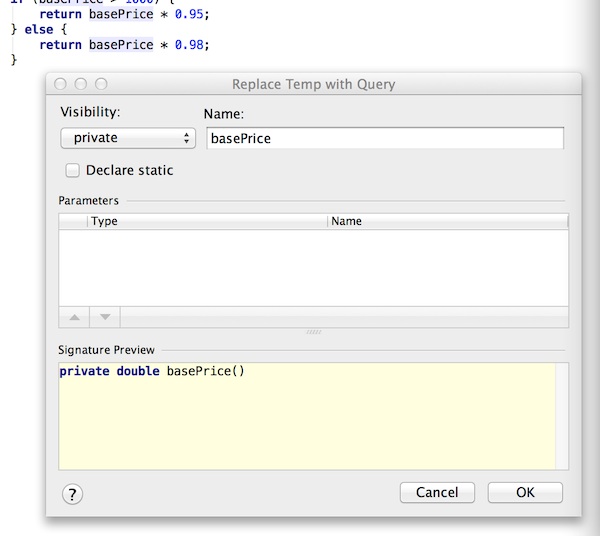
便会返回
```java
import java.lang.System;
public class replaceTemp {
public void count() {
if (basePrice() > 1000) {
return basePrice() * 0.95;
} else {
return basePrice() * 0.98;
}
}
private double basePrice() {
return _quantity * _itemPrice;
}
}
```
而实际上我们也可以
1. 选中
_quantity * _itemPrice
2. 对其进行``Extrace Method``
3. 选择``basePrice``再``Inline Method``
#### Intellij IDEA重构
在Intellij IDEA的文档中对此是这样的例子
```java
public class replaceTemp {
public void method() {
String str = "str";
String aString = returnString().concat(str);
System.out.println(aString);
}
}
```
接着我们选中 ``aString``,再打开重构菜单,或者
``Command``+``Alt``+``Shift``+``T`` 再选中 Replace Temp with Query
便会有下面的结果:
```java
import java.lang.String;
public class replaceTemp {
public void method() {
String str = "str";
System.out.println(aString(str));
}
private String aString(String str) {
return returnString().concat(str);
}
}
```