2023-11-08 01:22:48 +00:00
< img src = "https://github.com/documenso/documenso/assets/13398220/a643571f-0239-46a6-a73e-6bef38d1228b" alt = "Documenso Logo" >
2023-09-28 22:48:02 +00:00
< p align = "center" style = "margin-top: 20px" >
2023-03-14 11:29:38 +00:00
< p align = "center" >
2023-07-21 07:55:50 +00:00
The Open Source DocuSign Alternative.
2023-07-21 07:47:05 +00:00
< br >
2023-03-14 11:29:38 +00:00
< a href = "https://documenso.com" > < strong > Learn more »< / strong > < / a >
< br / >
< br / >
2023-08-02 13:12:31 +00:00
< a href = "https://documen.so/discord" > Discord< / a >
2023-03-14 11:29:38 +00:00
·
< a href = "https://documenso.com" > Website< / a >
·
< a href = "https://github.com/documenso/documenso/issues" > Issues< / a >
·
2024-01-09 13:32:49 +00:00
< a href = "https://documen.so/live" > Upcoming Releases< / a >
2023-11-06 03:47:46 +00:00
·
2024-01-09 13:32:49 +00:00
< a href = "https://documen.so/roadmap" > Roadmap< / a >
2023-03-14 11:29:38 +00:00
< / p >
< / p >
< p align = "center" >
2023-09-29 14:43:45 +00:00
< a href = "https://documen.so/discord" > < img src = "https://img.shields.io/badge/Discord-documen.so/discord-%235865F2" alt = "Join Documenso on Discord" > < / a >
2023-03-14 11:29:38 +00:00
< a href = "https://github.com/documenso/documenso/stargazers" > < img src = "https://img.shields.io/github/stars/documenso/documenso" alt = "Github Stars" > < / a >
< a href = "https://github.com/documenso/documenso/blob/main/LICENSE" > < img src = "https://img.shields.io/badge/license-AGPLv3-purple" alt = "License" > < / a >
2023-03-17 12:43:42 +00:00
< a href = "https://github.com/documenso/documenso/pulse" > < img src = "https://img.shields.io/github/commit-activity/m/documenso/documenso" alt = "Commits-per-month" > < / a >
2023-09-29 14:43:45 +00:00
< a href = "https://vscode.dev/redirect?url=vscode://ms-vscode-remote.remote-containers/cloneInVolume?url=https://github.com/documenso/documenso" >
< img alt = "open in devcontainer" src = "https://img.shields.io/static/v1?label=Dev%20Containers&message=Enabled&color=blue&logo=visualstudiocode" / >
< / a >
2023-10-04 07:38:59 +00:00
< a href = "code_of_conduct.md" > < img src = "https://img.shields.io/badge/Contributor%20Covenant-2.1-4baaaa.svg" alt = "Contributor Covenant" > < / a >
2023-03-14 11:29:38 +00:00
< / p >
2023-03-12 20:28:59 +00:00
< div >
< img style = "display: block; height: 120px; width: 24%"
2023-09-26 09:12:59 +00:00
src="https://github.com/documenso/documenso/assets/1309312/67e08c98-c153-4115-aa2d-77979bb12c94)">
2023-03-12 20:28:59 +00:00
< img style = "display: block; height: 120px; width: 24%"
2023-09-26 09:12:59 +00:00
src="https://github.com/documenso/documenso/assets/1309312/040cfbae-3438-4ca3-87f2-ce52c793dcaf">
2023-03-12 20:28:59 +00:00
< img style = "display: block; height: 120px; width: 24%"
2023-09-26 09:12:59 +00:00
src="https://github.com/documenso/documenso/assets/1309312/72d445be-41e5-4936-bdba-87ef8e70fa09">
2023-03-12 20:28:59 +00:00
< img style = "display: block; height: 120px; width: 24%"
2023-09-26 09:12:59 +00:00
src="https://github.com/documenso/documenso/assets/1309312/d7b86c0f-a755-4476-a022-a608db2c4633">
2023-03-12 20:28:59 +00:00
< img style = "display: block; height: 120px; width: 24%"
2023-09-26 09:12:59 +00:00
src=https://github.com/documenso/documenso/assets/1309312/c0f55116-ab82-433f-a266-f3fc8571d69f">
2023-03-12 20:28:59 +00:00
< / div >
2023-03-13 20:39:20 +00:00
## About this project
2023-03-13 20:03:23 +00:00
2023-09-29 14:43:45 +00:00
Signing documents digitally should be fast and easy and should be the best practice for every document signed worldwide.
This is technically quite easy today, but it also introduces a new party to every signature: The signing tool providers. While this is not a problem in itself, it should make us think about how we want these providers of trust to work.
Documenso aims to be the world's most trusted document-signing tool. This trust is built by empowering you to self-host Documenso and review how it works under the hood.
Join us in creating the next generation of open trust infrastructure.
2023-01-16 12:38:26 +00:00
2023-06-05 11:33:08 +00:00
## Recognition
2023-09-29 14:43:45 +00:00
< p align = "center" >
< a href = "https://www.producthunt.com/posts/documenso?utm_source=badge-top-post-badge&utm_medium=badge&utm_souce=badge-documenso" target = "_blank" > < img src = "https://api.producthunt.com/widgets/embed-image/v1/top-post-badge.svg?post_id=395047&theme=light&period=daily" alt = "Documenso - The open source DocuSign alternative | Product Hunt" style = "width: 250px; height: 54px;" width = "250" height = "54" / > < / a >
< a href = "https://www.producthunt.com/posts/documenso?utm_source=badge-featured&utm_medium=badge&utm_souce=badge-documenso" target = "_blank" > < img src = "https://api.producthunt.com/widgets/embed-image/v1/featured.svg?post_id=395047&theme=light" alt = "Documenso - The Open Source DocuSign Alternative. | Product Hunt" style = "width: 250px; height: 54px;" width = "250" height = "54" / > < / a >
< / p >
2023-06-05 11:33:08 +00:00
2023-03-14 08:45:37 +00:00
## Community and Next Steps 🎯
2023-04-04 12:20:36 +00:00
2023-10-31 22:50:35 +00:00
We're currently working on a redesign of the application, including a revamp of the codebase, so Documenso can be more intuitive to use and robust to develop upon.
2023-03-13 20:03:23 +00:00
2023-10-31 22:50:35 +00:00
- Check out the first source code release in this repository and test it.
- Tell us what you think in the [Discussions ](https://github.com/documenso/documenso/discussions ).
- Join the [Discord server ](https://documen.so/discord ) for any questions and getting to know to other community members.
- ⭐ the repository to help us raise awareness.
- Spread the word on Twitter that Documenso is working towards a more open signing tool.
- Fix or create [issues ](https://github.com/documenso/documenso/issues ), that are needed for the first production release.
2023-03-14 08:45:37 +00:00
## Contributing
2023-04-04 12:20:36 +00:00
2023-08-29 18:57:44 +00:00
- To contribute, please see our [contribution guide ](https://github.com/documenso/documenso/blob/main/CONTRIBUTING.md ).
2023-03-13 20:03:23 +00:00
2023-06-28 17:53:39 +00:00
## Contact us
Contact us if you are interested in our Enterprise plan for large organizations that need extra flexibility and control.
< a href = "https://cal.com/timurercan/enterprise-customers?utm_source=banner&utm_campaign=oss" > < img alt = "Book us with Cal.com" src = "https://cal.com/book-with-cal-dark.svg" / > < / a >
2023-09-28 22:48:02 +00:00
## Tech Stack
2023-08-28 14:34:31 +00:00
2023-09-28 22:48:02 +00:00
- [Typescript ](https://www.typescriptlang.org/ ) - Language
- [Next.js ](https://nextjs.org/ ) - Framework
- [Prisma ](https://www.prisma.io/ ) - ORM
- [Tailwind ](https://tailwindcss.com/ ) - CSS
- [shadcn/ui ](https://ui.shadcn.com/ ) - Component Library
- [NextAuth.js ](https://next-auth.js.org/ ) - Authentication
- [react-email ](https://react.email/ ) - Email Templates
- [tRPC ](https://trpc.io/ ) - API
- [Node SignPDF ](https://github.com/vbuch/node-signpdf ) - Digital Signature
- [React-PDF ](https://github.com/wojtekmaj/react-pdf ) - Viewing PDFs
- [PDF-Lib ](https://github.com/Hopding/pdf-lib ) - PDF manipulation
- [Stripe ](https://stripe.com/ ) - Payments
- [Vercel ](https://vercel.com ) - Hosting
2023-03-13 20:03:23 +00:00
2023-09-28 22:48:02 +00:00
<!-- - Support for [opensignpdf (requires Java on server) ](https://github.com/open-pdf-sign ) is currently planned. -->
2023-03-13 20:03:23 +00:00
2023-09-28 22:48:02 +00:00
## Local Development
2023-03-13 20:03:23 +00:00
2023-09-28 22:48:02 +00:00
### Requirements
2023-02-14 12:11:10 +00:00
2023-10-31 22:50:35 +00:00
To run Documenso locally, you will need
2023-02-02 19:04:59 +00:00
2024-03-01 13:12:08 +00:00
- Node.js (v18 or above)
2023-09-28 22:48:02 +00:00
- Postgres SQL Database
- Docker (optional)
2023-02-02 19:04:59 +00:00
2023-09-28 22:48:02 +00:00
### Developer Quickstart
2023-04-08 13:09:57 +00:00
> **Note**: This is a quickstart for developers. It assumes that you have both [docker](https://docs.docker.com/get-docker/) and [docker-compose](https://docs.docker.com/compose/) installed on your machine.
Want to get up and running quickly? Follow these steps:
2023-12-29 13:48:26 +00:00
1. [Fork this repository ](https://docs.github.com/en/pull-requests/collaborating-with-pull-requests/working-with-forks/about-forks ) to your GitHub account.
2023-12-24 04:18:32 +00:00
2023-12-30 23:27:24 +00:00
After forking the repository, clone it to your local device by using the following command:
2023-04-08 13:09:57 +00:00
2023-09-28 22:48:02 +00:00
```sh
2023-12-24 04:18:32 +00:00
git clone https://github.com/< your-username > /documenso
2023-09-28 22:48:02 +00:00
```
2023-04-08 13:09:57 +00:00
2023-10-31 22:50:35 +00:00
2. Set up your `.env` file using the recommendations in the `.env.example` file. Alternatively, just run `cp .env.example .env` to get started with our handpicked defaults.
2023-09-29 14:43:45 +00:00
2023-09-28 22:48:02 +00:00
3. Run `npm run dx` in the root directory
2023-04-08 13:09:57 +00:00
2023-09-28 22:48:02 +00:00
- This will spin up a postgres database and inbucket mailserver in a docker container.
2023-04-08 13:09:57 +00:00
2023-09-28 22:48:02 +00:00
4. Run `npm run dev` in the root directory
2023-09-29 14:43:45 +00:00
2023-09-28 22:48:02 +00:00
5. Want it even faster? Just use
2023-04-08 13:09:57 +00:00
2023-09-28 22:48:02 +00:00
```sh
npm run d
```
2023-04-08 13:09:57 +00:00
2023-09-28 22:48:02 +00:00
#### Access Points for Your Application
2023-02-02 19:04:59 +00:00
2023-09-28 22:48:02 +00:00
1. **App** - http://localhost:3000
2. **Incoming Mail Access** - http://localhost:9000
3. **Database Connection Details**
2023-12-08 09:49:08 +00:00
2023-09-28 22:48:02 +00:00
- **Port**: 54320
- **Connection**: Use your favorite database client to connect using the provided port.
2023-03-13 20:03:23 +00:00
2023-12-08 09:49:08 +00:00
4. **S3 Storage Dashboard** - http://localhost:9001
2023-09-28 22:48:02 +00:00
## Developer Setup
2023-03-13 20:03:23 +00:00
2023-09-28 22:48:02 +00:00
### Manual Setup
2023-04-04 22:02:32 +00:00
2023-10-31 22:50:35 +00:00
Follow these steps to setup Documenso on your local machine:
2023-03-13 20:03:23 +00:00
2023-12-29 13:48:26 +00:00
1. [Fork this repository ](https://docs.github.com/en/pull-requests/collaborating-with-pull-requests/working-with-forks/about-forks ) to your GitHub account.
2023-12-24 04:18:32 +00:00
2023-12-30 23:27:24 +00:00
After forking the repository, clone it to your local device by using the following command:
2023-03-13 20:03:23 +00:00
2023-09-28 22:48:02 +00:00
```sh
2023-12-24 04:18:32 +00:00
git clone https://github.com/< your-username > /documenso
2023-09-28 22:48:02 +00:00
```
2023-08-11 20:44:09 +00:00
2023-10-31 22:50:35 +00:00
2. Run `npm i` in the root directory
2023-08-11 20:44:09 +00:00
2023-09-29 14:43:45 +00:00
3. Create your `.env` from the `.env.example` . You can use `cp .env.example .env` to get started with our handpicked defaults.
2023-03-14 10:35:27 +00:00
2023-10-31 22:50:35 +00:00
4. Set the following environment variables:
2023-10-04 07:38:59 +00:00
- NEXTAUTH_URL
- NEXTAUTH_SECRET
- NEXT_PUBLIC_WEBAPP_URL
- NEXT_PUBLIC_MARKETING_URL
- NEXT_PRIVATE_DATABASE_URL
- NEXT_PRIVATE_DIRECT_DATABASE_URL
- NEXT_PRIVATE_SMTP_FROM_NAME
- NEXT_PRIVATE_SMTP_FROM_ADDRESS
2023-03-13 20:03:23 +00:00
2023-10-08 10:51:15 +00:00
5. Create the database schema by running `npm run prisma:migrate-dev`
2023-03-13 20:03:23 +00:00
2023-10-31 22:50:35 +00:00
6. Run `npm run dev` in the root directory to start
2023-06-17 03:08:15 +00:00
2023-09-29 14:43:45 +00:00
7. Register a new user at http://localhost:3000/signup
2023-06-17 03:08:15 +00:00
2023-09-28 22:48:02 +00:00
---
2023-03-13 20:03:23 +00:00
2023-10-31 22:50:35 +00:00
- Optional: Seed the database using `npm run prisma:seed -w @documenso/prisma` to create a test user and document.
- Optional: Create your own signing certificate.
- To generate your own using these steps and a Linux Terminal or Windows Subsystem for Linux (WSL), see ** [Create your own signing certificate ](./SIGNING.md )**.
2023-06-17 03:08:15 +00:00
2023-09-28 22:48:02 +00:00
### Run in Gitpod
2023-06-17 03:08:15 +00:00
2023-09-28 22:48:02 +00:00
- Click below to launch a ready-to-use Gitpod workspace in your browser.
2023-06-17 03:08:15 +00:00
2023-09-28 22:48:02 +00:00
[](https://gitpod.io/#https://github.com/documenso/documenso)
2023-03-13 20:03:23 +00:00
2023-09-29 14:43:45 +00:00
### Run in DevContainer
2023-04-08 13:09:57 +00:00
2023-09-29 14:43:45 +00:00
We support DevContainers for VSCode. [Click here to get started. ](https://vscode.dev/redirect?url=vscode://ms-vscode-remote.remote-containers/cloneInVolume?url=https://github.com/documenso/documenso )
2023-04-08 13:09:57 +00:00
2023-11-20 08:01:34 +00:00
### Video walkthrough
If you're a visual learner and prefer to watch a video walkthrough of setting up Documenso locally, check out this video:
[](https://youtu.be/Y0ppIQrEnZs)
2023-09-29 14:43:45 +00:00
## Docker
2023-09-10 03:58:15 +00:00
2023-10-31 22:50:35 +00:00
🚧 Docker containers and images are current in progress. We are actively working on bringing a simple Docker build and publish pipeline for Documenso.
2023-09-10 03:58:15 +00:00
2023-09-28 22:48:02 +00:00
## Self Hosting
2023-03-13 20:03:23 +00:00
2023-08-01 14:12:33 +00:00
We support a variety of deployment methods, and are actively working on adding more. Stay tuned for updates!
2023-10-31 22:50:35 +00:00
> Please note that the below deployment methods are for v0.9, we will update these to v1.0 once it has been released.
2023-09-29 14:43:45 +00:00
2023-10-31 22:50:35 +00:00
### Fetch, configure, and build
2023-10-23 13:44:28 +00:00
First, clone the code from Github:
```
git clone https://github.com/documenso/documenso.git
```
Then, inside the `documenso` folder, copy the example env file:
```
cp .env.example .env
```
2023-11-06 01:18:24 +00:00
The following environment variables must be set:
2023-10-23 13:44:28 +00:00
* `NEXTAUTH_URL`
* `NEXTAUTH_SECRET`
* `NEXT_PUBLIC_WEBAPP_URL`
* `NEXT_PUBLIC_MARKETING_URL`
* `NEXT_PRIVATE_DATABASE_URL`
* `NEXT_PRIVATE_DIRECT_DATABASE_URL`
* `NEXT_PRIVATE_SMTP_FROM_NAME`
* `NEXT_PRIVATE_SMTP_FROM_ADDRESS`
> If you are using a reverse proxy in front of Documenso, don't forget to provide the public URL for both `NEXTAUTH_URL` and `NEXT_PUBLIC_WEBAPP_URL` variables!
Now you can install the dependencies and build it:
```
npm i
2023-11-29 19:06:25 +00:00
npm run build:web
2023-10-23 13:44:28 +00:00
npm run prisma:migrate-deploy
```
Finally, you can start it with:
```
npm run start
```
This will start the server on `localhost:3000` . For now, any reverse proxy can then do the frontend and SSL termination.
> If you want to run with another port than 3000, you can start the application with `next -p <ANY PORT>` from the `apps/web` folder.
### Run as a service
2023-10-31 22:50:35 +00:00
You can use a systemd service file to run the app. Here is a simple example of the service running on port 3500 (using 3000 by default):
2023-10-23 13:44:28 +00:00
```bash
[Unit]
Description=documenso
After=network.target
[Service]
Environment=PATH=/path/to/your/node/binaries
Type=simple
User=www-data
WorkingDirectory=/var/www/documenso/apps/web
ExecStart=/usr/bin/next start -p 3500
TimeoutSec=15
Restart=always
[Install]
WantedBy=multi-user.target
```
2023-09-28 22:48:02 +00:00
### Railway
2023-08-01 13:47:50 +00:00
2023-12-22 06:14:22 +00:00
[](https://railway.app/template/bG6D4p)
2023-06-02 07:00:54 +00:00
2023-09-28 22:48:02 +00:00
### Render
2023-08-10 01:53:05 +00:00
[](https://render.com/deploy?repo=https://github.com/documenso/documenso)
2023-12-19 08:04:29 +00:00
### Koyeb
[](https://app.koyeb.com/deploy?type=git& repository=github.com/documenso/documenso& branch=main& name=documenso-app& builder=dockerfile& dockerfile=/docker/Dockerfile)
2023-09-28 22:48:02 +00:00
## Troubleshooting
2023-06-02 07:00:54 +00:00
2023-10-31 22:50:35 +00:00
### I'm not receiving any emails when using the developer quickstart.
2023-06-17 03:08:15 +00:00
2023-10-31 22:50:35 +00:00
When using the developer quickstart, an [Inbucket ](https://inbucket.org/ ) server will be spun up in a docker container that will store all outgoing emails locally for you to view.
2023-06-17 03:08:15 +00:00
2023-10-31 22:50:35 +00:00
The Web UI can be found at http://localhost:9000, while the SMTP port will be on localhost:2500.
2023-06-17 03:08:15 +00:00
2023-09-28 22:48:02 +00:00
### Support IPv6
2023-06-02 07:00:54 +00:00
2023-10-31 22:50:35 +00:00
If you are deploying to a cluster that uses only IPv6, You can use a custom command to pass a parameter to the Next.js start command
2023-06-02 07:00:54 +00:00
For local docker run
```bash
docker run -it documenso:latest npm run start -- -H ::
```
For k8s or docker-compose
```yaml
containers:
- name: documenso
image: documenso:latest
imagePullPolicy: IfNotPresent
command:
- npm
args:
- run
- start
- --
- -H
2023-09-28 22:48:02 +00:00
- '::'
2023-06-02 07:00:54 +00:00
```
2023-09-28 22:48:02 +00:00
2023-10-31 22:50:35 +00:00
### I can't see environment variables in my package scripts.
2023-10-08 10:51:15 +00:00
Wrap your package script with the `with:env` script like such:
```
npm run with:env -- npm run myscript
```
2023-10-31 22:50:35 +00:00
The same can be done when using `npx` for one of the bin scripts:
2023-10-08 10:51:15 +00:00
```
npm run with:env -- npx myscript
```
This will load environment variables from your `.env` and `.env.local` files.
2023-09-28 22:48:02 +00:00
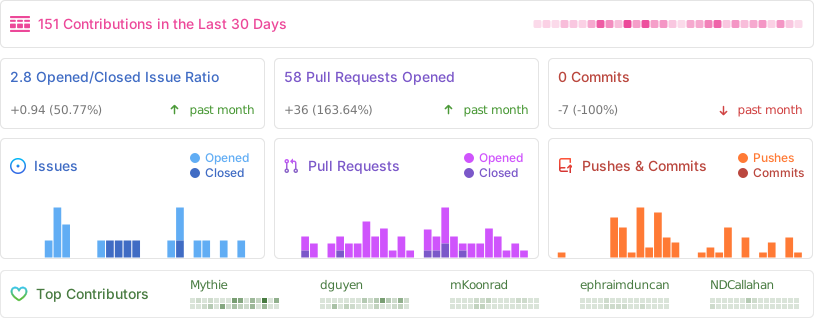
## Repo Activity